

Financial services IT support is the ongoing maintenance and user assistance that keeps business technology working, with the aim of protecting access to client information and keeping essential workflows available. This guide explains how to organize IT support for financial services firms around access control, workstation stability, recovery, and clear escalation—not just fixing devices after they fail.
- IT support for financial services firms should combine system maintenance, access control, recovery testing, and accountable user support.
- BritCore IT suits business teams needing ongoing managed IT support and structured user help.
- Choose support ownership before choosing tools; document who handles maintenance, incidents, approvals, and escalation.
- Test a business workflow during recovery exercises, not just whether a backup job completed.
Why IT support matters for financial services firms
Financial services teams handle client records, financial documents, and access to business applications. A workstation problem and an account compromise require different responses, but employees need a clear way to report either. Your support arrangement should distinguish ordinary troubleshooting from incidents requiring security or management involvement.
The priority is dependable business operations, not a longer software list. Start by defining which systems staff need to serve clients, who authorizes access, and how work continues when a dependency fails. The scope of managed IT support services belongs in that discussion before you compare individual tools.
For your 2026 support plan, separate technical responsibilities from compliance decisions. IT staff can maintain systems and collect technical records; your designated compliance lead determines which obligations apply to the business. Neither a support agreement nor a security product replaces that decision.
Make the distinction practical: name the person who approves access, the person who restores systems, and the person who decides whether an incident requires outside notification.
How to organize financial services IT support in 2026
Build the support process around the work your firm must complete. A spreadsheet, a written contact list, and existing administrative records are enough to begin. Paid support becomes useful when those responsibilities exceed the time or technical capability your internal owners can provide.
Identify your critical workflows and dependencies
Start with a manual inventory of the work that stops when technology fails. Include client meetings, document preparation, account administration, and other activities your firm actually performs. Do not copy another firm's application list and assume the priorities match.
For each workflow, record the application, device, connection, and user access it requires. Then name a business owner who can explain the operational impact of an outage. This connects technical work to a clear business decision: what needs attention first?
Use a suggested 30-day planning window to gather examples of interruptions and identify missing ownership. This is an internal organizing period, not a promise that every underlying issue will be resolved within it. Keep urgent security concerns outside that timetable.
Close the inventory with these actions:
- List the workflows that require client or financial information.
- Record the servers, workstations, and network connections supporting each workflow.
- Assign a business owner and a technical owner.
- Document an approved fallback where one exists.
Establish one intake and escalation process
Create a written reporting process before buying a ticketing platform. Tell employees where to report a problem, which details to include, and how to report suspected security incidents. Keep a fallback reporting route for situations where the normal channel is unavailable.
Use a sequence your team can understand: Intake, Triage, Escalation, Resolution, and Verification. Intake captures the issue. Triage establishes impact and urgency. Escalation sends work to the person with the necessary authority or technical knowledge; verification checks that the affected workflow works again.
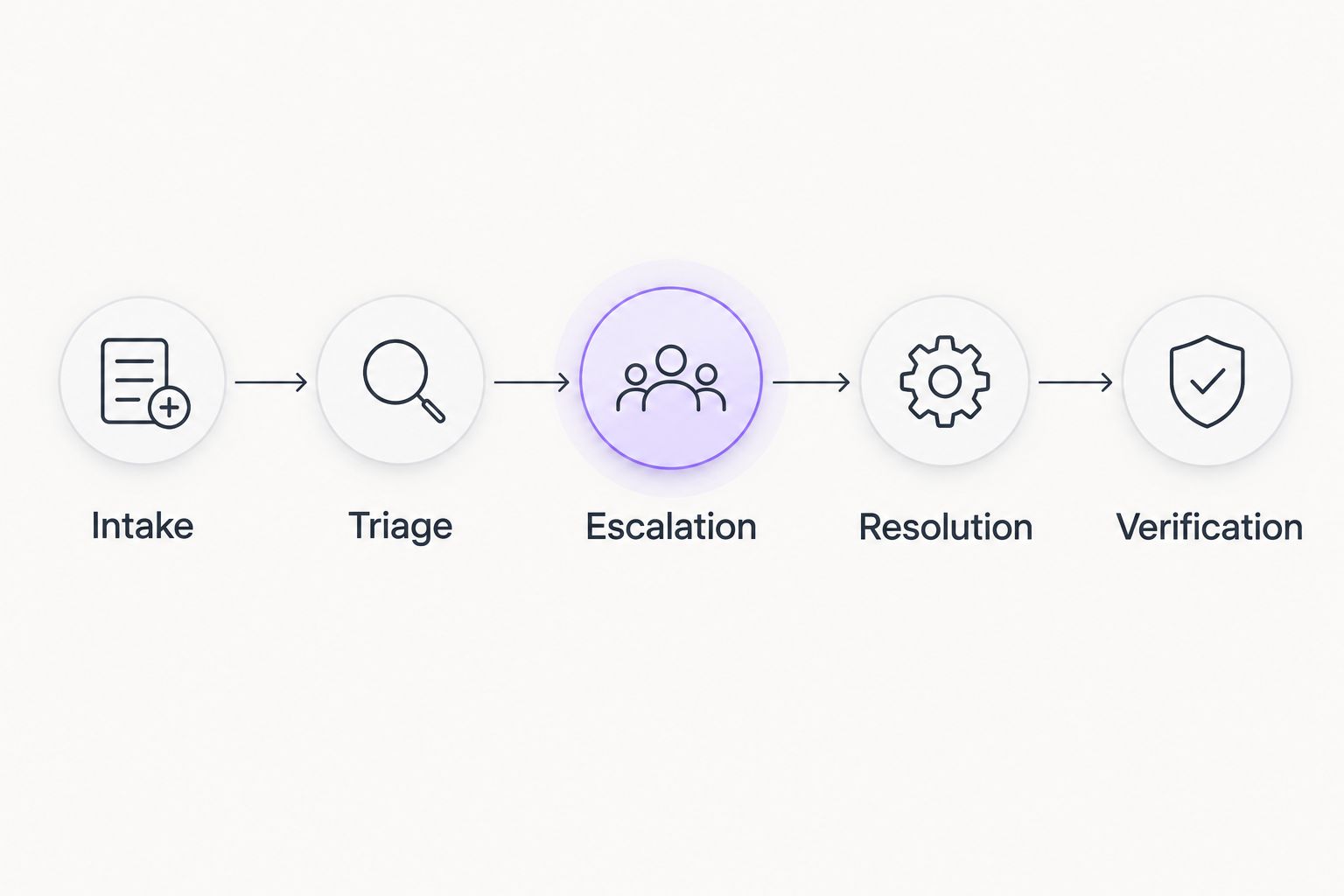
Define urgency by business impact, not by who sends the loudest message. An isolated display problem and loss of access across a team should not enter the same queue without distinction. Keep the categories simple enough for employees to use correctly.
- Ask for the affected application, device, error, and business impact.
- Identify who can declare a wider incident.
- Set an escalation route for access and security concerns.
- Require confirmation that the affected task works before closure.
Assign ongoing maintenance to a named owner
Begin by assigning an internal owner to review the inventory, coordinate maintenance, and track unresolved work. That person does not need to perform every technical task. They do need authority to obtain decisions and make sure responsibilities do not disappear between suppliers.
When internal coordination becomes a second job, a managed service provider is an alternative to arranging each repair separately. BritCore IT managed IT support is best for business teams needing ongoing system maintenance and structured user help. BritCore IT manages servers, network equipment, and workstations, with escalation paths for issues requiring more technical attention.
That service description is a starting point, not a substitute for a written scope. Confirm application responsibilities, support coverage, access arrangements, and any work involving specialist vendors. Keep business approvals with the people authorized to make them.
- Assign ownership for servers, network equipment, and workstations.
- Identify who coordinates application vendors.
- Document what the provider handles and what remains internal.
- Confirm escalation contacts and handover requirements.
Schedule maintenance around business deadlines
Build your 2026 maintenance calendar from business commitments, not just technical convenience. Identify periods when staff need uninterrupted application access, then agree when systems can be changed. Record who approves exceptions when an urgent issue cannot wait for a routine window.
Start manually with a shared calendar and a change log. For each planned change, record the affected systems, the reason, the owner, and the recovery approach. Central management tools can help execute and document work, but they do not decide whether the timing suits your business.
A completed update is not the same as a verified workflow. After maintenance, check the tasks staff actually perform: signing in, opening required applications, accessing approved documents, and using necessary peripherals. Separate a technical installation result from the business acceptance check.
- Schedule routine work around documented business deadlines.
- Identify a change owner and approval route.
- Record a rollback or recovery approach before making changes.
- Verify relevant user tasks after maintenance.
Control access through the employee lifecycle
Start with a role-based access list maintained by your business owner and technical administrator. Record what each role needs, who approves access, and who removes it when responsibilities change. Avoid using another employee's permissions as the only justification for a new account.
Use individually assigned accounts and multifactor authentication where supported. Privileged access deserves separate attention because it permits changes that ordinary user accounts cannot make. Record approved exceptions rather than allowing temporary arrangements to become permanent without review.
Your access process should cover new hires, role changes, departures, and outside support personnel. For departure planning, include both account access and the return or reassignment of business devices. Coordinate the timing with the authorized business contact rather than leaving IT to infer employment decisions.
- Match account permissions to documented job responsibilities.
- Require named approval for privileged access.
- Track accounts held by outside providers.
- Include device ownership and account removal in departure procedures.
Test recovery against a business task
Write a recovery checklist before selecting additional backup or recovery software. Identify what needs restoring, who can authorize the work, and which dependencies must be available first. A backup report alone does not demonstrate that your staff can resume their work.
Choose 1 business workflow for the first exercise. Restore the necessary information into an approved test setting and have an authorized user complete the relevant task. Record what worked, what failed, and which permissions or dependencies were missing.
Use a 60-minute planning session to scope that first exercise with the business owner and technical owner. That is a suggested meeting length, not a recovery target. Set recovery objectives separately, based on the firm's operational needs and the technical arrangements actually in place.
- Identify the information and systems the workflow requires.
- Confirm who can access and authorize restoration.
- Test usability, not just file presence.
- Record gaps and assign corrective work.
Review support outcomes and unresolved risks
Begin with existing support records and a simple review sheet. Separate individual requests from wider incidents, and distinguish completed work from items awaiting a business decision. A closed request should not hide an unresolved dependency or an exception that still needs approval.
Use a suggested 90-day review interval to revisit ownership, maintenance, access exceptions, and recovery findings. Review urgent incidents when they occur rather than waiting for the scheduled meeting. The interval provides a planning rhythm; it is not a security response standard.
Look for decisions the business needs to make. An unsupported application, unavailable administrator, or undocumented vendor dependency needs a named owner and clear next steps. Do not let a report become a list of technical activity without explaining what remains exposed or unfinished.
- Review outstanding issues by business impact and owner.
- Check whether maintenance and recovery actions were completed.
- Revisit access exceptions and vendor dependencies.
- Assign a decision-maker and next action to every unresolved item.
Compare support options for your 2026 plan
Choose the operating model before choosing the tools. The right arrangement depends on who owns the daily work, who handles difficult incidents, and whether your internal team can maintain the process consistently.
| Option | Best for | Main advantage | Key limitation or check |
|---|---|---|---|
| Internal IT owner | Firms with sufficient internal technical capacity | Direct control over priorities and business context | Requires coverage for absences and specialist issues |
| Break-fix support | Firms needing help with clearly bounded individual problems | External help for a defined repair or task | Ongoing maintenance and ownership need separate arrangements |
| BritCore IT managed support | Business teams needing ongoing maintenance and structured user help | Management of servers, network equipment, and workstations with escalation paths | Confirm coverage, application responsibilities, and support terms |
| Co-managed support | Firms keeping internal IT while assigning defined work externally | Divides responsibilities between internal and external teams | Handoffs fail when ownership and authority remain unclear |
Compare written responsibilities, not labels. Two providers using the same service category can propose different boundaries. Ask each candidate to explain an ordinary user request, a server problem, an access change, and an issue requiring a specialist vendor.
For any model, keep an internal business owner. Outsourcing technical execution does not remove the need to approve access, prioritize disruption, or decide whether a proposed change is acceptable.
Discuss your support responsibilities
Start with the systems your team uses and the support responsibilities that need a clear owner.
Common mistakes financial services firms should avoid in 2026
Treating IT support as compliance ownership
Technical support and regulatory interpretation are different responsibilities. Keep your compliance lead responsible for determining applicable requirements, and assign technical work against those documented requirements. Ask who retains evidence and who reviews it; do not assume the support provider owns either task automatically.
Protecting workstations but overlooking account access
A maintained workstation does not answer every question about application permissions, privileged accounts, or outside-provider access. Review identity and device responsibilities together. Confirm who approves changes and who checks that permissions still match the employee's role.
Testing a backup without testing the application
A successful file restoration does not establish that the relevant application, account, connection, and permissions work together. Include a business user in recovery verification. Record whether the person can complete the intended task, not merely whether restored files appear in a folder.
Leaving specialist vendors outside the support plan
Business applications can depend on suppliers outside your main IT arrangement. Document who contacts each supplier, who is authorized to request changes, and who coordinates the response. Otherwise, an incident can stall while different parties wait for someone else to take ownership.
FAQ
What does IT support for financial services firms include?
IT support for financial services firms includes maintaining business systems, helping users, managing technical issues, and coordinating escalation. Your written scope should identify responsibilities for servers, workstations, networks, access changes, recovery, and application vendors.
What’s the best support model for a financial services firm?
The best support model is the one with clear ownership and enough technical capacity for your firm’s systems. Compare internal IT, break-fix support, managed support, and co-managed support against your actual maintenance and escalation needs.
Does a managed IT provider take responsibility for compliance?
A managed IT agreement does not automatically transfer responsibility for compliance. Your compliance lead determines applicable obligations, while the provider performs the technical work explicitly assigned in the agreement.
Can BritCore IT help with ongoing business IT maintenance?
BritCore IT provides ongoing managed IT support for business teams, including management of servers, network equipment, and workstations. It also provides structured user help with escalation paths for issues requiring more technical attention.
Is break-fix support enough for a financial services business?
Break-fix support addresses individual problems, but ongoing maintenance needs a separate owner. It fits only when your firm has another dependable arrangement for routine system upkeep, access administration, and recovery planning.
How should a financial services firm test its backups?
Test backups by restoring the information needed for a defined business workflow and verifying that an authorized user can complete the task. Check application access, permissions, and dependencies as well as the restored information.
What should we ask before signing an IT support agreement?
Ask who owns each system, which support activities are included, how escalation works, and what remains your responsibility. Confirm coverage, application-vendor coordination, administrative access, recovery responsibilities, and handover requirements in writing.
One last thing
Before approving your 2026 support plan, ask this question: If the person who normally handles IT is unavailable, can someone else identify the right owner and start the response?
Test the answer using a documented scenario, such as loss of access to an essential application. Have someone follow the contact list and escalation instructions without improvising technical changes. Missing names, unclear authority, and inaccessible records are actionable findings. Fix those gaps before treating the plan as ready.