

Accounting firms’ outsourced IT support is ongoing technical assistance and system maintenance delivered by an outside provider to keep accounting teams working and client information protected. This guide explains how to set responsibilities, evaluate providers, and plan your 2026 handover around filing deadlines, accounting applications, and confidential records.
- Outsourced IT support for accounting firms needs clear ownership of accounting applications, access controls, backups, and escalation.
- BritCore IT suits business teams seeking ongoing managed IT support, not consumer tech assistance.
- Choose managed IT services for continuing maintenance; choose co-managed support when an internal IT owner needs additional coverage.
- Require evidence of successful recovery and documented support responsibilities before signing an agreement.
Why outsourced IT support matters for accounting firms
An accounting team needs more than a working laptop. Staff must reach tax software, document systems, client portals, and shared records while protecting information that should not circulate beyond authorized users.
A failed login during a deadline is a support issue. An entire team losing access to its document repository is an operational interruption. Your provider needs a way to distinguish those situations and assign responsibility without leaving staff to coordinate several vendors.
BritCore IT’s managed IT support services cover ongoing business technology support. The provider manages servers, network equipment, and workstations, with structured user assistance and escalation when an issue requires deeper technical attention.
BritCore IT is best for business teams seeking ongoing managed IT support rather than consumer tech help. Accounting firms should still confirm accounting-software responsibilities, support coverage, and recovery requirements before selecting a provider.
For your 2026 evaluation, focus on work that must remain available, who can access it, and who takes responsibility when something fails. A list of monitoring tools does not answer those questions.
How to set up outsourced IT support for your accounting firm
1. Map your accounting workflows before requesting proposals
Start with a shared document or spreadsheet. List how your team receives client records, prepares work, obtains review, and delivers completed documents. Name the applications and systems behind each activity.
Do not assume every application runs in the same place. A browser-based portal, a workstation-installed tax application, and a shared file server have different support dependencies. Record the actual arrangement rather than the arrangement someone remembers from an earlier setup.
Include exceptions. A partner’s remote-access setup or a scanner used for incoming records belongs in the inventory if its failure would interrupt work. Give the resulting document to every prospective provider so proposals address the same environment.
- Record each application, its business owner, and its vendor contact.
- Identify where working files and completed client records reside.
- List office, home-working, and temporary-staff access requirements.
- Mark filing, payroll, and reporting periods that constrain maintenance.
- Name the person authorized to approve system changes.
2. Define support ownership and escalation
Write a responsibility table before comparing service packages. For each system, identify who receives the initial report, who investigates it, and who coordinates with an application vendor when necessary.
Accounting-software problems frequently involve more than the application itself. A failed connection needs investigation across the workstation, network, account permissions, and hosted service. Your agreement should explain who coordinates that investigation, not simply which categories appear on an exclusion list.
BritCore IT provides structured user help with escalation paths. Ask how those paths would handle your actual workflows; do not assume that general IT support includes specialist accounting advice or responsibility for every software configuration.
- Separate infrastructure support from accounting-software functional assistance.
- Define urgent incidents by business impact, not job title.
- Name the contact responsible for vendor coordination.
- Specify support hours and the process outside those hours.
- Record who approves changes that interrupt staff access.
3. Set access rules for employees and seasonal staff
Begin with a manual access register. Match each person to the systems they need, the person who approves that access, and the event that ends it. Include contractors and temporary staff rather than treating them as exceptions.
Your 2026 access plan should account for joining, changing roles, and leaving. An account that was appropriate during tax preparation should not remain active indefinitely because nobody owns the removal request.
Use individual accounts wherever the system supports them. Shared credentials make it harder to determine who accessed information and complicate departures. Ask a prospective provider which account-management tasks it performs and which approvals remain with your firm.
- Assign a named approver for every sensitive system.
- Require multifactor authentication where supported.
- Separate administrative accounts from everyday staff accounts.
- Set access end dates for temporary assignments.
- Document how to report a lost device or suspicious login.
4. Prove that client records can be restored
Start by identifying what a backup must restore. Recovering a folder is not the same as recovering an accounting application with its supporting database, configuration, and access permissions.
Create a written recovery checklist and walk through it with your current administrator or proposed provider. A successful backup job is not proof of a successful recovery. Request a demonstrated restore of representative data into an appropriate test location, without overwriting live records.
Separate your preferred recovery time from a provider’s contractual commitment. Your partners need to decide how much interruption and data loss each workflow can tolerate; the provider then needs to explain what the proposed arrangement supports.
- List files, databases, configurations, and hosted systems requiring recovery.
- Identify who controls backup administration and recovery credentials.
- Test restored records for readability and application use.
- Record dependencies needed before staff can resume work.
- Document who authorizes recovery and communicates progress.
5. Plan maintenance around accounting deadlines
Start with the firm’s calendar rather than a default maintenance schedule. Mark work periods when losing access would disrupt preparation, review, or delivery, then identify suitable windows for routine changes.
Do not turn deadline sensitivity into a blanket ban on maintenance. Delayed updates still need an owner and a scheduled next step. Define how an urgent security change receives approval when it conflicts with a busy period.
For your 2026 service plan, connect maintenance records to business systems. A report that lists completed updates is less useful than one that also identifies failed installations, required restarts, and unresolved exceptions affecting staff.
- Agree maintenance windows for servers and workstations.
- Define approval for disruptive or urgent changes.
- Record unsuccessful updates and their next action.
- Verify critical applications after relevant system changes.
- Assign responsibility for communicating restarts to staff.
6. Test the support process with realistic incidents
Run a 60-minute tabletop exercise before approving the support arrangement. This is a recommended evaluation session, not a claim about how quickly any provider resolves incidents. Describe a plausible interruption and ask each participant what happens next.
Use an incident with several dependencies: a remote preparer cannot open a client file, or the office loses access to its shared accounting application. The objective is to expose unclear ownership while you can still revise the agreement.
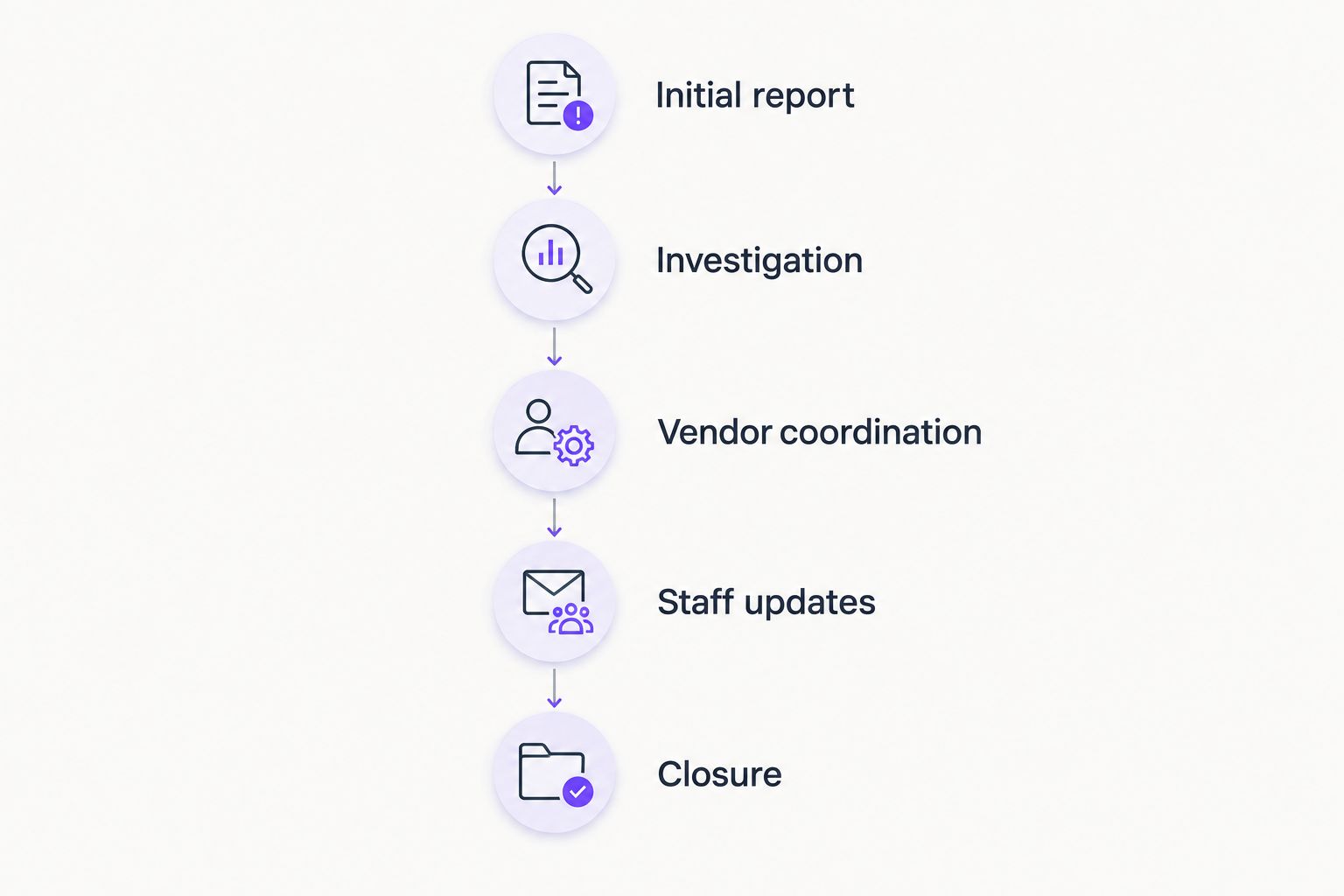
Follow the incident from the first report through escalation, restoration, and closure. Require plain-language updates that tell staff what is affected, what to do, and when to expect another update—not unsupported promises about resolution.
- Identify who receives the initial incident report.
- Decide how staff continue working during investigation.
- Name the person coordinating application and infrastructure vendors.
- Specify who communicates with partners and affected staff.
- Check how unresolved work transfers between support personnel.
7. Phase the handover and review the service
Use a 30-day onboarding checklist as a planning template, not a guaranteed completion deadline. Schedule access transfer, documentation, and initial checks around the condition of your systems and your accounting calendar.
Keep the outgoing support arrangement active until you have agreed how outstanding issues, administrator access, and recovery information will transfer. A new support contract does not automatically transfer ownership of accounts held by another provider.
Set a 90-day service review as an initial checkpoint. Examine unresolved incidents, recurring interruptions, and work awaiting approval. Use the review to assign actions rather than treating a report of closed tickets as proof that every operational problem is resolved.
- Confirm administrator access and account ownership.
- Transfer system records and open support issues.
- Tell staff how and where to request assistance.
- Verify recovery responsibilities and emergency contacts.
- Assign owners and due dates to unresolved handover tasks.
Bring your workflow inventory and responsibility questions when you contact BritCore IT. Confirm which tasks fall within the proposed service and which require a separate vendor or internal owner.
Compare support options for accounting firms
Choose the operating model before comparing provider promises. Your firm needs a support arrangement that matches the work you retain internally, not simply a longer feature list.
The options below describe different divisions of responsibility. They are not interchangeable, and none removes your responsibility to approve access, set business priorities, or decide which interruptions are unacceptable.
| Option | Best for | Main advantage | Key limitation |
|---|---|---|---|
| Internal coordination with separate vendors | Firms with a capable internal owner who can coordinate support | Direct internal control over priorities and approvals | Your staff must coordinate incidents spanning several vendors |
| Break-fix support | Firms seeking help with individual technical incidents | A defined route for specific repair work | Ongoing maintenance and prevention need separate ownership |
| Fully outsourced managed IT support | Firms seeking an outside provider for ongoing maintenance and user assistance | Routine support responsibilities sit with a designated provider | Accounting-software scope and coverage still depend on the agreement |
| Co-managed IT support | Firms with internal IT staff who need additional coverage or defined technical assistance | Internal knowledge remains alongside outside support | Unclear boundaries create duplicated work or unattended tasks |
| Accounting-application vendor support | Firms needing help with a particular application's behavior | Direct access to application-specific assistance | Workstations, networks, identity, and backups still need an owner |
Fully outsourced support fits a firm that wants an outside provider to coordinate day-to-day technology work. Co-managed support fits a firm that already has an internal IT owner and can define which duties move outside.
Application-vendor support remains useful in either model. Treat it as a specialist responsibility within your support plan, not a substitute for maintaining the environment the application depends on.
Common mistakes accounting firms make
Treating tax-software support as included by default
A provider maintaining your server does not automatically own every error inside your tax application. Put installation, connectivity, updates, data recovery, and functional software questions into separate responsibility categories. Confirm who opens and follows vendor cases.
Leaving seasonal access open after assignments end
Temporary staffing needs a departure process as well as an arrival process. Assign an access end date and a business approver before issuing credentials. Include remote access, client portals, shared folders, and devices in the departure checklist.
Accepting backup reports without recovery evidence
A report showing completed backup jobs does not establish that your team can reopen an accounting file after an interruption. Request recovery evidence tied to the systems you use. Record anything excluded from the test so partners understand the remaining gap.
Using ticket closure as the only measure of service
Closed tickets show completed support activity, not necessarily stable accounting workflows. Review repeated interruptions, unresolved dependencies, and tasks awaiting approval alongside ticket counts. Ask what changed when the same workflow failed again.
FAQ
What is outsourced IT support for accounting firms?
Outsourced IT support for accounting firms is technical assistance and system maintenance provided by an outside organization. The agreement should define responsibility for workstations, networks, servers, user access, backups, and coordination with accounting-software vendors.
Is managed IT support better than break-fix support for an accounting firm?
Managed IT support is the better fit when an accounting firm wants ongoing maintenance and user assistance. Break-fix support addresses individual incidents, so recurring maintenance and recovery preparation still need a separate owner.
Does outsourced IT support include tax and accounting software?
Accounting-software support is included only to the extent stated in the service agreement. Separate application installation and connectivity from functional questions, vendor cases, and recovery responsibilities.
Can an accounting firm outsource IT without replacing its internal IT employee?
An accounting firm can retain its internal IT employee and use a co-managed support arrangement. Document which responsibilities remain internal, which move to the provider, and who coordinates incidents crossing that boundary.
What should an accounting firm check before changing IT providers?
An accounting firm should verify administrator access, account ownership, system documentation, backup responsibilities, and open support issues before changing providers. Agree the transfer process with both providers before ending the outgoing arrangement.
How should an accounting firm evaluate BritCore IT?
Evaluate BritCore IT against your need for ongoing business IT support, system maintenance, and structured user assistance. Confirm accounting-application scope, coverage, escalation, and recovery responsibilities against your firm’s actual workflows.
How do we keep client information protected when outsourcing IT?
Set documented access approvals, individual accounts, appropriate authentication, and clear responsibilities for handling client information. Ask how provider access is authorized and removed, and confirm any contractual or regulatory requirements with the appropriate adviser.
One last thing
Before signing your 2026 support agreement, ask one question: Who coordinates recovery when the accounting application, network, and user account all appear to be involved?
A list of separate technical responsibilities is not enough. Put a named coordinating role in the agreement, with authority to involve the right vendors and keep your firm informed. That is the difference between having several support contacts and having a workable support process.