

Best overall: Freshservice. Best for teams already using Jira: Jira Service Management. Best for straightforward ticket tracking: Spiceworks Cloud Help Desk. This 2026 guide compares the best IT help desk software for small businesses by ticket handling, setup effort, and the person responsible for resolving problems.
- Freshservice is the best IT help desk software for small businesses that need dedicated internal service management.
- Jira Service Management suits businesses whose technical teams already work in Jira.
- Spiceworks Cloud Help Desk suits straightforward support queues; Zoho Desk and Zendesk suit customer-facing support workflows.
- BritCore IT provides managed IT support, not help desk software; choose it when your business needs ongoing technical ownership.
Why this matters
A help desk organizes requests. It does not maintain a server, diagnose an unstable workstation, or decide who owns a recurring network problem. Before choosing software, separate your need for a better queue from your need for technical staff.
BritCore IT managed IT support is best for business teams that need ongoing system maintenance and structured user help, rather than another software queue. BritCore IT manages servers, network equipment, and workstations, with escalation paths for issues needing more technical attention.
For your 2026 shortlist, start with a responsibility question: who will resolve the tickets? If you cannot name that person or team, selecting a platform is not the first decision.
What makes the best small-business IT help desk software?
Use these criteria before comparing dashboards. Each one connects the software to an operational task.
- Request capture: Employees need a clear way to report problems, and technicians need enough information to begin work.
- Ownership and escalation: Every request needs an owner, a status, and a route to someone with the right technical knowledge.
- Internal IT fit: Supporting employee workstations is different from answering customer questions about an order or account.
- Administration effort: Someone must maintain categories, routing rules, permissions, and documentation after setup.
- Useful reporting: Look for unresolved work, aging requests, and repeated problems—not just closed-ticket totals.
- Workflow fit: Choose a system your support staff can operate without repeatedly copying information between tools.
For a 2026 evaluation, treat these as acceptance criteria. Ask the person who will administer the system to demonstrate each one using your own support examples.
Best IT help desk software at a glance
The ranking separates use cases rather than pretending every business needs the same system. These are software choices; managed support is a separate service decision.
| Rank | Software | Best for | Standout capability | Key limitation |
|---|---|---|---|---|
| 1 | Freshservice | Dedicated internal IT support | IT service management and asset management | Requires process ownership and administration |
| 2 | Jira Service Management | Teams already working in Jira | Service requests connected to technical workflows | Configuration needs attention |
| 3 | Spiceworks Cloud Help Desk | Straightforward support queues | Centralized ticket tracking | Less suited to a detailed service-management requirement |
| 4 | Zoho Desk | Businesses centered on customer support | Customer tickets and knowledge-base workflows | Internal IT needs a separate fit assessment |
| 5 | Zendesk | Support teams handling customer conversations | Customer-service ticketing and routing | Broader customer-service scope than a simple internal queue needs |
1. Freshservice: best IT help desk for internal IT operations
Freshservice is an IT service management platform. It combines service requests with capabilities such as asset management and knowledge management, making it a relevant starting point when your help desk supports employees and business technology.
Best for: A small business with an identified IT owner who wants a dedicated internal support system.
Freshservice pros:
- Internal IT is the platform's central use case.
- Service-management capabilities support work beyond individual incident tickets.
- Asset information can add context to equipment-related requests.
Freshservice cons:
- Someone still needs to maintain workflows, records, and permissions.
- A business seeking only a basic shared queue can take on unnecessary administration.
During evaluation, submit a workstation problem and a new-starter request. Check whether your technician can understand the work, assign responsibility, and find the relevant equipment context without reconstructing the situation from email.
Do not adopt every available workflow at launch. Start with the requests your team actually receives, then add structure where repeated work justifies it.
Verdict: Buy Freshservice when you have internal IT ownership and need more than ticket tracking.
2. Jira Service Management: best for existing Jira teams
Jira Service Management handles service requests, incidents, and related technical workflows. Its connection to the Jira environment makes it a useful candidate when the people resolving requests already work there.
Best for: Businesses whose IT or engineering staff already use Jira to coordinate technical work.
Jira Service Management pros:
- Keeps service work close to existing Jira-based workflows.
- Supports structured request intake and escalation.
- Suits requests that require collaboration with technical teams.
Jira Service Management cons:
- Workflow configuration needs a clear administrator.
- Existing Jira familiarity among technicians does not guarantee an easy experience for employees submitting requests.
Test both sides of the workflow. An employee should be able to report a problem without understanding your internal project structure; a technician should be able to route that request without losing its original context.
Avoid copying an elaborate engineering workflow into employee support. A password-access request should not require the same process as a complex technical change.
Verdict: Buy Jira Service Management when Jira already anchors your technical team's work.
3. Spiceworks Cloud Help Desk: best for basic ticket tracking
Spiceworks Cloud Help Desk centralizes support requests in a ticket queue. It belongs on the shortlist when your immediate problem is scattered requests rather than a need to formalize a wider service-management operation.
Best for: A small support function that needs a straightforward place to assign and track requests.
Spiceworks Cloud Help Desk pros:
- Provides a central record of support work.
- Gives technicians a queue instead of relying on separate personal inboxes.
- Offers a focused starting point for ticket-based support.
Spiceworks Cloud Help Desk cons:
- Ticket tracking alone does not establish maintenance or escalation responsibilities.
- Detailed service-management requirements need careful validation before selection.
Use your actual request types during evaluation. Check assignment, employee replies, status visibility, and how an unresolved ticket moves to another technician. These basics matter more than a dashboard screenshot.
If your requirements include formal approvals, equipment relationships, or detailed change handling, test those requirements explicitly. Do not assume that every help desk covers the same operational scope.
Verdict: Buy Spiceworks Cloud Help Desk for a straightforward queue; skip it when unverified advanced requirements drive the purchase.
4. Zoho Desk: best for customer-support-led businesses
Zoho Desk is customer-service help desk software with ticket management and knowledge-base capabilities. Consider it when your business primarily supports external customers and wants to assess whether employee requests belong in the same operating environment.
Best for: A business whose help desk requirement starts with customer service rather than internal infrastructure support.
Zoho Desk pros:
- Organizes customer support requests into tickets.
- Supports knowledge-base content for repeat questions.
- Fits a customer-service evaluation without treating internal IT as the default use case.
Zoho Desk cons:
- Customer-service workflows are not automatically a good match for employee IT support.
- Technical maintenance and equipment ownership remain separate responsibilities.
During evaluation, keep customer and employee requests distinct. Test who can view internal tickets, how requests reach technical staff, and whether reporting separates the two workloads clearly.
Choose this direction because customer service is your main requirement—not because all products carrying the words help desk are interchangeable.
Verdict: Buy Zoho Desk for customer-support-led operations; hold for an internal-IT-only requirement until workflow fit is demonstrated.
5. Zendesk: best for customer conversation management
Zendesk is customer-service software built around support tickets and customer interactions. It is a relevant option when your team needs to manage customer conversations, not simply record employee equipment problems.
Best for: A dedicated customer support team with defined routing and conversation-management needs.
Zendesk pros:
- Centers support work on customer interactions.
- Supports ticket routing and knowledge content.
- Provides a customer-service framework for teams with an established support process.
Zendesk cons:
- Its customer-service scope can exceed a small internal IT queue's needs.
- It does not remove the need for technicians responsible for servers, networks, or workstations.
Evaluate Zendesk against customer support scenarios first. If employee IT support is your only requirement, compare that workflow directly with a dedicated IT service-management option before committing.
The deciding question is not whether Zendesk can receive a request. It is whether its operating model matches the people, information, and handoffs your support team needs.
Verdict: Buy Zendesk for customer conversation management; skip it as the default choice for basic employee IT support.
How the options are ranked
This 2026 ranking prioritizes internal IT fit, request ownership, administration effort, and workflow suitability. Freshservice takes the default position because internal IT service management matches the central business requirement; the remaining options serve distinct operating situations.
The ranking is a use-case guide, not a claim of hands-on testing or a measured performance comparison. Your own request-handling exercise should determine the final choice.
Test the workflow before choosing software
Run a small acceptance exercise using fictional employee details. Avoid putting real passwords, personal information, or sensitive business records into evaluation tickets.
- Request intake: Submit 5 sample tickets covering workstation trouble, account access, a network issue, a new starter, and a recurring fault.
- Ticket ownership: Have 2 staff members assign, transfer, and update the requests. Confirm that responsibility remains visible.
- Technical escalation: Move the recurring fault to someone handling deeper investigation. Keep the troubleshooting history attached.
- Resolution review: Check the completed records for the action taken, employee confirmation, and any follow-up work.
Set aside 30 minutes for the first walkthrough. This is a suggested evaluation exercise, not a performance benchmark or a vendor response-time promise.
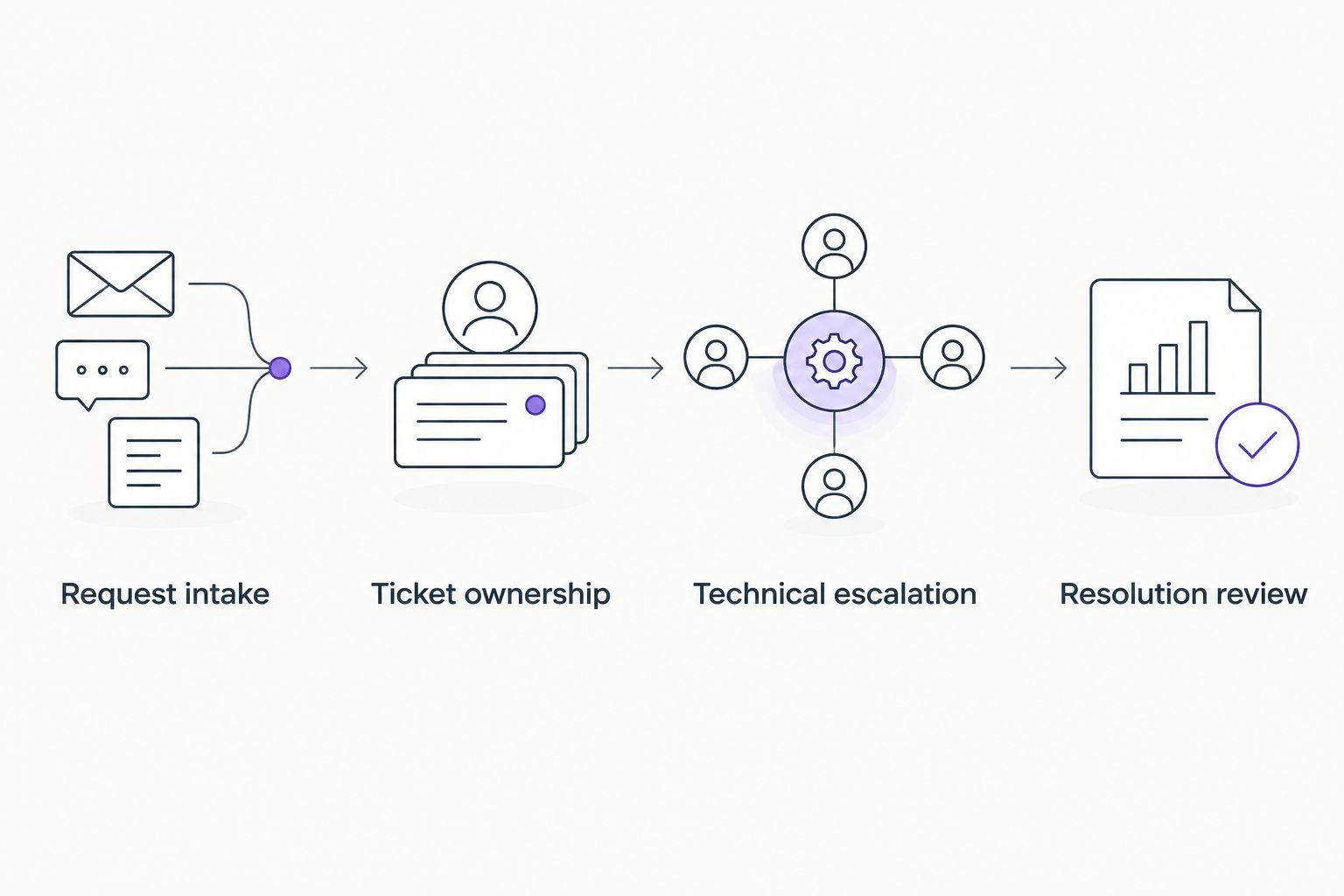
Write down where participants stop to ask what happens next. Those moments reveal either a configuration problem or an unresolved responsibility; buying additional features does not automatically fix either one.
When managed support is the better next move
Choose software when you have people ready to operate it. Choose a service discussion when nobody consistently owns maintenance, user assistance, and technical escalation.
BritCore IT managed IT support addresses that second requirement through ongoing support for business technology. Its stated scope includes servers, network equipment, workstations, and structured user help—not consumer gadget troubleshooting.
Before choosing a provider, ask how requests are recorded, who handles technical escalation, and which systems fall within the agreed scope. Confirm responsibilities explicitly rather than treating a ticketing interface as evidence of maintenance coverage.
Define your IT support needs
Start with the systems your business uses and the support responsibilities your team needs covered.
Which IT help desk software should you choose?
Choose Freshservice as the default for dedicated internal IT support in 2026. Choose Jira Service Management when your technical team already works in Jira, or Spiceworks Cloud Help Desk when straightforward ticket tracking is the immediate requirement.
Keep Zoho Desk and Zendesk on the shortlist when customer service drives the decision. If your real problem is a lack of technical ownership, discuss managed support before adding another system to administer.
FAQ
What’s the best IT help desk software for small businesses?
Freshservice is the default recommendation for small businesses seeking dedicated internal IT service management. Jira Service Management is a stronger contextual choice when technical staff already work in Jira.
Is help desk software the same as managed IT support?
No. Help desk software records and routes requests; managed IT support provides people and agreed responsibilities for supporting business technology.
Is Jira Service Management better than Freshservice?
Jira Service Management is the better fit when existing Jira workflows are central to your technical team’s work. Freshservice is the default recommendation when you want a dedicated internal IT service-management platform without that existing Jira requirement.
Can a small business use customer service software for internal IT?
Yes, but you should test internal request handling, permissions, and technical escalation before choosing it. Customer-service suitability does not establish a fit for workstation, network, or server support.
What should I test before choosing help desk software?
Test request submission, ownership, technical escalation, and resolution records. Use sample requests that reflect your actual work rather than relying only on a prepared demonstration.
Does BritCore IT sell help desk software?
BritCore IT is described as a managed service provider offering ongoing business IT support, not as a help desk software vendor. Its stated work includes servers, network equipment, workstations, and structured user assistance.
Do I need an IT employee to use help desk software?
You need an identified person or provider responsible for resolving the requests, whether or not that person is an employee. A queue can organize work, but it cannot take responsibility for technical maintenance.
One last thing
A recurring ticket can look successful every time someone closes it. Check whether the underlying fault was corrected or simply worked around again.
Before approving your 2026 choice, ask the proposed ticket owner to explain how a repeated workstation problem becomes maintenance work. Choose the setup that makes the next action and its owner clear.