

Best overall: Zabbix for a small business with a technical owner. Best for sensor-based setup: PRTG; best for SNMP-focused network visibility: LibreNMS; best for mixed infrastructure: Checkmk; best for an existing plugin-based setup: Nagios Core. This 2026 guide compares the best network monitoring software for small business by what it monitors, how you configure it, and who handles the alerts.
- Zabbix is the best network monitoring software for small business teams with someone responsible for configuration and maintenance.
- PRTG suits sensor-based monitoring; LibreNMS suits SNMP-focused network monitoring.
- Checkmk fits mixed infrastructure; Nagios Core fits teams already maintaining Nagios plugins.
- BritCore IT provides managed IT support for businesses needing ongoing maintenance and structured escalation.
Why this matters
A monitoring dashboard does not fix a failed switch, restore an application, or explain an outage to your staff. It tells someone where to investigate. Your software choice needs to match the skills and responsibilities of that person.
For businesses evaluating network monitoring software, BritCore IT provides ongoing IT support, system maintenance, and structured user help with escalation paths. That is a service decision, separate from choosing a monitoring application.
Zabbix is the best default for technically managed small businesses; businesses without an alert owner should settle support responsibilities before selecting software. A simpler dashboard does not solve an ownership gap.
What makes the best small-business network monitoring software?
Use these criteria to judge your 2026 shortlist before comparing interface screenshots:
- Coverage: The system should check the network equipment, servers, and services your business actually depends on. Device reachability alone does not establish application health.
- Setup effort: Assess discovery, credentials, templates, and configuration work. An installation wizard is only the beginning.
- Actionable alerts: You need conditions, recipients, and escalation rules that separate a business interruption from routine activity.
- Maintenance burden: Assign responsibility for updates, configuration backups, monitoring credentials, and changes to the device inventory.
- Operational fit: Choose an approach your staff or support provider can maintain without relying on one undocumented configuration.
Treat monitoring coverage and response ownership as separate requirements. A technically capable tool still fails operationally when alerts arrive in an inbox nobody checks.
Network monitoring software at a glance
| Rank and software | Best for | Standout approach | Key limitation |
|---|---|---|---|
| 1. Zabbix | Technically managed small businesses | Templates, triggers, agents, and SNMP monitoring | Configuration and ongoing administration need technical ownership |
| 2. PRTG | Teams preferring sensor-based setup | Individual sensors measure specific conditions | Sensor selection and alert configuration still need planning |
| 3. LibreNMS | SNMP-focused network estates | Network discovery and interface-focused visibility | Broader application requirements need separate evaluation |
| 4. Checkmk | Mixed server and network environments | Host and service monitoring using agents and SNMP | Discovery results and monitoring rules need review |
| 5. Nagios Core | Teams already using Nagios plugins | Plugin-based host and service checks | Configuration and supporting components require hands-on administration |
These are different operating approaches, not interchangeable dashboards. Start with your environment and support model, then use the sections below to identify the strongest fit.
1. Zabbix: best network monitoring software for technical ownership
Zabbix monitors infrastructure through methods including agents and SNMP. Templates organize monitoring configuration, while triggers define conditions that require attention. That combination fits a business willing to maintain a structured monitoring system rather than accept default settings indefinitely.
The strongest reason to choose Zabbix is control over what constitutes a problem. You can build monitoring around the systems your staff use, but someone must understand the conditions being checked and keep them current.
Zabbix pros:
- Supports server and network monitoring within the same platform.
- Uses templates to organize repeatable monitoring configurations.
- Provides trigger-based alert conditions rather than relying only on device availability.
Zabbix cons:
- Templates and triggers need review against your actual environment.
- The monitoring platform itself requires maintenance and configuration backups.
- Broad monitoring coverage can become distracting without a defined scope.
Best for: A small business with an internal administrator or external technical owner who can maintain monitoring rules.
For your 2026 evaluation, ask the proposed owner to demonstrate a useful alert and explain its resolution path. A populated dashboard is not enough evidence of a workable setup.
Verdict: Buy into Zabbix when technical ownership is explicit; skip it when nobody will maintain the configuration.
2. PRTG: best network monitoring software for sensor-based setup
PRTG organizes monitoring around sensors. A sensor checks a particular aspect of a device or service, making the relationship between a monitoring requirement and its corresponding check easy to discuss.
That structure suits a team that wants to work through requirements individually: connection status, interface activity, server conditions, and service checks. It still requires judgment about which measurements deserve an alert.
PRTG pros:
- Sensor terminology makes individual monitoring checks concrete.
- Supports monitoring across network equipment, servers, and services.
- Lets you organize checks around the systems your business depends on.
PRTG cons:
- Device count alone does not describe your monitoring scope; each device can need multiple checks.
- Adding sensors without reviewing notifications creates unnecessary alert work.
- Setup convenience does not remove responsibility for credentials and maintenance.
Best for: A small business that prefers a sensor-based configuration model and has someone available to manage it.
Before choosing PRTG, write down what a useful alert should say. A message that identifies the affected service and responsible person is more valuable than a long list of measurements without context.
Verdict: Buy into PRTG when its sensor model matches how your team wants to organize monitoring.
3. LibreNMS: best network monitoring software for SNMP visibility
LibreNMS focuses on network monitoring, with automatic discovery and SNMP-based device information among its core capabilities. It is a direct fit when your main questions concern switches, routers, interfaces, and network behavior.
Choose it for network visibility rather than assuming it answers every application-health question. A responding network interface does not establish that a business application is working correctly for its users.
LibreNMS pros:
- Centers monitoring on network devices and their interfaces.
- Uses discovery to help build a network monitoring inventory.
- Provides a focused approach for administrators working with SNMP-capable equipment.
LibreNMS cons:
- Useful results depend on correctly configured device access and SNMP credentials.
- Application-specific monitoring needs separate assessment.
- Discovery does not replace checking whether all business-critical devices are included.
Best for: A small business whose monitoring priority is network equipment rather than a broad application estate.
For a 2026 shortlist, distinguish interface visibility from business-service visibility. Ask whether you need to know that a connection is active, that a server responds, or that a particular application function succeeds. Those are different requirements.
Verdict: Buy into LibreNMS for SNMP-focused network monitoring; skip it as an assumed answer to every application requirement.
4. Checkmk: best network monitoring software for mixed infrastructure
Checkmk organizes monitoring around hosts and services, using methods that include agents and SNMP. It suits businesses that need to inspect server conditions alongside network equipment rather than maintain an exclusively network-focused view.
Service discovery helps identify checks, but discovered checks are a starting point. Your administrator still needs to decide which conditions matter, which notifications reach people, and which changes require investigation.
Checkmk pros:
- Brings server and network monitoring into a host-and-service structure.
- Uses discovery to identify monitoring checks.
- Supports rules for managing monitoring behavior across an environment.
Checkmk cons:
- Discovered services need review before they become useful operational coverage.
- Monitoring rules require an owner who understands their effects.
- A larger inventory of checks does not automatically produce clearer priorities.
Best for: A small business managing a mixture of servers, network equipment, and infrastructure services.
During evaluation, select one important server and its related network equipment. Check whether the resulting view helps the support person distinguish a server problem from a connectivity problem without treating every symptom as a separate incident.
Verdict: Buy into Checkmk when mixed infrastructure is the main requirement and someone will maintain its rules.
5. Nagios Core: best network monitoring software for existing plugins
Nagios Core uses plugins to check hosts and services. Its strongest place on this shortlist is an environment where administrators already understand that configuration model and have useful checks worth retaining.
For a business starting from scratch, familiarity elsewhere on the team is not enough. Identify who will maintain the configuration, supporting components, and custom checks after the initial setup.
Nagios Core pros:
- Uses plugins to define host and service checks.
- Lets experienced administrators retain useful existing monitoring logic.
- Provides an explicit check-based approach to monitoring conditions.
Nagios Core cons:
- Configuration requires hands-on technical administration.
- Custom checks need documentation and maintenance.
- Your required reporting and visualization workflow needs separate assessment.
Best for: A technically managed business with an established Nagios plugin setup and a reason to keep it.
Do not select Nagios Core solely because an administrator used it elsewhere. Select it when the current business benefits from those skills and can retain access to the configuration knowledge.
Verdict: Hold a working Nagios Core setup with clear ownership; skip a new deployment based only on habit.
How the ranking works
This 2026 ranking prioritizes monitoring coverage, configuration effort, useful alerts, maintenance responsibility, and operational fit. Zabbix takes the default position for technical ownership; the other tools earn distinct places through their monitoring models.
The ranking is a fit assessment, not a measured performance benchmark. It does not establish which tool discovers devices fastest or consumes the least server capacity. Those questions require evaluation in your environment.
Your existing skills can change the order. A well-maintained Checkmk installation is a better choice than an abandoned Zabbix installation, regardless of which appears first here.
Test the alert-to-action workflow before choosing
Run a 7-day evaluation as a recommended starting point, using a limited set of representative systems. The purpose is to inspect the workflow, not to claim that a short trial proves long-term reliability.
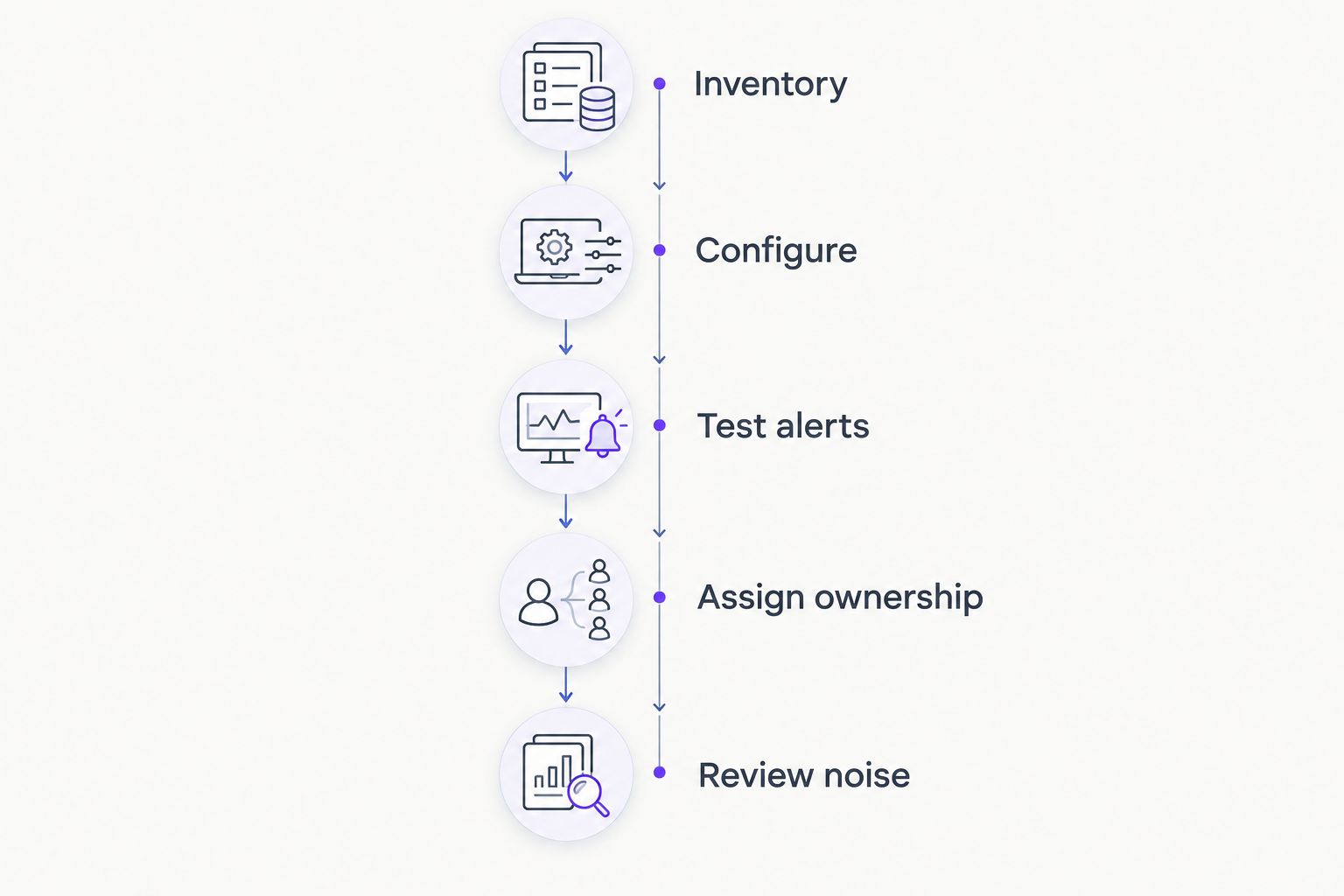
Use these stages in order:
- Inventory: Identify the devices and services needed for a normal working day.
- Configure: Add checks, document credentials, and assign meaningful names.
- Test alerts: Use safe, agreed tests to confirm that notifications arrive.
- Assign ownership: Record who investigates and who takes over when escalation is needed.
- Review noise: Remove or adjust notifications that do not support a clear action.
The evaluation should follow an issue from detection through resolution. Stopping at a successful notification leaves the most important operational question unanswered: what happens next?
Include 3 test events in the plan: a device becoming unreachable, a monitored service failing, and the monitoring system losing access to a device. Agree safe methods with the administrator before testing. Each event should produce a message someone can interpret and act on.
Name 2 contacts for escalation: a primary owner and a backup. These are recommended planning checks, not claims about any vendor's service commitments.
When selecting network monitoring software, BritCore IT's managed IT support addresses ongoing system maintenance and structured escalation. Confirm monitoring responsibilities explicitly rather than assuming that selecting a tool defines the support arrangement.
Define your IT support needs
Start with the servers, network equipment, workstations, and user issues your team needs help maintaining.
Which network monitoring software should you choose?
Choose Zabbix as the 2026 default when you have a technical owner. Choose PRTG for its sensor-based approach, LibreNMS for SNMP-focused network visibility, and Checkmk for mixed infrastructure. Keep Nagios Core when an existing plugin setup remains useful and maintainable.
If nobody owns alerts, do not begin with a longer feature comparison. Define the support arrangement first. Then require the responsible person to explain how the selected software will identify issues, notify the right contact, and support investigation.
Your final decision should fit on a short operational handover: what is monitored, what is excluded, who responds, and where configuration records live. If those answers remain unclear, the deployment is not ready for everyday use.
FAQ
What’s the best network monitoring software for a small business in 2026?
Zabbix is the best default on this shortlist for a small business with a technical owner. PRTG, LibreNMS, Checkmk, and Nagios Core fit different configuration preferences and existing environments.
Is PRTG better than Zabbix for a small team?
PRTG is the stronger fit when a small team prefers sensor-based configuration; Zabbix fits teams wanting template- and trigger-based control. Compare both against the checks and alert workflow your administrator must maintain.
Should I choose LibreNMS or Checkmk?
Choose LibreNMS when SNMP-focused network visibility is the main requirement, and Checkmk when mixed server and network monitoring is the priority. Evaluate your application checks separately rather than assuming device monitoring proves application health.
Can network monitoring software replace IT support?
Network monitoring software cannot replace the people responsible for investigation and repair. It detects configured conditions and sends notifications; someone still needs to diagnose the cause and restore service.
Does a small business need to monitor every device?
Start with devices and services that support essential work, then expand coverage deliberately. Include the monitoring system itself so a failure in monitoring does not silently remove visibility.
How should I compare network monitoring software costs?
Compare current vendor terms against your required monitoring scope, then account for setup and ongoing administration. Use the same device and service inventory for each evaluation so the comparison reflects equivalent coverage.
When should I keep Nagios Core instead of switching?
Keep Nagios Core when its existing checks remain useful, documented, and supported by someone who understands the configuration. A change is justified by an operational requirement, not merely a newer interface.
One last thing
Monitor the monitoring system. A quiet inbox can mean healthy infrastructure, but it can also mean broken notification delivery or lost device access. Include a deliberate notification test in your maintenance routine.
Before adding another dashboard, write down who acts when the next alert arrives. BritCore IT provides ongoing business IT support with structured escalation; your monitoring choice should support that kind of clear responsibility, not substitute for it.