

Best overall for a compact office: ASUS ExpertWiFi EBR63. Best for an Omada network: TP-Link Omada ER605. Best for UniFi management: Ubiquiti Cloud Gateway Ultra. This 2026 guide to the best wifi routers for small offices also covers access points and switches, because a router alone does not solve every network problem.
- ASUS ExpertWiFi EBR63 is the default small-office router pick when one device can provide adequate wireless coverage.
- TP-Link Omada ER605 suits offices choosing Omada routing; Ubiquiti Cloud Gateway Ultra suits UniFi network management.
- Aruba Instant On AP22 adds wireless access; TP-Link TL-SG2008P adds managed Ethernet connections and PoE.
- The best wifi routers for small offices match coverage, guest access, wired connections, and maintenance responsibilities.
Why this matters
A router connects networks. An access point connects wireless devices to your network, while a switch adds wired connections. Buying the wrong category leaves the original problem unresolved.
BritCore IT provides ongoing business IT support, including management of network equipment, servers, and workstations. BritCore IT is best for business teams that need ongoing network maintenance and structured user support. Hardware selection is one part of that work; keeping configurations documented and problems assigned matters just as much.
For a 2026 office refresh, start with the failure you need to fix. Weak reception behind a meeting-room wall calls for a different response than an internet connection that drops throughout the building.
What makes the best small-office network hardware?
Use these criteria before comparing models:
- Coverage design: Decide whether one wireless router can reach working areas or whether you need separately positioned access points.
- Traffic separation: Look for guest-network and VLAN capabilities appropriate to your network design. Confirm how those features work across the router, switches, and access points.
- Wired capacity: Count computers, printers, access points, and other equipment that need Ethernet. Include connections between network devices.
- Management fit: Choose equipment your support team can configure, update, and troubleshoot. A familiar management system is useful only when someone owns it.
- Recovery needs: Identify whether you need another internet connection, configuration backups, or a documented replacement process. These address different failures.
- Support boundaries: Separate responsibility for the internet service, office cabling, network hardware, and user devices. Otherwise, faults move between suppliers without an owner.
The strongest choice is not necessarily the router with the longest feature list. Choose the simplest network that meets your operational requirements and can be maintained consistently.
Small-office network hardware at a glance
These recommendations fill distinct roles. The gateways are alternatives; an access point and a switch can complement the router you choose. Model capabilities below refer to manufacturer product specifications and documentation, not comparative performance testing.
| Item | Best for | Standout feature | Key limitation |
|---|---|---|---|
| ASUS ExpertWiFi EBR63 | Compact offices wanting one wireless router | Routing and Wi-Fi in one device | Placement must serve both cabling and wireless coverage |
| TP-Link Omada ER605 | Offices building an Omada network | Wired VPN routing with multi-WAN support | No built-in Wi-Fi |
| Ubiquiti Cloud Gateway Ultra | Offices standardizing on UniFi | Gateway with integrated UniFi Network management | No built-in Wi-Fi or PoE output |
| Aruba Instant On AP22 | Offices adding separately positioned wireless coverage | Wi-Fi 6 access point with cloud management | Requires an upstream router and a suitable power source |
| TP-Link TL-SG2008P | Offices expanding managed wired connections | Eight Gigabit Ethernet ports, including four PoE+ ports | Not a router or wireless access point |
1. ASUS ExpertWiFi EBR63: best router for compact offices
The ASUS ExpertWiFi EBR63 combines routing and wireless access in one unit. It supports Wi-Fi 6 and business-oriented network configuration, including separate network arrangements through its ExpertWiFi features.
Best for: A compact office that wants one device to handle internet routing and nearby wireless connections.
Its main advantage is a straightforward physical setup. You do not need a separate access point just to establish wireless access, although the office layout still determines whether that arrangement is sufficient.
ASUS ExpertWiFi EBR63 pros:
- Combines the router and wireless access point roles.
- Provides wired Ethernet connections alongside Wi-Fi.
- Offers network-separation features beyond a single shared wireless network.
ASUS ExpertWiFi EBR63 cons:
- A convenient cable-entry location is not always a good wireless location.
- One unit does not establish reliable coverage across walls or separate floors.
- Replacing the unit affects both routing and its wireless service.
For a 2026 purchase, check the current firmware documentation against your guest-access requirements. A separate wireless name alone does not prove that guests cannot reach internal resources.
Verdict: Buy the ASUS ExpertWiFi EBR63 for a compact office when a coverage check supports a single-device design.
2. TP-Link Omada ER605: best router for an Omada office
The TP-Link Omada ER605 is a wired VPN router with multi-WAN capability and Omada management support. It does not provide Wi-Fi, so wireless devices need a separate access point.
Best for: An office choosing Omada for its routing and network-management approach.
Separating routing from wireless access lets you place the router near the internet handoff and position access points where employees work. That is a useful design distinction, not a promise that every office needs multiple devices.
TP-Link Omada ER605 pros:
- Supports multiple WAN connections.
- Supports centralized management through the Omada system.
- Keeps wireless placement independent of the router location.
TP-Link Omada ER605 cons:
- Requires separate equipment for wireless access.
- Centralized management needs an appropriate Omada controller arrangement.
- A second WAN connection requires configuration and testing; connecting it is not the whole job.
Confirm the hardware revision and corresponding documentation before purchase. Match the required VPN functions, WAN configuration, and management method to that exact revision.
Verdict: Buy the TP-Link Omada ER605 when Omada is your intended management system; skip it if you expect built-in Wi-Fi.
3. Ubiquiti Cloud Gateway Ultra: best gateway for UniFi management
The Ubiquiti Cloud Gateway Ultra combines a network gateway with integrated UniFi Network management. It is a wired device, not a wireless router with built-in radio coverage.
Best for: An office standardizing its supported network equipment around UniFi.
The integrated management application removes the need for a separate UniFi Network host for that deployment. You still need access points for Wi-Fi and suitable power arrangements for equipment that requires PoE.
Ubiquiti Cloud Gateway Ultra pros:
- Combines gateway functions and UniFi Network management.
- Provides a common management point for supported UniFi network equipment.
- Allows access points to be placed independently of the gateway.
Ubiquiti Cloud Gateway Ultra cons:
- Does not provide built-in Wi-Fi.
- Does not supply PoE power to connected access points.
- Does not bring unrelated vendors' devices into UniFi management.
For a 2026 deployment, write down who owns the administrative account and configuration records. A centralized console helps with operations only when the business retains access and a named person maintains it.
Verdict: Buy the Ubiquiti Cloud Gateway Ultra for a planned UniFi network; skip it as a standalone Wi-Fi solution.
4. Aruba Instant On AP22: best access point for separate coverage
The Aruba Instant On AP22 is a Wi-Fi 6 access point supporting the 2.4 GHz and 5 GHz bands. It connects wireless devices to an existing wired network and uses Instant On cloud management.
Best for: An office that needs wireless coverage positioned separately from its router.
An access point addresses the wireless portion of the network. It does not replace the router's internet-gateway role, and it cannot fix an upstream internet-service fault.
Aruba Instant On AP22 pros:
- Supports installation where wireless coverage is needed.
- Uses a wired network connection rather than relying on a wireless relay.
- Supports cloud-based access-point management.
Aruba Instant On AP22 cons:
- Requires a separate router.
- Needs compatible PoE or an appropriate external power arrangement.
- Adds another management system if the rest of the network uses another vendor.
Check the cable route before choosing the mounting position. An access point hidden beside the router because no cable reaches the working area gives up much of the benefit of separating those roles.
Verdict: Buy the Aruba Instant On AP22 when you need a separately positioned access point and accept its management approach.
5. TP-Link TL-SG2008P: best switch for wired office expansion
The TP-Link TL-SG2008P is a managed switch with eight Gigabit Ethernet ports. Four ports support PoE+, allowing compatible equipment to receive power and data over Ethernet.
Best for: An office adding wired devices and compatible powered access points without replacing its router.
Managed switching also provides network-configuration functions, including VLAN support. Those settings must agree with the router and access points if you want traffic separation to work across the network.
TP-Link TL-SG2008P pros:
- Adds eight physical Ethernet ports, including the port used for the uplink.
- Provides four PoE+ ports for compatible devices.
- Supports managed switching and Omada integration.
TP-Link TL-SG2008P cons:
- Does not replace an internet router.
- Does not provide Wi-Fi.
- Requires a power-budget check before connecting several powered devices.
Count connections before ordering. A router uplink, workstation, printer, and access point each occupy a switch port; the advertised port count is not the number left after installation.
Verdict: Buy the TP-Link TL-SG2008P for managed wired expansion; skip it if your only problem is weak wireless reception.
How the recommendations are ranked
These picks rank by operational fit: coverage design, traffic separation, wired capacity, management fit, and recovery requirements. They are not a measured speed leaderboard, and the access point and switch are not substitutes for the routers.
For 2026, the default recommendation remains conditional: choose an integrated wireless router for a suitable compact layout, and separate routing from wireless access when placement or management requires it. BritCore IT's managed network support fits the ongoing maintenance side of that decision, rather than treating hardware purchase as the finish line.
Match the hardware to the fault
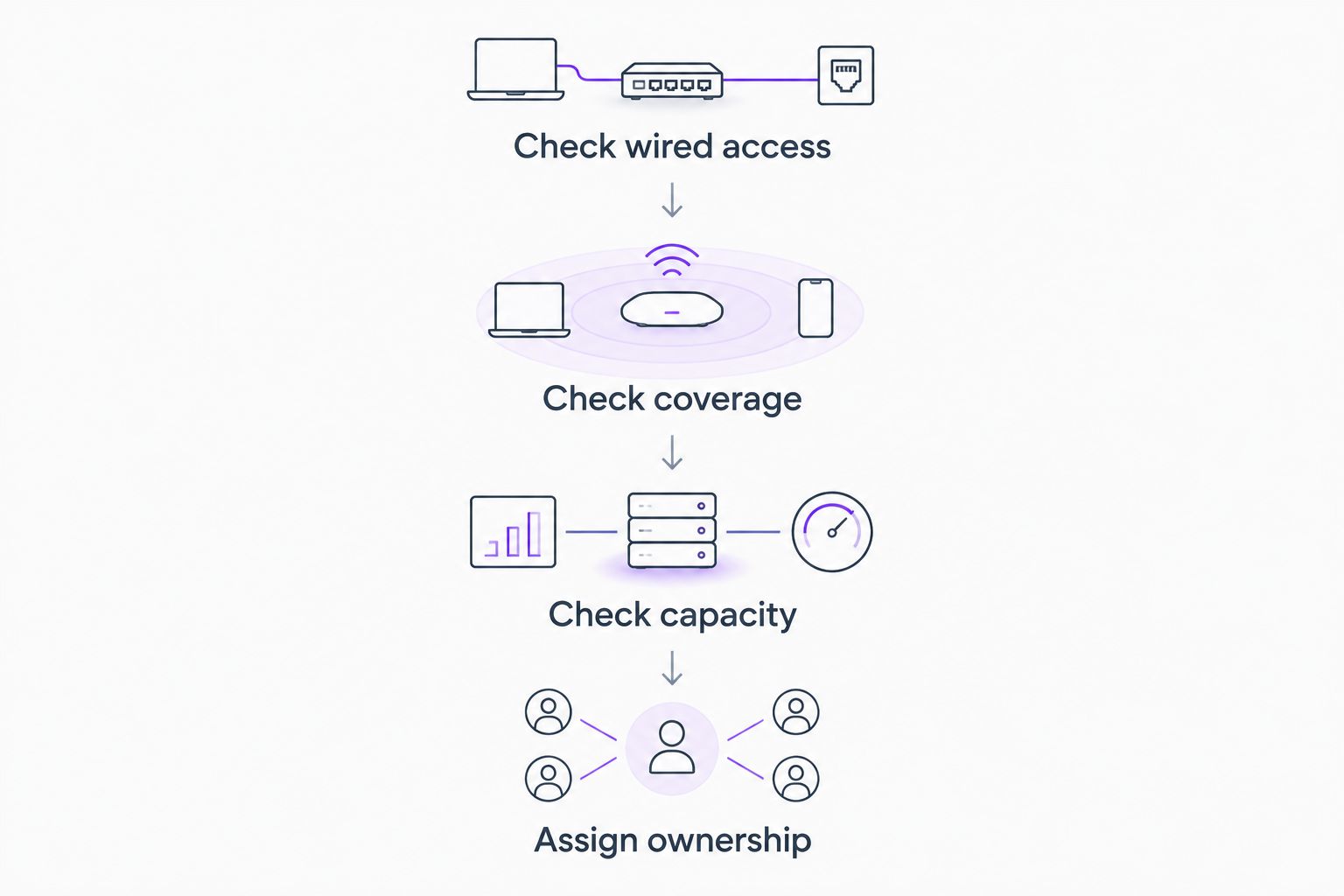
Use this sequence before replacing working equipment:
- Check wired access: Compare an affected wireless connection with a wired connection on the same network.
- Check coverage: Establish whether the problem follows a room or affects devices throughout the office.
- Check capacity: Count required Ethernet connections and identify powered equipment.
- Assign ownership: Record who handles configuration, updates, account access, and escalation.
A fault that affects wired and wireless users needs a different investigation from a weak signal in one room. This sequence helps prevent buying an access point to address a router or internet-service problem.
Keep the results with your equipment records. A short description of where the fault occurs gives support a better starting point than a request for a faster router.
Which small-office network hardware should you choose?
Choose the ASUS ExpertWiFi EBR63 as the default for a compact office that genuinely suits one wireless router. Choose the TP-Link Omada ER605 or Ubiquiti Cloud Gateway Ultra when the corresponding management system is part of your plan.
Add the Aruba Instant On AP22 for separately positioned wireless access, or the TP-Link TL-SG2008P for managed Ethernet expansion. Mixing vendors is possible, but it creates separate configuration and support responsibilities.
BritCore IT supports business technology through ongoing maintenance and structured user help. Describe the affected equipment, working areas, and business tasks first; those specifics should shape the network recommendation.
Discuss your office network needs
Start with the affected equipment, coverage gaps, and day-to-day support requirements.
FAQ
What’s the best Wi-Fi router for a small office in 2026?
The ASUS ExpertWiFi EBR63 is this guide’s default choice for a compact office suited to one wireless router. Offices needing distributed wireless coverage or a specific management system should choose their network design before the router.
Is a business router the same as an access point?
No. A router connects networks, while an access point connects wireless devices to a network. Some wireless routers combine both functions in one device.
Does the TP-Link Omada ER605 provide Wi-Fi?
No, the TP-Link Omada ER605 is a wired router. You need a separate access point to provide wireless access.
Does the Ubiquiti Cloud Gateway Ultra replace a wireless router?
The Ubiquiti Cloud Gateway Ultra can take the gateway role, but it does not provide built-in Wi-Fi. A wireless deployment also needs access points and suitable power arrangements.
Will a new access point fix slow office internet?
An access point addresses wireless access, not every cause of slow internet. Compare wired and wireless connections before deciding whether the fault concerns coverage, routing, or the internet connection.
Can a PoE switch power every office network device?
No. The connected device must support a compatible PoE standard, and its power requirement must fit the switch’s per-port and total power limits. Check both devices’ documentation.
Should a small office keep guest Wi-Fi separate?
Yes, guest devices should be separated from business resources. Configure and verify the separation across the relevant router, switch, and access-point settings rather than relying on a different wireless name.
One last thing
Your network's most useful handover document is not the equipment invoice. It is the record of administrative access, cable connections, configuration backups, and responsibility for each device.
Before approving a 2026 network refresh, name the person responsible for that record. A replacement router does not replace an operating process.