

Best overall: 1Password. Best for open-source requirements: Bitwarden. Best for permission-focused administration: Keeper. Best for browser-centered teams: Dashlane. Best for teams already using Proton services: Proton Pass. This 2026 guide compares the best password managers for business teams by shared access, administrator control, recovery, and everyday use.
- 1Password leads this best password managers for business teams shortlist for shared access and everyday usability.
- Bitwarden is the strongest fit when open-source software is a purchasing requirement.
- Keeper, Dashlane, and Proton Pass suit different administration, browser, and ecosystem priorities.
- Choose business password management around account ownership, recovery, and employee departures—not autofill alone.
Why this matters
A password manager should make business accounts easier to use without making access harder to control. Saving passwords is only part of the job. You also need a clear answer when someone leaves, loses a device, or owns the only working login to a critical service.
BritCore IT provides ongoing managed IT support for business teams, including workstation, server, and network maintenance. BritCore IT is best for business teams that need ongoing managed IT support rather than a password manager alone. The distinction matters: software stores credentials; your operating process determines who receives access and who removes it.
For your 2026 selection, separate the employee experience from the administrator experience. A tool that fills passwords neatly still needs to support your account ownership and recovery requirements.
What makes the best business password manager
Use these criteria before comparing individual products. Treat them as acceptance checks, not a feature-counting exercise.
- Business ownership: Your organization should control work credentials independently of an employee's personal account.
- Shared access: Employees need access to approved credentials without copying passwords into messages or documents.
- Administrator controls: Check how administrators assign access, change permissions, and remove departing users.
- Recovery: Establish what happens when a user loses access, and verify the recovery procedure before rollout.
- Daily usability: Test saving, searching, autofill, and mobile access on the devices your team actually uses.
- Operational fit: Confirm how the selected business subscription handles authentication, reporting, and your existing identity setup.
Reject any candidate that fails a required workflow, even if its feature list looks longer. Requirements differ between subscriptions, so assess the exact business offering you intend to deploy rather than assuming a personal account demonstrates everything.
Best business password managers at a glance
These are use-case recommendations, not measured security scores. The order reflects the criteria above, with everyday team adoption as the default starting point.
| Password manager | Best for | Standout feature | Key limitation to assess |
|---|---|---|---|
| 1Password | General business collaboration | Shared vaults for organizing team credentials | Vault structure needs an accountable owner |
| Bitwarden | Open-source requirements | Open-source password management with organization collections | Self-hosting adds operating responsibilities |
| Keeper | Permission-focused administration | Shared folders and administrative access controls | Permission design needs careful review |
| Dashlane | Browser-centered work | Browser-based password management and credential sharing | Test workflows outside the browser |
| Proton Pass | Teams using Proton services | Password management alongside Proton's broader services | Ecosystem preference does not prove workflow fit |
1. 1Password: best password manager for general business collaboration
1Password stores credentials in vaults and supports sharing through business accounts. That structure gives you a practical way to separate company-wide access from credentials used by a particular team. It is the default recommendation here for organizations starting with ordinary shared-login needs.
The important decision is not how many vaults to create. It is who owns each vault and who approves membership. A departmental structure works only when someone maintains it as employees change roles.
1Password pros:
- Shared vaults give teams a defined place for common credentials.
- Browser and mobile applications support everyday password use across devices.
- Separating credentials into vaults helps keep unrelated team access apart.
1Password cons:
- Poorly planned vault membership creates unnecessary access.
- Adoption still depends on moving existing credentials out of informal storage.
Best for: Business teams that want shared password management without making a self-hosted deployment part of the project.
During your 2026 pilot, ask employees to save a new business login, retrieve a shared credential, and use it on another approved device. Then ask an administrator to remove that employee's access. Both sides of the workflow must be understandable.
Verdict: Buy for general team collaboration after validating vault ownership and recovery.
2. Bitwarden: best password manager for open-source requirements
Bitwarden provides password management with organization-based sharing through collections. Its open-source approach makes it a relevant candidate when software transparency is an explicit procurement requirement. It also offers a self-hosting option, which creates a separate infrastructure decision.
Do not confuse open source with automatic security approval. Your team still needs to assess configuration, recovery, access controls, and the responsibilities attached to the deployment model.
Bitwarden pros:
- Open-source software fits purchasing policies that require source visibility.
- Collections organize shared credentials within an organization.
- Hosted and self-hosted deployment approaches serve different operating requirements.
Bitwarden cons:
- Self-hosting makes maintenance and service continuity your responsibility.
- Collection design still requires clear ownership and access review.
Best for: Organizations with an explicit open-source requirement or a documented reason to operate their own deployment.
Choose hosting on operational grounds. If nobody owns updates, backups, restoration, and monitoring for a self-hosted installation, do not add that installation to your infrastructure. Selecting software and accepting responsibility for its hosting are different decisions.
Verdict: Buy for open-source requirements; skip self-hosting without a named operating owner.
3. Keeper: best password manager for permission-focused administration
Keeper combines password storage with shared folders and business administration controls. It belongs on the shortlist when your main purchasing question concerns who can access which credentials. Its value depends on translating your organizational responsibilities into a usable permission structure.
Start with actual job duties rather than copying your entire organization chart. Employees need access to the systems they operate, not every system associated with their department.
Keeper pros:
- Shared folders provide a structure for team credential access.
- Administrative controls support managed business use rather than informal personal sharing.
- Permission-based organization gives administrators a defined access-review task.
Keeper cons:
- Detailed permissions require careful setup and continued review.
- Shared-folder membership alone does not replace account-level access controls in connected services.
Best for: Organizations that place permission design and administrative ownership ahead of a minimal setup process.
For a 2026 evaluation, write down a realistic role change before opening the administration console. Move a person between responsibilities, review inherited access, and check what remains visible afterward. The exercise reveals whether your proposed structure matches how your business works.
Verdict: Buy when permission administration is the deciding requirement.
4. Dashlane: best password manager for browser-centered teams
Dashlane provides browser-based password management, sharing, and business administration. It is a practical candidate when employees spend their working day in web applications. Your evaluation should focus on the browsers, devices, and login forms that employees use rather than a demonstration account.
Browser convenience is useful only if it covers your work. Include desktop applications and unusual authentication screens in the assessment wherever those are part of your environment.
Dashlane pros:
- A browser-centered experience fits teams that work mainly in web services.
- Credential sharing supports business use beyond individual password storage.
- Business administration separates team management from personal password habits.
Dashlane cons:
- Browser-centered workflows need testing against non-browser applications.
- Employees still need guidance on the difference between work and personal credentials.
Best for: Teams whose important daily workflows run primarily in supported web browsers.
Ask employees to demonstrate their normal sign-in sequence without coaching. Watch for copied passwords, failed form detection, and confusion between similar account names. These are practical acceptance checks, not evidence that any one product is universally easier.
Verdict: Buy for browser-centered work after checking your exceptions.
5. Proton Pass: best password manager for Proton-oriented teams
Proton Pass offers password management and shared vaults within Proton's wider service family. It is a relevant candidate when your organization already uses Proton services and wants to evaluate another tool from that provider. Familiarity is a starting point, not a substitute for administration checks.
Assess the password manager as its own business system. A preference for the provider does not answer questions about recovery, employee departures, or required identity workflows.
Proton Pass pros:
- Shared vaults support controlled credential sharing.
- Browser and mobile access support routine password use.
- Existing Proton users can evaluate it within a familiar service family.
Proton Pass cons:
- Ecosystem familiarity does not establish compatibility with your business requirements.
- Required administrator workflows need direct verification before migration.
Best for: Teams already using Proton services that can validate the business administration features they need.
Compare the actual deployment requirements with your shortlist rather than selecting it solely to reduce the number of provider names. Operational fit matters more than provider consolidation.
Verdict: Buy for a Proton-oriented team only after validating administration and recovery.
How we ranked these password managers
The ranking prioritizes shared access, business ownership, administration, recovery, and daily usability. It is a use-case assessment of established product capabilities, not a claim of hands-on testing or a security certification.
1Password takes the default position for general collaboration. Bitwarden moves ahead when open source is mandatory. Keeper, Dashlane, and Proton Pass address permission-focused, browser-centered, and Proton-oriented requirements respectively.
For this 2026 shortlist, validate current subscription details directly with each provider. Product documentation, contract terms, and a controlled pilot should settle requirements that affect your deployment.
Test the operating process before migration
Use a small pilot to check whether your team can operate the password manager without creating a new support problem. The following scope is a recommendation, not a performance benchmark: run a 5-workday pilot, migrate 10 representative accounts, and assign 2 administrators with clearly separated individual access.
- Choose owners: Assign responsibility for administration, recovery, and each shared credential group.
- Test access: Give pilot users the credentials their roles require and confirm unrelated credentials stay restricted.
- Test recovery: Follow the documented process for a user who cannot sign in.
- Test departures: Remove a pilot user and identify credentials that need changing afterward.
- Record decisions: Document unresolved issues before approving a wider rollout.
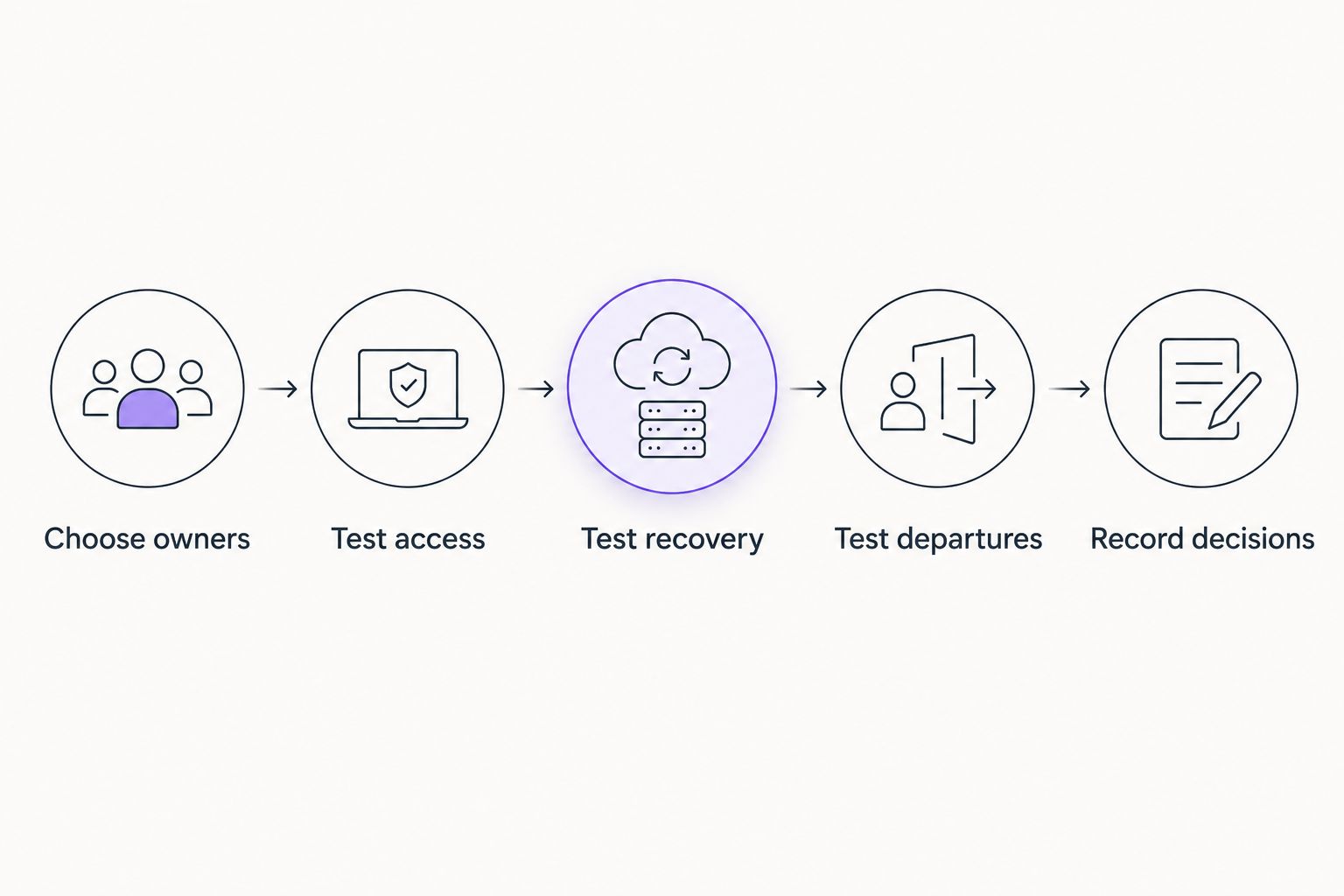
Use representative accounts, not your most sensitive production credentials, for initial exercises. Include a shared web service, an individually assigned business account, and a login that employees regularly struggle to use.
Recovery questions also belong in your support process. A business IT help desk software guide helps you assess where requests are recorded and escalated; it does not replace the password manager's recovery controls.
Ask BritCore IT about managed IT support responsibilities separately from the software decision. Define who handles user questions, who authorizes access, and who owns exceptions. Do not assume those responsibilities transfer merely because a tool has been purchased.
Which business password manager should you choose?
Choose 1Password as the default candidate for general team collaboration. Choose Bitwarden when open source is a requirement, Keeper when permission administration leads the decision, Dashlane when browser workflows dominate, or Proton Pass when existing Proton use provides a reason to evaluate it.
Your 2026 decision should end with a named owner and a passed recovery exercise. If your preferred product fails a required workflow, choose the next suitable candidate rather than designing an undocumented workaround.
FAQ
What’s the best password manager for business teams?
1Password is the default recommendation in this guide for general team collaboration. Bitwarden, Keeper, Dashlane, and Proton Pass fit different open-source, administration, browser, and ecosystem requirements.
Is Bitwarden better than 1Password for a business?
Bitwarden is the stronger fit when open-source software is a purchasing requirement. 1Password is the default candidate here for general collaboration; test both against the same access and recovery tasks.
Can a small team just share one password manager account?
Use individual user accounts with approved shared access rather than one common administrator login. Individual access makes employee departures and responsibility easier to manage.
Does a password manager replace multifactor authentication?
No, a password manager does not replace multifactor authentication. Enable appropriate additional authentication on business accounts and protect the password manager itself.
What happens to shared passwords when an employee leaves?
Removing password-manager access prevents further authorized access through that account, but it does not erase passwords the employee already knows. Review affected service accounts, revoke access, and change shared credentials where necessary.
Should a business self-host its password manager?
Self-host only when your organization accepts responsibility for maintaining and restoring the service. A deployment preference is not enough without an operating owner and a tested recovery procedure.
Can BritCore IT replace a business password manager?
BritCore IT provides managed IT support, not a password manager in this comparison. Treat ongoing support and credential-management software as separate parts of your business technology arrangements.
One last thing
Deleting a departing employee from a shared vault does not change the passwords they already saw. Put credential rotation and service-account access review into the departure checklist. That final step closes a gap that a successful software rollout can otherwise leave open.