

Best overall: NinjaOne. Best for combining monitoring with help desk work: Atera. Best for service-provider workflows: Syncro. Best for patch-focused teams: Action1. This 2026 guide compares the best RMM software for small IT teams by maintenance workload, support workflow, and operational fit—not by the longest feature list.
- NinjaOne is the best RMM software for small IT teams prioritizing endpoint monitoring and maintenance.
- Atera suits teams combining endpoint management with help desk work; Syncro suits service-provider operations.
- Action1 fits patch-focused teams; evaluate its scope against your wider support responsibilities.
- BritCore IT fits businesses seeking managed IT support rather than another platform to administer.
Why this matters
Remote monitoring and management software helps IT teams observe endpoints, perform maintenance, and address problems remotely. It does not decide who owns an incident, approve a disruptive change, or explain the next step to an employee.
That distinction matters when your IT team already handles support, infrastructure, and business requests. An RMM platform gives your team operating tools; managed support supplies people and processes to use them. BritCore IT provides ongoing business IT support across servers, network equipment, and workstations, with structured user help and escalation paths.
Choose software when your team needs better execution. Choose managed support when the unresolved problem is ownership or capacity.
What makes the best RMM software for small IT teams?
For a 2026 shortlist, use these criteria before comparing demonstrations:
- Endpoint coverage: Confirm that the operating systems and devices you actually manage support the maintenance actions you need.
- Patch control: Check how you approve updates, schedule restarts, handle exceptions, and identify failed installations.
- Support workflow: Follow an issue from detection through assignment, employee communication, escalation, and closure.
- Administrative effort: Count the recurring work required to maintain policies, scripts, alerts, and integrations.
- Access governance: Examine technician permissions, authentication, remote-session controls, and activity records.
- Operational fit: Decide whether you need endpoint operations, integrated service management, or a narrower patch-management system.
Do not award points for features nobody will own. A monitoring policy that generates unattended alerts adds work without improving the response.
RMM software at a glance
| Option | Best for | Standout capability | Key limitation to evaluate |
|---|---|---|---|
| NinjaOne | Endpoint-focused internal IT teams | Remote monitoring and endpoint management | Your incident ownership and escalation process still need definition |
| Atera | Teams combining monitoring and help desk work | RMM and ticketing in one platform | A combined platform still requires consistent ticket handling |
| Syncro | Small managed service providers | RMM alongside professional services automation | Client-service workflows add less value to a purely internal team |
| Action1 | Patch-focused IT teams | Patch management and endpoint visibility | Patch management alone does not cover the full support operation |
The table separates operational use cases rather than treating every platform as interchangeable. Start with the row that describes your team's responsibility, then test the daily workflow.
1. NinjaOne: best RMM software for endpoint-focused teams
NinjaOne combines remote monitoring with endpoint-management functions, including patch management and remote support. Its clearest fit is an IT team responsible for maintaining employee devices and servers rather than running a client-service business.
NinjaOne is the default shortlist choice when endpoint maintenance is the main problem. Evaluate it through your recurring work: finding an unhealthy device, investigating the issue, applying a change, and confirming the result.
NinjaOne pros
- Monitoring and maintenance sit within the same endpoint-management environment.
- Patch management supports a recurring maintenance workflow.
- Remote support helps technicians investigate issues without being physically beside the device.
- The endpoint-focused use case gives internal teams a clear evaluation starting point.
NinjaOne cons
- Device visibility does not establish who owns the resulting support request.
- Automation requires someone to maintain scripts, review outcomes, and handle exceptions.
- Selecting an endpoint platform does not resolve separate service-management requirements.
Best for: Internal IT teams that want a central operating environment for endpoint monitoring and maintenance.
For your 2026 evaluation, use a real incident rather than a guided feature tour. Ask a technician to locate the affected device, inspect its condition, carry out an approved action, and document the outcome. Watch where the work leaves the platform.
Verdict: Buy if endpoint operations are the priority and your team owns the support process.
2. Atera: best RMM software for combined help desk work
Atera brings RMM and help desk ticketing into the same platform. That combination suits teams that want device maintenance and employee support requests connected within their operating workflow.
The deciding question is not whether ticketing exists. It is whether your team can move from a reported issue to the relevant device and back to a clear employee update without losing responsibility along the way.
Atera pros
- RMM and ticketing support connected maintenance and service workflows.
- Remote support sits alongside endpoint-management work.
- A combined environment gives teams a place to standardize issue handling.
- The platform supports a shortlist centered on both devices and requests.
Atera cons
- Putting tickets and devices together does not guarantee useful categorization or prioritization.
- Teams with established service-management processes need to evaluate overlap before changing systems.
- Unclear ticket ownership remains a management problem, even inside a combined platform.
Best for: Small teams that want monitoring and help desk work organized together.
During evaluation, submit an ordinary employee request with incomplete information. Follow the clarification, device investigation, technician handoff, and closing message. A successful demonstration should show how your team works, not just how an administrator configures the platform.
Verdict: Buy if consolidating support requests and endpoint work is the main objective.
3. Syncro: best RMM software for service-provider workflows
Syncro combines RMM with professional services automation, commonly shortened to PSA. That makes it relevant to teams supporting customer organizations and managing the service work associated with those relationships.
An internal department and a service provider do not have identical operating needs. Customer separation, service records, and commercial administration deserve more attention when your team serves outside clients.
Syncro pros
- RMM and PSA address both technical operations and service administration.
- Its service-provider orientation matches teams working across customer organizations.
- Ticketing connects service requests with the broader support operation.
- Endpoint maintenance can be evaluated alongside client-service workflows.
Syncro cons
- A purely internal IT team has less reason to prioritize client-service administration.
- Combining technical and administrative work expands the processes your team must configure.
- Customer separation and technician access require deliberate setup and review.
Best for: Small managed service providers that need endpoint operations and service administration together.
Build the trial around separate customer environments, not just a collection of test devices. Follow a request through assignment, technical work, documentation, and the relevant administrative handoff. Confirm that technicians see the information they need without unnecessary access elsewhere.
Verdict: Buy for a service-provider workflow; skip if client-service administration adds no value.
4. Action1: best RMM alternative for patch-focused teams
Action1 centers on patch management and endpoint management. It belongs on the shortlist when the immediate problem is update visibility, deployment control, and unresolved patch exceptions rather than a complete help desk operation.
A narrower selection question makes the evaluation clearer. Ask whether your team needs a patch-focused operating tool or an environment spanning monitoring, support requests, and service administration.
Action1 pros
- Patch management provides a clear operational focus.
- Endpoint visibility supports investigation of update status.
- Deployment workflows give teams a concrete process to evaluate.
- A patch-centered shortlist avoids treating unrelated service features as requirements.
Action1 cons
- A patch-focused selection does not establish a complete help desk workflow.
- Successful deployment reporting does not prove that a business application still works correctly.
- Restart decisions and exception handling still need accountable owners.
Best for: IT teams whose central requirement is patch management and endpoint visibility.
Test an approved update, a device that is temporarily offline, and an endpoint with an unresolved installation problem. Your team should understand what happened and what action comes next. A dashboard alone is not an exception-handling process.
Verdict: Buy for a defined patch-management need; hold if you still need to define broader support requirements.
How these RMM options are ranked
The 2026 ranking prioritizes operational fit: endpoint work first, combined help desk work second, service-provider administration third, and patch-focused management fourth. These are different purchasing paths, not measured performance scores.
The criteria are endpoint coverage, patch control, support workflow, administrative effort, access governance, and operational fit. No ranking here represents a hands-on speed test or a claim that one platform resolves incidents faster than another.
Choose the closest workflow match before comparing individual features. Otherwise, a polished demonstration can distract from the work your team actually needs to finish.
Treat RMM access as a security decision
An RMM platform can give technicians substantial control over business endpoints. Your evaluation therefore needs to cover the supplier and the access model, not just maintenance features.
For a 2026 procurement review, vendor security due diligence belongs alongside the technical trial because approval depends on understanding supplier access, data handling, and incident responsibilities—not merely seeing a successful remote session.
Ask the same questions of each shortlisted provider:
- Can you assign permissions according to technician responsibilities?
- How do you remove access when a technician leaves?
- What records show administrative actions and remote activity?
- How are remote access and authentication configured?
- What happens to agents, access, and retained information when the relationship ends?
Record the answers in your decision notes. Do not confuse a feature appearing in documentation with that feature being configured correctly in your environment.
Run a small operational trial before deciding
For your 2026 trial, choose 5 representative endpoints, exercise 3 routine support tasks, and schedule a 30-day review after rollout. These are suggested evaluation boundaries, not vendor performance claims. Expand the sample when your environment contains important differences the initial devices do not represent.
Select endpoints
Include devices that reflect your actual work. A frequently traveling employee, an office workstation, and a business-critical server create different maintenance questions; include only the types your organization operates.
Assign ownership
Name the person responsible for reviewing alerts, approving changes, and resolving exceptions. Write down the escalation path before enabling automated actions.
Exercise tasks
Use a reported device problem, an approved update, and a failed maintenance action. For each task, require investigation, an accountable decision, and a recorded outcome.
Review exceptions
Check offline devices, incomplete work, unexpected results, and employee communication. Decide what requires manual attention rather than treating every non-success state as the same problem.
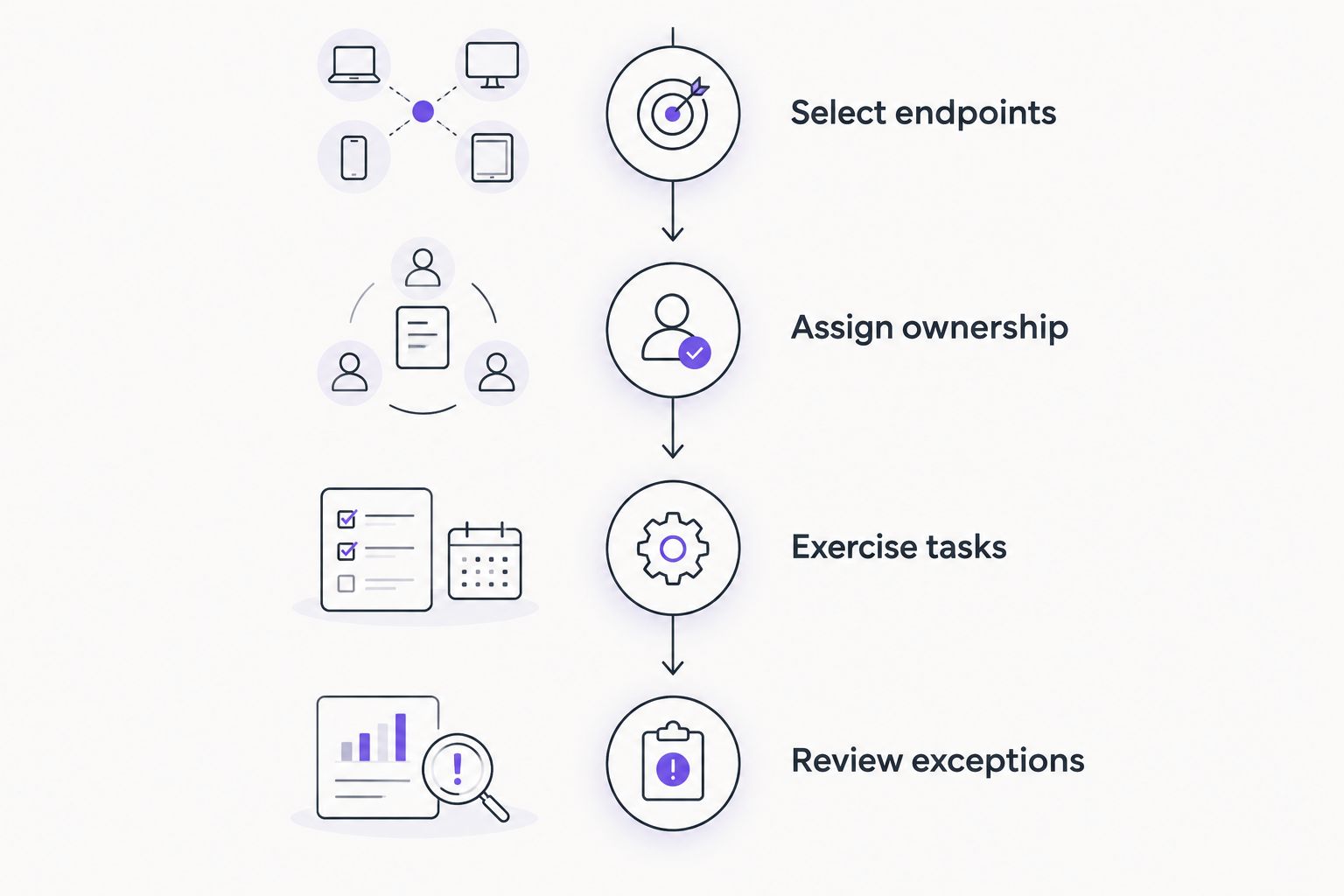
The trial ends with a decision, not a feature inventory. Keep the platform that makes your required work clear and repeatable; reject a workflow your team cannot consistently maintain.
Which RMM approach should you choose?
Start with NinjaOne if you need an endpoint-focused RMM shortlist. Choose Atera when combined help desk work defines the requirement, Syncro when customer-service administration matters, and Action1 when patch management is the central job.
Choose a service conversation instead when your business lacks the people to maintain the system. BritCore IT managed IT support is best for business teams that need ongoing system maintenance and structured user help rather than another platform to operate.
The trade-off is clear: an internal platform keeps the operating work with your team; managed support introduces an outside delivery relationship whose responsibilities need definition. Ask BritCore IT to explain the proposed scope, handoffs, and escalation paths before deciding.
FAQ
What’s the best RMM software for small IT teams in 2026?
NinjaOne is the default shortlist choice for small teams prioritizing endpoint monitoring and maintenance. Atera fits combined help desk work, Syncro fits service-provider operations, and Action1 fits patch-focused requirements.
Is Atera better than NinjaOne for a small IT team?
Atera is the closer fit when combining ticketing and endpoint work is your main requirement. NinjaOne is the default endpoint-focused shortlist choice; evaluate both against your actual incident and maintenance workflow.
Is Syncro suitable for an internal IT department?
Syncro deserves consideration when its combination of RMM and service administration matches your requirements. A purely internal department should assess whether client-service workflows add value or unnecessary configuration work.
Can Action1 replace a complete RMM and help desk setup?
Do not assume a patch-focused platform replaces your complete support operation. Evaluate monitoring, ticket handling, remote support, and escalation requirements separately before deciding what Action1 needs to cover.
Does RMM software replace managed IT support?
RMM software does not replace the people responsible for maintenance, investigation, and escalation. Managed support addresses those operating responsibilities, while RMM supplies tools for carrying out technical work.
How should a small team test RMM software?
Test representative endpoints using routine incidents, approved updates, and failed maintenance actions. Assign owners and evaluate exception handling, access controls, and documentation before rollout.
What should I check before giving an RMM provider access?
Check technician permissions, authentication, activity records, supplier responsibilities, and access removal. Include contract-end procedures so your team understands what happens to agents and retained information.
One last thing
Before approving an RMM platform, ask a technician to demonstrate what happens when a maintenance action fails. Require a named owner, a clear next step, and a way to confirm resolution.
The most revealing demonstration is the exception, not the successful update. That is where you see whether the proposed workflow supports your team or simply reports more unfinished work.