

Best overall for branch perimeter security: Fortinet FortiGate. Best for distributed offices: Cisco Meraki MX. Best for remote application access: Cloudflare One. This 2026 guide compares the best network security software for financial firms by operational fit, including where each option needs additional controls or specialist support.
- Fortinet FortiGate leads this best network security software for financial firms shortlist for branch perimeter control.
- Cisco Meraki MX suits distributed offices; Cloudflare One suits identity-based access to business applications.
- Palo Alto Networks NGFW suits detailed policy requirements; Suricata suits teams managing their own network detection.
- BritCore IT provides ongoing business IT support, not a standalone network security software product.
Why this matters
A financial firm's security purchase must fit how staff access client records, payment systems, and business applications. An office firewall, a remote-access service, and a network detection engine address different parts of that work. Buying one does not replace the others.
BritCore IT is best suited to business teams seeking ongoing IT support rather than a standalone security software purchase. Its managed IT support services cover business technology maintenance and structured user help. Evaluate software separately from the people responsible for operating it.
For a 2026 shortlist, start with the connection you need to protect. Then establish who changes policies, investigates alerts, and restores legitimate access when a control blocks business work.
What makes the best network security software for financial firms
Use these 5 selection criteria before comparing vendors:
- Traffic coverage: Identify whether the requirement concerns office internet traffic, connections between locations, remote application access, or internal network visibility.
- Access control: Check how administrators restrict access by user, device, application, and destination. Match the control to the business task.
- Investigation evidence: Require logs that let an administrator reconstruct a connection or policy decision. Confirm how the proposed configuration retains and exports them.
- Operational ownership: Identify who handles configuration, updates, alert review, exceptions, and escalation. A capable product still needs an accountable operator.
- Business continuity: Examine what happens when an appliance, connection, authentication service, or configuration change fails. Test the recovery procedure rather than accepting a feature label.
Do not score a product higher because its feature list is longer. Score the proposed deployment against the access paths your firm actually uses.
Network security options at a glance
These options occupy different security layers. The order reflects the use cases below, not a measured performance ranking.
| Option | Best for | Standout capability | Key limitation |
|---|---|---|---|
| Fortinet FortiGate | Branch perimeter security | Firewall policies with integrated network security functions | Requires careful policy and service configuration |
| Cisco Meraki MX | Centrally managed distributed offices | Dashboard-based management of security appliances | Dashboard management does not replace incident investigation |
| Palo Alto Networks NGFW | Detailed application-aware policies | Application-based traffic identification and control | Detailed controls require ongoing policy administration |
| Cloudflare One | Remote access to business applications | Identity-based access through cloud-delivered services | Does not replace every local network control |
| Suricata | Engineer-operated network threat detection | Open-source network inspection and detection engine | Requires infrastructure, tuning, and response workflows |
1. Fortinet FortiGate: best for branch perimeter security
Fortinet FortiGate is a firewall platform for controlling traffic across network boundaries. It combines firewall policy with network security functions, making it a practical starting point when an office needs a defined internet perimeter.
For a financial firm, evaluate the proposed configuration rather than the platform name. Ask the administrator to explain which connections are permitted, which inspection functions apply, and where investigation records go. Security functions and entitlements vary by deployment.
Fortinet FortiGate pros:
- Combines perimeter traffic control and security inspection within a firewall platform.
- Supports policies separating network segments and restricting connections between them.
- Gives administrators a central enforcement point for office traffic that crosses the appliance.
Fortinet FortiGate cons:
- Policy mistakes can block legitimate business connections or leave unnecessary access open.
- Selecting an appliance alone does not establish logging, incident ownership, or recovery procedures.
- Features must be checked against the actual model, configuration, and service entitlements.
Best for: Financial firms whose main requirement is controlling traffic entering, leaving, or crossing an office network.
Verdict: Buy Fortinet FortiGate for a defined perimeter requirement with a named administrator—not as a complete security program.
2. Cisco Meraki MX: best for distributed office management
Cisco Meraki MX is a security appliance platform managed through the Meraki dashboard. Its operational appeal is centralized administration across office locations rather than separate management workflows at each site.
A financial firm evaluating Meraki MX should examine how administrators maintain consistent rules while documenting justified local exceptions. Central management helps organize that work; it does not establish whether an exception is safe.
Cisco Meraki MX pros:
- Provides dashboard-based administration for security appliances.
- Supports centralized visibility into managed sites and their configurations.
- Fits an operating model where administrators coordinate office network changes centrally.
Cisco Meraki MX cons:
- A dashboard is not a substitute for reviewing alerts and investigating unusual traffic.
- Administrators must verify whether the required inspection and logging functions fit the proposed deployment.
- Local connectivity and recovery arrangements still need explicit planning.
Best for: Financial firms managing distributed offices with a common network administration process.
Verdict: Buy Cisco Meraki MX when centralized office management is the deciding requirement.
3. Palo Alto Networks NGFW: best for application-aware policies
Palo Alto Networks next-generation firewalls identify and control traffic using application-aware policies. This approach suits firms that need rules expressed around application use rather than relying only on network addresses and ports.
That control requires maintenance. Business applications change, exceptions accumulate, and administrators must distinguish necessary access from permissions that no longer serve a purpose.
Palo Alto Networks NGFW pros:
- Supports application-based traffic identification and policy enforcement.
- Gives administrators a way to express detailed access requirements at the firewall.
- Provides traffic and threat records for investigation when configured appropriately.
Palo Alto Networks NGFW cons:
- Detailed policies require skilled administration and regular review.
- Application exceptions can become difficult to manage without clear ownership.
- Required functions and entitlements must be verified for the selected deployment.
Best for: Financial firms with specific application-control requirements and administrators responsible for maintaining them.
Verdict: Buy Palo Alto Networks NGFW when detailed application policies justify the administrative work.
4. Cloudflare One: best for remote application access
Cloudflare One brings together cloud-delivered access and network security services. Its identity-based access capabilities make it relevant when staff need controlled access to business applications outside a traditional office perimeter.
Start with the application, user identity, and device requirements. Do not assume that moving access enforcement to a cloud service removes the need to manage endpoints, local networks, or application permissions.
Cloudflare One pros:
- Supports identity-based access decisions for business applications.
- Provides cloud-delivered controls for access beyond an office network boundary.
- Offers an approach to application access that does not depend solely on trusting a user's network location.
Cloudflare One cons:
- Application onboarding and identity integration require planning.
- Local network segmentation and endpoint protection remain separate responsibilities.
- Administrators must examine how service or identity-provider disruptions affect access.
Best for: Financial firms prioritizing controlled remote access to business applications.
Verdict: Buy Cloudflare One for an application-access requirement; do not treat it as a replacement for every firewall function.
5. Suricata: best for engineer-operated network detection
Suricata is an open-source engine for network intrusion detection, intrusion prevention, and network security monitoring. It inspects traffic and produces detection records; it is not a fully staffed monitoring service.
The deployment determines what Suricata can observe. A sensor cannot inspect traffic it never receives, and encrypted traffic limits visibility into application content without additional arrangements.
Suricata pros:
- Supports signature-based inspection and network protocol analysis.
- Produces structured event records that can feed investigation workflows.
- Allows technically capable teams to control sensor placement and detection configuration.
Suricata cons:
- Requires infrastructure, rule management, tuning, and operational maintenance.
- Alerts need investigation and an agreed response process.
- Visibility depends on traffic access and the deployment's inspection limits.
Best for: Financial firms with engineers who can operate network sensors and investigate their output.
Verdict: Skip Suricata as a standalone answer when nobody owns tuning and response.
How the options are ranked
This 2026 shortlist ranks deployment fit against traffic coverage, access control, investigation evidence, operational ownership, and continuity. It does not claim laboratory testing, comparative detection rates, or proven results at a particular financial firm.
Fortinet FortiGate is the default perimeter recommendation. The other entries take distinct roles: distributed administration, application-aware policy, remote application access, and engineer-operated detection. A firm can need more than one role, but each needs a clear reason to exist.
Validate the deployment before replacing existing controls
A product demonstration shows available functions. An acceptance exercise shows whether the proposed configuration supports your work without leaving access decisions unexplained.
Use these 3 acceptance scenarios in your 2026 evaluation:
- Access check: A staff member reaches an approved business application, while an unauthorized account cannot use the same access path.
- Alert review: An administrator follows a permitted test event from detection through investigation, recording the evidence and the decision.
- Recovery check: The responsible operator demonstrates how to reverse a problematic policy change and confirm restored business access.
Independent testing addresses a different question from a product demonstration: whether the deployed controls resist the agreed attack scenarios. When assessing network penetration testing companies, require a defined scope, written authorization, business-system exclusions, and a process for verifying fixes.
Agree on test boundaries before work starts. Financial applications and third-party connections need explicit handling; a test should not assume permission to disrupt a system simply because your staff use it.
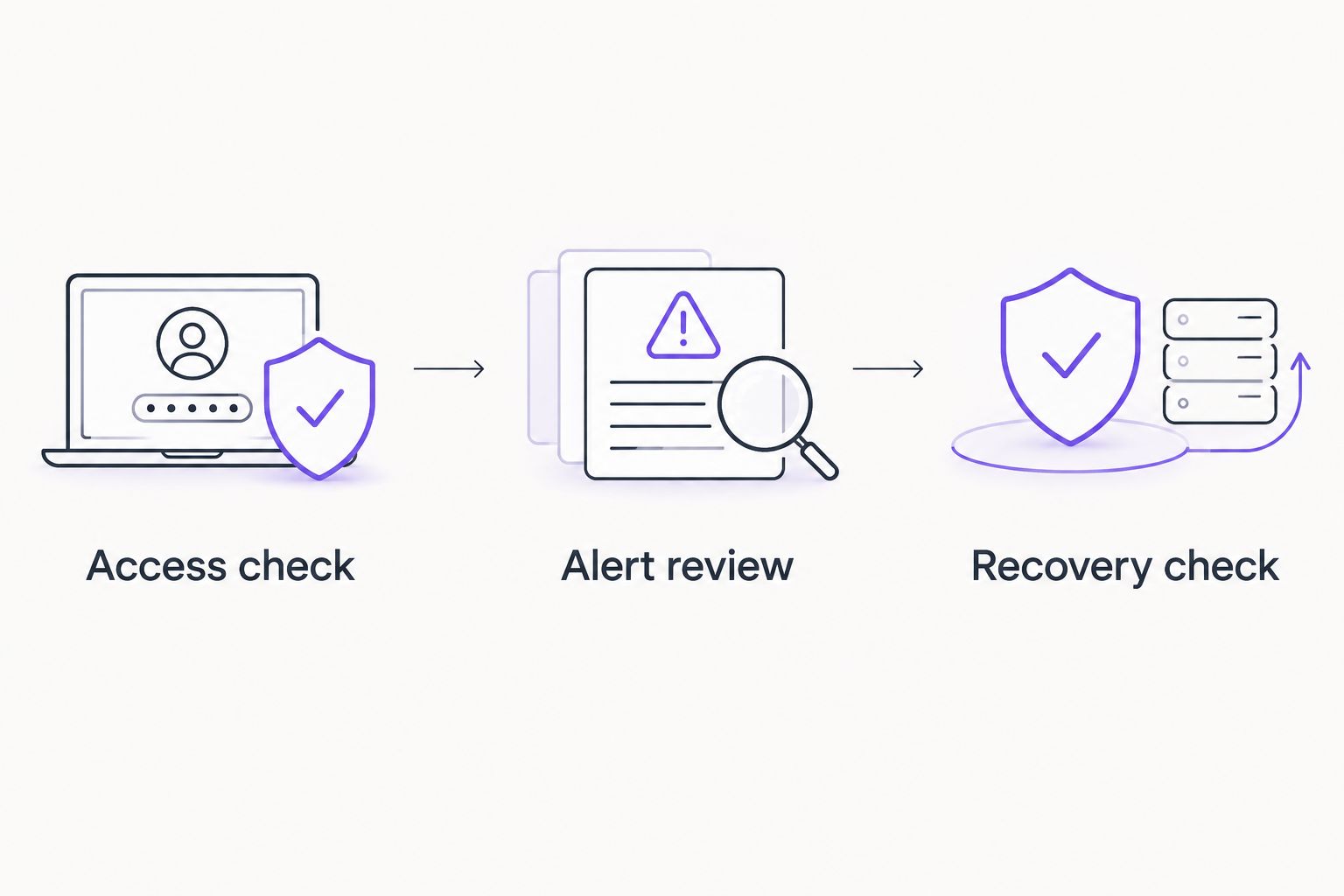
Keep the acceptance record with the configuration documentation. A successful test should identify what worked, who checked it, and which unresolved conditions prevent approval.
Assign ownership before the first policy change
Separate 2 ownership roles: the business owner who authorizes access and the technical owner who implements and verifies it. One person can hold both roles, but the responsibilities should remain explicit.
For each sensitive connection, record the business purpose, approving owner, enforcement point, and review trigger. When the business purpose ends, the permission should not survive merely because nobody remembers why it exists.
BritCore IT provides ongoing support for servers, network equipment, and workstations, with structured user help and escalation paths. Discuss the proposed security responsibilities through the contact page rather than assuming a general IT support arrangement includes every security function.
For a 2026 service discussion, ask who reviews security events, who approves emergency access changes, and who coordinates with application providers. Confirm those responsibilities before replacing a working control.
Which network security option should you choose?
Choose Fortinet FortiGate as the default shortlist entry when your central problem is office perimeter security. Choose Cisco Meraki MX instead when distributed-office administration is the defining requirement, or Palo Alto Networks NGFW when detailed application policy drives the decision.
Choose Cloudflare One when the immediate problem is controlled remote application access. Choose Suricata only when a technical team owns detection engineering and response.
Do not force one product to win unrelated jobs. The best 2026 decision is the deployment whose access rules, investigation process, and recovery responsibilities your firm can explain and maintain.
FAQ
What’s the best network security software for financial firms in 2026?
Fortinet FortiGate is this guide’s default shortlist choice for branch perimeter security. Cisco Meraki MX, Palo Alto Networks NGFW, Cloudflare One, and Suricata address different operational requirements, so the final choice depends on the access path and operating team.
Is Cisco Meraki MX better than Fortinet FortiGate for multiple offices?
Cisco Meraki MX is the stronger fit in this shortlist when centralized office administration is the deciding requirement. Compare the proposed policies, logging, recovery arrangements, and required services before selecting either platform.
Can Cloudflare One replace a financial firm’s firewall?
Cloudflare One should not be assumed to replace every local firewall function. Assess remote application access separately from office perimeter control, local segmentation, and endpoint protection.
Is Suricata enough to secure a financial firm’s network?
Suricata alone is not a complete network security program. It needs appropriate traffic visibility, maintained detection rules, investigation workflows, and separate access controls.
Does network security software make a financial firm compliant?
Network security software alone does not establish compliance. Your firm must identify its applicable requirements and document how technical controls, access decisions, oversight, and evidence address them.
What should a financial firm test before deploying a new firewall?
Test approved access, unauthorized access handling, investigation records, and recovery from a problematic change. Define the test scope and acceptance conditions before changing production controls.
Does BritCore IT sell its own network security software?
BritCore IT is described as a managed service provider offering ongoing business IT support, not a standalone network security software vendor. Discuss the required support responsibilities and technical scope directly.
One last thing
Ask the proposed operator to explain a permitted connection, not just a blocked threat. If nobody can identify why a sensitive application is reachable, who approved that access, and how to remove it safely, the configuration is not ready for acceptance.