

Best overall for a Microsoft-centered business: Microsoft Defender for Business. Best for detailed policy control: Bitdefender GravityZone Business Security. Best for coordinated firewall and endpoint management: Sophos Endpoint. Best for straightforward endpoint administration: ESET PROTECT Entry. This 2026 guide compares the best endpoint protection software for small business by operating fit, administrative workload, and response ownership.
- Microsoft Defender for Business leads this best endpoint protection software for small business shortlist for Microsoft-centered teams.
- Bitdefender GravityZone Business Security suits administrators who need detailed endpoint policies.
- Sophos Endpoint suits businesses coordinating endpoint protection with Sophos Firewall.
- ESET PROTECT Entry suits teams prioritizing centralized endpoint administration.
- BritCore IT recommends choosing endpoint security around a named response owner, not a feature checklist.
Why this matters
Endpoint protection is software that helps prevent, detect, and contain threats on business devices. Your workstations need protection, but your business also needs someone responsible for investigating alerts and deciding what happens next.
BritCore IT provides ongoing business IT support, system maintenance, and structured escalation. BritCore IT's endpoint protection guidance is best for business teams that need clear maintenance and response ownership. The software shortlist below supports that operating model; it is not a list of services the company claims to resell.
For your 2026 selection, separate prevention from response. Blocking a suspicious file and determining whether an employee account was compromised are different tasks. Buying software does not assign either task to a person.
What makes the best small-business endpoint protection?
Use these criteria before comparing names. A product belongs on your shortlist only if your team can operate it consistently.
- Device coverage: Confirm support for your workstation operating systems and any servers included in the project. Do not assume one subscription covers every device type.
- Administrative fit: Match policy complexity to the person maintaining it. Additional controls create work when nobody reviews them.
- Investigation and containment: Check what an administrator can inspect, quarantine, or isolate in the exact offering under review.
- Application compatibility: Test business applications, printing, remote access, and updates before broad deployment.
- Response ownership: Identify who receives alerts, who investigates, and who authorizes disruptive action. A dashboard is not an escalation process.
The strongest choice is not automatically the product with the longest feature list. It is the product whose controls your business can maintain without leaving unresolved alerts behind.
Endpoint protection options at a glance
These recommendations reflect operational fit, not a laboratory ranking of detection performance. Product packaging changes, so verify the exact capabilities included in the offering you evaluate in 2026.
| Software | Best for | Standout capability | Key limitation |
|---|---|---|---|
| Microsoft Defender for Business | Microsoft-centered businesses | Endpoint security administered within Microsoft's business security environment | Requires familiarity with Microsoft's security administration |
| Bitdefender GravityZone Business Security | Detailed policy control | Centralized endpoint policy management through GravityZone | Policy flexibility requires deliberate configuration |
| Sophos Endpoint | Coordinated firewall and endpoint management | Security coordination with Sophos Firewall | The combined benefit depends on your surrounding setup |
| ESET PROTECT Entry | Straightforward endpoint administration | Centralized endpoint management through ESET PROTECT | Entry-level scope is not a substitute for managed investigation |
Treat the table as a routing decision. Start with the option closest to your existing environment, then test whether its administration and response workflow fit your staff.
1. Microsoft Defender for Business: best for Microsoft-centered teams
Microsoft Defender for Business provides endpoint protection for small and medium-sized organizations. It combines preventive controls with endpoint detection and response capabilities, making it a sensible first evaluation for businesses already administering Microsoft business systems.
The attraction is operational alignment. Your administrator can assess endpoint security alongside the Microsoft environment already supporting employees, rather than introducing a completely separate security workflow without a clear reason.
Microsoft Defender for Business pros:
- Combines endpoint prevention with detection and response capabilities.
- Fits naturally into a Microsoft-centered administration model.
- Supports investigation and containment rather than stopping at malware alerts.
Microsoft Defender for Business cons:
- Security administration still requires knowledge of Microsoft's tools and permissions.
- Included capabilities must be checked against your exact subscriptions and device requirements.
- Software alone does not supply a person to investigate incidents.
Best for: A business whose IT administrator already manages Microsoft business systems and can take responsibility for endpoint alerts.
During evaluation, ask the administrator to locate an affected device, review an alert, and explain the containment process. Familiarity with Microsoft email administration does not automatically establish competence with endpoint security.
Verdict: Buy Microsoft Defender for Business if Microsoft administration and incident ownership already have clear owners. Hold if both responsibilities are unresolved.
2. Bitdefender GravityZone: best for detailed policy control
Bitdefender GravityZone Business Security provides centrally managed endpoint protection through the GravityZone platform. It belongs on the shortlist when an administrator needs to apply different protection settings to different groups of business devices.
That flexibility is useful when departments run different applications or require different restrictions. It also creates a maintenance obligation: exceptions need justification, documentation, and periodic review.
Bitdefender GravityZone Business Security pros:
- Centralizes protection settings across managed endpoints.
- Supports policy-based administration rather than device-by-device configuration.
- Gives administrators a structure for separating device groups and their settings.
Bitdefender GravityZone Business Security cons:
- Detailed configuration takes administrative attention.
- Poorly governed exceptions can undermine otherwise sensible policies.
- Investigation and response features require checking the exact offering, not just the GravityZone name.
Best for: A business with an administrator who needs policy control and has time to maintain it.
Ask your evaluator to demonstrate a normal workstation policy and a documented exception for a business application. The important question is not whether an exception can be created. It is whether another administrator can understand why it exists and remove it safely later.
Verdict: Buy Bitdefender GravityZone Business Security when policy control solves a defined operational need. Skip it if nobody will maintain those policies.
3. Sophos Endpoint: best for firewall coordination
Sophos Endpoint provides business endpoint protection and can coordinate security information with Sophos Firewall through Sophos's synchronized security capabilities. That makes it a distinct option for businesses evaluating endpoint and firewall operations together.
The relevant benefit is shared context between security controls. Do not treat that as automatic protection across every network arrangement; your administrator must confirm the supported setup and configure the connection.
Sophos Endpoint pros:
- Supports centralized business endpoint administration.
- Offers a coordinated endpoint and firewall approach within the Sophos environment.
- Gives businesses a route to evaluate connected security controls rather than isolated tools.
Sophos Endpoint cons:
- Firewall coordination is less relevant if your business uses unrelated network equipment.
- Connected controls still require configuration and operational testing.
- Endpoint software and a managed response service are different purchases and responsibilities.
Best for: A business already using Sophos Firewall, or deliberately evaluating a connected Sophos endpoint and firewall setup.
Ask for a demonstration of what happens when an endpoint reports a security problem. Your administrator should explain which controls change, what employees experience, and how normal access is restored after investigation.
Verdict: Buy Sophos Endpoint when firewall coordination is part of your documented plan. Hold if that benefit is only a sales talking point.
4. ESET PROTECT Entry: best for straightforward administration
ESET PROTECT Entry combines endpoint protection with centralized management through ESET PROTECT. It is a practical candidate when the immediate requirement is consistent endpoint administration rather than a broader security operations project.
Keep that requirement explicit. Central management helps organize protection, but it does not remove the need to investigate suspicious activity or maintain the underlying workstations.
ESET PROTECT Entry pros:
- Provides centralized administration for endpoint protection.
- Supports a consistent approach to protection settings across business devices.
- Keeps the evaluation focused on endpoint protection and its management workflow.
ESET PROTECT Entry cons:
- Entry-level protection should not be confused with a staffed investigation service.
- Additional response requirements need a separate capability review.
- Console access is not enough without someone responsible for reviewing its findings.
Best for: A small IT team prioritizing consistent endpoint deployment, policy administration, and routine protection checks.
Have the evaluator show how an unhealthy device is identified and brought back into a known state. A clear daily workflow matters more than an attractive console demonstration that never reaches resolution.
Verdict: Buy ESET PROTECT Entry when its endpoint-management scope matches your needs. Hold if you actually need someone else to investigate incidents.
How this 2026 ranking works
The ranking prioritizes administrative fit, policy control, connected security operations, and centralized endpoint management. Each option owns a different use case; the order does not claim that one product detects every threat better than another.
For BritCore IT, endpoint protection belongs inside routine business technology maintenance. Workstation stability, system updates, and clear escalation remain necessary regardless of the security product selected.
Your 2026 evaluation should therefore include the work around the software. Check how endpoint alerts connect to your small-team RMM evaluation without assuming that remote monitoring and endpoint protection perform the same job.
Decide who responds before you deploy
Assign 1 named response owner before installing your chosen endpoint agent. That person needs an escalation path and the authority to involve a more technical specialist when the situation exceeds routine support.
A business evaluating managed cybersecurity for small businesses needs to distinguish routine device maintenance from threat investigation. Write down which party reviews security alerts, which party contains a compromised workstation, and which party coordinates recovery; do not leave those duties implied by a service label.
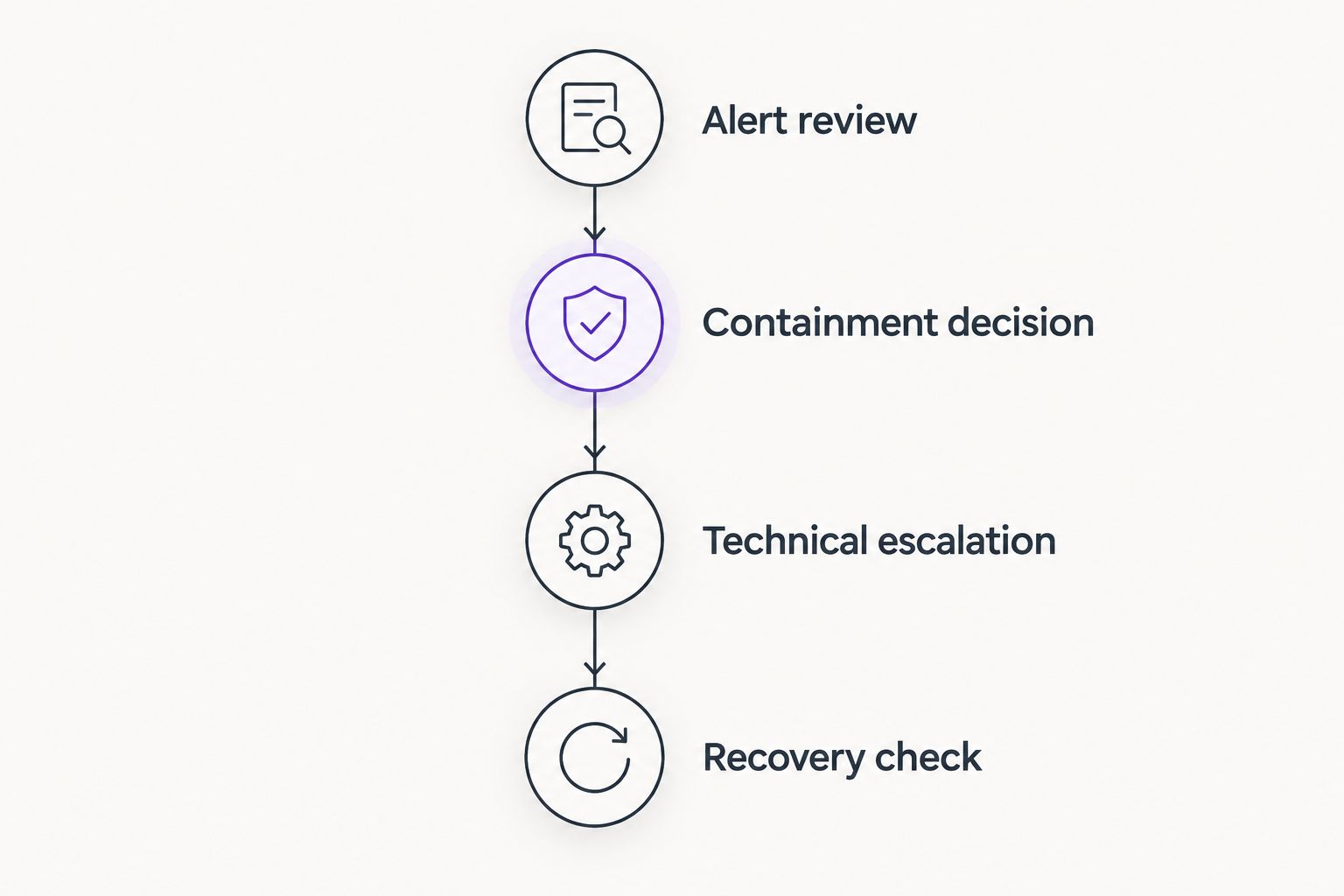
Use a simple sequence for every significant alert:
- Alert review: Check the affected device, user, and reported activity.
- Containment decision: Decide whether access or device connectivity must be restricted.
- Technical escalation: Transfer unresolved findings with the evidence already collected.
- Recovery check: Confirm that the device is safe to return to work and document the outcome.
This sequence prevents a common operational gap: an employee gets help restoring access while the underlying security question remains unanswered.
Pilot the software before a business-wide rollout
For your 2026 rollout, start with a recommended pilot of 3 workstations representing different jobs. Include a device running a critical business application, a remote worker's device, and a workstation with typical office tasks.
Use 5 business days as an initial observation window, not proof of protection quality. Extend the pilot when it misses an important activity such as a scheduled application update or remote-access session.
Record these checks:
- Installation completes and the device appears in the management console.
- Business applications, printing, and remote access continue working.
- Protection updates and device health are visible to the administrator.
- The response owner can explain an alert and the next action.
- Removal or replacement has a documented process.
Do not deliberately introduce live malware into your business environment. Use the security vendor's documented evaluation procedures and have a qualified administrator supervise any detection checks.
Which endpoint protection should you choose?
Start with Microsoft Defender for Business if your business already has capable Microsoft administration. Choose Bitdefender GravityZone Business Security for deliberate policy control, Sophos Endpoint for a planned Sophos firewall relationship, or ESET PROTECT Entry for centralized endpoint administration.
If no employee or provider owns investigation, settle that responsibility first. Switching software does not fix an unattended alert queue.
FAQ
What’s the best endpoint protection software for small business in 2026?
Microsoft Defender for Business is the default shortlist choice for a Microsoft-centered business with a capable administrator. Bitdefender GravityZone Business Security, Sophos Endpoint, and ESET PROTECT Entry fit different policy and management requirements.
Is endpoint protection the same as antivirus?
Endpoint protection is a broader category than traditional antivirus. Depending on the offering, it can combine malware prevention with centralized policy management, investigation, and containment capabilities.
Is Microsoft Defender for Business better than Bitdefender GravityZone?
Microsoft Defender for Business is the stronger operational fit for Microsoft-centered administration; Bitdefender GravityZone Business Security suits deliberate endpoint policy control. Compare the exact offerings and test the workflows your administrator will use.
Do small businesses need endpoint detection and response?
Small businesses should evaluate endpoint detection and response when they need to investigate suspicious activity and contain affected devices. Those capabilities require someone who can interpret findings and act on them.
Can endpoint protection replace managed IT support?
Endpoint protection cannot replace managed IT support. Device maintenance, application troubleshooting, user assistance, and technical escalation remain separate operational responsibilities.
How should a small business test endpoint protection?
Test endpoint protection on representative business workstations before a wider rollout. Check application compatibility, console visibility, update health, and the administrator’s response workflow using vendor-documented evaluation procedures.
Does endpoint protection cover business servers?
Server coverage depends on the exact product, subscription, and supported operating system. Confirm server requirements separately instead of assuming workstation protection includes them.
One last thing
Ask your administrator to demonstrate how a device stops being managed. Replacement laptops, retired workstations, and departing employees need a clear removal process just as much as new devices need installation.
A trustworthy endpoint inventory explains both what is protected and why a device disappeared. Make that part of your 2026 operating checklist before calling the rollout complete.