

Best for accounting firms without an internal IT team: BritCore IT managed IT support. Best for technician-led endpoint monitoring: Atera; best for network visibility: PRTG; best for self-managed monitoring: Zabbix; best for workstation administration: ManageEngine Endpoint Central. This 2026 guide separates monitoring software from the people responsible for acting on its alerts.
- The best remote monitoring tools for accounting firms match your systems and the people responsible for responding.
- BritCore IT managed IT support suits business teams that need ongoing maintenance and structured user help.
- Atera and ManageEngine Endpoint Central address endpoint operations; PRTG and Zabbix address infrastructure monitoring.
- Choose an alert owner before choosing software. A dashboard does not replace technical support.
Why this matters
Accounting work depends on more than a functioning laptop. Staff also need access to documents, business applications, printers, networks, and any servers supporting those services. Monitoring one layer does not establish that the whole workflow works.
A healthy workstation can still sit behind an unreliable connection. A reachable server can still host an application that users cannot open. Choose monitoring around the work your accountants need to complete, not the number of indicators a dashboard displays.
For your 2026 shortlist, separate detection, administration, and response. Some products report a problem; others also provide tools to change the affected device. Neither arrangement works without someone assigned to investigate.
What makes the best remote monitoring tools for accounting firms
Use these criteria before comparing names:
- System coverage: Identify whether you need workstation, server, network, or application checks. Do not assume one category covers the others.
- Actionable alerts: Require alerts that identify the affected system and give a technician enough context to investigate.
- Maintenance controls: Check how device administration and update work fit alongside monitoring. Reporting a condition is different from correcting it.
- Access safeguards: Review technician permissions, authentication, session records, and the process for removing access.
- Response ownership: Name the person or provider responsible for acknowledging, investigating, and escalating an issue.
- Administrative fit: Match configuration and upkeep to your available technical staff. Monitoring software itself requires maintenance.
Before your 2026 evaluation, write down which systems each candidate must cover. Treat an unsupported business-critical dependency as a gap to resolve, not a detail to revisit after deployment.
Remote monitoring options at a glance
These options are not interchangeable. The first is a managed service; the others are software products your firm or its IT provider must operate.
| Option | Best for | Standout capability | Key limitation |
|---|---|---|---|
| BritCore IT managed IT support services | Firms needing ongoing operational support | Maintenance of servers, network equipment, and workstations, with structured user help | A service engagement, not a standalone monitoring application |
| Atera | Technicians handling endpoint monitoring and support | Remote monitoring and management alongside help-desk functions | Your team still needs to configure alerts and handle incidents |
| PRTG | IT teams investigating network and infrastructure health | Sensor-based monitoring across infrastructure | Monitoring does not replace a full endpoint-management workflow |
| Zabbix | Technical teams building self-managed monitoring | Configurable monitoring, templates, triggers, and dashboards | Deployment and ongoing administration require technical ownership |
| ManageEngine Endpoint Central | Teams standardizing workstation administration | Endpoint administration, including patch and software deployment functions | Endpoint management does not provide complete network visibility |
1. BritCore IT: best for managed operational support
BritCore IT provides ongoing IT support for business teams. Its stated scope includes servers, network equipment, workstations, and structured user help with escalation when an issue needs deeper technical attention.
This is a service choice rather than a software purchase. It fits an accounting firm that needs someone to maintain business technology instead of handing an office manager another console to watch. Establish the monitoring scope and response arrangements before treating the service as a replacement for an existing tool.
BritCore IT managed IT support is best for business teams that need ongoing system maintenance and structured user help.
Pros:
- Covers the main business-technology layers: servers, network equipment, and workstations.
- Combines maintenance with a route for users to request help.
- Includes escalation paths for issues requiring more technical attention.
Cons:
- Not a standalone application for a firm seeking software only.
- Monitoring coverage and response commitments require agreement; the service category alone does not establish them.
Best for: Accounting firms that need ongoing IT support rather than another internally operated tool.
Ask for a clear distinction between routine maintenance, user support, and incident escalation. Your agreement should identify who handles each responsibility and where exceptions go.
Verdict: Buy the service approach when your main gap is operational ownership; confirm the scope first.
2. Atera: best for technician-led endpoint monitoring
Atera combines remote monitoring and management with support functions such as ticketing and remote access. It gives technicians a place to observe managed devices and organize support work.
For an accounting firm with an internal technician or an IT provider, that combination connects device administration with incoming user issues. The important distinction is ownership: the platform supplies tools, but your team still decides what constitutes an incident and what happens next.
Atera pros:
- Brings endpoint monitoring and support workflows into the same platform.
- Includes remote-management functions for technician-led work.
- Supports a workflow that connects device information with user requests.
Atera cons:
- Requires someone to maintain configurations and respond to alerts.
- Endpoint visibility alone does not establish that an accounting application works correctly.
Best for: Firms with a named technical operator who wants monitoring and support administration together.
During evaluation, start with a representative workstation and a routine support request. Check whether the technician can identify the device, understand the issue, and record the action without losing context between systems.
Do not treat an alert arriving successfully as the end of the test. The useful result is a technician reaching a documented resolution.
Verdict: Buy when you have the technical ownership to operate an endpoint-support platform.
3. PRTG: best for network and infrastructure visibility
PRTG monitors infrastructure through sensors that track particular conditions or measurements. Its role is to show the status of systems and connections, rather than serve as your entire workstation-administration platform.
That makes it a candidate when your accounting team reports connection problems and IT needs evidence about the underlying infrastructure. Build checks around the relevant dependencies instead of monitoring every available measurement without a purpose.
PRTG pros:
- Supports monitoring across different infrastructure components.
- Uses sensors to separate the conditions you want to observe.
- Provides infrastructure dashboards and alerting for investigation.
PRTG cons:
- Sensor selection and alert thresholds require configuration.
- Does not replace a complete workstation patching and software-deployment process.
Best for: Firms whose technical team needs to investigate network or infrastructure conditions.
Ask the evaluator to explain what an alert proves. A successful connectivity check establishes reachability; it does not establish that a staff member can complete an application task. Where the accounting workflow depends on more than connectivity, identify the additional checks or manual validation needed.
Keep the business description beside the technical check so the response team understands what is affected.
Verdict: Buy for infrastructure visibility; skip it as a substitute for endpoint administration.
4. Zabbix: best for self-managed monitoring
Zabbix is an open-source monitoring platform with templates, triggers, dashboards, and alerting. Technical teams can configure it around the infrastructure they operate.
The deciding factor is administrative capacity. A firm needs someone who can deploy the platform, maintain its supporting systems, configure useful checks, and keep notifications working as the environment changes. That responsibility remains even when the monitoring configuration is stable.
Zabbix pros:
- Offers configurable monitoring for technical teams.
- Provides templates and triggers for organizing checks.
- Supports dashboards and notifications around monitored conditions.
Zabbix cons:
- Requires technical deployment and ongoing platform maintenance.
- Monitoring and alerting do not supply a user help desk or an incident-response team.
Best for: Accounting organizations with technical staff who deliberately want to own their monitoring environment.
Before selecting Zabbix, identify both the platform administrator and the person who receives escalations. Document configuration changes so the monitoring setup does not depend on one person's memory.
Also test notification delivery after changes to mail, authentication, or network settings. A monitoring platform that continues collecting data while its alerts go nowhere does not provide a usable response process.
Verdict: Buy when self-management is an intentional operating choice, not an unassigned task.
5. ManageEngine Endpoint Central: best for workstation administration
ManageEngine Endpoint Central focuses on endpoint management, including patch management, software deployment, inventory, and remote administration. It fits a different problem from a network-monitoring platform: keeping managed devices consistently administered.
For an accounting firm, evaluate it around the workstation tasks your technical team needs to perform. Confirm operating-system and application coverage against your actual device list rather than assuming every endpoint supports the same controls.
ManageEngine Endpoint Central pros:
- Combines several endpoint-administration functions.
- Supports patch-management and software-deployment workflows.
- Provides inventory information alongside device-management tools.
ManageEngine Endpoint Central cons:
- Does not replace infrastructure monitoring across every network dependency.
- Device policies and deployment settings need technical administration.
Best for: Firms with IT staff responsible for consistent workstation administration.
Test changes on a controlled device group before expanding deployment. Include the applications and peripherals your accountants use, and document how the team handles an unsuccessful change.
A workstation reporting successful administration is not the same as a user confirming that an accounting workflow remains usable. Include both checks in acceptance testing.
Verdict: Buy for endpoint administration; pair it with separate infrastructure checks where needed.
How we ranked these options
This 2026 ranking prioritizes operating fit: system coverage, actionable alerts, maintenance controls, access safeguards, response ownership, and administrative effort. It is a role-based shortlist, not a claim that each option performs the same job.
Managed support leads for firms without internal technical ownership. The software choices follow distinct needs: combined endpoint support, infrastructure visibility, self-managed monitoring, and workstation administration. No performance testing or accounting-specific certification is implied.
Build an alert-to-resolution process
Use a 30-day evaluation as a planning window, not a vendor performance promise. Test the operating process as well as the software.
- System scope: List the devices, services, and accounting workflows the evaluation must cover. Record exclusions.
- Alert owner: Assign a primary responder and a backup. These are 2 named owners, not an unassigned shared inbox.
- Safe test: Agree on a non-disruptive test with IT. Verify that the expected notification reaches the correct responder.
- Resolution record: Record the investigation, action, and validation. Include 3 checks: alert delivery, response ownership, and confirmation that work can resume.
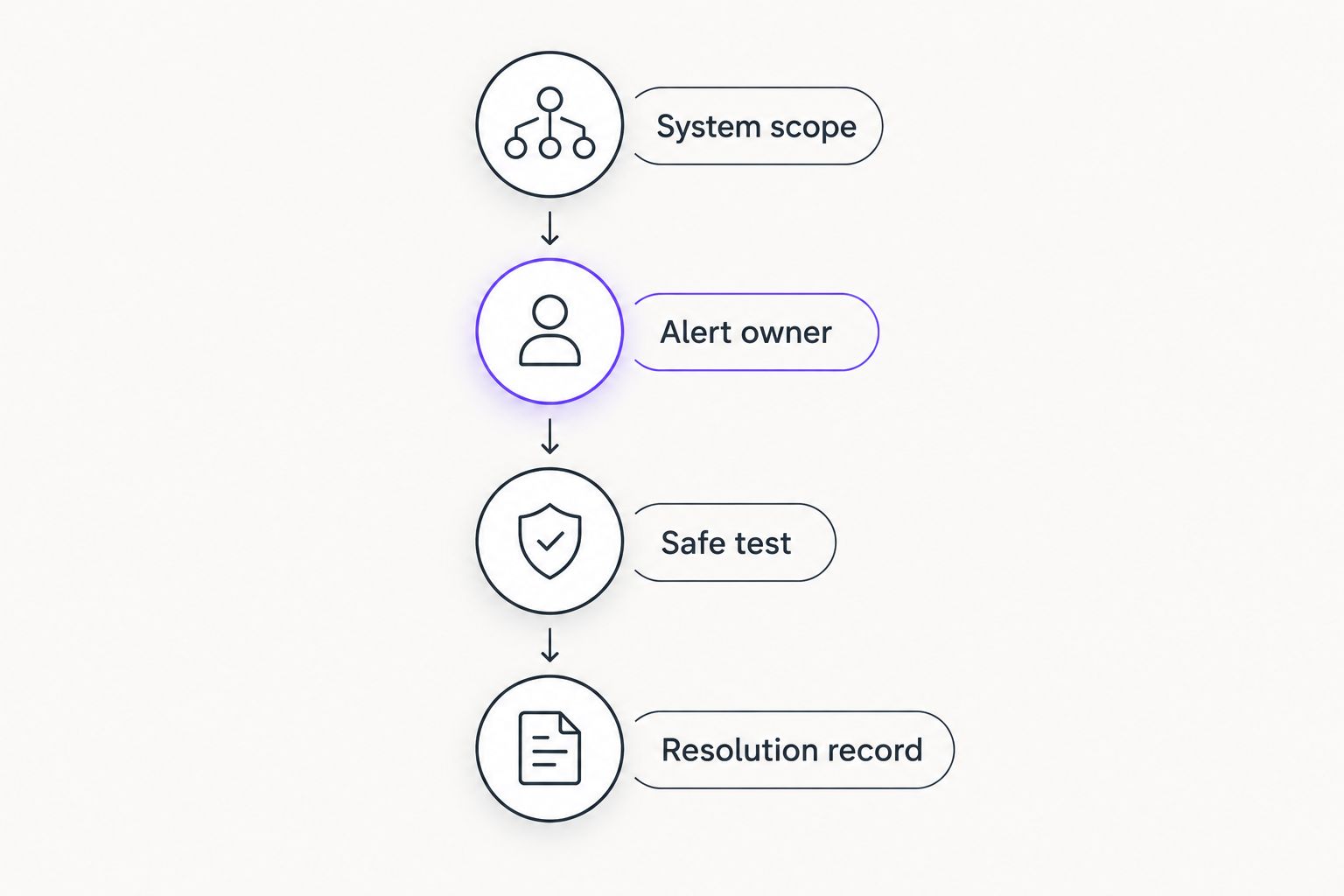
For the 2026 rollout, keep responsibility explicit when more than one provider is involved. Your firm should know whether a workstation issue, connection failure, or application problem belongs with internal IT, the managed provider, or the application supplier.
Which remote monitoring option should you choose?
Choose BritCore IT managed IT support when your firm needs ongoing operational help rather than software alone. Confirm which systems are maintained, how users request help, and how technical escalation works.
Choose Atera for technician-led endpoint support, PRTG for infrastructure visibility, Zabbix for a deliberately self-managed monitoring environment, or ManageEngine Endpoint Central for workstation administration. If your firm has several of these needs, define their boundaries before adding overlapping tools.
FAQ
What’s the best remote monitoring option for an accounting firm without IT staff?
A managed IT service is the better fit when nobody inside the firm can operate monitoring software and respond to incidents. Confirm system coverage, user-support arrangements, and escalation responsibilities before selecting a provider.
Is remote monitoring the same as remote support?
No. Remote monitoring observes system conditions and generates alerts, while remote support lets a technician investigate or assist with an issue. Some platforms combine these functions, but they remain different responsibilities.
Is Atera better than PRTG for an accounting firm?
Atera fits endpoint-support operations; PRTG fits infrastructure monitoring. Choose according to the technical job you need to perform, not the assumption that both products cover the same scope.
Can Zabbix replace an IT support provider?
No. Zabbix supplies monitoring capabilities, not the people responsible for maintaining systems and helping users. Your firm still needs technical administration and an incident-response process.
Does endpoint management monitor the entire office network?
Endpoint management does not establish complete network visibility. Check separately how your team monitors network equipment, connectivity, servers, and application dependencies.
What should an accounting firm test before adopting monitoring software?
Test coverage, alert delivery, responder ownership, and the resolution record. Use a safe scenario agreed with IT, then confirm that the intended responder receives and handles it.
Will remote monitoring prove that accounting software is working?
Not by itself. Device health and connectivity checks do not prove that a user can complete an accounting task. Define the application checks or user validation needed for that workflow.
One last thing
A green dashboard can coexist with an unusable accounting application because each check answers only the question it was configured to ask. Before approving your 2026 setup, ask the responder: What does this check prove, and what does it leave untested?