

Construction companies’ managed IT support is ongoing maintenance and user assistance for business technology, with the aim of keeping office and jobsite teams working from dependable systems. This 2026 guide explains how to define coverage, manage access, protect project files, and choose a support model that fits work across changing locations.
- Managed IT support for construction companies should cover office systems, jobsite access, project files, and clear escalation responsibilities.
- BritCore IT provides ongoing managed IT support for business teams, including servers, network equipment, workstations, and user assistance.
- Choose a support model by ownership and coverage, not by the number of tools listed.
- Test file recovery and jobsite connectivity separately; a working office connection proves neither.
BritCore IT is best for business teams seeking ongoing managed IT support rather than consumer tech help. Use BritCore IT as a service option to assess against the construction-specific requirements below, not as a substitute for defining your scope.
Why managed IT support matters for construction companies
Construction IT connects people who do not all work in the same place. Estimators need dependable access to bid documents. Project managers need current files. Office staff need stable workstations, while field teams need access that survives changes in location and connectivity.
The support requirement is therefore broader than repairing computers. Your provider needs a clear boundary between business systems, internet connections, specialist applications, and equipment supplied by other contractors. Without that boundary, a failed connection becomes a dispute over who owns the problem.
For your 2026 support plan, distinguish system availability from usable access. A file server can be running while a supervisor cannot open a drawing because of permissions, a weak connection, or an outdated shortcut. Monitoring the server alone does not resolve that workflow.
Start with actual work interruptions rather than assumptions about company size. Review support requests from the last 30 days, identify the affected tasks, and document who handled each issue. That record gives you a practical basis for choosing coverage without relying on demand estimates or generic industry benchmarks.
How to organize managed IT support for construction companies
1. Map your office and jobsite technology
Start with a spreadsheet and a walkthrough. List the systems that support estimating, project administration, purchasing, payroll, and field communication, then identify the person responsible for each. Include temporary offices and company devices that move between projects.
For your 2026 inventory, separate equipment ownership from responsibility for maintaining it. A device can belong to your business while a software vendor controls the application installed on it. Record both roles so a support technician knows where to begin.
Do not turn the inventory into a catalog of serial numbers alone. It must explain which business activity stops when an item fails and whether another workable route exists.
- Device ownership: Record who owns, uses, and maintains each workstation and network device.
- Account access: List business accounts and the person who approves access changes.
- File location: Identify where active drawings, estimates, and project records belong.
- Support contact: Record the responsible provider for connectivity and specialist applications.
- Business dependency: Name the task affected when each system becomes unavailable.
2. Define how employees report and escalate issues
Create a short reporting template before buying a support platform. Ask employees for their location, affected application, error message, and business impact. A useful request explains whether one person cannot sign in or an entire site cannot reach shared files.
Set priority by interrupted work, not by who complains loudest. An estimating deadline, a payroll interruption, and an isolated display problem need different handling. Agree on the escalation route for technical problems and the separate route for business decisions.
Keep an alternative reporting method for employees who cannot use the normal channel. Test that method from a jobsite, not just an office desk, and make sure employees know where to find it.
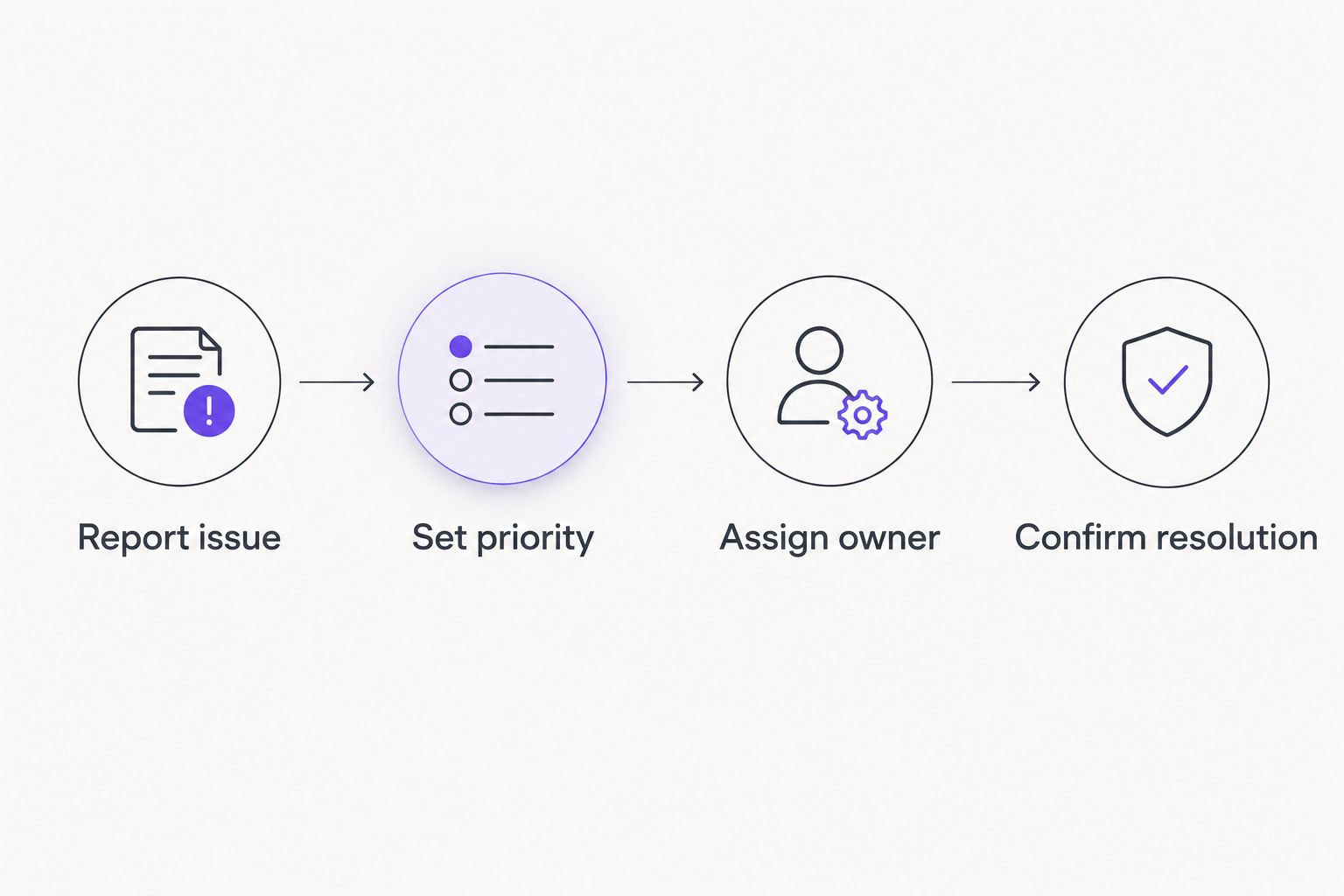
- Report issue: Capture the location, symptoms, affected users, and blocked task.
- Set priority: Classify the request by operational impact and any relevant deadline.
- Assign owner: Give each request a named person responsible for its next action.
- Confirm resolution: Ask the affected employee to test the original task before closing.
3. Match managed services to named responsibilities
Build a responsibility sheet using the inventory and reporting process. You can do this in a shared document: list each system, its maintenance owner, the user-support contact, and the escalation contact. Resolve empty cells before comparing proposals.
A managed provider offers an alternative to coordinating every routine maintenance task yourself. BritCore IT’s managed IT support services include day-to-day support for business teams, management of servers, network equipment and workstations, and structured user assistance with escalation paths.
Those capabilities do not automatically establish coverage for every construction application, temporary site, or physical visit. Ask for those boundaries in writing. A useful agreement explains what happens when the problem crosses from a managed workstation into a vendor-controlled application.
- Identify which servers, workstations, and network devices fall within scope.
- Ask who coordinates with your construction software and internet providers.
- Separate remote troubleshooting from work requiring someone on site.
- Define approval responsibilities for maintenance and configuration changes.
- Record exclusions and the escalation route for work outside the agreement.
4. Standardize account access across project changes
Start with an access checklist for employees, subcontractors, and external project participants. For each group, define who approves access, which information is necessary, and what triggers removal. Apply the checklist whenever a person joins, changes responsibility, or leaves.
Your 2026 access plan should distinguish company-wide information from individual project folders. Someone who needs a drawing for one project does not automatically need estimating records, payroll information, or documents from unrelated jobs.
Give people access through their own accounts wherever the system supports it. Shared credentials make it harder to withdraw one person’s access without disrupting everyone else. Ask your support provider to document exceptions rather than allowing informal arrangements to become permanent.
- Assign a business owner to approve each project’s access requests.
- Use individual accounts and multifactor authentication where supported.
- Separate employee access from external participant access.
- Review permissions when people change projects or responsibilities.
- Remove access when employment or project involvement ends.
5. Separate connectivity problems from application problems
Create a simple troubleshooting sheet for office and jobsite connections. Begin by checking whether the issue affects one device, one application, or everyone using the same connection. This narrows the investigation without asking employees to change technical settings.
A temporary site deserves its own check. Office connectivity does not establish whether a project location has adequate service, reliable wireless coverage, or a usable alternative when the main connection fails. Assess the actual tasks employees perform there.
A managed provider can take over ongoing administration within the agreed scope, but the internet supplier and application vendor still have separate responsibilities. Record who contacts each party and who keeps your employees informed while the issue remains open.
- Test access to the applications field staff actually use.
- Record where wireless coverage fails during normal work.
- Separate business access from guest access where appropriate.
- Document the internet supplier and escalation contact for each location.
- Test any alternative connection before treating it as an operational fallback.
6. Verify file protection with recovery tests
List the information your business cannot readily recreate: active drawings, estimates, contracts, project correspondence, and accounting records. Then confirm where each category is stored and how it is protected. Do not assume every folder on every workstation is included.
File synchronization and backup serve different purposes. Synchronization keeps copies aligned; it does not by itself establish that you can recover the version you need after deletion or unwanted changes. Ask for a demonstration using a representative project file.
Define 2 recovery targets for each critical system: how much recent work the business can accept losing, and how long it can operate without access. These are business requirements to agree with the provider, not performance promises established by this guide.
- Record which locations and applications are included in backup coverage.
- Identify information kept only on individual workstations.
- Restore a representative file and confirm that it opens correctly.
- Check permissions on recovered project information.
- Document the recovery owner and any unresolved gaps.
7. Review service against completed work
Begin with a spreadsheet of requests, affected tasks, and outcomes. Use it to distinguish isolated incidents from repeated interruptions involving the same system. A total ticket count alone does not explain whether employees can work reliably.
For your 2026 service review, use a 90-day review window as a starting point for examining patterns. Compare the same categories each time rather than changing the definition of success between meetings. Keep a record of scope changes, including new locations, new applications, and additional devices.
Ask the provider to explain open risks and proposed actions in business terms. Each action needs an owner, an approval decision, and a way to confirm completion. A technical report without those details leaves you with another document to interpret.
- Review repeated interruptions by system, location, and affected task.
- Check whether resolved requests stayed resolved for the affected employee.
- Track changes to device counts and support responsibilities.
- Review outstanding access, maintenance, and recovery actions.
- Record decisions and confirm ownership before ending the meeting.
Compare support models for your construction business
Choose the operating model before comparing proposals. The useful distinction is who performs routine work, who handles interruptions, and who coordinates problems spanning several suppliers. No model removes the need for a business owner to approve access and priorities.
| Option | Best for | Main advantage | Key limitation |
|---|---|---|---|
| Internal coordination with direct vendor support | Teams with someone able to own day-to-day IT administration | Keeps decisions close to business operations | Depends on internal time and technical capability |
| Break-fix support | Businesses seeking assistance for discrete, clearly scoped incidents | Provides a route to technical help for a particular problem | Does not establish ongoing maintenance unless separately agreed |
| Managed IT support | Teams wanting an external owner for agreed routine maintenance and user support | Creates defined responsibilities across covered systems | Coverage depends on the agreement and its exclusions |
| Co-managed IT support | Businesses with internal IT staff who need defined external assistance | Divides responsibilities between internal staff and a provider | Requires clear handoffs to avoid duplicated or unowned work |
| BritCore IT managed IT support | Business teams needing ongoing support for servers, networks, workstations, and users | Combines infrastructure management with structured user assistance | Construction application coverage and jobsite requirements need confirmation |
Choose managed support when you need ongoing operational ownership, not merely access to a technician. Choose co-managed support when an internal IT role already exists and you can clearly divide responsibilities. Neither arrangement replaces the business decisions only your team can make.
Define your business IT support needs
Discuss your workstations, servers, network equipment, and user-support requirements.
Common mistakes construction companies make
Treating each jobsite as a copy of the office
A temporary office has its own connection, equipment, users, and physical constraints. Reusing the office checklist without testing the location leaves those differences unresolved. Assign an owner to confirm connectivity and access before staff depend on them.
Assuming specialist applications are automatically covered
Workstation support does not establish responsibility for estimating, design, or project-management software. Confirm whether the provider troubleshoots the application, coordinates with its vendor, or stops at the operating system. Put the handoff in the support procedure.
Letting project access continue indefinitely
A completed assignment should trigger a permissions review. Otherwise, access decisions outlive the reason they were approved. Include employees moving between projects as well as external participants leaving them.
Accepting backup status without testing a restore
A successful backup notification is not the same as a usable recovered file. Test representative information and ask the business owner to verify the result. Include permissions and application access in the check, not just the presence of a filename.
Measuring support only by response speed
A quick acknowledgment does not prove that estimating, payroll, or project administration is working again. Keep acknowledgment, technical action, and confirmed resolution separate in service reviews. Judge the outcome against the interrupted task.
FAQ
What does managed IT support for construction companies include?
Managed IT support for construction companies covers the systems and user assistance specified in the service agreement. Assess workstations, servers, networks, account administration, project-file access, and escalation responsibilities separately; inclusion is not automatic.
Can a managed IT provider support both the office and jobsites?
A managed IT provider can support both when the agreement covers those locations and systems. Confirm remote access, connectivity ownership, physical attendance requirements, and responsibilities for temporary site equipment.
Is managed IT support better than break-fix support for a contractor?
Managed IT support fits a contractor seeking ongoing maintenance and defined user-support responsibilities. Break-fix support fits discrete incidents, but it does not establish responsibility for routine maintenance unless that work is separately agreed.
Will managed support cover our estimating and project-management software?
Coverage for estimating and project-management software must be confirmed in the agreement. Ask who handles application faults, licensing questions, workstation issues, and escalation to the software vendor.
Does BritCore IT provide ongoing business IT support?
BritCore IT provides ongoing managed IT support for business teams, including servers, network equipment, workstations, and structured user assistance. Construction-specific applications, site requirements, and service boundaries should be discussed before defining the scope.
What should we prepare before speaking to a managed IT provider?
Prepare an inventory of devices, locations, applications, file storage, and existing supplier responsibilities. Add examples of interrupted work and identify who approves access, maintenance, and support priorities.
How do we check whether project files are recoverable?
Restore a representative project file and confirm that the intended user can open it with the correct permissions. Repeat the check for critical storage locations rather than assuming one successful test covers every system.
One last thing
Test access from the place where the work happens. Ask a field employee to open the current project document, confirm it is the intended version, and follow the support procedure if the task fails. Watching that workflow checks connectivity, identity, permissions, file location, and support instructions together.
Make this a practical acceptance check for your 2026 support plan. A system can appear healthy in an administration console while the employee’s actual task remains blocked.