

Los Angeles managed IT services provide ongoing management of business computers, servers, networks, and user support so your team can keep working. This 2026 buyer’s guide compares support models and explains how to check service coverage, escalation, maintenance, and accountability before you choose a provider.
- For managed IT services Los Angeles buyers, compare service ownership before comparing provider names.
- BritCore IT is best for business teams seeking ongoing IT maintenance and structured user support.
- Require written coverage for office locations, remote workers, escalation, and system maintenance.
- Choose fully managed support for outsourced ownership; choose co-managed support when your internal IT team needs defined assistance.
Why managed IT services matter for Los Angeles businesses
The best provider is the one whose written responsibilities match your operations. A local address alone does not establish who maintains your servers, handles employee problems, or coordinates an incident involving several vendors.
Your comparison needs to distinguish remote support from physical attendance. A provider serving Los Angeles remotely is not the same as a provider committing to visit your office under an agreed process. Ask separately about each location and each type of work.
Professional services teams should connect the evaluation to client work, employee access, and document systems. The managed IT guide for professional services firms provides a related starting point for defining those requirements.
Use the same written brief with every candidate in your 2026 shortlist. Otherwise, you will compare proposals that assign different meanings to support, maintenance, and management.
How to choose managed IT services in Los Angeles
Define the business systems you need supported
Start with a shared spreadsheet, not a proposal request. List the systems employees need to complete their work, then identify who currently maintains each one. Include business applications even when another vendor supplies them: someone still needs to coordinate access, connectivity, and escalation.
Describe the business consequence of failure in plain language. An unavailable document system and an isolated printer fault require different handling. Your inventory should make that distinction clear without requiring employees to diagnose the technology.
Use a 30-day review period as a starting exercise for collecting examples of interruptions. This is a suggested evaluation window, not a service benchmark. Ask team leads to record what stopped working, who was affected, and how work resumed.
Close this step with a support inventory:
- Record office locations and remote working arrangements.
- List workstations, servers, and network equipment.
- Name the owner of each business application.
- Identify systems that interrupt client work when unavailable.
- Mark devices and services with unclear maintenance ownership.
Set your coverage and escalation requirements
Write down when your team works before asking when a provider answers. Include early starts, evening work, and any periods when an unavailable system would block a deadline. Do not treat a general statement about availability as a commitment to handle every issue immediately.
For Los Angeles office support, ask how physical attendance is arranged. Confirm who decides a visit is necessary, what information the provider needs, and whether every business address falls within the proposed service area.
Separate acknowledgment from technical action. A message confirming receipt does not establish when investigation begins or when a specialist takes ownership. Your 2026 agreement should define those events separately.
Request a written escalation example involving a workstation, a server, and an external application vendor. It should show who communicates with your staff while technical work continues.
- Define business hours and exceptional coverage needs.
- Separate remote assistance from office attendance.
- Ask who assigns incident priority.
- Record the path from initial support to technical escalation.
- Name the person responsible for status updates.
Match the support model to your internal capacity
Begin by listing what your staff can reasonably own. A technically capable office manager is not automatically responsible for maintaining servers, approving access changes, and supervising outside vendors. Assign responsibilities deliberately rather than leaving them with whoever helped last time.
BritCore IT managed IT services are best for business teams seeking ongoing IT maintenance and structured user support. The service description covers servers, network equipment, workstations, and escalation when issues need more technical attention. Review the managed IT services against your inventory rather than assuming every adjacent technology task is included.
The trade-off with outsourced management is that responsibilities must be documented across the business-provider boundary. You still need an internal person who can approve changes and confirm priorities.
If you already employ an IT lead, assess co-managed support instead of automatically replacing internal ownership.
- Choose fully managed support when you need external operational ownership.
- Choose co-managed support when internal IT retains defined responsibilities.
- Use project support for a bounded implementation or migration.
- Assign an internal approver for access and significant changes.
- Confirm local attendance and service exclusions before selecting a provider.
Verify maintenance responsibilities in writing
Create a maintenance checklist yourself before reviewing a provider’s version. Include workstations, servers, network equipment, access administration, and business applications. Then ask each candidate to mark what it manages, what it coordinates, and what remains your responsibility.
Do not confuse monitoring with maintenance. Detecting an alert, assessing its significance, approving a change, and completing the work are separate activities. The proposal should identify who owns each activity rather than grouping everything under a broad monitoring label.
Ask how maintenance affects employees. Your team needs a process for scheduling disruptive work, communicating changes, and dealing with an unsuccessful update. For your 2026 agreement, include a method for approving exceptions when a business application cannot follow the normal maintenance schedule.
The objective is not a longer list of tools. It is a clear assignment of work.
- Identify who maintains each device category.
- Separate alert review from corrective action.
- Record approval rules for disruptive changes.
- Define how maintenance exceptions are documented.
- Require a process for unsuccessful changes.
Test the support process with business scenarios
Use 3 test scenarios to evaluate how a candidate organizes work. These are discussion exercises, not claims about provider performance. Give every candidate the same facts and ask for the sequence of actions, the communication owner, and the escalation point.
Use situations your staff understand: an employee cannot access business files, an office loses connectivity, or a departing employee needs access removed. Avoid turning the meeting into a technical trivia test. You are checking whether ownership remains clear as an issue moves between people.
A 60-minute review meeting is a practical format for walking through the scenarios and recording unanswered questions. It is a suggested meeting length, not a promised resolution time.
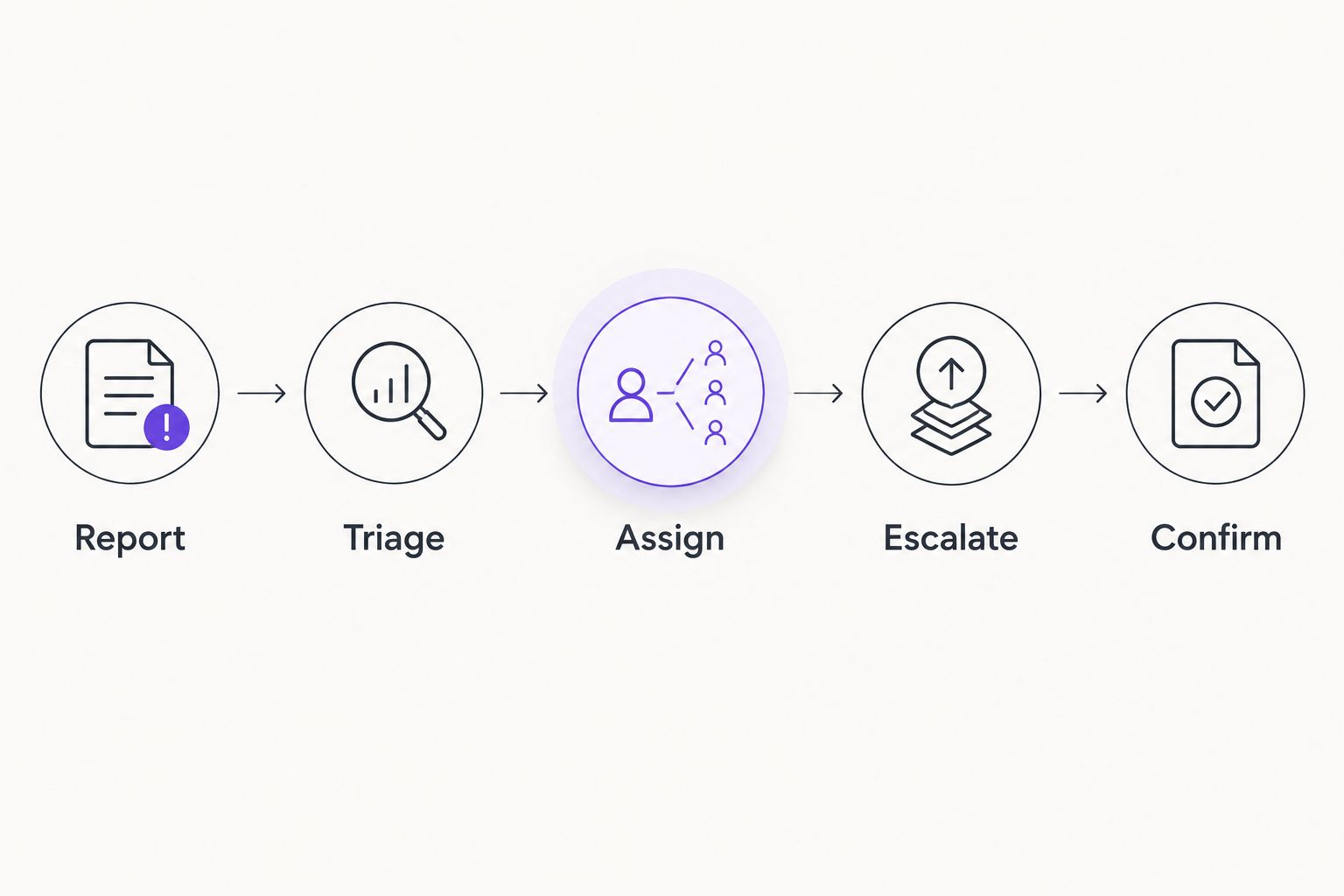
Document the candidate’s process under these labels before discussing tools:
- Report: How does an employee submit the issue?
- Triage: Who assesses business impact?
- Assign: Who owns the next action?
- Escalate: What triggers specialist involvement?
- Confirm: Who checks that the employee can work again?
Plan onboarding before changing providers
Build a handover checklist before giving notice to an existing provider. Identify who controls business accounts, administrative access, device records, software agreements, and technical documentation. Ask your current internal owner to verify the list rather than relying on memory.
A provider change should not leave two parties assuming the other is maintaining a system. Define when the incoming provider takes responsibility and how unresolved issues transfer. Keep projects separate from routine onboarding so you can see what must happen before normal support begins.
Use your 2026 transition plan to record dependencies, approvals, and acceptance criteria. Do not accept a fixed completion date without understanding what information and access the incoming provider needs from you.
- Identify the owner of administrative accounts.
- Collect current device and system records.
- Assign responsibility for obtaining access securely.
- Document unresolved support issues for handover.
- Define when operational responsibility transfers.
- Agree how your business confirms onboarding is complete.
Measure service quality against business outcomes
Start with a simple monthly review document. Record the issues affecting work, maintenance completed, outstanding decisions, and tasks awaiting another vendor. This gives you a useful management view without requiring a new reporting platform.
Distinguish service activity from service effectiveness. A large ticket count does not explain whether employees received useful help. A short acknowledgment time does not establish that a blocked business process resumed. Ask for reporting that connects technical work to the original business impact.
Set a 30-day service review interval as an initial management recommendation, then adjust it to your operational needs. Review urgent matters when they arise rather than saving them for a scheduled meeting.
Choose measures you can interpret and act on:
- Track unresolved issues affecting business work.
- Separate acknowledgment, investigation, and restoration milestones.
- Review maintenance completed and exceptions awaiting approval.
- Identify tasks blocked by access or external vendors.
- Assign an owner and next action to outstanding decisions.
Compare the support options for your business
This comparison separates service models rather than assigning unsupported rankings to Los Angeles providers. Choose the model first, then compare candidates against the same scope.
Each option solves a different ownership problem. A project specialist can be appropriate for a migration without becoming your ongoing support provider. A software tool can help an internal technician without supplying that technician’s judgment or availability.
| Option | Best for | Main advantage | Key limitation or check |
|---|---|---|---|
| BritCore IT managed support | Business teams needing ongoing maintenance and structured user help | Covers management of servers, network equipment, and workstations, with technical escalation | Confirm Los Angeles service coverage, attendance arrangements, and contractual scope |
| Co-managed IT support | Businesses with an internal IT owner needing defined outside assistance | Lets you divide responsibilities between internal staff and an external provider | Gaps remain unless both parties agree who owns each task |
| Internal IT team | Businesses choosing to retain direct operational ownership | Keeps prioritization and technical responsibility inside the business | Your business must arrange staffing, specialist help, and absence coverage |
| Project-based IT support | Businesses completing a specific migration or implementation | Focuses work on defined deliverables and acceptance criteria | Ongoing support requires a separate responsibility agreement |
| Software with internal administration | Teams with staff assigned to operate and maintain support tools | Gives internal staff direct control of configured workflows | Software does not replace people responsible for investigation and action |
A hybrid arrangement is valid when the boundaries are explicit. For example, an internal employee can approve access while an outside provider carries out the agreed technical work. Write that division into the operating process.
Discuss your support requirements
Describe your systems, locations, and support responsibilities to establish clear next steps.
Common mistakes Los Angeles businesses make
Treating a local address as a service commitment
An address does not define office attendance. Ask whether the agreement covers your specific locations, who authorizes a visit, and which work requires separate approval. Apply the same check to remote employees outside the office service area.
Buying tools instead of assigning responsibility
A proposal listing monitoring, security, and ticketing products still needs named operational responsibilities. Ask who reviews information, makes decisions, and performs corrective work. A tool list is not a support process.
Leaving business application coordination undefined
Your application vendor and IT provider can have different responsibilities. Record who collects diagnostic information, opens the vendor case, and keeps employees informed. Do not leave staff to determine the boundary during an interruption.
Choosing a project proposal for an ongoing support need
An installation or migration has a completion point. Daily support continues after that point. If your business needs both, request separate descriptions of project acceptance and ongoing service ownership so neither substitutes for the other.
FAQ
What are the best managed IT services in Los Angeles for a business team?
The best fit is a provider whose written scope covers your systems, working hours, locations, and escalation needs. BritCore IT suits business teams seeking ongoing maintenance and structured user support; confirm Los Angeles coverage and attendance arrangements before selecting it.
Is a Los Angeles IT provider better than a remote provider?
A local provider is the better fit when your requirements include physical attendance that the provider agrees to deliver. Compare remote support and office attendance separately rather than using location as a substitute for service commitments.
What should a managed IT services agreement include?
A managed IT services agreement should define supported systems, responsibilities, coverage, escalation, exclusions, and transition arrangements. It should also explain how changes are approved and how unresolved work is reported.
Should my business choose fully managed or co-managed IT?
Choose fully managed IT when you want an external provider to own agreed operational tasks; choose co-managed IT when an internal IT owner retains defined responsibilities. Document the division of work before service begins.
Can managed IT support replace business application support?
Managed IT support does not automatically include responsibility for every business application. Confirm whether the provider handles access, connectivity, vendor coordination, application administration, or only some of those tasks.
How do I compare managed IT proposals fairly?
Give every candidate the same system inventory, coverage requirements, and support scenarios. Compare written ownership and exclusions before deciding which proposal fits your business.
What should I check before switching IT providers in 2026?
Before switching IT providers in 2026, verify administrative access, documentation, unresolved issues, and the responsibility transfer point. Assign an internal approver and agree how onboarding completion will be confirmed.
One last thing
Ask who is responsible when an issue crosses company boundaries. A workstation problem can involve a business application vendor, an internet connection, or an account administrator. Your support agreement needs a communication owner even when another party performs part of the technical work.
For your 2026 selection, put that question into the final review: who keeps your employee informed until work resumes? A clear answer is more useful than another page of product names. Keep it alongside the system inventory and escalation process you use to assess every candidate.