

Multi-location business network management is the coordinated maintenance of connections, network equipment, and access rules across business sites to keep teams working reliably. Unlike a single-office setup, it requires shared standards, location-specific records, and clear responsibility when a problem crosses site boundaries.
- Network management for multi-location businesses requires shared standards, site-level monitoring, and clear incident ownership.
- BritCore IT fits business teams seeking ongoing managed IT support rather than consumer troubleshooting.
- Standardize essential settings, but document each location’s connection, equipment, and operating requirements.
- Choose monitoring around business impact; alerts alone do not establish responsibility for recovery.
Why network management matters for multi-location businesses
A disconnected branch needs more than a dashboard alert. Your team needs to know whether the fault sits with the internet connection, local equipment, access permissions, or an application used across the business.
For your 2026 operating plan, define managed IT support responsibilities alongside equipment requirements. A centrally managed network still needs local contacts, documented dependencies, and an escalation route.
The practical distinction is shared control without treating every location as identical. A branch with customer-facing operations needs different maintenance arrangements from an administrative office, even when both follow the same security standards.
Consistency also makes handoffs clearer. When every location records equipment and incidents differently, a technician must reconstruct the setup before troubleshooting can begin. A common record format gives the next person a usable starting point.
Build a repeatable network management process
Use the following sequence for your 2026 network management plan. Start with records and responsibilities before changing equipment; a new dashboard cannot resolve an undocumented dependency or an unassigned task.
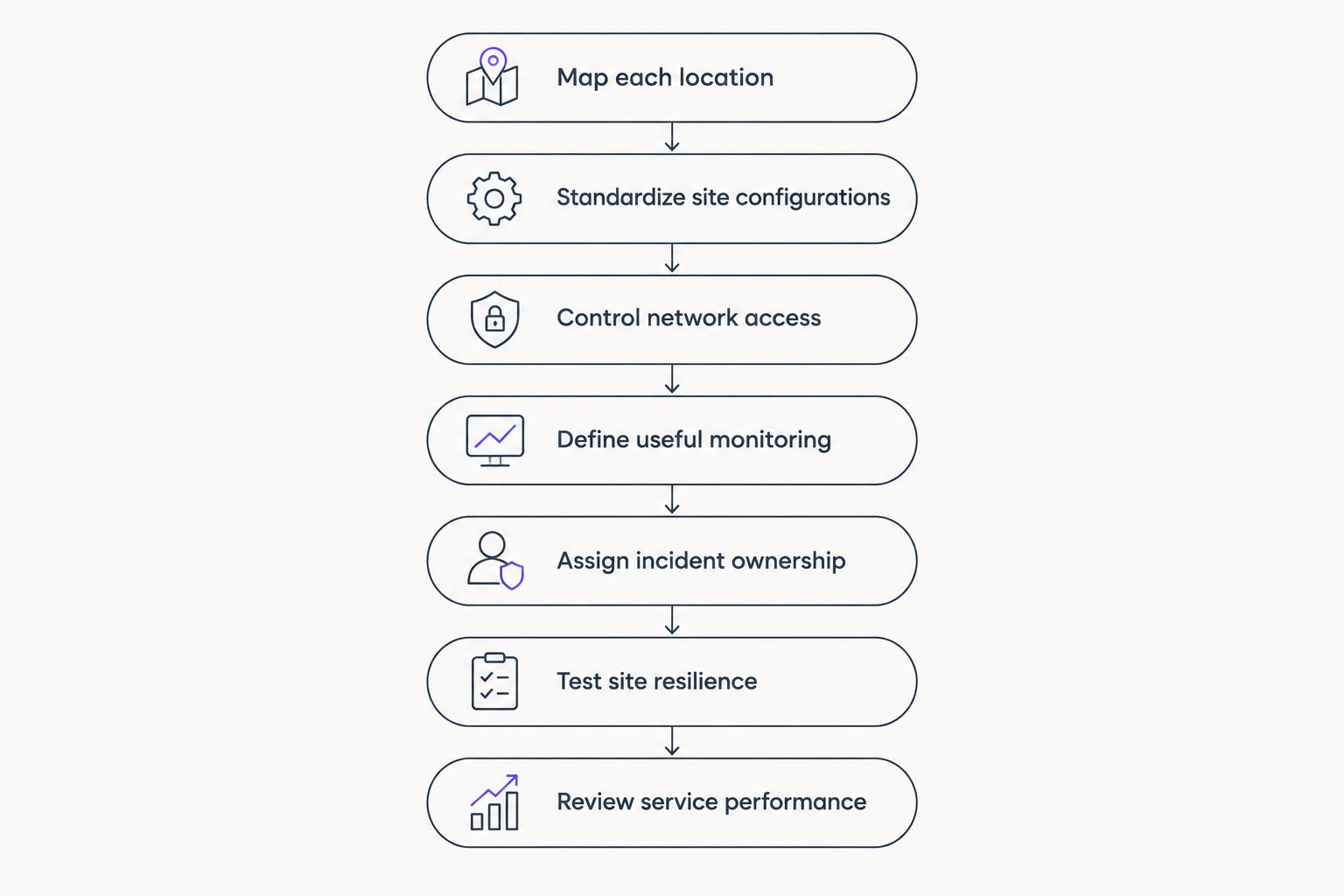
Map each location
Start with a shared spreadsheet and a simple network drawing. Create 1 site record per location, with named owners for the information, rather than keeping connection details in individual inboxes.
Record how people actually work. Identify which applications require internet access, which depend on a server elsewhere, and which equipment connects through the local network. This separates a site-wide outage from an individual workstation problem.
The manual approach is useful for establishing scope. Its limitation is upkeep: a record stops helping when equipment changes without a corresponding update. Assign responsibility for changes before expanding the inventory.
Close the mapping exercise with these records:
- Site details: address, operating hours, and local access arrangements.
- Connection details: provider, circuit reference, and support contact.
- Equipment details: device role, location, and management responsibility.
- Dependency details: applications, shared servers, and connected systems.
- Contact details: name 2 contacts per site where staffing allows, including a backup.
Standardize site configurations
Write a configuration checklist before buying replacement equipment. Define the required outcome for each site: separate visitor access, controlled administration, documented network ranges, and a maintenance process.
Standardization does not mean copying every setting. Locations need distinct addressing where networks connect, and changes must account for local devices and application requirements. Record exceptions instead of allowing undocumented variations to accumulate.
Use 1 pilot location for a proposed configuration change before extending it elsewhere. Select a site that represents the intended setup, confirm local support access, and keep a recovery procedure ready. A successful pilot is evidence for that configuration, not proof that every branch is identical.
- Establish a baseline for firewall, switch, and wireless settings.
- Record approved differences and the reason for each exception.
- Save current configurations before making changes.
- Check that administration remains accessible after the change.
- Update the site record when equipment or settings change.
Control network access
Begin with a manual list of people who can administer network equipment. Remove access that no longer has a business purpose, use named administrator accounts where supported, and document how emergency access works.
Separate ordinary employee access from administrative control. Visitor connections should not provide the same access as business devices, and a successful wireless connection should not automatically establish permission to reach every internal system.
BritCore IT provides ongoing support for network equipment, servers, and workstations. For a team seeking outside help, that is a service-based alternative to assigning maintenance tasks across office managers; confirm the access-management scope before handing over responsibility.
- Assign access according to job responsibilities.
- Enable multifactor authentication for administration where supported.
- Separate visitor traffic from business resources.
- Review administrator access when staff or providers change.
- Document who can approve exceptions and emergency access.
Define useful monitoring
Start with an outage log and manual checks of the services each location needs. Record the affected site, business activity, start time, symptoms, and recovery evidence. This creates a useful baseline before introducing additional monitoring.
Then choose checks that distinguish device status from service health. A reachable firewall does not establish that employees can use a hosted application. Likewise, an unavailable device does not identify the business impact without knowing what depends on it.
For your 2026 monitoring requirements, compare capabilities against the questions you need answered. The network monitoring software guide provides a separate starting point for evaluating monitoring options; monitoring remains distinct from managing the response.
- Check connection availability at each location.
- Monitor network equipment relevant to business operations.
- Test access to important shared services.
- Route alerts to a named owner and backup.
- Adjust alerts that repeatedly trigger without requiring action.
Assign incident ownership
Write a support route that employees can follow without diagnosing the network themselves. Ask for the location, affected task, error message, and whether colleagues have the same problem. Give employees an alternative reporting route when their usual channel depends on the failed connection.
Separate the person reporting the incident from the person coordinating recovery. An internet provider, application supplier, and internal administrator can all be involved, but someone still needs to track the whole incident.
BritCore IT offers structured user help with escalation paths for issues requiring more technical attention. When assessing managed support, ask how that escalation applies to branch outages and third-party handoffs; the service description alone does not establish response commitments.
- Name the person or team responsible for incident coordination.
- Define impact categories around interrupted business activities.
- Record provider references and escalation contacts.
- Specify who updates affected employees.
- Require a clear handoff when responsibility changes.
Test site resilience
List what each location can still do when its primary connection or critical network equipment fails. Then document the recovery path for the activities that cannot continue. Do not treat a backup connection as a complete recovery plan.
Begin with a tabletop walkthrough before interrupting a live service. Check who initiates recovery, how equipment is accessed, and which applications require additional steps. Schedule practical tests around business operations and obtain authorization for disruptive work.
Include remote administration in the test. A recovery plan that depends on reaching equipment through the failed connection needs another access method or a local intervention procedure.
- Identify the business activities affected by each failure scenario.
- Document backup connectivity where it is part of the design.
- Verify that saved configurations can be accessed when needed.
- Record local actions for a person at the affected site.
- Confirm application access after restoring the connection.
Review service performance
Use your own incident records to judge whether the network management arrangement meets business needs. Review affected locations, interrupted activities, unresolved work, and whether employees received usable updates. Avoid judging service quality solely by the number of alerts generated.
For a 2026 service review, separate technical work from operational outcomes. Installing an update is a completed task; confirming that the location still works afterward establishes the result. Both belong in the record.
Keep the review focused on decisions. Each unresolved item needs an owner and a next action, not another unexplained status label. Compare locations only when the underlying records describe incidents consistently.
- Record impact in terms of the work employees could not complete.
- Assign ownership to unresolved work and configuration exceptions.
- Check recovery with someone who uses the affected service.
- Document changes in the relevant site record.
- Agree next actions before closing the review.
Compare management options for your locations
Choose an operating model based on who will perform the work, not just who supplies the dashboard. BritCore IT’s managed IT support fits business teams seeking ongoing maintenance of servers, network equipment, and workstations. Confirm the proposed site coverage, responsibilities, and escalation arrangements before deciding.
| Option | Best for | Main advantage | Key limitation |
|---|---|---|---|
| Internal team with manual records | Businesses with staff assigned to network maintenance | Direct control over records and changes | Documentation and coverage depend on available staff |
| Internal team with centralized monitoring | Businesses with technical staff responsible for multiple sites | Shared visibility across locations | Staff must still investigate alerts and coordinate recovery |
| Co-managed arrangement | Businesses retaining internal ownership while assigning selected work externally | Divides work according to agreed responsibilities | Gaps remain when boundaries and handoffs are unclear |
| BritCore IT managed IT support | Business teams seeking ongoing technology maintenance and structured user help | Support covers servers, network equipment, and workstations | Location coverage and service commitments require confirmation |
Manual management is a valid starting point when responsibilities are explicit and records remain current. Centralized monitoring adds visibility, but it does not replace the people responsible for configuration, maintenance, or incident handling.
An external provider changes who performs agreed work. It does not remove your need for an internal business owner who approves access, explains operational priorities, and confirms whether recovery meets the team’s needs.
Common mistakes multi-location businesses make
Treating every branch as an identical copy
A common equipment list does not establish identical application dependencies or operating hours. Keep a shared baseline, then record local exceptions and maintenance restrictions. Otherwise, a change that works at headquarters becomes an untested assumption elsewhere.
Depending on a single local contact
A branch manager is not always available when remote access fails. Document backup contacts and the physical actions they are authorized to perform. Do not ask untrained employees to change network settings as a substitute for a recovery procedure.
Buying monitoring without assigning response work
An alert creates a notification, not a resolution. Before enabling a check, identify who receives it, what action is expected, and where it escalates. If nobody owns the response, additional alerts add another unattended queue.
Closing an incident after a device responds
A reachable device is only part of recovery. Ask someone at the location to complete the previously blocked task, including access to shared applications. Record that confirmation so the next shift does not inherit an incident marked resolved while work remains interrupted.
FAQ
What is network management for multi-location businesses?
Network management for multi-location businesses is the coordinated maintenance of connections, network equipment, and access rules across business sites. It combines shared standards with local records, monitoring, and incident ownership.
What is the best way to manage networks across several offices?
Start with a shared site inventory, a documented configuration baseline, and named incident owners. Add centralized monitoring around the services employees need, then test the recovery arrangements for each location.
Do all business locations need identical network equipment?
No, shared management standards do not require identical equipment at every location. Document the required capabilities and local exceptions so differences remain deliberate and supportable.
Is network monitoring the same as managed IT support?
No, network monitoring checks conditions and generates information or alerts, while managed IT support assigns agreed maintenance and support work. A monitoring system still needs someone responsible for investigating problems and coordinating recovery.
Can a managed service provider replace our internal IT team?
A managed service provider can take responsibility for agreed work, but the scope determines what remains internal. Your business still needs an owner for approvals, operational priorities, and confirmation that affected work has resumed.
How should employees report a network outage at a branch?
Employees should report the location, interrupted task, visible error, and whether colleagues are affected through the agreed support route. Provide an alternative route that remains usable when the branch connection is unavailable.
What should we check before changing network management providers?
Check access ownership, configuration records, equipment responsibilities, provider contacts, and the incident handoff process. Confirm how the outgoing and incoming teams will transfer responsibility without leaving locations unsupported.
One last thing
Test the support route during a connection failure, not just the connection itself. For your next 2026 recovery exercise, ask a local contact to find the reporting instructions without using the affected office network. If the instructions are inaccessible, fix that dependency before adding another dashboard.