

Best overall: Jira Service Management. Best for employee-facing IT support: Freshservice. Best for asset-centered service management: ManageEngine ServiceDesk Plus. This guide compares the best IT ticketing software for help desks in 2026, including Zendesk for customer support and GLPI for self-hosted control.
- Jira Service Management is the best IT ticketing software for help desks coordinating support with technical delivery teams.
- Freshservice suits employee-facing IT service management; ManageEngine ServiceDesk Plus suits asset-centered support.
- Zendesk fits customer-facing help desks; GLPI fits organizations prepared to operate a self-hosted system.
- BritCore IT provides managed IT support, not ticketing software; choose service ownership separately from the ticket queue.
Why this matters
A ticket queue records demand. It does not establish who maintains your servers, fixes an unstable workstation, or takes responsibility when an issue needs technical escalation. Those responsibilities need an owner outside the software configuration screen.
For business teams evaluating ticketing software, BritCore IT is best suited to organizations that need ongoing managed IT support rather than another tool to operate. Its managed IT support services cover servers, network equipment, workstations, and structured user help with escalation paths. That is a different purchase from a ticketing application.
The software shortlist below is for teams choosing a system to manage support work. For a 2026 selection, start with the work you need to control: employee requests, technical incidents, equipment records, or customer conversations.
What makes the best IT ticketing software for help desks?
Judge each application against these criteria before comparing feature lists:
- Request intake: Users need an understandable way to report an issue and provide useful details.
- Ownership and escalation: Every ticket needs an accountable owner and a route to specialist help.
- Operational context: Technicians need access to relevant equipment, service, and previous incident information.
- Workflow fit: Approvals, routing, and status changes should reflect how your team actually works.
- Administration burden: Someone must maintain permissions, forms, automation, integrations, and reporting.
- Knowledge reuse: Resolved work should produce instructions that help users and technicians handle repeat requests.
Choose the simplest system that supports your required handoffs. A long feature list adds little when technicians cannot tell who owns an unresolved incident.
IT ticketing software at a glance
The ranking favors internal business IT support. Customer-service breadth and self-hosting control get separate use-case slots rather than competing with the default recommendation.
| Rank | Software | Best for | Standout capability | Key limitation |
|---|---|---|---|---|
| 1 | Jira Service Management | IT teams working with technical delivery teams | Service requests and incidents connected to Jira workflows | Workflow design requires ongoing administration |
| 2 | Freshservice | Employee-facing IT support | IT service management with a service catalog and asset context | Broader service processes need deliberate setup |
| 3 | ManageEngine ServiceDesk Plus | Asset-centered IT operations | Help desk workflows alongside IT asset management | Deployment and feature scope require careful selection |
| 4 | Zendesk | Customer-facing support desks | Customer conversations organized into agent workflows | Customer support is a different starting point from internal IT operations |
| 5 | GLPI | Self-hosted service management | Tickets connected to inventory and asset records | Self-hosting puts application operations on your team |
These are workflow-based recommendations, not measured performance results. Confirm current feature packaging, deployment choices, and integration requirements during your 2026 evaluation.
1. Jira Service Management: best for technical delivery coordination
Jira Service Management organizes service requests, incidents, changes, and knowledge for support teams. Its connection to Jira makes it a strong fit when IT support regularly hands work to development or other technical delivery teams.
The key question is whether those connections improve an actual handoff. If a support incident needs an engineering fix, your team needs a way to relate the work without losing responsibility for communicating with the requester.
Jira Service Management pros:
- Supports structured request intake through a service portal.
- Provides incident, problem, and change management capabilities.
- Connects service work with the wider Jira environment.
Jira Service Management cons:
- Flexible workflows require someone to maintain rules and permissions.
- An elaborate Jira configuration is unnecessary for a straightforward request queue.
Best for: Internal IT teams whose support work regularly intersects with engineering or technical delivery.
During evaluation, follow an incident from the employee request through the technical handoff. Check whether the support owner can still see progress and provide an understandable update. A linked work item is useful only when it keeps the support process clear.
Verdict: Buy Jira Service Management when cross-team technical coordination is a requirement; skip it when that connection adds administration without value.
2. Freshservice: best for employee-facing IT support
Freshservice is an IT service management application built around employee requests and service delivery. Its service catalog, ticket workflows, knowledge management, and asset management capabilities suit teams formalizing an internal help desk.
Start with the requests employees already make. Equipment requests, access requests, and technical incidents should not all ask the same questions or follow an identical approval path.
Freshservice pros:
- Provides a service catalog for structured employee requests.
- Supports workflow automation and approval processes.
- Brings IT asset information into service management.
Freshservice cons:
- Catalog design and approval rules still require an internal owner.
- Features outside basic ticket handling add configuration and maintenance work.
Best for: Organizations replacing an informal internal support inbox with defined employee services.
Test the employee experience as closely as the technician interface. A request form should collect information the technician needs without forcing the employee to understand internal IT terminology. Then check how an incorrectly categorized request gets reassigned.
Freshservice deserves its place when your priority is a clear internal service structure, not a direct connection to an existing engineering workflow.
Verdict: Buy Freshservice for employee-facing IT service management; hold if your team has not defined its request types and owners.
3. ManageEngine ServiceDesk Plus: best for asset-centered IT operations
ManageEngine ServiceDesk Plus combines help desk functions with IT asset management. It fits teams that need to connect support work with the equipment and services involved.
That context matters when a ticket refers to a workstation, server, or shared business system. The help desk needs more than a description of the symptom; technicians need a reliable way to identify the affected asset and review relevant records.
ManageEngine ServiceDesk Plus pros:
- Combines service desk workflows with asset management capabilities.
- Supports incident, problem, and change management processes.
- Offers cloud and on-premises deployment choices.
ManageEngine ServiceDesk Plus cons:
- Available capabilities depend on the selected edition and deployment.
- Asset information needs maintenance to remain useful during support work.
Best for: IT teams that treat equipment records as an essential part of incident handling.
Ask technicians to work through a workstation issue using the asset record, not a manually assembled spreadsheet. Check what identifies the device, how the ticket attaches to it, and who corrects an inaccurate record.
For a 2026 rollout, decide on deployment responsibility before building workflows. Hosting decisions affect who maintains the application and how your team handles changes to it.
Verdict: Buy ManageEngine ServiceDesk Plus when asset context drives support decisions; hold until deployment and record ownership are clear.
4. Zendesk: best for customer-facing help desks
Zendesk organizes customer support conversations into tickets and agent workflows. Its support channels, routing, automation, and help center capabilities make it a relevant choice when the people asking for help are customers rather than employees.
That distinction changes the ranking. Customer communication and internal IT operations overlap, but equipment ownership, employee approvals, and infrastructure incidents are not the same problem as managing customer conversations.
Zendesk pros:
- Organizes customer conversations into a shared ticketing workflow.
- Supports routing, automation, and agent collaboration.
- Provides help center capabilities for customer self-service.
Zendesk cons:
- Its customer-support focus does not replace an internal IT operating model.
- IT asset and change requirements need separate evaluation.
Best for: Customer-facing support desks where conversation handling is the main requirement.
Test a conversation that changes channels or needs another department's input. Check whether the assigned agent can preserve context and keep responsibility for the customer response.
For employee IT support, compare the required asset, approval, and incident workflows before choosing Zendesk on the strength of its customer-service interface alone.
Verdict: Buy Zendesk for customer-facing support; skip it as the default internal IT choice when service and asset workflows are your priority.
5. GLPI: best for self-hosted service management
GLPI is an open-source IT service management application with help desk and asset management functions. Its self-hosted option suits organizations that want to operate the application within their own environment.
Control comes with operational responsibility. Someone must handle application maintenance, backups, access configuration, and the compatibility of any extensions your workflow depends on.
GLPI pros:
- Connects help desk activity with inventory and asset records.
- Offers a self-hosted approach to service management.
- Supports customization through its plugin ecosystem.
GLPI cons:
- Self-hosting requires application operations and maintenance.
- Plugins introduce compatibility checks during upgrades.
Best for: IT teams with a clear reason to self-host and the capacity to maintain the application.
Evaluate GLPI as an operational commitment, not just a ticket interface. Identify who updates the system and who restores it if an application change fails.
Verdict: Buy GLPI for deliberate self-hosting control; skip self-hosting when nobody owns application maintenance.
How the software is ranked
This 2026 ranking applies the criteria above to distinct operating needs. Jira Service Management leads for technical handoffs; Freshservice serves employee-facing workflows; ManageEngine ServiceDesk Plus emphasizes asset context; Zendesk serves customer conversations; GLPI serves self-hosted control.
The order does not claim that one application is fastest or easiest for every team. Your required workflow takes priority over the numbered position.
Test the workflow before you commit
Use a small, repeatable evaluation instead of an unrestricted feature tour. The following is a suggested test design, not a vendor performance benchmark: give 2 technicians the same 10 representative tickets and run the exercise over 5 working days.
Request intake
Include a routine access request, an unclear workstation complaint, and an incident affecting a shared service. Check whether the forms collect the information needed to begin work.
Ownership
Assign each ticket to a responsible technician. Test absence coverage and reassignment so a queue change does not quietly remove accountability.
Escalation
Move an issue to someone with deeper technical responsibility. Check that the receiving technician gets the history and the requester still has a clear communication path.
Resolution
Record the fix and decide whether a reusable instruction belongs in the knowledge base. Reopen a ticket to check whether the history remains understandable.
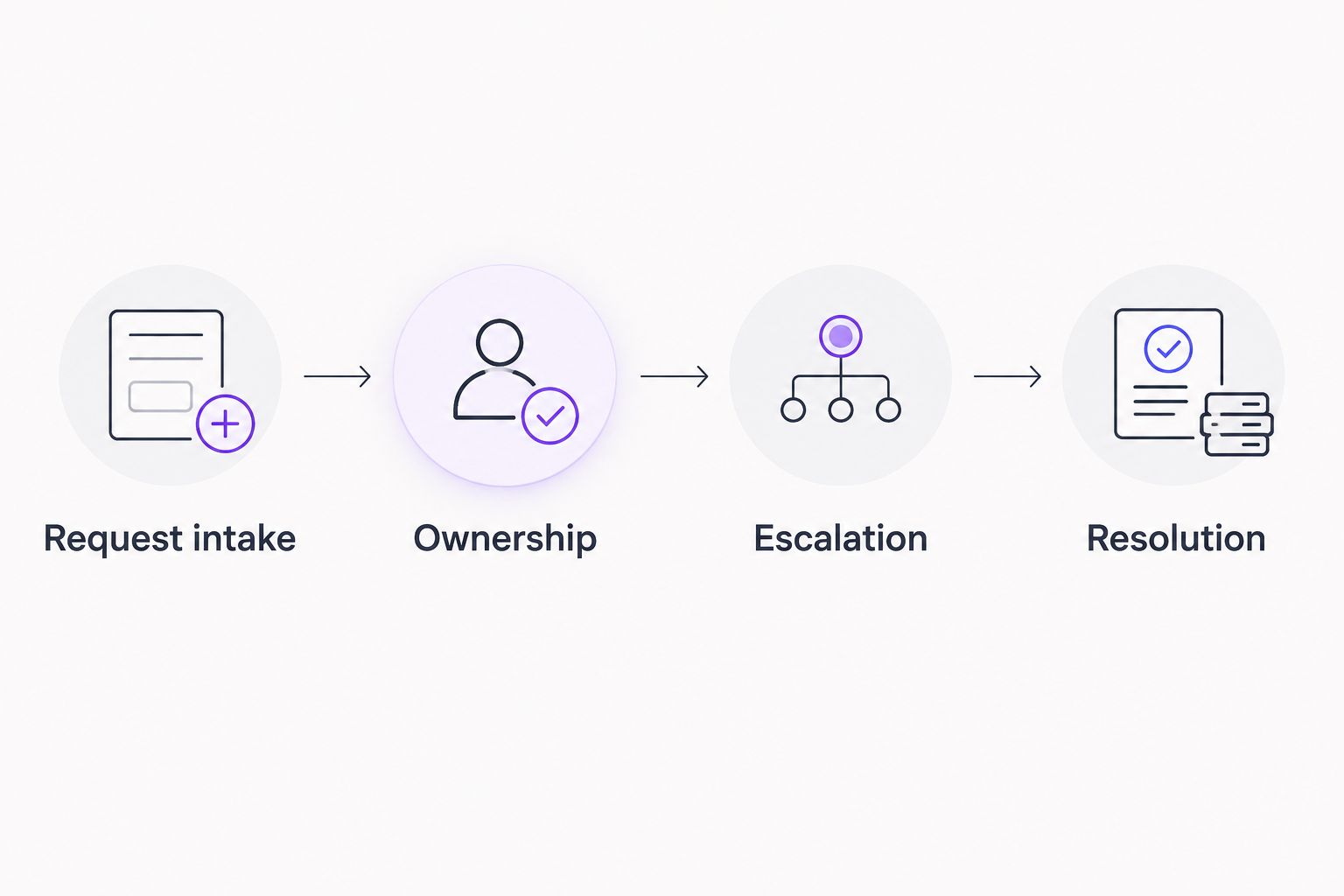
The exercise should reveal what your team must configure and maintain. Record the manual handoffs, unclear ownership, and information gaps before deciding which application fits.
Which IT ticketing software should you choose?
Choose Jira Service Management by default when internal support depends on technical delivery teams. Choose Freshservice when organizing employee services is the main job. Choose ManageEngine ServiceDesk Plus when asset records drive the work.
Zendesk and GLPI answer different questions: customer conversation management and self-hosted operation. Neither needs to win the internal IT default to be the right choice for its intended use.
BritCore IT provides managed IT support rather than ticketing software. If your unresolved question is who will maintain systems and handle technical escalation, settle that responsibility before selecting another application.
Discuss your IT support needs
Describe the systems, workstation issues, and support handoffs your business needs help managing.
FAQ
What’s the best IT ticketing software for help desks in 2026?
Jira Service Management is the default recommendation for internal IT teams that coordinate support with technical delivery teams. Freshservice is a better fit when employee-facing service management is the main requirement.
Is Freshservice better than Jira Service Management?
Freshservice is the stronger fit for teams prioritizing employee-facing IT services, while Jira Service Management fits support connected to Jira-based technical work. Compare your actual request and escalation workflows rather than selecting from feature counts.
Which help desk software is best for asset management?
ManageEngine ServiceDesk Plus is the asset-centered recommendation in this shortlist. Test how technicians associate tickets with equipment and how your team maintains those records.
Can Zendesk handle an internal IT help desk?
Zendesk can organize internal support requests, but its customer-support focus makes workflow validation essential. Check your requirements for assets, employee approvals, and infrastructure incidents before choosing it.
Is GLPI a good choice for self-hosting?
GLPI is a suitable choice for teams that deliberately want self-hosted service management. Assign responsibility for updates, backups, access controls, and plugin compatibility before deployment.
Does ticketing software replace managed IT support?
Ticketing software does not replace managed IT support. It organizes requests, while a support team remains responsible for maintenance, technical investigation, and escalation.
How should a small team compare help desk applications?
A small team should compare applications using the same representative support requests. Follow intake, assignment, escalation, and resolution, then document the configuration and manual work each application requires.
One last thing
Before signing off on your 2026 choice, ask a technician to explain who owns a ticket after escalation. If the answer is unclear, the workflow is not ready—regardless of how polished the dashboard looks.
BritCore IT's structured user help includes escalation paths for issues needing more technical attention. Apply that same ownership standard to whichever ticketing system you choose.