

Your outsourced IT support cost per month depends on the services, equipment, users, and support hours covered by your agreement; a written, business-specific quote is the basis for your budget. Check separately for onboarding, software licensing, on-site work, and projects outside routine maintenance. For a 2026 comparison, ask each provider to quote the same scope before comparing the monthly commitment.
- Outsourced IT support cost per month depends on service scope, billing units, support hours, and exclusions.
- Compare managed IT support agreements against the same inventory and coverage requirements.
- BritCore IT provides ongoing business IT support, including system maintenance and structured user help.
- Separate recurring support from onboarding, licensing, equipment, and project work before approving a quote.
How much does outsourced IT support cost per month?
Your monthly commitment is the quoted recurring service amount plus any separately billed recurring services you require. Initial setup, replacement equipment, and project work belong in separate budget lines unless the agreement includes them.
BritCore IT is best suited to business teams seeking ongoing managed IT support rather than consumer tech help. That distinction matters: maintaining business systems is a different scope from answering occasional troubleshooting requests.
Use this table to distinguish billing structures. These are agreement types to compare, not statements about any provider's packages.
| Billing structure | Best for | Main benefit | Main limitation to check |
|---|---|---|---|
| Per user | Teams organizing support around employees | Connects the billing unit to headcount | Shared devices, servers, and nonemployee accounts need explicit treatment |
| Per device | Businesses budgeting around managed equipment | Connects charges to listed assets | A person using several devices changes the equipment count |
| Fixed monthly scope | Teams seeking a defined recurring commitment | Makes the agreed service boundary clear | Changes and exclusions still need written terms |
| Time-based support | Businesses buying specified support time | Connects billing to work performed | Maintenance and availability require separate agreement |
Choose the agreement by its responsibilities, not its label. A fixed monthly agreement with narrow coverage is not equivalent to one that includes user assistance, server maintenance, and network management.
Why this matters
A monthly support figure tells you little until you know what happens during an incident. Your team needs to know who receives the request, who owns the next step, and when a more technical specialist becomes involved.
For your 2026 budget, compare service boundaries alongside billing terms. Otherwise, you are comparing different purchases under the same outsourced IT support heading.
A clear agreement also separates the provider's work from your responsibilities. Approving equipment purchases, authorizing account access, and coordinating a specialist application vendor should have named owners rather than assumptions.
Why outsourced IT support costs vary
These factors define the work being purchased. Ask providers to explain how each factor appears in the scope and billing terms.
- Supported users: Specify which employees, contractors, and shared accounts receive assistance. Clarify how joining and departing staff affect the agreement.
- Managed equipment: List workstations, servers, and network equipment. Identify which assets receive maintenance rather than troubleshooting alone.
- Support hours: Define the ordinary service window and the arrangements outside it. Distinguish request submission from active incident handling.
- Technical responsibility: Separate user help, system administration, network management, and specialist escalation. Record where another supplier takes ownership.
- Service boundaries: Identify whether licensing, backup administration, security work, on-site attendance, and projects are included or separately agreed.
- Starting condition: Ask what must happen before routine service begins. Document setup work and unresolved issues rather than leaving them inside a general onboarding description.
The purpose is not to make every agreement identical. It is to expose differences so you can decide which responsibilities your business needs to transfer.
How do I get a quote I can actually compare?
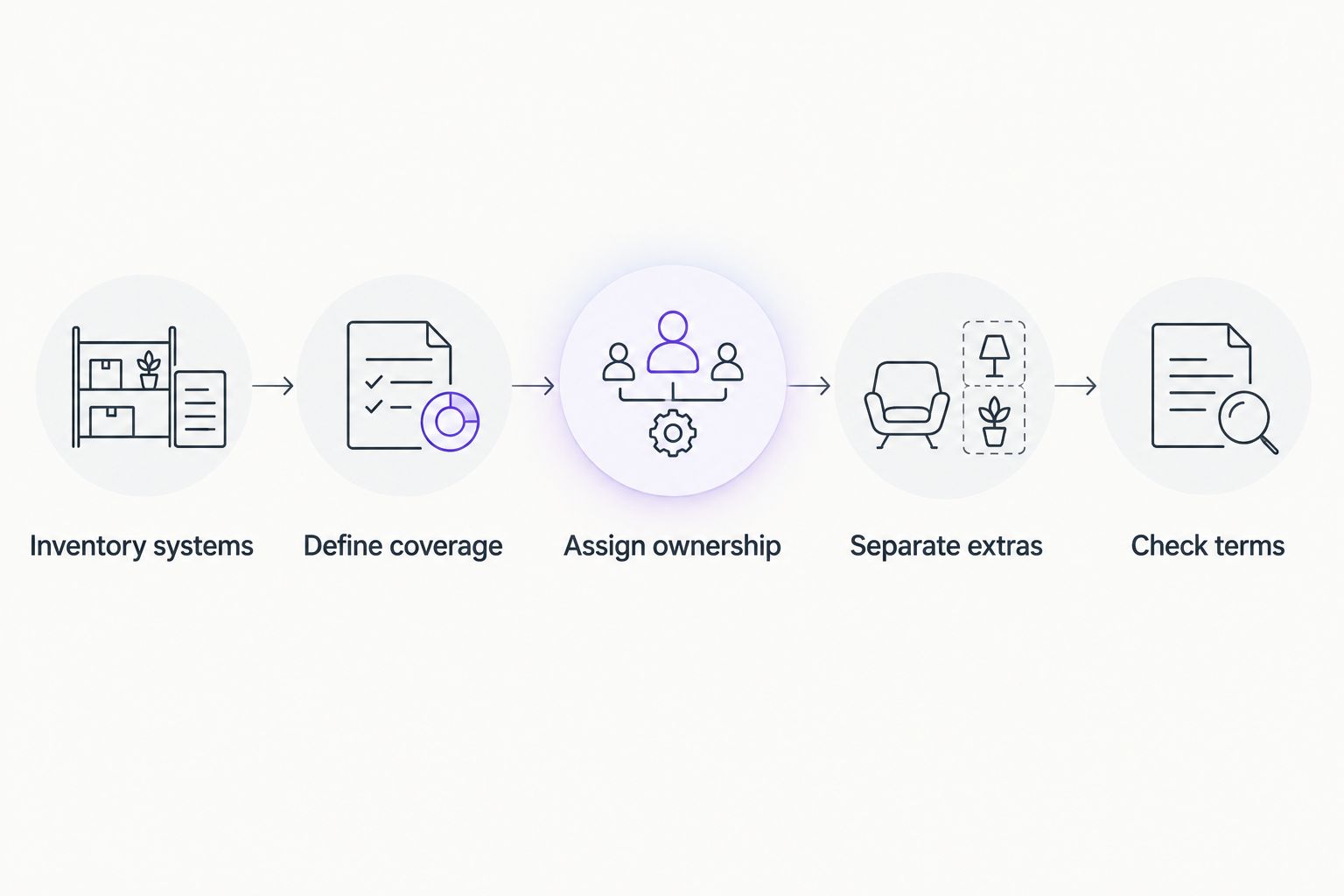
Send every provider the same brief. A quote becomes easier to assess when the provider responds against a shared inventory and a written description of the work.
- Inventory systems. List users, workstations, servers, network equipment, locations, and essential business applications. Mark anything whose ownership or support responsibility is unclear.
- Define coverage. Describe who needs help, which systems need maintenance, and when support must be available. Separate ordinary requests from business-stopping incidents.
- Assign ownership. Identify responsibility for accounts, applications, connectivity, backups, and outside suppliers. Ask where escalation begins and ends.
- Separate extras. Request distinct treatment of onboarding, recurring services, licensing, equipment, and projects. Require approval rules for work outside the agreement.
- Check terms. Review billing adjustments, renewal, cancellation, service changes, and handover. Confirm what happens when your staffing or equipment changes.
The output should be a scope you can read without translating sales language. A colleague should be able to identify the supported systems and explain how to request help.
For a 2026 request for proposals, ask providers to list assumptions beside their answers. An assumption about remote-only service or application ownership changes what the agreement covers, even when the headline wording looks similar.
What belongs in the inventory?
Record enough detail to establish responsibility without sending passwords or sensitive records. Include the equipment type, its business purpose, its location, and the organization currently responsible for it.
Distinguish employee workstations from shared devices and servers. Also identify systems managed by another supplier, so the support agreement addresses coordination instead of implying control the provider does not have.
What should the monthly agreement actually include?
Start with the operational responsibilities your team needs covered. Do not treat this checklist as a promise that every managed service agreement includes them.
User support and escalation
Specify how employees submit requests and who tracks them through resolution. Ask how the provider handles an issue that exceeds the first technician's technical responsibility.
Distinguish an initial response from a completed fix. Acknowledging a request is not the same as restoring access to an essential application.
Workstation and server maintenance
Ask which systems receive routine administration and what that administration involves. The agreement should distinguish scheduled maintenance from employee-requested troubleshooting.
Document who approves disruptive changes and how maintenance exceptions are handled. A system that cannot follow the ordinary maintenance process needs an explicit decision, not silent exclusion.
Network management
Identify the network equipment within scope and who handles configuration changes. Separate responsibility for office equipment from responsibility for the internet connection or a hosted application.
When connectivity fails, your team needs a clear coordination path. An agreement should explain whether the provider investigates across those boundaries or hands the issue back to you.
Service reporting
Ask what records you receive about open issues, completed work, and outstanding decisions. Reporting should help you see what requires action rather than simply confirm that support activity occurred.
Also ask who reviews unresolved problems. A ticket list without an owner for the next step leaves the operational responsibility unclear.
Which costs sit outside the recurring agreement?
Read exclusions before accepting an inclusive-sounding service description. Words such as managed or unlimited do not replace a written definition of covered work.
Separate these budget categories in your 2026 planning:
- Initial work: Assessment, documentation, access setup, and any agreed remediation before routine support begins.
- Recurring services: The support agreement and any separately contracted software or administration.
- Equipment: Replacement workstations, network equipment, and other physical assets.
- Projects: Migrations, office changes, major deployments, and other work requiring a distinct scope.
- Exceptions: Attendance or work outside the agreed service window, location, or technical responsibility.
Ask how each category is authorized. You need to know who can request additional work, who approves it, and how approval is recorded.
A separate project scope is not inherently a disadvantage. It becomes a problem when ordinary business requirements are excluded without a clear explanation before signing.
How should backup responsibilities affect the quote?
Backup work needs its own service boundary because scheduling a backup and restoring usable business information are different responsibilities. Ask who configures protection, checks failures, handles recovery requests, and confirms that restoration has been tested.
Your required recovery point should inform small business backup frequency: information that changes throughout the working day needs a different backup discussion from an archive that rarely changes. Specify the amount of work your business can accept losing before asking the provider to define the schedule.
Then discuss recovery order. Restoring an essential shared system and recovering an individual document require different operational decisions, even when both fall under backup support.
Ask whether the support agreement covers backup administration, the underlying service, recovery labor, or only some of those responsibilities. Do not treat the word backup as proof that every recovery task is included.
Is fully outsourced or shared IT support better for my team?
Fully outsourced support fits businesses transferring defined daily IT responsibilities; shared support fits businesses retaining an internal IT owner. Neither structure removes the need to assign ownership.
| Support arrangement | Best for | Main benefit | Main limitation |
|---|---|---|---|
| Fully outsourced | Teams assigning routine IT operations to an outside provider | Establishes an external service owner for the agreed scope | Your business still needs an internal decision-maker |
| Shared responsibility | Teams retaining internal IT staff or a technical owner | Divides work between internal and external teams | Unclear boundaries create handoffs without ownership |
For shared support, write down who handles user requests, infrastructure changes, supplier coordination, and escalation. Avoid assigning the same task to both parties without naming the person responsible for completion.
For fully outsourced support, identify who inside your business approves access and operational changes. An external provider needs authorized decisions; outsourcing does not transfer your business priorities automatically.
What should I ask before signing in 2026?
Ask the provider to walk through realistic situations: an employee cannot sign in, a server becomes unavailable, or an office loses connectivity. For each situation, identify the request route, responsible team, escalation path, and boundary of included work.
Then review the agreement itself:
- How does the recurring commitment change when staff or equipment changes?
- Who authorizes work outside scope?
- What does the provider need from your existing suppliers?
- What records and administrative access remain available to your business?
- What happens to documentation and open issues when the agreement ends?
BritCore IT provides ongoing support for servers, network equipment, and workstations, with structured user help and escalation paths. When discussing your requirements through the contact page, describe those responsibilities specifically and request a written scope.
Approve the responsibility map before approving the agreement. If an essential system has no clear owner, resolve that gap before service starts.
FAQ
How do I calculate outsourced IT support cost per month?
Calculate outsourced IT support cost per month from the quoted recurring agreement and any required recurring services billed separately. Track onboarding, equipment, and projects outside that monthly figure unless the agreement expressly includes them.
Is per-user IT support better than per-device support?
Per-user support fits budgeting around employees, while per-device support fits budgeting around managed equipment. Compare the coverage of shared devices, servers, and multiple devices before choosing either structure.
Does monthly IT support include software licenses?
Software licenses are included only when the agreement explicitly lists them. Ask which subscriptions are covered, who owns the accounts, and how changes affect billing.
Does a monthly support agreement include on-site visits?
On-site visits are included only when the agreement defines that coverage. Confirm covered locations, qualifying work, service hours, and authorization requirements.
What does BritCore IT support for businesses?
BritCore IT provides managed IT support for business teams, including servers, network equipment, workstations, and structured user assistance. Escalation paths address issues requiring more technical attention.
Can my internal IT employee work with an outsourced provider?
An internal IT employee can work with an outsourced provider under a shared-responsibility agreement. Assign ownership for requests, system changes, supplier coordination, and escalation before service begins.
What should I compare besides the monthly support commitment?
Compare supported systems, service hours, escalation, exclusions, approval rules, and exit arrangements. Ask each provider to respond to the same business requirements so differences remain visible.
One last thing
The agreement's most revealing test is a handoff, not a routine password request. Ask what happens when a business application fails but the initial investigation points toward a server, network connection, or outside supplier.
The answer should identify who keeps the issue moving. A clear escalation path matters most when the first diagnosis does not produce a fix.