

Managed IT support for a small business is priced around the people, equipment, and responsibilities covered by the agreement, so your cost requires a quote against a defined service scope. For a 2026 budget, separate recurring support from onboarding, equipment, software subscriptions, and project work unless the agreement explicitly includes them.
- Small-business managed IT support cost depends on covered users, equipment, service hours, and responsibilities.
- Compare recurring support and separately billed work before choosing an agreement.
- BritCore IT managed IT support suits business teams needing ongoing maintenance and structured user help.
How much does managed IT support cost for a small business?
Your useful comparison is the total cost of an agreed support scope, not the lowest advertised monthly charge. Ask each provider to price the same users, workstations, servers, network equipment, and support hours. Otherwise, different proposals describe different services.
BritCore IT provides managed IT support services for business teams, covering ongoing maintenance and structured user help. Evaluate that service against the work your organization needs handled, rather than treating every IT support arrangement as interchangeable.
The charging structure also matters. These are common ways to organize an IT support agreement, not descriptions of any particular provider's packages.
| Charging structure | Best for | Practical advantage | Limitation to check |
|---|---|---|---|
| Per user | Teams whose support needs follow individual employees | Connects the agreement to the people receiving support | Shared equipment and servers need explicit treatment |
| Per device | Businesses that need equipment-level coverage | Makes covered equipment identifiable | Multiple devices per employee affect the covered inventory |
| Fixed scope | Teams with clearly documented ongoing requirements | Establishes a defined service boundary | Changes outside that boundary need separate agreement |
| Hourly support | Discrete troubleshooting or clearly bounded work | Connects billing to time spent | Hours alone do not establish responsibility for ongoing maintenance |
Do not compare these structures by their labels alone. A per-user agreement that covers network maintenance is not equivalent to one that only handles user requests. The proposal must describe the actual work.
Why this matters
A support budget needs to explain both the bill and the responsibility behind it. If nobody owns server maintenance, workstation stability, or escalated problems, a low recurring charge leaves an operational gap.
For your 2026 review, write down who handles each task before evaluating the commercial terms. Include your employees, any internal IT staff, outside vendors, and the proposed support provider. Every recurring responsibility needs a named owner.
This also keeps the buying conversation practical. Instead of asking whether a package is complete, ask who investigates a failed workstation, who manages the network equipment, and what happens when the first support contact cannot resolve the issue.
Per-user support: check what follows each employee
Per-user billing organizes coverage around the people receiving support. It is a useful comparison structure when employees regularly need help with their business technology, but the term does not establish what equipment or applications are included.
Ask how the agreement handles an employee with a workstation and a laptop. Then ask about shared computers, meeting-room equipment, and staff who use business applications without a company-managed computer.
The advantage is a clear connection between staffing and the covered population. The limitation is that infrastructure does not disappear into a user count: servers and network equipment still need documented responsibility.
Before signing, establish how employee additions and departures change the agreement. Record when coverage starts, when it ends, and how the provider confirms those changes.
Per-device support: define the equipment inventory
Per-device billing organizes coverage around identified equipment. It gives you a practical starting point when you need to distinguish managed workstations, servers, and network equipment.
The inventory must be more specific than a total count. Record each equipment category, its business purpose, and the maintenance responsibility attached to it. A device listed for monitoring is not automatically covered for troubleshooting, replacement, or configuration changes.
This structure makes equipment coverage visible. Its limitation is that a device inventory alone does not explain how employees get help or how application problems are handled.
Reconcile the proposed inventory with what your business actually uses. Ask how newly installed equipment enters coverage and how retired equipment leaves it.
Fixed-scope support: make the boundary readable
A fixed-scope agreement defines an ongoing set of services. It is best for teams that can clearly describe the systems, users, and responsibilities they want an outside provider to manage.
Its strength is a documented boundary. Its weakness is the same boundary when it excludes work your team assumes is included. Moving an office, replacing infrastructure, and introducing a business application deserve explicit treatment rather than assumptions.
Read the exclusions beside the included services, not after them. A promise of ongoing support becomes useful only when you understand the covered hours, equipment, locations, and escalation process.
For a 2026 agreement, request a written process for scope changes. Your business needs a way to approve additional work before it becomes a billing dispute.
Hourly support: separate troubleshooting from maintenance
Hourly support connects billing to time spent on a task. It is best for discrete work with a defined objective, such as investigating a specific fault or completing an agreed configuration change.
The advantage is a direct relationship between the work requested and the time recorded. The limitation is that purchasing troubleshooting time does not, by itself, assign responsibility for maintaining the wider environment.
Ask whether the arrangement includes any scheduled maintenance or whether you must request every task. Also establish who decides that an issue needs more investigation and who authorizes that work.
If you need ongoing management, evaluate the assigned responsibilities rather than assuming an hourly relationship provides them. A billing method is not a maintenance plan.
Why managed IT support costs vary
These factors belong in every quote request because they define the work being purchased:
- Covered people and equipment. Specify employees, workstations, servers, and network equipment. Explain which items are shared and which support business-critical work.
- Support hours. State when employees need help and when maintenance can occur. Ask providers to distinguish routine assistance from urgent escalation.
- Maintenance responsibilities. Identify who handles scheduled maintenance, configuration changes, and investigation of recurring faults. Do not substitute a general promise of support for a task list.
- Technical escalation. Establish what happens when the initial support contact cannot resolve an issue. The handoff needs an owner and a communication process.
- Business changes. Explain expected hiring, departures, location changes, and equipment replacement. Ask how those events change coverage or require separate work.
- Existing system condition. Disclose known faults and incomplete documentation. Ask whether bringing those systems into the agreed operating condition is part of onboarding or separate work.
These are scope questions, not reasons to accept an unexplained bill. Ask providers to connect each proposed charge to a responsibility, deliverable, or approved change.
What belongs in your support budget?
Build the budget around recurring operations and separately approved work. Keep these categories visible even when a provider combines them in a proposal.
| Budget category | What to clarify | Approval question |
|---|---|---|
| Recurring support | Covered users, systems, maintenance, and assistance | What work is included throughout the agreement? |
| Initial setup | Documentation, access arrangements, and agreed corrective work | What must happen before normal service begins? |
| Software subscriptions | Included subscriptions and subscriptions you retain | Who owns, administers, and renews each subscription? |
| Equipment | Purchasing, installation, configuration, and disposal responsibilities | Which equipment tasks require separate authorization? |
| Projects | Migrations, office changes, and infrastructure replacement | Where does routine support end and project work begin? |
| Out-of-scope work | Requests outside the documented service boundary | Who can approve additional work? |
An item belongs in your budget even when it does not belong in the recurring support fee. Keeping categories separate prevents a narrow support quote from being mistaken for the entire technology budget.
For your 2026 planning document, record the owner of each category alongside its treatment in the agreement. That makes the budget usable when a renewal, equipment failure, or business change needs a decision.
How do you compare managed IT support quotes fairly?
Use the same brief for every provider. Then resolve differences in writing before choosing an agreement.
Document the environment
List your employees, workstations, servers, network equipment, and locations. Add the business applications your team depends on and identify who currently administers them.
You do not need a polished technical specification to begin. You do need an honest description of what exists, what is unreliable, and what your team expects someone else to maintain.
Define support access
Describe how employees should request help and which business hours need coverage. Ask how requests are recorded, prioritized, and transferred when more technical attention is required.
Separate acknowledgement from resolution. Knowing that someone received a request is different from knowing who is working on it and what happens next.
Assign maintenance ownership
Ask for a task-level explanation of ongoing maintenance. Identify the systems covered, the provider's responsibilities, and anything that remains with your organization.
Include recurring problems in this discussion. A provider should explain the proposed investigation process, not simply treat the same symptom as an unrelated request each time.
Check exclusions
Review onboarding, projects, equipment work, software subscriptions, and support outside the agreed hours. Ask what triggers separate authorization and how that authorization is recorded.
A clear exclusion is manageable. An unstated assumption is harder to budget for because neither side has agreed who owns the work.
Confirm handover
Ask how administrative access, documentation, and open support requests are handled when the relationship starts or ends. Establish which accounts your organization owns and who can authorize changes.
A buying decision should account for the whole service relationship. The initial setup matters, but so does your ability to retain control of your business technology.
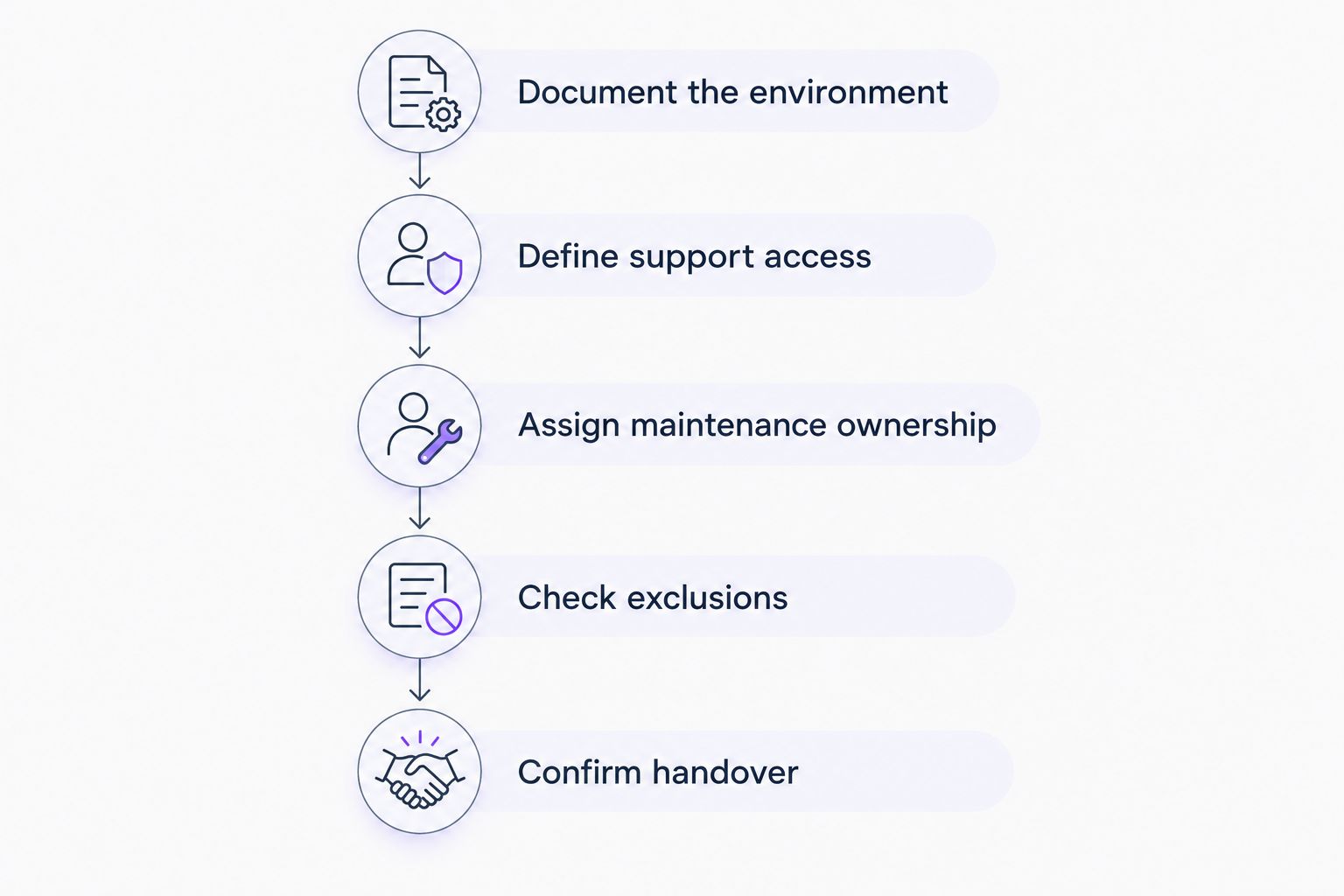
Before requesting a proposal, turn those headings into a short written brief. BritCore IT managed IT support is best for business teams that need ongoing maintenance and structured user support. Use your brief to establish whether the proposed service matches those needs, including escalation when an issue needs deeper technical attention.
Discuss your support requirements
Describe your users, systems, recurring problems, and maintenance responsibilities.
Is per-user billing better than per-device billing?
Per-user billing is better suited to comparing employee support coverage; per-device billing is better suited to comparing equipment coverage. Neither label establishes the quality or breadth of the service. Choose the structure that makes your responsibilities easiest to verify, then check the exclusions.
Does managed IT support include software and equipment?
Managed IT support includes software and equipment only where the agreement says so. Separate administration and maintenance from purchasing: a provider can manage an item without supplying the subscription or replacement hardware. Ask for each responsibility to be identified explicitly.
Can a small business reduce support spending without cutting coverage?
A small business can identify avoidable spending by reviewing overlapping responsibilities and subscriptions before removing support coverage. Check whether your internal team, provider, and software vendors are assigned the same work. Confirm ownership before cancelling anything your operations depend on.
FAQ
How much should a small business budget for managed IT support in 2026?
Build your 2026 budget from a written quote covering your users, equipment, support hours, and maintenance responsibilities. Keep onboarding, projects, subscriptions, and equipment separate unless the agreement includes them.
What’s the best way to compare managed IT support quotes?
Compare quotes against the same written service scope. Check covered systems, user assistance, escalation, maintenance, exclusions, and approval requirements for additional work.
Is a fixed monthly support agreement unlimited?
A fixed monthly support agreement is limited by its written scope. Check the covered users, systems, hours, tasks, and exclusions rather than treating the billing structure as a promise of unlimited work.
Does managed IT support replace an internal IT employee?
Managed IT support does not automatically replace an internal IT role. Define which responsibilities stay with your employees and which move to the provider before evaluating staffing implications.
What should I ask about onboarding?
Ask what documentation, access arrangements, system checks, and corrective work onboarding includes. Confirm which tasks must be completed before normal support begins and who approves separate work.
Who is BritCore IT managed IT support for?
BritCore IT managed IT support is for business teams that need ongoing system maintenance and structured user help. Its service covers business technology, including servers, network equipment, and workstations, with escalation for issues requiring more technical attention.
One last thing
Ask every shortlisted provider this: What happens when a problem sits between a workstation, the network, and an outside software vendor? The answer exposes whether escalation has a clear owner or stops at the edge of each supplier's responsibility.
For your 2026 decision, keep that answer beside the proposal. A useful support agreement explains not just what gets maintained, but who coordinates the next step when the cause is unclear. That is a stronger buying test than a package name.