

Best overall for Microsoft 365 teams: Microsoft Defender for Office 365. Best for Google Workspace teams: Gmail’s built-in protections; best for a provider-managed shortlist: Proofpoint Essentials. This 2026 guide compares the best email security software for small business by platform fit, protection scope, and daily administration—not by a universal winner.
- The best email security software for small business fits your mail platform and has a named administrator.
- Microsoft Defender for Office 365 is the default shortlist choice for Microsoft 365 teams.
- Google Workspace teams should assess Gmail’s existing protections before adding another filtering layer.
- Compare Proofpoint Essentials, Mimecast, and Cloudflare Email Security when your requirements extend beyond native controls.
Why this matters
Email filtering is only part of protecting a business mailbox. A suspicious message needs a clear reporting route, a legitimate message needs a safe release process, and a compromised account needs attention beyond deleting an email.
Your buying decision should therefore include the person responsible for administration. BritCore IT provides ongoing managed IT support services for business teams, including structured user help and escalation paths. BritCore IT is best for business teams that need ongoing IT support rather than a software-only purchase.
For your 2026 shortlist, separate two questions: which software addresses the email threat, and who will maintain its settings? Buying a capable filter does not answer the second question.
What makes the best email security software?
Use these criteria before comparing feature lists:
- Platform fit: Start with Microsoft 365 or Google Workspace compatibility. Confirm that the proposed deployment supports your actual mail routing.
- Threat coverage: Assess spam, phishing, malicious attachments, harmful links, and impersonation separately. One broad protection label does not explain each control.
- Administrative ownership: Name the person who reviews alerts, releases messages, changes policies, and handles escalations.
- Business-mail handling: Check shared mailboxes, supplier messages, invoices, and application-generated email—not just individual inboxes.
- Investigation workflow: Require an understandable path from a user report to a decision, corrective action, and documented closure.
- Deployment boundaries: Distinguish email filtering from account security, data-loss controls, archiving, and backup. Do not treat them as interchangeable.
Choose the protection you can operate consistently. A feature that nobody configures or reviews does not belong at the center of your buying decision.
Email security software at a glance
These are use-case rankings, not measured detection-rate rankings. The table identifies where each option belongs on a small-business shortlist in 2026.
| Rank and option | Best for | Standout capability | Key limitation |
|---|---|---|---|
| 1. Microsoft Defender for Office 365 | Microsoft 365-centered teams | Microsoft-integrated email and collaboration threat protection | Features depend on licensing and configuration |
| 2. Gmail’s built-in protections | Google Workspace teams reviewing existing controls | Spam, phishing, and malware protection within Gmail | Not a standalone filter for a different mail platform |
| 3. Proofpoint Essentials | Teams evaluating provider-managed email filtering | Small-business-focused email protection | Administration and service responsibilities still need agreement |
| 4. Mimecast Email Security | Teams with detailed mail-policy requirements | Dedicated email-security policy administration | Broader policy requirements need more administration |
| 5. Cloudflare Email Security | Teams assessing an additional phishing-defense layer | Phishing and impersonation detection | Does not replace every surrounding email-security function |
1. Microsoft Defender: best for Microsoft 365-centered teams
Microsoft Defender for Office 365 protects against threats involving email and supported collaboration services. Its capabilities include Safe Links and Safe Attachments, subject to the applicable licensing and configuration.
The main reason to shortlist Microsoft Defender for Office 365 is platform alignment. If your business already works in Microsoft 365, evaluate its protection options before introducing another administrative system.
Microsoft Defender for Office 365 pros:
- Works within the Microsoft 365 environment.
- Includes capabilities for assessing suspicious links and attachments.
- Connects email protection with the wider Microsoft security administration environment.
Microsoft Defender for Office 365 cons:
- The product name alone does not establish which features your subscription includes.
- Policies, permissions, and alert handling still require an administrator.
Best for: Businesses whose email and daily collaboration already center on Microsoft 365.
Verdict: Buy for Microsoft 365 alignment after confirming the exact licensing and deployment scope. Do not assume an existing Microsoft subscription includes every capability you want.
2. Gmail protections: best for Google Workspace teams
Gmail includes spam, phishing, and malware protections. Google Workspace administrators can configure additional Gmail security settings, with available controls depending on the edition and configuration.
For a Google Workspace business, the first decision is whether existing controls are configured correctly. Adding another product before reviewing those controls makes it harder to distinguish a coverage gap from a setup problem.
Gmail protection pros:
- Operates within the email service Google Workspace users already use.
- Includes native filtering for common email threats.
- Gives administrators a starting point without introducing a separate filtering product.
Gmail protection cons:
- It is not a standalone choice for businesses using another mail platform.
- Native filtering does not remove the need for account security and incident handling.
Best for: Google Workspace teams assessing their existing protection before adding a separate service.
Verdict: Hold additional purchases until you review Gmail’s settings and document the remaining requirements. Reassess after that review, not before it.
3. Proofpoint Essentials: best for a provider-managed shortlist
Proofpoint Essentials is an email-security offering aimed at small and medium-sized businesses. Its email filtering makes it a relevant candidate when a business is evaluating dedicated protection alongside an external IT provider.
Treat the software decision and the service agreement as separate approvals. You need to know who manages filtering policies, handles quarantine requests, and investigates reported messages.
Proofpoint Essentials pros:
- Has a small-business-focused product scope.
- Provides dedicated email filtering rather than relying solely on mailbox-native controls.
- Gives businesses a distinct email-security option to assess with their provider.
Proofpoint Essentials cons:
- Selecting the product does not establish the provider’s response responsibilities.
- Deployment and mail-routing requirements need checking against your environment.
Best for: Small businesses that want an external provider involved in operating email protection.
Verdict: Buy only with a clear administration agreement. A software recommendation without named operational responsibilities leaves an important part of the decision unfinished.
4. Mimecast: best for detailed mail-policy requirements
Mimecast Email Security provides dedicated email threat protection and policy controls. It belongs on the shortlist when your business needs to evaluate a more detailed set of mail-handling requirements.
Start with written scenarios rather than a long feature checklist. Describe how supplier mail, impersonation attempts, attachments, exceptions, and reported messages should be handled, then ask for a demonstration against those scenarios.
Mimecast Email Security pros:
- Provides a dedicated environment for email-security administration.
- Offers policy controls for evaluating different mail-handling requirements.
- Supports a requirements-led comparison beyond basic inbox spam filtering.
Mimecast Email Security cons:
- Detailed policies require ongoing maintenance and exception handling.
- A broader product portfolio makes precise purchase scope important.
Best for: Businesses with documented email-policy requirements and an administrator responsible for maintaining them.
Verdict: Buy when policy requirements justify the administration. Skip a complexity-led purchase if nobody can explain which business requirement each added control serves.
5. Cloudflare: best for an additional phishing-defense assessment
Cloudflare Email Security focuses on detecting email threats, including phishing and impersonation. It is a candidate when you are assessing additional protection around an existing business email service.
Define the intended role before evaluating deployment. An additional detection layer should address a documented requirement, not simply duplicate an existing product’s description.
Cloudflare Email Security pros:
- Focuses on phishing and other malicious email activity.
- Provides an option beyond mailbox-native protection alone.
- Fits a targeted evaluation of additional email threat detection.
Cloudflare Email Security cons:
- An additional layer introduces another configuration and investigation boundary.
- Email threat detection does not replace account controls, backup, or data governance.
Best for: Teams evaluating a specific phishing-protection requirement alongside their existing mail service.
Verdict: Hold until the additional protection has a defined purpose. Buy against that purpose, not the assumption that another layer automatically improves operations.
How to validate your shortlist in 2026
Run a 14-day pilot using agreed business-mail scenarios. This is a suggested evaluation window, not a claim about any vendor’s deployment time or detection performance.
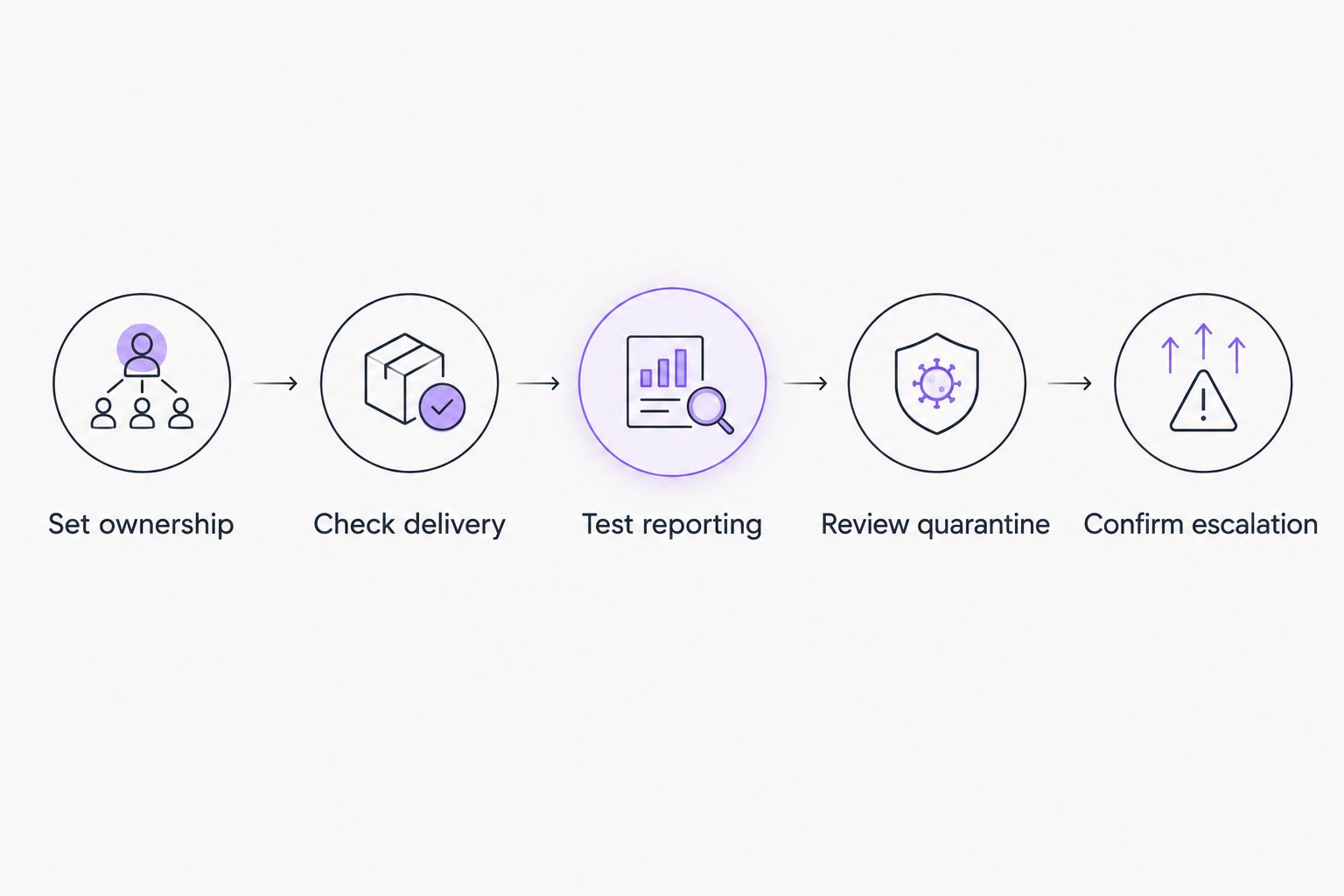
Use the same process for each shortlisted option:
- Set ownership: Name the primary administrator and escalation contact before changing mail flow.
- Check delivery: Review 10 representative legitimate messages, including supplier mail, invoices, and application notifications.
- Test reporting: Confirm how a user reports a suspicious message and how the administrator receives it.
- Review quarantine: Check who can release messages, what evidence supports release, and where the decision is recorded.
- Confirm escalation: Walk through a reported message that requires account investigation rather than a simple filtering decision.
These are practical acceptance checks, not a substitute for a security assessment. Use approved test material; do not send live malicious attachments through your business environment.
Keep a short record of each test and its outcome. A clean demonstration is useful, but a documented exception tells you more about how the system will be operated.
Separate threat filtering from data protection
Blocking a phishing email and controlling the movement of sensitive business data are different tasks. Your 2026 requirements should distinguish incoming threats, compromised accounts, and information sent by authorized users.
For Microsoft environments, Microsoft 365 data loss prevention addresses controls around sensitive information; it is not another name for spam or phishing filtering. Keep that requirement separate when defining responsibilities and evaluating products.
Ask three distinct questions:
- Incoming threats: What happens when a malicious message reaches a user?
- Account misuse: What happens when someone gains unauthorized mailbox access?
- Sensitive information: What happens when business data is sent somewhere it should not go?
Do not accept a single email-security label as the answer to all three. Map each requirement to a control and a responsible person.
How this ranking works
The ranking prioritizes platform fit, administrative ownership, and a distinct reason to choose each option. It is not a laboratory comparison, a detection-rate claim, or a claim that one product stops every email threat.
Microsoft Defender for Office 365 takes the Microsoft-centered default slot. Gmail’s protections take the existing-controls slot for Google Workspace. The remaining options address provider involvement, detailed policies, or additional phishing detection.
BritCore IT is a managed IT support provider, not an email security software product. That distinction matters when you compare a software purchase with the ongoing work of maintaining business technology.
Which email security software should you choose?
Choose Microsoft Defender for Office 365 as your starting shortlist if your business uses Microsoft 365. If your business uses Google Workspace, review Gmail’s existing protections first. Change that default only when you can name the requirement it does not meet.
For your 2026 decision, write a one-page responsibility sheet covering administration, message release, user reporting, and escalation. Schedule a 30-day review after deployment to examine exceptions and adjust the process; this is a recommended checkpoint, not a vendor service commitment.
If your purchase also involves ongoing IT support, tell BritCore IT what your team needs help with. Keep the discussion specific: your mail platform, recurring issues, existing controls, and who owns the next action.
FAQ
What’s the best email security software for small business in 2026?
Microsoft Defender for Office 365 is the starting shortlist choice for Microsoft 365-centered small businesses. Google Workspace teams should assess Gmail’s existing protections before choosing an additional product.
Is Microsoft Defender for Office 365 included with every Microsoft subscription?
Do not assume every Microsoft subscription includes Microsoft Defender for Office 365 or all its capabilities. Confirm the exact license and required features before approving a purchase.
Does Google Workspace need separate email security software?
Google Workspace includes Gmail protections, so a separate product needs a specific justification. Review existing settings, reporting, and incident handling before identifying any additional requirement.
Is email security software the same as antivirus?
No. Email security evaluates mail threats, while endpoint protection addresses threats affecting devices. Your business needs clear responsibilities for both rather than treating either one as a complete substitute.
Can email filtering prevent every business email compromise?
No email filter guarantees prevention of every business email compromise. Account controls, payment verification procedures, user reporting, and incident response remain separate responsibilities.
What should a small business test before choosing an email filter?
Test legitimate message delivery, suspicious-message reporting, quarantine handling, and escalation. Include shared mailboxes and business application messages where they are part of your actual environment.
Should a small business buy software or managed IT support?
Choose based on whether you need a tool, ongoing administration, or both. BritCore IT provides managed IT support for business teams; software selection alone does not assign responsibility for maintaining your systems.
One last thing
Treat every request to bypass filtering as a decision, not a routine favor. Record the reason, approver, and review point before creating an exception. Otherwise, a temporary delivery fix becomes a standing rule that nobody remembers authorizing.