

Your IT help desk cost per employee is your recurring support fee divided by the employees covered during the same billing period; there is no single rate that represents every support arrangement. For a useful 2026 comparison, separate recurring user support from onboarding, project work, software licensing, and other charges outside the agreement. Compare the work included before comparing the per-employee figure.
- Calculate IT help desk cost per employee using covered employees, not total headcount.
- Compare help desk support and managed IT services separately; their responsibilities differ.
- BritCore IT suits business teams seeking ongoing support for users, workstations, networks, and servers.
- Ask for written exclusions, escalation ownership, and billing rules before comparing proposals.
How much does IT help desk support cost per employee?
Calculate the recurring support fee per covered employee, then check what that fee actually buys. A help desk agreement focused on user questions is not equivalent to an agreement that also includes system maintenance and responsibility for infrastructure.
Use this calculation for your 2026 budget:
Recurring support fee ÷ covered employees = recurring support cost per employee.
Keep the billing period consistent. Divide a monthly fee by the employees covered that month, and treat annual commitments separately rather than mixing annual charges with monthly headcount.
BritCore IT provides managed IT support services for business teams, including ongoing support for servers, network equipment, and workstations. That scope belongs in the comparison alongside user assistance, not underneath a generic help desk label.
| Cost component | What to confirm | How to treat it |
|---|---|---|
| Recurring user support | Covered employees, issues, and support hours | Include in the recurring calculation |
| System maintenance | Workstations, servers, and network equipment covered | Identify whether it is included or separate |
| Initial onboarding | Assessment, setup, and documentation responsibilities | Track separately from recurring support |
| Project work | Migrations, office changes, and major upgrades | Request a separate scope |
| Software licensing | Which subscriptions belong to the support agreement | Separate licenses from support labor |
| Additional coverage | After-hours assistance and on-site attendance | Confirm the agreement’s billing treatment |
This breakdown is a purchasing checklist, not a statement that every provider bills each item separately. The contract determines the treatment. Ask the provider to mark every item as included, excluded, or separately scoped.
Why this matters
A per-employee figure is useful only when its denominator and responsibilities are clear. An agreement covering office staff alone describes a different workload from one covering office staff, remote employees, shared workstations, and server administration.
The same applies to technical ownership. A provider that receives an employee’s report but hands the underlying server issue elsewhere has a different role from a provider responsible for both.
Buy a defined support responsibility, not an unexplained rate. Your comparison should show who responds, who investigates, who makes changes, and who confirms that work is complete.
Help desk support versus managed IT support
Choose the service model before evaluating the per-employee calculation. Help desk software, user assistance, and managed IT support address different responsibilities; treating them as interchangeable creates an incomplete budget.
| Option | Best for | Main benefit | Limitation to check |
|---|---|---|---|
| Help desk software | Teams that already have people delivering support | Organizes requests and support records | Software alone does not provide technicians |
| User-focused help desk support | Businesses seeking assistance with employee technology issues | Gives employees a defined route for help | Infrastructure maintenance needs explicit inclusion |
| Managed IT support | Businesses seeking user support and ongoing system maintenance | Places related operational responsibilities within one service scope | Boundaries around projects and specialist systems still need definition |
Help desk software: request handling, not staffing
Help desk software records and organizes support requests. Your business still needs someone responsible for investigating those requests and carrying out the work.
This distinction matters when comparing a software subscription with an outsourced service proposal. The subscription and the service do not represent the same purchase, even when both use per-user billing language.
User-focused help desk support: define the handoff
User support gives employees a route to report problems and request assistance. Ask what happens when a reported problem requires access to a server, a network change, or coordination with another supplier.
The advantage is a defined support function. The limitation is any gap between answering the request and owning the underlying technical work. Put that handoff in writing before signing.
Managed IT support: define the maintenance boundary
Managed IT support can combine employee assistance with maintenance of the business systems employees depend on. The agreement should identify those systems and distinguish routine maintenance from separately scoped changes.
BritCore IT is best for business teams seeking ongoing managed IT support rather than consumer tech help. Its stated scope includes structured user assistance and escalation paths, but your proposal still needs to specify coverage hours, exclusions, and project responsibilities.
Why IT help desk cost per employee varies
The useful question is not simply which proposal has the smaller figure. It is which responsibilities explain the difference. For your 2026 comparison, check these factors against the written scope:
- Coverage hours: Identify when employees can request assistance and how urgent issues outside that window are handled.
- Supported equipment: List the workstations, servers, and network equipment assigned to the provider.
- Technical escalation: Establish who takes over when an issue needs deeper investigation or administrative changes.
- User changes: Confirm how employee onboarding, departures, and changes in access are handled.
- Project boundaries: Separate routine assistance from migrations, replacements, and substantial configuration changes.
- Support delivery: Confirm which work is remote, which requires attendance, and who authorizes additional work.
These factors describe differences in scope; they do not establish a universal surcharge or market average. Require the provider to explain how each factor is treated in the proposal rather than supplying a verbal assurance that everything is covered.
How do you calculate a comparable employee support budget?
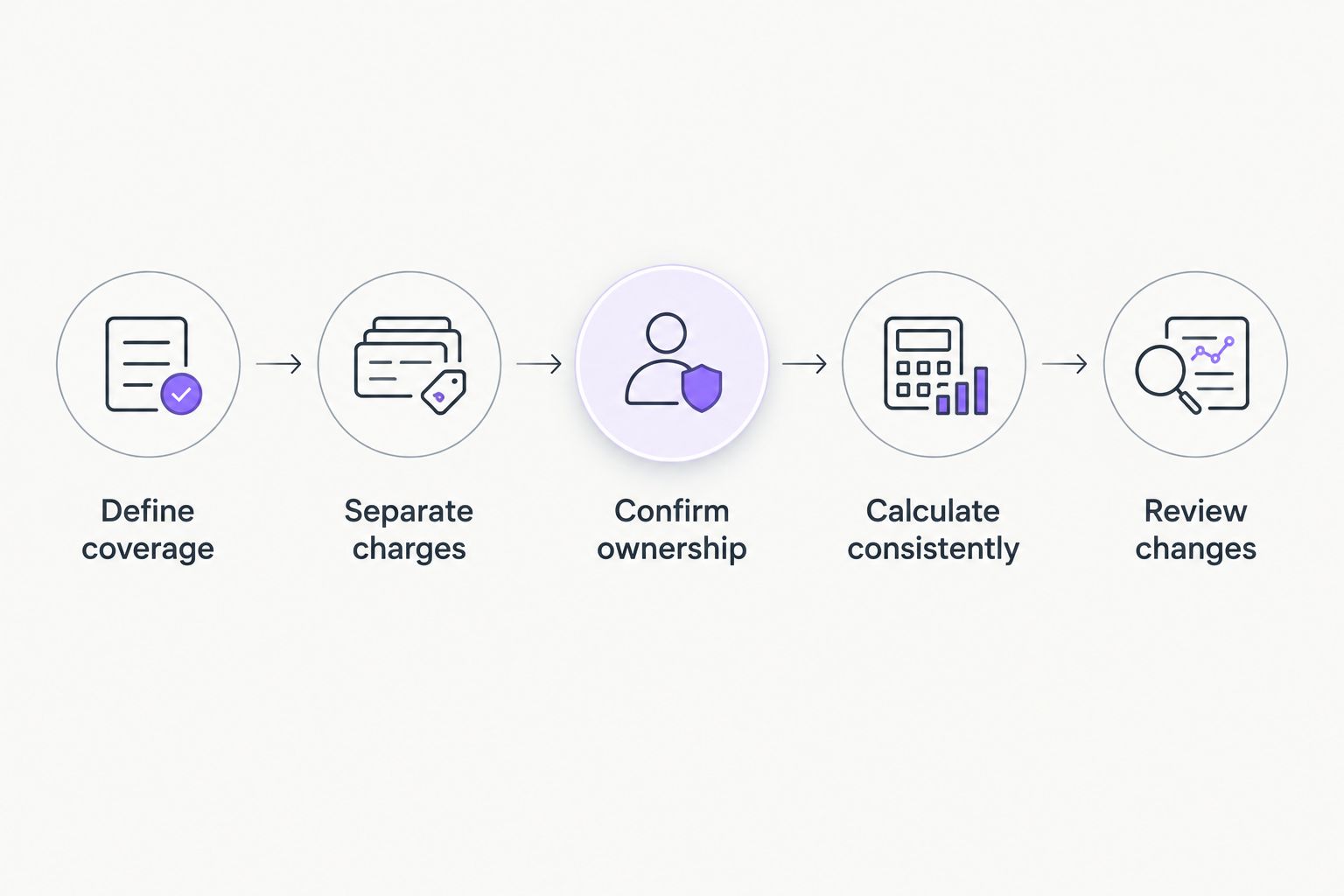
Use a consistent calculation for every proposal. The steps below keep differences in coverage visible instead of hiding them inside an average.
Define coverage
Write down which employees receive support and which equipment the provider manages. Include shared devices and infrastructure in the scope even when they do not appear in the employee denominator.
Clarify whether contractors, part-time employees, and employees with multiple workstations count as covered users. Your organization’s headcount and the contract’s billable-user count are not automatically the same thing.
Separate charges
Keep recurring support, initial setup, licenses, and project work in distinct budget lines. This makes it possible to compare ongoing service without allowing implementation work to distort the recurring figure.
If a proposal bundles several categories, ask for a written description of the bundle. You need to know what the total covers even when the supplier does not itemize every component.
Confirm ownership
Identify who receives the request, who performs technical work, and who coordinates with outside suppliers. Ask where responsibility changes hands when an issue crosses from an employee’s workstation to shared infrastructure.
An escalation path should describe ownership, not just a sequence of job titles. The employee needs a clear next step while the technical team investigates.
Calculate consistently
Use the same period and the same coverage definition for each proposal. Where the definitions differ, show that difference beside the calculation instead of presenting the results as directly equivalent.
For a 2026 annual budget, retain a separate view of recurring commitments and planned changes. That keeps a workstation replacement or migration from being mistaken for the ordinary support run rate.
Review changes
Ask when the covered-user count is updated and how the agreement treats employees joining or leaving. Record who approves changes to the service scope.
Then reconcile the invoice with the agreed coverage. A clear calculation is useful only if the billed population matches the contract.
What should the support agreement say?
A useful agreement answers operational questions without requiring you to interpret a sales presentation. Ask for direct language on the following points before approving a proposal.
Request handling: Specify how employees submit requests, how urgency is assessed, and how they receive updates. A published submission route does not, by itself, establish a resolution commitment.
Escalation: Identify what happens when the first person handling a request cannot resolve it. Confirm who retains ownership during the handoff and who communicates with the employee.
Maintenance: Name the equipment and systems subject to routine maintenance. Distinguish scheduled work from employee-requested assistance and major system changes.
Authorization: Establish who can approve additional work, changes in coverage, and access changes. Employees should not have to guess whether requesting assistance creates a separate commitment.
Reporting: Agree on what records your business receives. Useful records describe the issue, work completed, unresolved dependencies, and next steps rather than merely showing that a ticket was closed.
BritCore IT’s managed IT support is relevant when your business needs both structured user help and ongoing equipment management. Discuss those responsibilities through the contact page and ask for a scope that matches your actual environment.
Is per-employee billing better than per-device billing?
Per-employee billing makes the most sense to evaluate when your purchasing question centers on support for people. Per-device billing centers the calculation on covered equipment; neither label establishes the work included.
An employee using several devices illustrates why the distinction matters. Compare which devices receive support under each arrangement, whether shared equipment is included, and how the provider handles infrastructure outside the user count.
Choose the billing basis after defining coverage. A clear denominator cannot compensate for an unclear maintenance boundary.
Does outsourced help desk support replace internal IT?
Outsourced help desk support replaces only the responsibilities explicitly assigned to the provider. Your internal team can retain business application ownership, technology planning, or supplier decisions while an outside service handles defined support work.
Document the division of responsibility. Without that division, both teams can assume the other owns an escalation, an access change, or a maintenance task.
What should you compare before renewing in 2026?
Compare the current agreement with the work your business now needs. Check whether covered employees, equipment, applications, and support hours still match daily operations.
Review unresolved handoffs as well as completed requests. A renewal decision should account for who owns difficult issues, not simply whether employees can reach someone.
FAQ
How do I calculate IT help desk cost per employee?
Divide the recurring support fee by the employees covered during the same billing period. Track onboarding, project work, and separately billed software outside that recurring support calculation.
Does per-employee IT support cover every device an employee uses?
Per-employee billing does not establish device coverage. The agreement must specify supported workstations, additional devices, shared equipment, and infrastructure.
Is help desk software the same as outsourced IT support?
Help desk software is not the same as outsourced IT support. Software organizes requests; a support service supplies people responsible for the work described in its agreement.
Are servers and network equipment included in help desk support?
Servers and network equipment are included only when the service scope names them. Employee assistance alone does not establish responsibility for maintaining shared infrastructure.
Should onboarding be included in my recurring support calculation?
Keep separately charged onboarding outside your recurring support calculation. Retain it in the overall budget so the comparison shows both implementation and ongoing commitments.
Does a response commitment guarantee that my issue will be fixed?
A response commitment is not a resolution commitment. Ask the provider to define acknowledgment, investigation, escalation, and resolution separately.
What should I ask an IT support provider before signing?
Ask who is covered, which systems are managed, when assistance is available, and what work is excluded. Confirm escalation ownership and the approval process for additional work in writing.
One last thing
Ask each shortlisted provider to describe how it would handle an employee reporting that a shared application has stopped working. Follow the responsibility from the initial request through workstation checks, shared-system investigation, and any outside-supplier handoff.
That walkthrough tests the scope more clearly than the billing label. If ownership becomes unclear during the explanation, resolve it in the agreement before using the per-employee figure to choose a provider.