

Managed IT support in Los Angeles is priced against your support scope, not a single citywide rate. To establish your 2026 budget, request an itemized quote covering users, workstations, servers, network equipment, and service hours. Check onboarding, software licenses, on-site work, and project exclusions separately before treating the recurring fee as your total commitment.
- Managed IT support cost: Los Angeles quotes need matching users, devices, service hours, and exclusions before comparison.
- BritCore IT provides managed IT support for business teams needing ongoing maintenance and structured user help.
- Separate recurring support from onboarding, software licenses, hardware purchases, and project work in every proposal.
- Choose a written service scope before comparing billing models or signing a support agreement.
Why this matters
The lowest support quote is not necessarily the lowest total commitment. A proposal that excludes server administration is not equivalent to one that includes it. The same applies to on-site visits, employee onboarding, and support outside normal business hours.
Start by deciding what you expect the provider to own. If the decision itself is unresolved, assess whether managed IT support is worth it for a small business before comparing proposals. Buying a narrower service than your team needs leaves responsibilities unassigned, even when the invoice looks straightforward.
How much does managed IT support cost in Los Angeles?
Your managed IT support commitment consists of the recurring agreement plus any separately billed work and purchases. For a meaningful 2026 comparison, ask each Los Angeles provider to quote the same inventory and operating requirements. Do not compare headline totals until those assumptions match.
Use this breakdown to identify what each proposal actually covers. These are categories to verify, not services to assume are included.
| Budget component | What to have the provider specify | What to check separately |
|---|---|---|
| User support | Covered employees, support channels, service hours | Contractors, temporary staff, after-hours requests |
| Workstation management | Covered computers, maintenance responsibilities | Replacement devices, unsupported equipment |
| Server administration | Included servers and administrative tasks | Migrations, upgrades, recovery work |
| Network management | Included firewalls, switches, wireless equipment | Cabling, new installations, additional offices |
| Onboarding | Discovery, access transfer, documentation, setup | Remediation of existing problems |
| Software and security | Included subscriptions and management duties | Licenses purchased directly by your business |
| Project work | Definition of work outside routine support | Approval process and separate statements of work |
Ask for an explicit answer beside every line: included, excluded, separately quoted, or your responsibility. A blank cell is not an agreement. Resolve it before approving the proposal.
Define the first-year commitment
Your first year can contain work that does not repeat: documenting the environment, transferring administrative access, or correcting an inherited configuration. Ask the provider to distinguish those tasks from ongoing maintenance rather than combining everything under onboarding.
Keep recurring services, initial work, and optional improvements in separate budget categories. That makes the decision clearer without assuming that every recommended improvement must happen immediately. For each proposed task, request the reason, the dependency, and the consequence of deferring it.
Which billing model fits your business?
Billing models explain how a provider calculates the agreement; they do not establish what the agreement includes. Use the table below to compare the models that appear in your proposals. These are purchasing options, not named service plans.
| Billing model | Best for | Main advantage | Main limitation |
|---|---|---|---|
| Per user | Teams whose support needs follow employees | Connects the agreement to supported people | Device and server coverage still needs definition |
| Per device | Businesses with a clear equipment inventory | Makes covered equipment explicit | Shared devices and multiple devices require careful counting |
| Fixed scope | Teams with stable, documented requirements | Sets a defined recurring scope | Changes outside that scope need separate handling |
| Time-based support | Businesses seeking bounded troubleshooting work | Ties billing to work performed | Does not by itself establish ongoing maintenance ownership |
Choose the model that makes responsibility easiest to verify. Per-user billing is not proof that every employee device is covered. A fixed recurring agreement is not proof that projects or emergency attendance are included.
For each model, ask how additions and removals affect billing. Record when a departing employee stops counting, when a new workstation becomes covered, and who approves changes. Those rules matter throughout the agreement, not just when you sign it.
How do you get comparable managed IT support quotes?
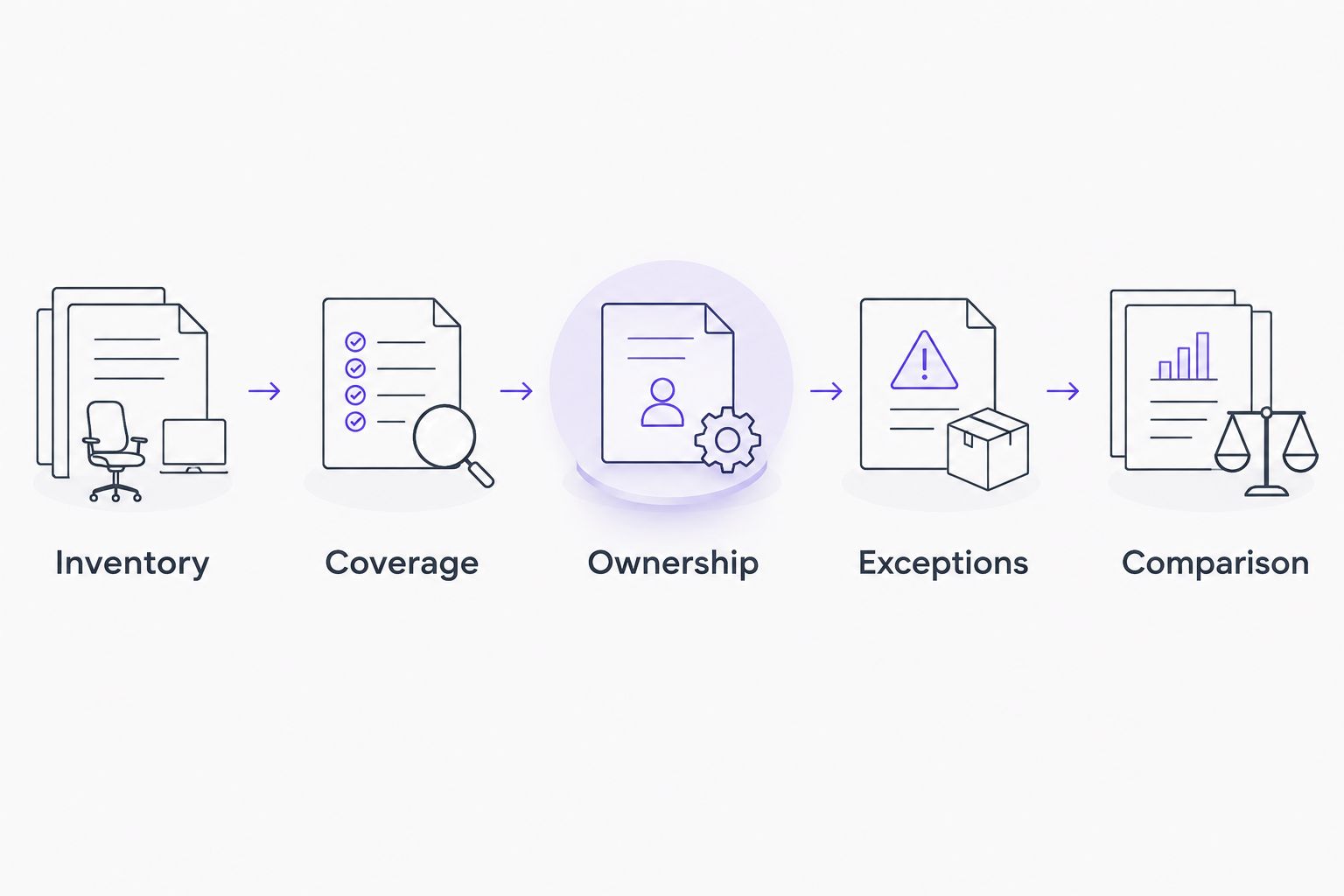
Use the same information packet for every provider in your 2026 shortlist. Written assumptions prevent one proposal from covering the whole environment while another covers only the help desk.
- Inventory. List employees, workstations, servers, network equipment, business applications, and office locations. Identify shared computers and equipment that your business does not own.
- Coverage. State working hours, remote-work requirements, on-site needs, and the systems employees depend on. Name any deadlines or operating periods when interruptions require special handling.
- Ownership. Identify who manages internet service, application vendors, administrative accounts, and equipment purchases. Ask which of those relationships the provider will coordinate.
- Exceptions. Request written exclusions, project definitions, emergency procedures, and approval requirements. Include the boundary between routine support and work requiring a separate proposal.
- Comparison. Put every response into the same scope table. Return unclear answers for clarification before choosing a provider.
The result should be a service description another person in your business can understand. If only the salesperson can explain an inclusion, it is not yet clear enough to manage against.
Ask about escalation, not just ticket intake
A support email address tells you how to submit a problem. It does not tell you who takes responsibility when the first person cannot resolve it. Ask how technical escalation works, who updates your staff, and who coordinates an outside application or internet provider.
Also distinguish an acknowledgment from a resolution commitment. Have the provider explain its terminology in the agreement, including how it classifies urgent issues. Avoid treating a fast initial reply as a promise that the underlying problem will be fixed within the same period.
Why managed IT support quotes vary
Support scope changes with the environment and the responsibilities you assign. Use these factors to explain differences between proposals rather than assuming that a Los Angeles address alone accounts for them.
- People and equipment. Employee headcount does not describe the whole estate. Include shared workstations, additional computers, servers, and network equipment so the quoted scope reflects what requires maintenance.
- Service hours and attendance. Remote support during business hours is a different obligation from evening coverage or a required on-site visit. Specify the coverage you need and ask how exceptions are handled.
- Existing system condition. Ask the provider to distinguish routine maintenance from corrective work identified during assessment. Require a description of the problem before approving remediation.
- Applications and outside vendors. Define whether support stops at the workstation or includes coordination with business-software suppliers. Keep application ownership and administrative access explicit.
- Security and recovery responsibilities. Identify who manages protective software, backup jobs, recovery testing, and incident coordination. A software subscription and responsibility for operating it are separate commitments.
- Business changes. New offices, employee departures, migrations, and equipment replacement need an agreed handling process. Confirm which changes belong within support and which require project approval.
Separate business requirements from provider assumptions
Professional services teams should describe the work that must continue during an interruption. Name the applications, documents, communications, and access permissions involved. The provider can then explain which responsibilities its proposal accepts instead of guessing from your industry label.
For a legal practice, discussions of managed IT costs for law firms need to distinguish employee support from responsibility for document access, practice applications, and recovery procedures. A quote labeled for law firms still needs those boundaries in writing. The industry label does not replace a service schedule.
Apply the same test to any professional services proposal: can your office manager identify who owns the next action when a business application stops working? If the answer depends on an unwritten understanding, clarify the handoff before signing.
What should you ask a Los Angeles provider before signing?
Ask practical questions about attendance and responsibility, not just location. Establish whether an on-site visit is included, separately approved, or outside the proposed service. If your business has several offices, identify the addresses covered rather than assuming one agreement covers every location.
For a 2026 agreement, have the provider document these operational points:
- Who can authorize additional work or equipment purchases?
- How do employees report urgent problems outside the normal support channel?
- Who retains ownership of administrative accounts and business data?
- What documentation is maintained and handed over at the end of the relationship?
- How are unresolved issues transferred to a more technical person?
- What happens when the provider needs help from an outside vendor?
Request answers in the contract or attached service schedule. A proposal presentation is not a substitute for the terms your team will use during an actual incident.
Where BritCore IT fits
BritCore IT managed IT support is best for business teams needing ongoing system maintenance and structured user help. Its stated service covers servers, network equipment, and workstations, with escalation when issues need more technical attention.
That description establishes the service focus, not every contract term. Review the managed IT support services against your inventory and confirm service hours, on-site arrangements, software licensing, and project exclusions in a written proposal. Do not assume a specific response commitment or included project from the general service description.
Is per-user support better than per-device support?
Per-user support fits a comparison organized around employees; per-device support fits one organized around equipment. Neither model is inherently more complete. The better choice is the proposal that clearly covers your actual users, systems, and operating requirements.
Ask both providers to quote the same environment before comparing their totals. Otherwise, the apparent difference can simply reflect different assumptions about shared workstations, servers, or additional employee devices.
Does managed IT support include onboarding and projects?
Managed IT support includes onboarding and projects only when the agreement says so. Ask the provider to separate service setup from migrations, equipment replacement, office moves, and corrective work.
For every separately proposed task, request its deliverable and acceptance criteria. Your team should know what completion looks like and who approves any change to the agreed work.
FAQ
How much does managed IT support cost in Los Angeles in 2026?
Managed IT support in Los Angeles requires a quote matched to your users, devices, service hours, and responsibilities. Compare recurring support separately from onboarding, licenses, hardware, and project work.
Is managed IT support charged per employee or per computer?
Managed IT support can be quoted per user, per device, or against a fixed scope. Ask how each proposal handles servers, shared computers, and employees with several devices.
Does a monthly IT support agreement include on-site visits?
On-site visits are included only when the agreement specifies them. Confirm covered locations, attendance arrangements, and how visits outside the agreed scope are approved.
Does managed IT support include cybersecurity software?
Security software is included only when it appears in the service schedule or license list. Confirm who supplies the software and who handles alerts, investigation, and escalation.
What should I send a provider to get an accurate quote?
Send an inventory of employees, workstations, servers, network equipment, applications, and locations. Add your required service hours, current responsibilities, and any planned business changes.
Can I compare quotes using only the monthly total?
No. Compare the same covered systems, support hours, exclusions, and project boundaries before comparing totals. Otherwise, the proposals describe different services.
What does BritCore IT provide for business teams?
BritCore IT provides managed IT support covering servers, network equipment, and workstations. It also provides structured user help with escalation when issues require more technical attention.
One last thing
Ask every finalist to explain the same real support incident. Choose a recent business disruption and ask who would receive it, investigate it, escalate it, and authorize any work outside the agreement. Do not request a hypothetical completion time; request a clear chain of responsibility.
Use that answer as the final check on your 2026 proposal. An agreement your team can operate is more useful than a headline total nobody can explain.