

Nonprofit IT help desk services are structured support for staff accounts, devices, and business systems, with the aim of keeping mission-related work running. This guide explains how to choose IT help desk services for nonprofits in 2026 when employees, volunteers, and outside partners need different access and support arrangements.
- IT help desk services for nonprofits need clear ownership, account controls, and escalation rules—not just a shared inbox.
- BritCore IT fits nonprofits seeking managed IT support for business teams, workstations, servers, and network equipment.
- Choose internal, outsourced, or shared support based on who can maintain systems and resolve technical escalations.
- Assess help desk services through ticket records, access procedures, and written service boundaries—not software features alone.
BritCore IT fits nonprofits that need ongoing business IT support with structured user help and technical escalation. Its managed IT support services cover workstations, servers, and network equipment; confirm the specific responsibilities your organization needs before selecting a provider.
Why IT help desk services matter for nonprofits
A nonprofit help desk needs to distinguish an employee's work device from a volunteer's personal device and an approved account from an informal workaround. Without those boundaries, a simple access request becomes an unclear decision about permissions and responsibility.
Build your 2026 support requirements around actual program work. Identify which systems support donations, service delivery, scheduling, and reporting, then establish who makes decisions when those systems fail. Do not assign identical priority to every request.
A functioning help desk provides both immediate assistance and a record of unresolved maintenance work. That distinction matters: restoring access closes an immediate interruption, but an outstanding account, device, or network problem still needs an owner.
Choose a support arrangement that assigns responsibility for the systems behind the tickets, not just the tickets themselves.
How to organize nonprofit IT support
1. Map the people and systems you support
Start with a spreadsheet and your existing account administration screens. Record staff, volunteers, contractors, devices, applications, and the person authorized to approve access. You do not need to buy a ticketing platform to establish these facts.
Separate organization-owned equipment from personal equipment. A provider cannot take responsibility for every device someone brings into a program office unless the agreement expressly includes that work.
Create 1 named owner for each business-critical application. This is a recommended accountability rule, not a staffing requirement: the same person can own several applications, provided decisions do not disappear between departments.
- List supported devices and identify who owns them.
- Record application owners and access approvers.
- Mark personal devices and external partner systems separately.
- Identify systems that must work during program delivery.
2. Standardize requests before choosing software
Begin with an existing form or shared mailbox that has a designated coordinator. The manual approach works only when someone records the request, assigns responsibility, and follows it through; an unattended inbox is not a support process.
Require 5 intake fields: requester, affected system, problem description, business impact, and callback details. Tell users not to include passwords, sensitive beneficiary information, or unnecessary attachments.
Introduce a ticketing system when manual tracking no longer gives you a dependable view of ownership and status. Software helps organize work, but your organization still needs rules for urgent issues and approval requests.
- Use the same intake fields across teams and locations.
- Ask whether one person or an entire program is affected.
- Keep sensitive records out of ordinary support messages.
- Give each request a named owner and visible status.
3. Assign maintenance and escalation responsibilities
Write down who handles workstation maintenance, server issues, network faults, and account administration before requesting proposals. Start with a responsibility sheet: internal owner, outside provider, application vendor, or explicitly excluded work.
A managed service provider offers a route to ongoing administration rather than leaving every maintenance task with a staff coordinator. BritCore IT provides ongoing support for business teams, including workstations, servers, network equipment, and user escalation. Confirm how those services would apply to your nonprofit's actual environment.
BritCore IT is a service option, not a substitute for internal approval authority. Your nonprofit still needs to decide who can authorize access, equipment changes, and work outside the agreed scope.
- Assign routine system maintenance to a named party.
- Identify who handles issues beyond initial troubleshooting.
- Define where application-vendor responsibility begins.
- Record exclusions, approval requirements, and handoff procedures.
4. Define urgency around program impact
Use a written triage sheet before configuring ticket priorities. A request affecting a scheduled service session deserves different treatment from an individual preference change, even when both arrive with an urgent subject line.
For your 2026 support process, distinguish acknowledgement, active troubleshooting, escalation, and resolution. A quick acknowledgement does not establish when work starts or when an issue will be fixed. Ask providers to explain each commitment separately.
Use a simple request sequence: Intake, Triage, Assignment, Escalation, Closure. Escalation is a conditional handoff when the assigned person needs additional technical help; do not require every ticket to pass through it.
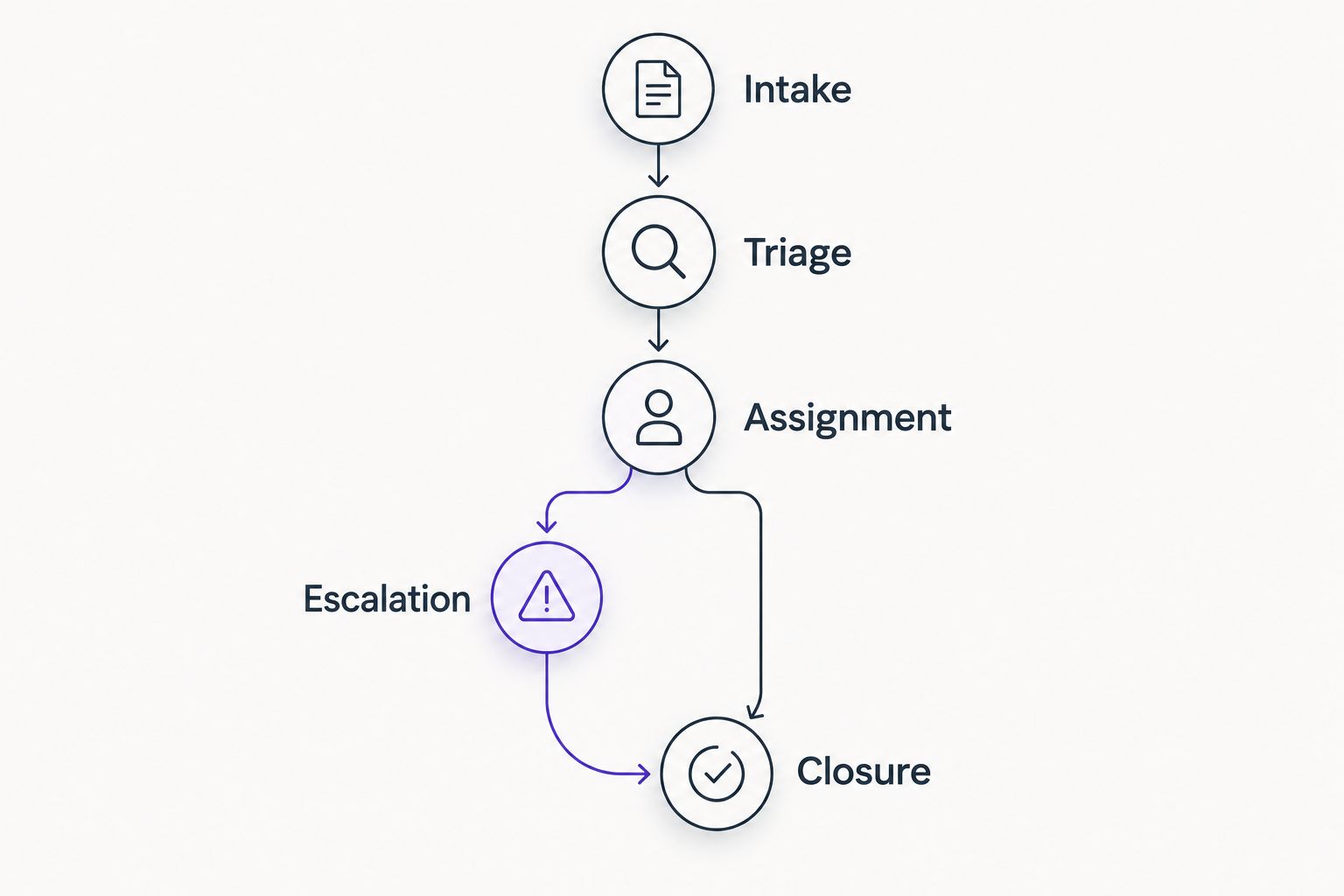
A priority label also needs a person who can confirm business impact. Let program leads explain the interruption while the support team assesses the technical problem; neither judgment replaces the other.
- Define urgency using affected work and affected users.
- Separate response commitments from resolution commitments.
- Name the technical escalation route and backup contact.
- Confirm closure with the requester or responsible system owner.
5. Control account changes and remote access
Start with an approved joiner, role-change, and departure checklist. Record who requested each change, who approved it, and who completed it. Apply the checklist to temporary workers and volunteers as well as employees.
Avoid shared credentials for people who need individual accountability. Where a shared mailbox or shared resource is necessary, grant access through named accounts rather than circulating its password.
Define remote support permissions before anyone connects. The agreement should explain who can initiate a session, whether user approval is required, and how support activity is recorded. Do not assume every access method follows the same rules.
- Require approval before adding or expanding account access.
- Set an access review or end date for temporary roles.
- Establish an approved method for sharing sensitive support information.
- Document remote access permissions and account removal steps.
6. Review outcomes before expanding the contract
Use your existing ticket log to establish a 30-day baseline. Record request categories, unresolved work, repeated incidents, and requests passed between parties. This is a suggested review period, not a claim about how quickly support improves.
In a 2026 provider review, ask what changed in the environment—not just how many tickets closed. A closed ticket can represent a permanent correction, a temporary workaround, or an administrative closure; those outcomes should not be treated as equivalent.
Review the service boundary before adding tools or extending coverage. Your nonprofit needs to know whether an unresolved problem reflects missing responsibility, missing technical capability, or an approval that has not happened.
- Separate permanent corrections from temporary workarounds.
- Review reopened requests and unresolved escalations.
- Identify maintenance work behind repeated interruptions.
- Assign each follow-up action an owner and due date.
Compare nonprofit help desk support options
The best support model is the one with clear ownership across user assistance and system maintenance. These options describe operating arrangements, not interchangeable software products. Choose according to the work your organization can reliably own.
| Option | Best for | Main advantage | Key limitation |
|---|---|---|---|
| Internal help desk | Nonprofits with available technical staff and management capacity | Direct control over priorities and institutional knowledge | Internal staff must also cover absences, specialist issues, and maintenance |
| Outsourced user help desk | Nonprofits needing a defined route for everyday user requests | Centralizes intake and initial troubleshooting | Server, network, or application administration requires explicit scope |
| Managed IT support | Nonprofits needing ongoing maintenance alongside user assistance | Places agreed operational responsibilities with a service provider | Coverage, exclusions, escalation, and internal approvals still need definition |
| Shared internal and external support | Nonprofits retaining an internal coordinator while assigning technical work externally | Keeps organizational decisions close to staff | Requests stall when internal and external responsibilities overlap |
Do not compare a narrow user-support proposal with a broader maintenance agreement as though they contain the same work. Ask each provider to respond to the same responsibility sheet and realistic incident examples.
For example, ask who handles a volunteer account request, a workstation fault, and an office-wide connectivity interruption. These scenarios expose service boundaries more clearly than a long feature list.
Discuss your nonprofit’s support requirements
Describe your users, systems, and escalation needs before choosing a support arrangement.
Common mistakes nonprofits make
Treating volunteer access as informal access
A volunteer role still needs an approver, appropriate permissions, and an end point. Do not let a short engagement become an account nobody remembers to review. Include temporary roles in the same access records you use for employees.
Making a program employee the permanent technical fallback
A staff member who knows how to restart an application is not automatically responsible for maintaining its server or investigating a network fault. Give that employee a clear reporting route rather than an undefined second job.
Buying ticketing software to solve missing ownership
A ticket queue can display an unassigned request without resolving it. Establish who accepts work, who approves changes, and who handles escalation before evaluating automation. Otherwise, the software records the same uncertainty more neatly.
Leaving program applications outside the support map
A help desk can restore a workstation while an application problem remains with its vendor. Record that boundary in advance, including who opens the vendor case and keeps the requester informed. Do not make staff discover the handoff during an interruption.
Accepting vague coverage language
For a 2026 agreement, replace broad promises of support with named systems, contact routes, coverage periods, and escalation responsibilities. Ask how excluded work is identified and approved. A service description should tell your nonprofit what happens next.
FAQ
What’s the best IT help desk service for a nonprofit?
The best service matches your nonprofit’s supported systems, internal capacity, and escalation needs. Compare written responsibilities for user help, maintenance, and technical handoffs rather than selecting on a feature list alone.
Can volunteers use our nonprofit’s IT help desk?
Volunteers can use the help desk when your support agreement includes them. Define supported devices, account permissions, access approvers, and the end date or review point for each temporary role.
Is managed IT support different from a help desk?
Managed IT support includes agreed ongoing system responsibilities, while a help desk focuses on receiving and resolving user requests. The services can overlap, so confirm which party owns workstation, server, and network maintenance.
Does BritCore IT provide business IT support?
BritCore IT provides ongoing managed IT support for business teams, including workstations, servers, network equipment, and structured user help. Confirm nonprofit-specific requirements and service boundaries directly before making a selection.
Do nonprofits need ticketing software before hiring IT support?
No, nonprofits can document users, systems, request intake, and responsibilities before choosing ticketing software. A form and maintained request log provide a starting point; software does not replace ownership or approval rules.
What should a nonprofit include in an IT support request?
Include the requester, affected system, problem description, business impact, and callback details. Do not include passwords or unnecessary donor, beneficiary, or personnel information in an ordinary support message.
How should a nonprofit evaluate help desk performance?
Evaluate unresolved requests, reopened issues, escalation handoffs, and completed maintenance actions alongside response commitments. Separate permanent corrections from workarounds so ticket closures do not hide outstanding technical work.
One last thing
Before signing an agreement, ask the proposed provider to walk through an issue involving both a workstation and an external application. Require a clear answer about who keeps ownership while another party investigates. A handoff should transfer technical work without leaving your employee to coordinate the entire incident.