

Best overall for device-to-resource access: Tailscale. Best for Cisco-based networks: Cisco Secure Client. Best for Fortinet-based networks: FortiClient. The best business VPN software for remote teams in 2026 depends on what employees need to reach; OpenVPN Access Server suits self-hosted VPN administration, while Cloudflare Zero Trust suits application-specific access.
- Tailscale leads this best business VPN software for remote teams shortlist for identity-based access to private resources.
- Cisco Secure Client and FortiClient fit organizations already operating their corresponding network gateways.
- OpenVPN Access Server suits teams that want to administer their own VPN server.
- Cloudflare Zero Trust suits application-specific access rather than a traditional network-wide VPN rollout.
- BritCore IT provides managed IT support, not VPN software; include maintenance and user escalation in your selection.
Why this matters
A remote connection is only useful when employees can reach the right systems without gaining unnecessary access. A successful login does not prove that network permissions, workstation settings, or offboarding work correctly.
BritCore IT provides managed IT support for business teams, including servers, network equipment, workstations, and structured user help. BritCore IT is best for business teams seeking managed IT support rather than a standalone business VPN software product.
For your 2026 shortlist, separate the access product from the operating responsibility. Someone must maintain the configuration, investigate failed connections, remove departing users, and explain the next step when an employee cannot work.
What makes the best business VPN software for remote teams?
Use these criteria before comparing product names. A feature earns its place only when it solves a requirement you can describe.
- Resource fit: Identify whether users need individual applications, private servers, or broader network connectivity. These are different access requirements.
- Identity control: Check how the product connects to your identity system, applies multifactor authentication, and removes access after account changes.
- Device coverage: Verify support for the operating systems your employees actually use, including the management options required for those devices.
- Permission boundaries: Confirm that administrators can separate employee, contractor, and technical-support access without granting unnecessary network reach.
- Operational ownership: Assign responsibility for client updates, gateway maintenance, connection troubleshooting, and escalation before deployment.
- Useful evidence: Check which connection events, administrative changes, and access decisions your team can inspect in the proposed configuration.
Do not score a product higher simply because its feature list is longer. A clear configuration that your support team can maintain is a better selection criterion than capabilities nobody owns.
Business VPN options at a glance
The order below follows the use cases in this guide. Cloudflare Zero Trust appears as an alternative access model, not as an interchangeable replacement for every conventional VPN deployment.
| Option | Best for | Standout feature | Key limitation |
|---|---|---|---|
| Tailscale | Device-to-resource access across distributed teams | WireGuard-based private connectivity with identity-based access policies | Requires deliberate device enrollment and access-policy design |
| Cisco Secure Client | Organizations using compatible Cisco remote-access infrastructure | Endpoint connection software within the Cisco security ecosystem | Gateway compatibility and deployment details shape the implementation |
| FortiClient | Organizations using FortiGate for remote access | Endpoint VPN connectivity tied to the Fortinet ecosystem | VPN connectivity and centrally managed endpoint functions require separate scope checks |
| OpenVPN Access Server | Teams administering their own VPN server | Self-hosted administration built around OpenVPN connectivity | Your team owns server maintenance and gateway operation |
| Cloudflare Zero Trust | Application-specific access for distributed users | Access policies in front of applications | Legacy network access requires separate design beyond browser application protection |
1. Tailscale: best business VPN for distributed private access
Tailscale connects enrolled devices through a private network built on WireGuard. It uses identity and access policies to control which devices and users can communicate, with subnet routing available for resources that do not run the client directly.
Best for: A distributed team that needs controlled access to private servers or other business resources without making a traditional central VPN gateway the default design.
For a 2026 evaluation, start with a named resource and a named user group. Confirm how access works from an employee workstation, then check how that access stops when the user leaves or a device is removed.
Tailscale pros:
- Supports private connectivity between enrolled devices.
- Provides policy controls for restricting communication.
- Offers subnet routing for access to existing network resources.
Tailscale cons:
- Requires careful enrollment and policy ownership; installing the client does not define appropriate permissions.
- Access to existing subnets introduces routing and connector responsibilities that still need maintenance.
Tailscale is the default recommendation here because its model fits distributed device-to-resource access. Do not select Tailscale solely to avoid documenting your network: routes, resource ownership, and access groups still matter.
Verdict: Buy for a distributed-access requirement after validating identity integration, routing, and removal of access.
2. Cisco Secure Client: best business VPN for Cisco environments
Cisco Secure Client provides endpoint connectivity for compatible Cisco remote-access deployments. It belongs on the shortlist when your organization already uses Cisco infrastructure and wants to evaluate remote access within that environment.
Best for: A business maintaining compatible Cisco gateways and an established process for operating them.
Begin with the gateway, not the desktop download. Ask the administrator to identify the supported client configuration, authentication flow, and required endpoint modules for your environment. Keep optional functions outside the rollout unless they solve a defined requirement.
Cisco Secure Client pros:
- Fits remote-access deployments built around compatible Cisco infrastructure.
- Supports a familiar gateway-centered model for network administrators.
- Allows the endpoint connection to be evaluated alongside existing Cisco security operations.
Cisco Secure Client cons:
- Requires compatibility checks across the gateway, client, and endpoint operating system.
- Introduces unnecessary deployment work when the business has no relevant Cisco infrastructure or operating expertise.
Test employee access to real business resources, not just the connection status. An established Cisco environment is a reason to evaluate Cisco Secure Client first, not a reason to skip permission checks.
Verdict: Buy for a compatible Cisco environment; skip as a default recommendation for an unrelated network.
3. FortiClient: best business VPN for FortiGate environments
FortiClient provides VPN connectivity associated with Fortinet deployments. Fortinet also offers centrally managed endpoint capabilities, so the evaluation must distinguish the VPN connection requirement from broader endpoint-management requirements.
Best for: An organization using FortiGate infrastructure and seeking a remote-access client that fits that environment.
Write down exactly what your proposal includes. A working VPN client, centralized configuration, endpoint reporting, and additional security functions are not interchangeable requirements. Confirm the relevant management components and supported deployment before approving the scope.
FortiClient pros:
- Fits remote-access planning around FortiGate infrastructure.
- Keeps gateway and endpoint discussions within the Fortinet ecosystem.
- Provides a path to evaluate VPN connectivity alongside centrally managed endpoint functions.
FortiClient cons:
- Requires a clear distinction between VPN-only needs and additional managed endpoint capabilities.
- Depends on a supported gateway, client, and authentication configuration rather than the endpoint installer alone.
For your 2026 decision, request a demonstration of the exact configuration being proposed. Do not accept a demonstration of a broader deployment as proof that every function belongs in your rollout.
Verdict: Buy for a supported FortiGate deployment after confirming the endpoint-management scope.
4. OpenVPN Access Server: best business VPN for self-hosted control
OpenVPN Access Server provides an administrable VPN server using OpenVPN connectivity. You deploy and operate the server, configure access, and connect users through compatible clients.
Best for: A technical team that deliberately wants responsibility for its own remote-access server and configuration.
Self-hosting changes who owns the work. Your team must maintain the server, protect administrative access, manage certificates and authentication settings, and keep recovery instructions usable. Assign these tasks to named roles before treating self-hosting as an advantage.
OpenVPN Access Server pros:
- Gives administrators direct responsibility for the VPN server deployment.
- Uses the established OpenVPN connection model.
- Supports a conventional gateway-based approach to private network access.
OpenVPN Access Server cons:
- Places server updates, configuration protection, and recovery work on your organization.
- Requires routing and access rules that prevent authenticated users from receiving excessive network reach.
OpenVPN Access Server makes sense when operational control is a real requirement. It is a poor match when nobody has time to maintain another business-critical server.
Verdict: Buy for a team with assigned server ownership; skip when self-hosting would create an unattended system.
5. Cloudflare Zero Trust: best option for application-specific access
Cloudflare Zero Trust includes access controls for applications and private-network connectivity capabilities. It offers a different starting point from a traditional VPN: decide which application a person can use rather than automatically granting broad network access.
Best for: A team prioritizing access to specific applications and prepared to assess other network dependencies separately.
Distinguish browser applications from everything else employees use. A browser-based access demonstration does not establish that file shares, administrative tools, and other private-network workflows are covered by the same configuration.
Cloudflare Zero Trust pros:
- Supports application-specific access decisions.
- Connects access policy to user identity.
- Provides an alternative to treating broad network connectivity as the default requirement.
Cloudflare Zero Trust cons:
- Requires application discovery before you can define the correct policies.
- Needs additional design for workflows beyond the browser applications protected by the initial deployment.
Cloudflare Zero Trust earns this slot when reducing application access scope is the objective. Evaluate private-network requirements independently instead of assuming that application protection replaces every VPN workflow.
Verdict: Buy for an application-first access design; hold until non-browser dependencies are documented.
How we ranked these options
This 2026 ranking prioritizes resource fit, permission boundaries, and operational ownership. Tailscale takes the default distributed-access slot; Cisco Secure Client and FortiClient take infrastructure-specific slots; OpenVPN Access Server takes self-hosted administration; Cloudflare Zero Trust takes application-specific access.
The order is a decision guide, not a measured performance league table. No throughput benchmark, connection reliability score, or hands-on testing result is claimed here. Validate the proposed configuration against your own applications, endpoints, and support responsibilities.
Run a pilot before choosing
Use a small, representative pilot rather than connecting everyone at once. Keep the test focused on whether employees can work and whether administrators can control that access.
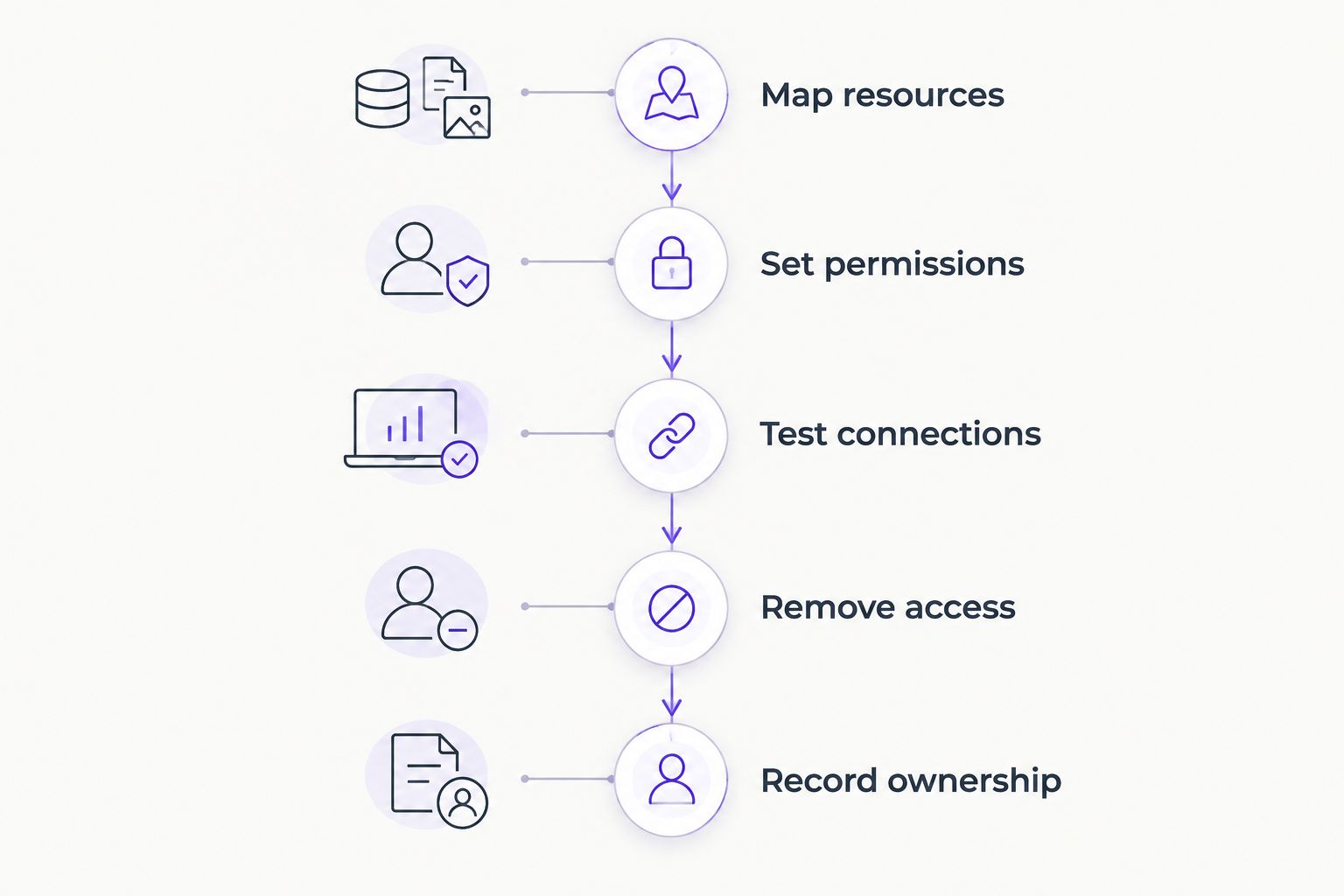
- Map resources. List the private applications, servers, and network services each role needs. Include dependencies such as internal name resolution.
- Set permissions. Test at least 2 user roles with different access needs. Confirm that each role cannot reach resources outside its assignment.
- Test connections. Check 3 access paths: a normal connection, a reconnect after a network change, and a failed authentication attempt.
- Remove access. Run 1 offboarding exercise. Verify that removing the user or device prevents the access your policy intends to stop.
- Record ownership. Write down who handles workstation problems, access-policy changes, and gateway or connector failures.
BritCore IT provides structured user help with escalation paths when problems need more technical attention. Apply that same distinction to your VPN operating plan: the person receiving the request needs a clear route to whoever owns the underlying issue.
Which business VPN should you choose?
Start with Tailscale if your main requirement is distributed access to private resources. Start with Cisco Secure Client or FortiClient instead when the corresponding gateway environment already defines your remote-access design.
Choose OpenVPN Access Server when administering the server is intentional. Choose Cloudflare Zero Trust when access to specific applications is the central requirement. In every case, require a successful pilot before making the product your standard for 2026.
FAQ
What’s the best business VPN software for remote teams?
Tailscale is this guide’s default choice for distributed device-to-resource access. Cisco Secure Client and FortiClient fit their corresponding gateway environments, while OpenVPN Access Server suits self-hosted administration.
Is Tailscale better than a traditional business VPN?
Tailscale is the better fit when identity-based access between distributed devices matches your requirements. A traditional gateway-based VPN remains a valid choice when your network design and operational processes depend on it.
Should a business choose Cisco Secure Client or FortiClient?
Choose according to the gateway environment and supported configuration, not the client name alone. Cisco Secure Client belongs in a compatible Cisco evaluation, while FortiClient belongs in a FortiGate-based evaluation.
Is Cloudflare Zero Trust the same as a business VPN?
Cloudflare Zero Trust is not simply another name for a traditional VPN. Its application-access model and private-network capabilities need to be assessed against the particular resources employees use.
Does a business VPN replace endpoint security?
No, a business VPN does not replace endpoint security. Controlling remote connectivity does not remove the need to maintain workstations, protect identities, and manage software updates.
What should a remote-team VPN pilot include?
A VPN pilot should test resource access, permission boundaries, connection failures, and removal of access. Include different user roles and record who handles each type of support issue.
Does BritCore IT sell its own business VPN software?
BritCore IT provides managed IT support rather than a named proprietary VPN product. Its stated services include maintaining business technology and providing structured user help with technical escalation.
One last thing
An offboarding test can reveal a permission problem that a successful login never exposes. Before approving a remote-access rollout, remove a pilot user's access and confirm the result from the device that previously connected. A connection that works is only half the requirement; access must also stop when intended.