

Best overall for server-led businesses: Veeam Data Platform. Best for individual workstations: Backblaze Computer Backup. Best for Microsoft 365 data: Microsoft 365 Backup. Best for combined backup and endpoint security: Acronis Cyber Protect. This 2026 guide matches each option to the business systems you need to restore—not a feature count.
- The best cloud backup software for small business depends on the systems you must restore.
- Veeam Data Platform is the first shortlist option for businesses protecting servers and virtual machines.
- Backblaze Computer Backup suits workstation protection; Microsoft 365 Backup targets supported Microsoft 365 services.
- BritCore IT provides ongoing business IT support; assess backup software separately against recovery requirements.
Why this matters
A successful backup job is not the same as a successful recovery. Your business needs the right data, usable recovery points, and someone responsible for restoring access when a workstation or server fails.
BritCore IT provides ongoing support for business servers, network equipment, and workstations, with structured user help and escalation paths. That operational role matters alongside software selection. BritCore IT fits businesses that need ongoing IT support, not consumer gadget troubleshooting.
Treat backup selection as an operating decision. Name the systems you need to recover, the person who owns each recovery task, and the evidence required before a restore counts as complete.
What makes the best small-business cloud backup software?
Use these criteria before comparing products in 2026. A platform that misses a required workload is the wrong choice, regardless of its other features.
- Workload coverage: Match protection to workstations, servers, virtual machines, or cloud application data. These are different requirements.
- Restore scope: Check whether you can recover a file, a mailbox, an application, or an entire machine, as required.
- Recovery objectives: Define how much recent work you can lose and how long a system can remain unavailable.
- Administrative separation: Check how backup access, recovery permissions, and deletion permissions are controlled.
- Operational ownership: Assign someone to investigate failures, manage retention, and perform recovery tests.
- Recovery evidence: Require a completed restore, not just a green status indicator, before accepting the setup.
Keep an established backup principle in view: 3 copies of data, on 2 different media types, with 1 copy off-site. This is the familiar 3-2-1 backup rule. It is a starting point for copy design, not proof that your recovery process works.
Cloud backup software at a glance
The order below reflects workload fit, not measured restore speed. Start with the row matching your most important system, then check whether another workload needs separate protection.
| Option | Best for | Standout capability | Key limitation |
|---|---|---|---|
| Veeam Data Platform | Server-led businesses | Backup and recovery for supported infrastructure workloads | Requires infrastructure-specific setup and administration |
| Backblaze Computer Backup | Individual business workstations | Computer-focused cloud backup | Does not replace server or cloud application backup |
| Microsoft 365 Backup | Supported Microsoft 365 data | Backup and recovery within the Microsoft 365 environment | Does not protect your entire business technology estate |
| Acronis Cyber Protect | Combined backup and endpoint security | Backup and security functions in one product family | A combined platform still needs separate backup and security policies |
Do not read this table as a recommendation to buy every option. Separate products are justified only when your required workloads or operating responsibilities demand them.
1. Veeam Data Platform: best for server-led businesses
Veeam Data Platform is an infrastructure backup and recovery platform covering supported physical and virtual workloads. It belongs on your shortlist when restoring a business server matters more than recovering an individual employee's document.
The important distinction is workload recovery. A server can contain application services, configuration, and dependencies that a collection of copied files does not recreate.
Veeam Data Platform pros:
- Infrastructure-oriented protection fits server and virtual-machine recovery requirements.
- Workload-level recovery supports planning beyond individual file retrieval.
- Its infrastructure focus gives technical teams a clear starting point for evaluating application dependencies.
Veeam Data Platform cons:
- Deployment requires decisions about backup infrastructure, storage, access, and maintenance.
- Its scope is unnecessary when your only requirement is backing up individual workstations.
Before selecting Veeam Data Platform in 2026, identify the exact workloads, deployment model, and storage destination you require. Confirm current support against the relevant product documentation rather than treating the platform name as a compatibility guarantee.
Best for: Businesses whose recovery plan centers on servers or virtual machines and has a named technical owner.
Verdict: Buy for a defined infrastructure requirement; skip for a workstation-only requirement.
2. Backblaze Computer Backup: best for individual workstations
Backblaze Computer Backup focuses on backing up computers to the cloud. It is a direct fit for a narrower problem: recovering supported data from an employee's computer after loss, failure, or accidental deletion.
Keep the product boundary clear. Computer backup is not the same assignment as restoring a server application or recovering information held in a separate cloud service.
Backblaze Computer Backup pros:
- Its computer-focused scope matches an understandable business requirement.
- Cloud storage places a backup copy away from the protected computer.
- It provides a focused option when employee device data is the immediate concern.
Backblaze Computer Backup cons:
- Workstation protection does not establish coverage for servers or Microsoft 365 data.
- Files outside the configured backup scope still require a separate protection decision.
Before deploying it, inspect where employees actually save business information. A local folder, a synced folder, and a cloud application are not interchangeable backup sources. Confirm coverage for the relevant data instead of assuming that installing an agent protects everything an employee uses.
Best for: Businesses protecting data on individual employee workstations.
Verdict: Buy for computer backup; skip as your sole answer to server or cloud application recovery.
3. Microsoft 365 Backup: best for supported Microsoft 365 data
Microsoft 365 Backup provides backup and recovery for supported Exchange Online, SharePoint, and OneDrive data. It belongs on the shortlist when your recovery question starts with a mailbox, a SharePoint site, or a user's OneDrive account.
This is a cloud application decision, not a replacement for computer or server backup. Define which Microsoft 365 data you need to restore before assessing the service.
Microsoft 365 Backup pros:
- It addresses named services within the Microsoft 365 environment.
- Its workload scope gives administrators a concrete basis for mapping mailbox and file recovery requirements.
- It separates cloud application recovery planning from workstation backup planning.
Microsoft 365 Backup cons:
- It does not replace protection for local computers, on-premises servers, or unrelated cloud services.
- You must verify that the required recovery object and recovery scope are supported.
For your 2026 evaluation, write down an actual recovery request. Recovering an employee's deleted document and recovering a wider set of business data require different checks. Validate the operation you need rather than relying on the word backup in a service name.
Best for: Businesses with a defined recovery requirement for supported Microsoft 365 services.
Verdict: Buy for a matched Microsoft 365 workload; skip as whole-business backup coverage.
4. Acronis Cyber Protect: best for backup and endpoint security
Acronis Cyber Protect combines backup with endpoint security functions. It belongs on the shortlist when your business wants to assess those responsibilities within a shared product family.
The combined approach does not remove the need for clear policies. Backup retention, recovery permissions, security configuration, and incident handling remain separate operating decisions.
Acronis Cyber Protect pros:
- Backup and endpoint security functions are available within the same product family.
- The combined scope suits an evaluation covering protection and recovery together.
- It gives a responsible administrator a basis for coordinating those policies.
Acronis Cyber Protect cons:
- A wider functional scope creates more configuration decisions than a backup-only requirement.
- Selecting a combined platform does not prove that its backup and security settings meet your requirements.
Check the exact edition, supported workloads, and included functions before making a decision. Do not assume that every capability associated with the product family is included in the configuration you are considering.
Best for: Businesses deliberately combining backup and endpoint security administration.
Verdict: Buy when both functions are required; hold if the business has not assigned responsibility for either.
How this ranking works
The ranking prioritizes workload coverage, recovery scope, and the responsibility required to operate each option. It is not a restore-speed benchmark or a claim that one platform wins across every business environment.
Veeam Data Platform leads for server-led recovery requirements. The other options take distinct positions: workstation data, supported Microsoft 365 services, and combined backup and endpoint security. Your workload determines the winner.
A broader product is not automatically a better choice. Extra functions create no recovery value unless someone configures, monitors, and tests the functions your business needs.
Prove recovery before accepting the setup
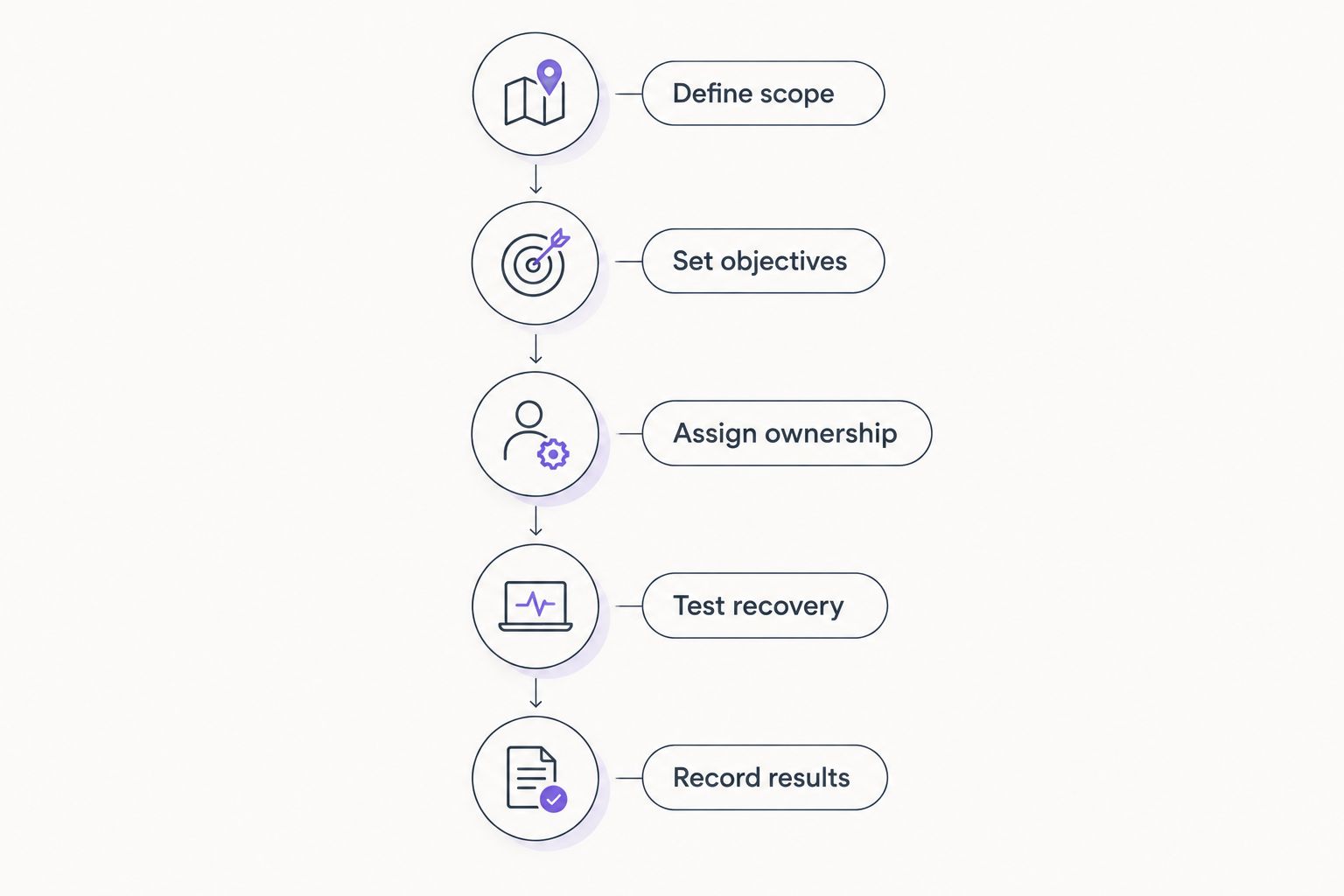
Use this sequence for your 2026 shortlist. Keep the same business recovery task throughout the evaluation so that the comparison remains useful.
- Define scope: Name the system, its data, its dependencies, and the business owner who must confirm recovery.
- Set objectives: Record acceptable data loss and acceptable interruption in business terms.
- Assign ownership: Identify who investigates backup failures and who authorizes a restore.
- Test recovery: Restore the required data or workload to an appropriate test destination.
- Record results: Document what worked, what failed, and which corrective actions remain open.
The test should end with a business check, not a software notification. A recovered document must open; a recovered application must support its required task.
Retain the recovery instructions outside the system they describe. If the only copy sits on the failed server, the instructions are unavailable when the team needs them.
Make backup part of daily IT ownership
Software selection leaves an important question unanswered: who acts when something fails? A backup warning needs an owner, an escalation path, and a recorded next step.
BritCore IT provides managed IT support for business technology, including servers, network equipment, and workstations. When discussing cloud backup software alongside that support, establish the specific responsibilities in scope. Do not assume that general IT support automatically includes a particular backup product, recovery commitment, or retention policy.
Your operating checklist should identify:
- Who reviews unsuccessful backup jobs and unresolved warnings.
- Who maintains the list of protected systems as employees and devices change.
- Who approves recovery access and changes to retention settings.
- Who communicates with the affected business team during recovery.
- Who verifies that the restored system supports normal work.
A named owner is more useful than a broad promise that someone handles IT. Put responsibilities in writing before a failure forces the discussion.
Which cloud backup software should you choose?
Choose Veeam Data Platform as your default shortlist starting point when servers or virtual machines drive the requirement. Choose Backblaze Computer Backup for workstation data, Microsoft 365 Backup for supported Microsoft 365 services, or Acronis Cyber Protect when combined backup and endpoint security is the explicit objective.
If you cannot name the system you need to restore, pause the purchase. First list the business systems, where their data lives, and the required recovery outcome. That exercise determines whether you need a single product or separate protection for different workloads.
For 2026, keep software selection and operational support connected but distinct. BritCore IT fits the ongoing IT support requirement; the backup choice still needs a documented workload match and an accepted recovery test.
FAQ
What’s the best cloud backup software for a small business?
The best cloud backup software for a small business is the option that restores its required systems. Start with Veeam Data Platform for server-led requirements, Backblaze Computer Backup for workstations, Microsoft 365 Backup for supported Microsoft 365 data, or Acronis Cyber Protect for combined backup and endpoint security.
Is cloud file sync the same as cloud backup?
No. File sync keeps data aligned between locations, while backup provides recovery copies under a defined protection policy. Check retention and restore behavior rather than assuming a synced folder is an independent backup.
Does Microsoft 365 Backup protect employee laptops?
Microsoft 365 Backup protects supported Microsoft 365 service data, not an employee’s entire laptop. Local workstation data and machine recovery require a separate coverage decision.
Is Backblaze Computer Backup enough for a business with servers?
Backblaze Computer Backup does not replace server backup. A business with servers must assess server workloads and their recovery requirements separately from employee computer data.
Should a small business choose Veeam Data Platform or Acronis Cyber Protect?
Start with Veeam Data Platform for an infrastructure-led backup requirement and Acronis Cyber Protect for a combined backup and endpoint security requirement. Confirm supported workloads, included functions, and administrative responsibilities before selecting either.
What does the 3-2-1 backup rule mean?
The 3-2-1 backup rule means keeping 3 copies of data on 2 different media types, with 1 copy off-site. It guides copy placement but does not replace access controls or recovery testing.
What should I ask an IT support provider about cloud backup?
Ask which systems are protected, who investigates failures, and who performs recovery tests. For BritCore IT or another provider, confirm the agreed service scope rather than assuming a specific backup product or recovery commitment is included.
One last thing
Test the instructions as well as the software. Ask another authorized person to follow the documented recovery process without relying on the usual administrator's memory.
A backup plan is incomplete when only one person knows how to use it. Record access procedures, escalation contacts, and acceptance checks before you need them under pressure.