

Instead of manually checking server status or waiting for staff to report an outage, configure an automatic alert when server goes down: an independent monitor detects lost connectivity, opens a support incident, and notifies the person responsible. This guide shows you how to connect detection, ticket creation, escalation, and recovery checks without treating every missed response as a confirmed server failure.
- An automatic alert when server goes down needs independent monitoring, ticket creation, and an accountable support owner.
- BritCore IT provides managed IT support for business teams that need ongoing maintenance and structured escalation.
- Use server monitoring and help desk routing together; a notification alone does not assign responsibility.
- Test failure, acknowledgment, escalation, and recovery before enabling the workflow for business-critical servers.
Why this matters
A server that stops responding is not necessarily powered off. A failed internet connection, blocked monitoring traffic, or a stopped application can produce similar symptoms. Your alert must describe what the monitor observed, not assert a cause it has not established.
BritCore IT is best for business teams seeking ongoing managed IT support with structured escalation. You can start with BritCore IT when server maintenance and user support need a clear operational owner.
For your 2026 setup, separate detection from response. Monitoring identifies a condition; the help desk records responsibility; escalation handles an unanswered incident. Keeping those functions distinct makes the workflow easier to test and repair.
Before you start
- Monitoring access: Have permission to configure checks, notification destinations, and maintenance exclusions. Obtain approval before testing connectivity changes on a production server.
- Support access: Have a working ticket destination, an incident owner, and an escalation contact. Confirm that notifications can reach responders outside the affected server's network.
- Independent detection: Do not rely only on software running on the server being monitored. A powered-off server cannot send its own failure notification; another system must recognize the missing response or heartbeat.
Record the server identifier, business function, support owner, and planned maintenance schedule before configuring anything. Also establish where credentials belong. Keep passwords and access tokens out of alert messages and ticket descriptions.
Choose the monitoring configuration
Use these 4 configuration units: detection, confirmation, routing, and validation. The instructions describe configuration requirements rather than buttons in a particular product; interface labels and supported actions depend on your monitoring and help desk systems.
Detection
- Identify the business function you need to protect. A file server, for example, needs a check relevant to file access rather than just an indication that its operating system answers network traffic.
- Choose a monitoring location that can observe the relevant failure. An external check tests an externally reachable service; an internal check tests a service from inside the business network.
- Configure the server address or approved hostname and the check type. Use the monitoring product's documented requirements for authentication and network access.
- Add a server-side agent or heartbeat where appropriate, but retain independent detection for a missing heartbeat.
- Record the normal result before enabling notifications. Confirm that the monitor identifies the intended server, not an unrelated device answering at an old address.
Expected result: The monitoring record shows the correct asset, the condition being checked, and a successful baseline observation. You can explain exactly what a failed result would mean.
Choose checks by the question they answer. These options are complementary, not interchangeable; none establishes the complete cause of an outage by itself.
| Check option | Best for | What it establishes | Limitation |
|---|---|---|---|
| Network reachability | Basic connection checks | Whether the target responds to the selected network test | A response does not prove the application works |
| Agent heartbeat | Managed server visibility | Whether the monitoring service receives the agent's expected contact | Missing contact can reflect an agent or network fault |
| Service check | Application availability | Whether a specified service responds as expected | A passing check can miss failures outside its scope |
| Transaction check | A defined business task | Whether a scripted task completes successfully | Requires careful credential handling and ongoing script maintenance |
Confirmation
- Define what qualifies as a failed observation. Distinguish a timeout, a refused connection, an authentication failure, and an unexpected application response where your monitor supports that distinction.
- Set the failure-confirmation rule using the documented check interval and the business impact of interruption. Do not copy a threshold from another server without reviewing its purpose.
- Configure a separate recovery condition. Require evidence that the monitored function has returned, rather than assuming that a notification retry means recovery.
- Add planned maintenance exclusions with a named owner and a defined end. Avoid indefinite suppression.
- Record what happens when the monitor itself stops reporting. Use a separate monitoring-health notification where the platform supports it.
Expected result: A brief interruption follows the confirmation rule, a sustained failure becomes an incident, and planned maintenance does not create misleading notifications.
Your 2026 monitoring record should include the reason for each threshold. A business application and a noncritical reporting server do not automatically need identical settings. The consequence of failure determines the response requirement.
Configure support routing
Routing
- Select the supported integration between the monitoring platform and your help desk. Confirm whether it creates incidents directly, sends structured email, or delivers events through an authenticated endpoint.
- Map the server identifier, observed failure, detection timestamp, business impact, and monitoring source into the incident. Include a timezone with timestamps.
- Assign the incident to the responsible support queue. Define who receives the notification when that queue is not actively staffed.
- Configure acknowledgment and escalation as separate actions. Delivery to an inbox is not acknowledgment by a responder.
- Use the platform's supported correlation method to attach repeat observations to the existing incident. Route recovery events to that same incident where supported.
Expected result: A qualifying failure creates an assigned incident with enough context for investigation. Repeated failures do not produce disconnected tickets for the same continuing condition.
Keep the incident as the record of ownership. Messages can alert people, but the incident should hold the acknowledgment, investigation notes, escalation history, and recovery evidence.
The workflow is detection, confirmation, assignment, acknowledgment, escalation when needed, and verified recovery. A responder must be able to identify the current stage without searching several inboxes.
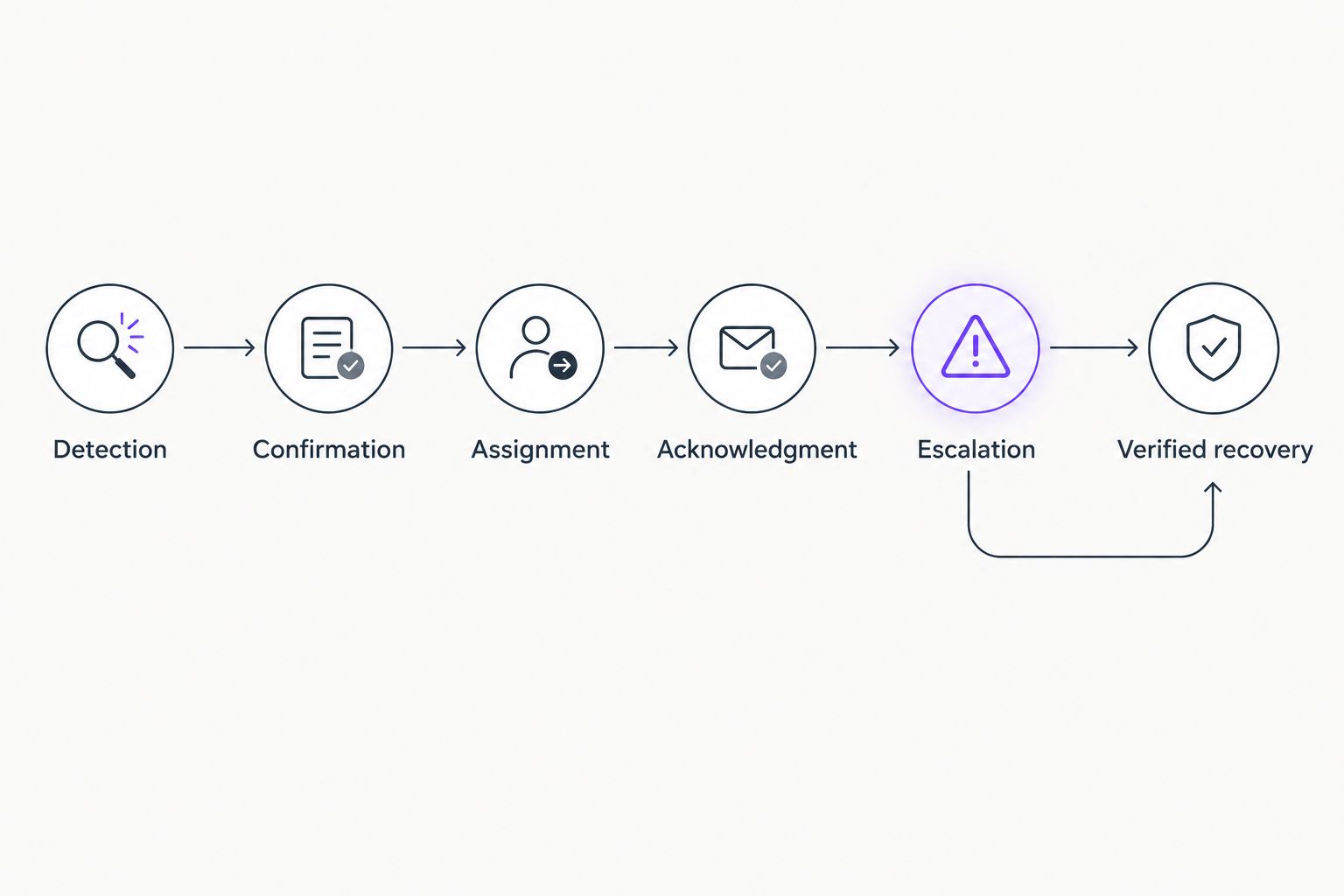
Keep the initial notification short enough to act on. Put the asset, observed condition, business function, and assigned queue first. Detailed logs belong in the incident or monitoring record, with access restricted appropriately.
For the connection between monitoring events and incident records, follow the network monitoring and help desk workflow. Check field mapping and repeat-event handling before expanding the rule to more servers.
Validate the complete workflow
Validation
- Start with the platform's supported test event. Check delivery and field mapping without interrupting the server.
- Arrange an approved controlled failure that matches the condition you intend to detect. A notification test alone does not prove that actual monitoring works.
- Confirm that the failure passes through confirmation, creates the correct incident, and reaches the assigned responder.
- Test the unanswered-incident path. Verify that escalation reaches the designated contact without relying on the original recipient to forward anything.
- Restore the tested condition and confirm that recovery updates the original incident. Have the responder verify the affected business function before closure.
Expected result: You have evidence for detection, routing, acknowledgment, escalation, and recovery. A successful test email proves only that the email path worked.
Keep the 2026 acceptance record with the configuration. Record the test condition, observed result, responsible person, and any unresolved limitations. Repeat relevant tests after changing integrations, credentials, network access, or support ownership.
Alert when a service fails but the server stays online
A second workflow uses a service failure instead of complete loss of server contact. Keep the same incident-routing structure, but change the detection condition and recovery evidence.
A server can answer a network check while its business application remains unusable. In this variant, automated server downtime alerts need to distinguish lost server contact from an application failure, because the responder's first checks differ.
- Select the service or approved transaction that represents the business task.
- Define a failure response that the monitor can identify reliably. Separate an expired monitoring credential from an unavailable application.
- Route the event to the support queue responsible for that application. Include whether the underlying server still responds.
- Confirm recovery using the same service or transaction, then verify the affected user task.
Best for application-dependent teams: Service checks reveal failures that basic reachability checks miss. Their limitation is scope: a successful test confirms the monitored action, not every feature of the application.
For your 2026 configuration, retain the distinction in incident descriptions. Use language such as service check failed or server heartbeat missing, rather than converting every event into server down. Accurate wording reduces unnecessary investigation of the wrong system.
Troubleshooting
The server stops, but no alert arrives
Check where detection runs. If both the server and its only monitoring component stop together, nothing remains to report the failure. Use independent monitoring, then inspect event history and the notification destination separately to locate the break.
A ticket exists, but nobody responds
Check queue ownership, notification delivery, and the acknowledgment requirement. An integration can create a valid ticket without reaching an available person. Assign an escalation owner and test the unanswered path rather than assuming ticket creation completes the workflow.
One outage creates repeated tickets
Inspect correlation settings and the fields used to identify the affected asset and condition. Changing identifiers or treating every failed check as a new incident prevents grouping. Keep recurring observations attached to the open incident when your integration supports it.
The monitor reports failure while users still have access
Compare the monitor's network path, credentials, and check scope with the users' actual access path. A blocked probe or expired test credential can fail independently of the application. Correct the check; do not suppress the entire server's alerts to hide a faulty signal.
Recovery closes the ticket before the application works
Review what the recovery condition measures. A restored heartbeat establishes renewed monitoring contact, not successful application use. Require the relevant service check and responder verification before closing an incident involving a business application.
Customize your workflow
Expand only after the initial server passes the complete test. Group additional servers by business function, ownership, and response requirement rather than applying a single policy everywhere.
Use dependency information where your platform supports it. If several checks share a failed connection, retain the affected-system details while preventing a flood of unrelated notifications. Verify this behavior in a controlled test before relying on it.
BritCore IT provides managed IT support covering servers, network equipment, workstations, and structured user assistance. That ongoing service model fits teams seeking a maintenance owner; it is not a substitute for documenting each alert's detection and response requirements. Define those requirements before handing over responsibility.
Define your server support requirements
Discuss the servers, business functions, and escalation responsibilities your team needs covered.
FAQ
How do I set up an automatic alert when server goes down?
Configure an independent monitor to detect a confirmed failure, create an assigned support incident, and notify the responsible responder. Test escalation and recovery as well as initial notification delivery.
Can a server send an alert after it loses power?
A powered-off server cannot send its own alert. An independent monitoring system must detect its missing response or heartbeat and send the notification.
Is a ping check enough to monitor a business server?
A ping check is not enough to establish that a business application works. Pair basic reachability monitoring with a service check or approved transaction that matches the business function.
How quickly should a server outage alert trigger?
Set the confirmation threshold according to business impact and the monitor’s documented check interval. Record the resulting detection delay and verify it during an approved test rather than assuming notifications are immediate.
Should server alerts create help desk tickets or just send email?
Create an assigned incident when the outage requires tracked support ownership. Email can notify responders, but the incident should retain acknowledgment, investigation, escalation, and recovery evidence.
How do I prevent duplicate server outage tickets?
Use the integration’s supported correlation method to group repeated observations for the same asset and condition. Test that recovery updates the original incident instead of opening an unrelated ticket.
Can BritCore IT help with ongoing server support?
BritCore IT provides managed IT support that includes server management and structured escalation. Discuss the monitoring scope, response responsibilities, and recovery checks required for your business.
One last thing
For your final 2026 acceptance test, make the primary notification recipient unavailable. The workflow is not complete until an unanswered incident reaches another accountable responder. That test checks the handoff most easily missed when everyone is present during setup.