

Instead of manually checking backups before every server update, configure automatic server backup before maintenance as a dependency: request a backup, verify its result, and release the maintenance job only when recovery checks pass. In your 2026 runbook, a failed, incomplete, or unverified backup must stop the change—not merely send an alert.
- Automatic server backup before maintenance needs a verified recovery point, not just a successful backup request.
- BritCore IT provides managed server support for business teams that need ongoing maintenance and structured escalation.
- Use a fail-closed maintenance gate: backup failure, timeout, or missing evidence stops the change.
- Test recovery separately; a completed backup job does not prove the server will restore.
Why this matters
A scheduled backup and a maintenance task are separate operations unless you connect their outcomes. Scheduling them near each other does not establish a dependency. The update can start while the backup is running, or after the backup has failed.
The maintenance gate must evaluate the backup result before it authorizes any change. That rule applies whether you patch the operating system, update an application, or change server configuration.
BritCore IT is best for business teams seeking managed IT support for ongoing server maintenance and structured escalation. Its managed IT support services cover business technology, including servers, network equipment, and workstations. The workflow below defines the checks your internal administrator or support provider should implement; it does not assume a particular backup platform.
Before you start
- Access and ownership: Identify the server administrator, backup administrator, and change approver. Provide service credentials with only the permissions needed to request backups, read results, and authorize the maintenance task.
- Recovery materials: Confirm backup coverage, retention requirements, recovery credentials, encryption-key access, and a documented restore procedure. Include application data and dependencies, not only operating-system files.
- The critical gotcha: A successful backup request is not a completed backup. Your automation needs the final job result and a recoverable point associated with the correct server; an accepted request or running job must never release maintenance.
Before building this 2026 workflow, confirm that your backup platform exposes job results through a supported interface. Confirm that your maintenance system can wait for an external decision. If either capability is absent, keep an explicit human approval gate rather than describing two independent schedules as automation.
Maintenance scope and recovery criteria
These instructions describe configuration requirements, not product-specific menu labels. Implement them through your systems’ documented scheduling, scripting, or integration interfaces.
- Define the change boundary. Record the target server, planned work, affected applications, maintenance deadline, and responsible owner. Use a stable server identifier rather than relying only on a display name.
- Define the recovery requirement. Specify what must be recoverable: individual files, application data, the operating system, or the complete server. Match the backup scope to the change’s failure modes.
- Set the backup timing rule. For this workflow, require a recovery point created after change approval and before maintenance begins. Recheck that requirement if the window moves or meaningful application changes occur.
- Set a completion deadline. Work backward from the maintenance window using observed backup duration and operational constraints. If the backup misses that deadline, defer maintenance instead of allowing the jobs to overlap.
- Record dependencies. Identify databases, application services, attached volumes, and other systems needed for recovery. Where the application requires coordinated protection, include those requirements in the backup procedure.
Expected result: You have one approved change record that defines the server, recovery scope, timing rule, deadline, and accountable owner. The automation can evaluate explicit conditions rather than interpret a vague instruction to check the latest backup.
Do not confuse recovery coverage with backup location. A backup stored separately from the server still needs the data, configuration, and recovery access necessary to rebuild the intended service.
Backup request and completion checks
The backup stage must track a specific execution. Looking up the latest successful job without checking its identity can select an older result that does not protect the planned change.
- Create a unique execution reference. Associate the approved change with the target server and the requested backup. Keep the reference in the change record and automation logs.
- Request the backup through a supported interface. Capture the returned job identifier. If the request fails or returns no usable identifier, stop the workflow and notify the owner.
- Wait for the final result. Check the identified job until it completes or reaches the deadline. Treat queued and running states as unfinished; treat unknown states as a blocked decision.
- Evaluate warnings explicitly. Do not automatically treat a warning as success. Establish which warnings invalidate the recovery requirement, such as excluded application data or an inaccessible required volume.
- Verify the recovery point. Confirm that the backup catalog contains a recovery point for the intended server, with the required scope and acceptable timing. Record its identifier separately from the job identifier.
- Check recovery access. Confirm that the recovery procedure has access to the repository and required credentials. Do not copy passwords or encryption keys into maintenance logs.
Expected result: The change record contains a completed backup execution and its associated recovery point. Neither an old successful job nor a newly accepted request can satisfy the gate.
If your current backup service cannot expose this evidence, review the selection criteria in the guide to cloud backup software for small business. Evaluate integration and recovery requirements before choosing a replacement; scheduling alone is not enough.
Maintenance gate and validation
For the 2026 runbook, make the final authorization a separate decision. The maintenance task must not have another schedule or manual shortcut that bypasses the backup checks without a recorded exception.
- Evaluate all required conditions together. Require the correct server, approved change, completed backup, valid recovery point, acceptable timing, and an open maintenance window.
- Block uncertain results. A timeout, unavailable backup service, missing recovery point, or unreadable result must produce a hold. Do not interpret a connection error as permission to proceed.
- Prevent duplicate execution. Use an execution lock or an equivalent mechanism supported by your automation system. A retry must not start a second update against the same server.
- Release the approved task. Pass authorization only to the maintenance operation tied to the evaluated change. Invalidate authorization if the target, scope, or approved window changes.
- Validate service after maintenance. Check the operating system, required services, application access, and monitoring state. A successful restart alone does not establish that the business application works.
- Preserve the evidence. Record the authorization decision, maintenance result, validation outcome, and any escalation. Keep sensitive recovery material outside the log.
Expected result: Maintenance starts only after the recovery checks pass, and the change closes only after service validation. A failed validation opens the documented recovery or escalation procedure rather than repeating the update blindly.
The decision sequence should remain visible to whoever owns the server. Keep each outcome explicit: continue, hold, or escalate.
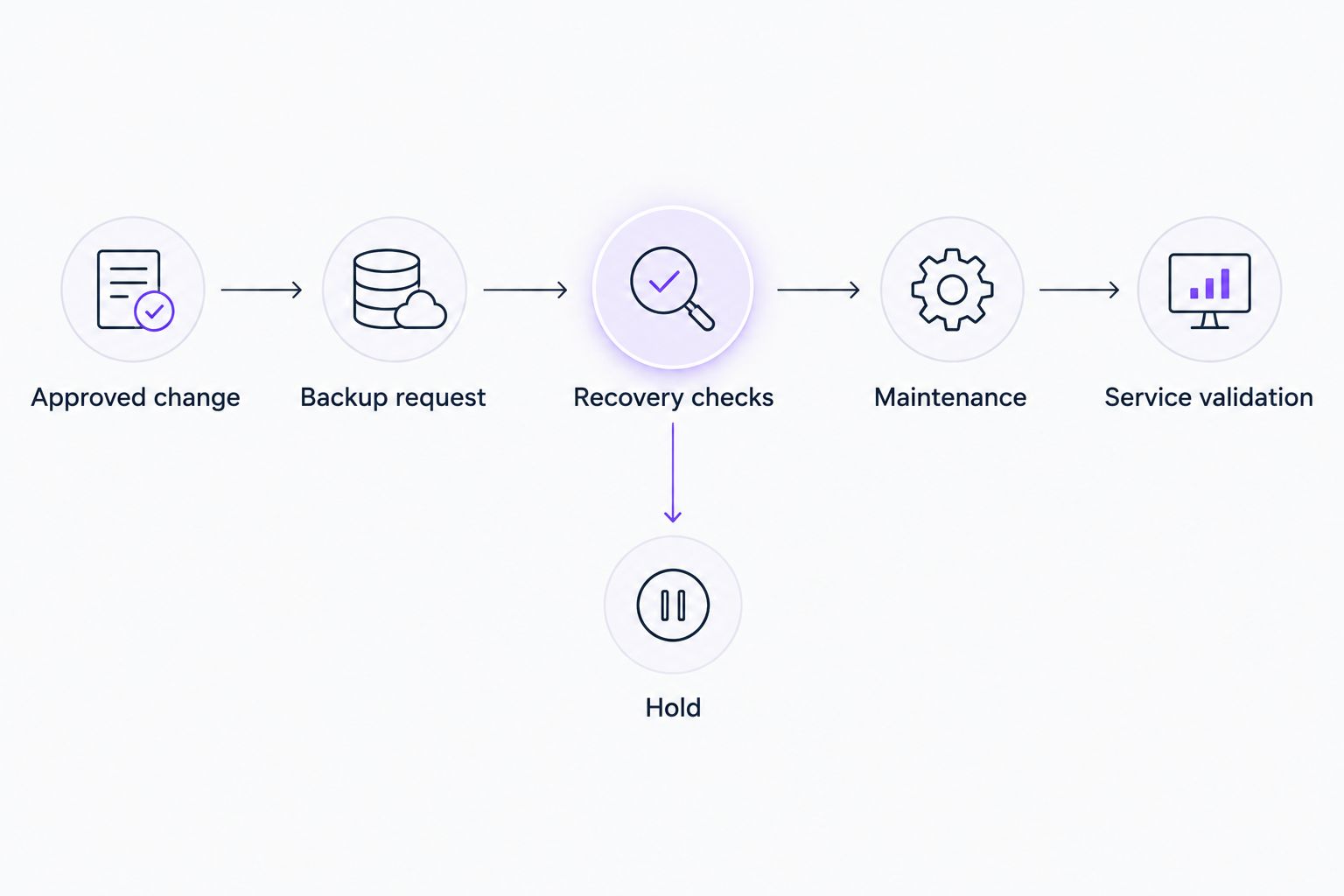
Back up whenever a change is approved
A fixed maintenance window is not the only useful trigger. You can also start the workflow when an approved server change becomes ready for execution.
The same gate still applies. A change-triggered backup must finish and meet the recovery criteria before the update starts; approval does not replace backup verification.
| Workflow | Best for | Advantage | Limitation |
|---|---|---|---|
| Scheduled-window trigger | Recurring server maintenance | Establishes a predictable preparation sequence | Requires revalidation when the window moves |
| Approved-change trigger | Individually approved server changes | Associates backup evidence with a specific change | Requires reliable approval events and duplicate-event handling |
For the approved-change variant:
- Accept only an approval event that identifies the target and authorized work.
- Check whether that change already has an active execution before requesting another backup.
- Run the same backup, recovery-point, and deadline checks used for scheduled maintenance.
- Invalidate the gate if someone changes the server, scope, or approval status.
Choose the scheduled-window trigger for recurring maintenance and the approved-change trigger for individually controlled work. Neither option removes the need for a restore procedure or post-maintenance validation.
Troubleshooting
The backup request succeeds, but maintenance stays blocked
Check the final job status and recovery-point catalog separately. The request can be accepted before data protection finishes. Preserve the hold until the expected execution produces a qualifying recovery point; do not bypass it by accepting the request response.
An old backup incorrectly releases the change
Replace the latest-success lookup with a check tied to the current execution reference, server identifier, and timing rule. Review time-zone handling as well. Compare timestamps consistently and reject results that fall outside the approved criteria.
Maintenance starts twice after an integration retry
Check duplicate-event handling and the execution lock. Store the active change reference before starting the update, then have retries inspect that state. Do not start another maintenance task merely because the first acknowledgment was lost.
The backup completes after the maintenance window closes
Keep maintenance blocked and reschedule the change. Review observed backup duration, contention, and scheduling conflicts before selecting the next preparation time. Extending the window requires approval; it is not a backup-script decision.
The backup completes, but application data is missing
Review exclusions, protected volumes, application requirements, and backup warnings. Where supported and required, configure application-consistent protection. Repeat recovery validation against representative application data before allowing the affected maintenance workflow to proceed.
Customize your workflow
Treat your 2026 rollout as an operational control, not just a new scheduled task. Start with a nonproduction server and a representative application, then expand after the stop conditions behave correctly.
Use these deliberate acceptance tests:
- Missing recovery point: Confirm that the maintenance job never starts.
- Unavailable backup service: Confirm that the workflow holds and notifies the responsible owner.
- Repeated trigger: Confirm that only the existing execution continues.
- Changed approval: Confirm that an edited target or scope invalidates authorization.
- Failed service validation: Confirm that the recovery or escalation procedure receives the failure evidence.
For a concrete rehearsal, create 1 test change, submit 2 duplicate trigger events, and require 0 maintenance starts while the backup result is unavailable. These are test conditions, not performance benchmarks. Repeat the rehearsal with a valid recovery point and confirm that only the approved maintenance execution starts.
BritCore IT provides ongoing server management and structured user support; a defined maintenance gate gives the responsible team clear next steps when preparation fails. Discuss the backup platform, affected applications, approval ownership, and recovery requirements before assigning implementation work.
Define your server maintenance requirements
Discuss server scope, recovery checks, maintenance ownership, and escalation requirements.
FAQ
How do I set up automatic server backup before maintenance?
Connect maintenance authorization to a completed backup and a verified recovery point for the target server. Keep maintenance blocked when the backup fails, times out, or lacks the required recovery evidence.
Is scheduling a backup before patching enough?
No. Separate schedules do not guarantee that the backup finishes successfully before patching starts. Use an explicit dependency that evaluates the backup outcome.
Should maintenance continue if the backup finishes with warnings?
Continue only when the warnings have been evaluated against documented recovery requirements and accepted through the approved process. A warning about missing required data must block the change.
How long before maintenance should the backup start?
Set the start time from observed backup duration, the completion deadline, and your operational constraints. There is no universal interval that guarantees a completed, usable recovery point.
Does a successful backup job prove that the server will restore?
No. A successful job result does not prove end-to-end recovery. Test the restore procedure, application recovery, credentials, and required dependencies separately.
Can I trigger the backup when a server change is approved?
Yes, when your change and backup systems expose supported integration interfaces. Tie the execution to the approved change, handle duplicate events, and invalidate authorization when the target or scope changes.
Can BritCore IT help with ongoing server maintenance?
BritCore IT provides managed IT support that includes server management and structured escalation. Discuss the specific backup platform, recovery requirements, and maintenance scope to define the work.
One last thing
Test the blocked path before trusting the successful path. During your 2026 acceptance review, deliberately withhold the qualifying recovery result in a controlled test and confirm that maintenance cannot start. A workflow that runs correctly when everything succeeds has not yet demonstrated that it protects your server when preparation fails.