

Best overall for Windows-focused teams: Microsoft Intune. Best for combined monitoring and patching: NinjaOne. Best for a focused patching workflow: Action1. This 2026 guide compares the best patch management software for small IT teams by administrative workload, coverage, deployment control, and follow-through.
- Microsoft Intune leads this best patch management software for small IT teams shortlist for Windows-focused endpoint administration.
- Choose NinjaOne when patching belongs alongside monitoring and remote management; consider Action1 for a narrower patching workflow.
- ManageEngine Patch Manager Plus suits dedicated patch administration; Automox suits teams managing updates across different operating systems.
- BritCore IT is best for business teams seeking ongoing managed IT support rather than another software console.
Why this matters
A successful deployment is not the same as a finished update. You still need to identify devices that missed installation, handle restarts, investigate failures, and confirm that business applications work afterward.
The practical question for 2026 is not which dashboard displays the longest feature list. It is which option leaves your team with a manageable exception queue. If nobody owns that queue, consider managed IT support services alongside the software decision.
BritCore IT is best for business teams seeking ongoing managed IT support rather than another software console. That is a different purchasing decision from selecting a patching application: you are deciding who maintains the systems, not just which interface they use.
What makes the best patch management software?
Use these criteria before comparing individual products. A small team needs a workflow it can maintain during ordinary weeks, absences, and busy periods—not just during implementation.
- Coverage: Match operating systems, application publishers, and device types to your actual inventory. An operating-system update policy does not establish coverage for every installed application.
- Deployment control: Separate test devices from broader deployment groups. Set approval, scheduling, and restart rules around business operations.
- Exception handling: Make missing devices, installation failures, and pending restarts easy to identify and assign.
- Administrative fit: Decide whether patching belongs inside endpoint management, a broader remote management platform, or a dedicated application.
- Evidence: Require device-level results and understandable reporting. A policy assignment alone does not demonstrate installation.
Treat these as acceptance criteria for your 2026 evaluation. Ask each supplier to demonstrate your workflow rather than presenting an unrelated feature tour.
Patch management software at a glance
These recommendations describe different operating models, not measured performance rankings. The right default changes with your device estate and the responsibilities your team already carries.
| Software | Best for | Standout approach | Key limitation to evaluate |
|---|---|---|---|
| Microsoft Intune | Windows-focused endpoint administration | Update policies within broader endpoint management | Application patch coverage requires separate attention |
| NinjaOne | Combined monitoring and patching | Patching alongside remote monitoring and management | Broader scope requires more configuration decisions |
| Action1 | A focused patching workflow | Cloud-based patch management and deployment | Coverage must match your operating systems and applications |
| ManageEngine Patch Manager Plus | Dedicated patch administration | A patch-focused management platform | A separate console can add operational handoffs |
| Automox | Updates across different operating systems | Cloud-based cross-platform patch management | Supported applications and offline-device behavior need validation |
1. Microsoft Intune: best for Windows-focused teams
Microsoft Intune manages endpoints and provides Windows update policy controls. It belongs at the top of your shortlist when Windows device administration and update policy should sit together.
Best for: Teams that want Windows update management inside a broader endpoint-management workflow.
For a 2026 evaluation, start with enrollment, update policy assignment, restart behavior, and reporting. Then assess application updates separately; do not assume that managing Windows updates resolves the rest of your software inventory.
Microsoft Intune pros:
- Combines update administration with broader endpoint policy management.
- Supports separating devices into different policy groups.
- Fits organizations that want centralized Windows device administration.
Microsoft Intune cons:
- Enrollment and policy design require deliberate setup.
- Third-party application maintenance needs its own coverage review.
Ask the administrator to trace a device from policy assignment through installation and any required restart. That demonstration is more useful than a screen showing that a policy exists.
Verdict: Buy Microsoft Intune when Windows endpoint administration is the main requirement; skip it as a presumed answer to every application update.
2. NinjaOne: best for monitoring and patching together
NinjaOne combines remote monitoring and management with patch-management capabilities. It suits a small IT team that wants to connect maintenance work with wider device administration rather than maintain a standalone patching process.
Best for: Teams responsible for device monitoring, remote management, and updates within the same operating workflow.
The benefit is consolidation of responsibilities. During evaluation, prove how an administrator moves from a failed installation to investigation and follow-up without losing the device context.
NinjaOne pros:
- Brings patching into a broader remote management environment.
- Connects update work with ongoing device administration.
- Provides an alternative to managing patching as an isolated task.
NinjaOne cons:
- Teams seeking only patch deployment must evaluate a broader platform.
- Policy configuration and exception ownership still require staff time.
Do not select NinjaOne solely because consolidating tools sounds attractive. Confirm that its supported update coverage matches your inventory and that the proposed workflow replaces work your team actually performs.
Verdict: Buy NinjaOne when monitoring and patching need a shared workflow; skip it when the wider management scope serves no defined need.
3. Action1: best for a focused patching workflow
Action1 provides cloud-based patch management and software deployment. It belongs on the shortlist when your immediate requirement is maintaining supported systems and applications rather than replacing your entire endpoint-management approach.
Best for: Teams that want a patch-focused evaluation with a clearly bounded operational goal.
Start with a list of the applications your business depends on. Ask which updates the platform handles directly and what remains outside its coverage; a focused product still needs an explicit boundary.
Action1 pros:
- Centers the evaluation on patch management and deployment.
- Uses a cloud-based management approach.
- Offers a distinct alternative to adopting a broader management platform.
Action1 cons:
- A patch-focused choice does not replace every endpoint-management function.
- Unsupported applications still need a separate maintenance process.
Have the evaluator explain how devices are discovered, how deployment groups are maintained, and how unresolved installations become assigned work. Reject a demonstration that ends at sending the update command.
Verdict: Buy Action1 when its coverage matches a defined patching requirement; hold if important applications remain outside the proposed workflow.
4. ManageEngine Patch Manager Plus: best for dedicated administration
ManageEngine Patch Manager Plus is a dedicated patch-management product. It fits teams that want patch approval, deployment, and reporting treated as a distinct administrative responsibility.
Best for: Teams with an assigned patch owner who needs a purpose-built patching environment.
This option deserves attention when a separate patch console matches your operating model. It deserves less attention when adding another console would leave results disconnected from the people resolving failures.
ManageEngine Patch Manager Plus pros:
- Keeps the evaluation centered on patch administration.
- Provides an alternative to a wider remote management platform.
- Suits a clearly assigned maintenance responsibility.
ManageEngine Patch Manager Plus cons:
- A separate console can create handoffs with other support tools.
- Deployment design and supported application coverage need verification.
Test the handoff between reporting and action. If a report identifies an unsuccessful installation, the team should know who investigates it and where the resolution is recorded.
Verdict: Buy ManageEngine Patch Manager Plus for dedicated patch administration; skip it if another console would fragment ownership.
5. Automox: best for cross-platform update management
Automox provides cloud-based patch management across Windows, macOS, and Linux. It is a candidate when a mixed operating-system estate makes a Windows-only evaluation too narrow.
Best for: Teams seeking a shared patch-management approach across different operating systems.
Shared management does not mean identical behavior on every platform. Evaluate each operating system separately, including the applications, restart requirements, and device connectivity patterns that matter to your business.
Automox pros:
- Addresses patch management across different operating systems.
- Uses a cloud-based management approach.
- Supports evaluating mixed-device maintenance in one product shortlist.
Automox cons:
- Application coverage requires platform-by-platform verification.
- Cloud management does not remove offline-device follow-up.
Use representative devices rather than testing only the easiest operating system. A cross-platform decision is incomplete if the evaluation proves Windows behavior but leaves the other systems unexamined.
Verdict: Buy Automox when cross-platform coverage matches your estate; hold until every required platform passes the pilot.
Prove the workflow before you commit
Build a small acceptance pilot for your 2026 selection. As a proposed starting point—not a performance benchmark—include 5 workstations, 1 server if servers are in scope, and 2 update cycles before approving broader deployment.
Choose representative devices, including an intermittently connected workstation and a machine running an important business application. Do not begin with a production server whose interruption would stop essential work.
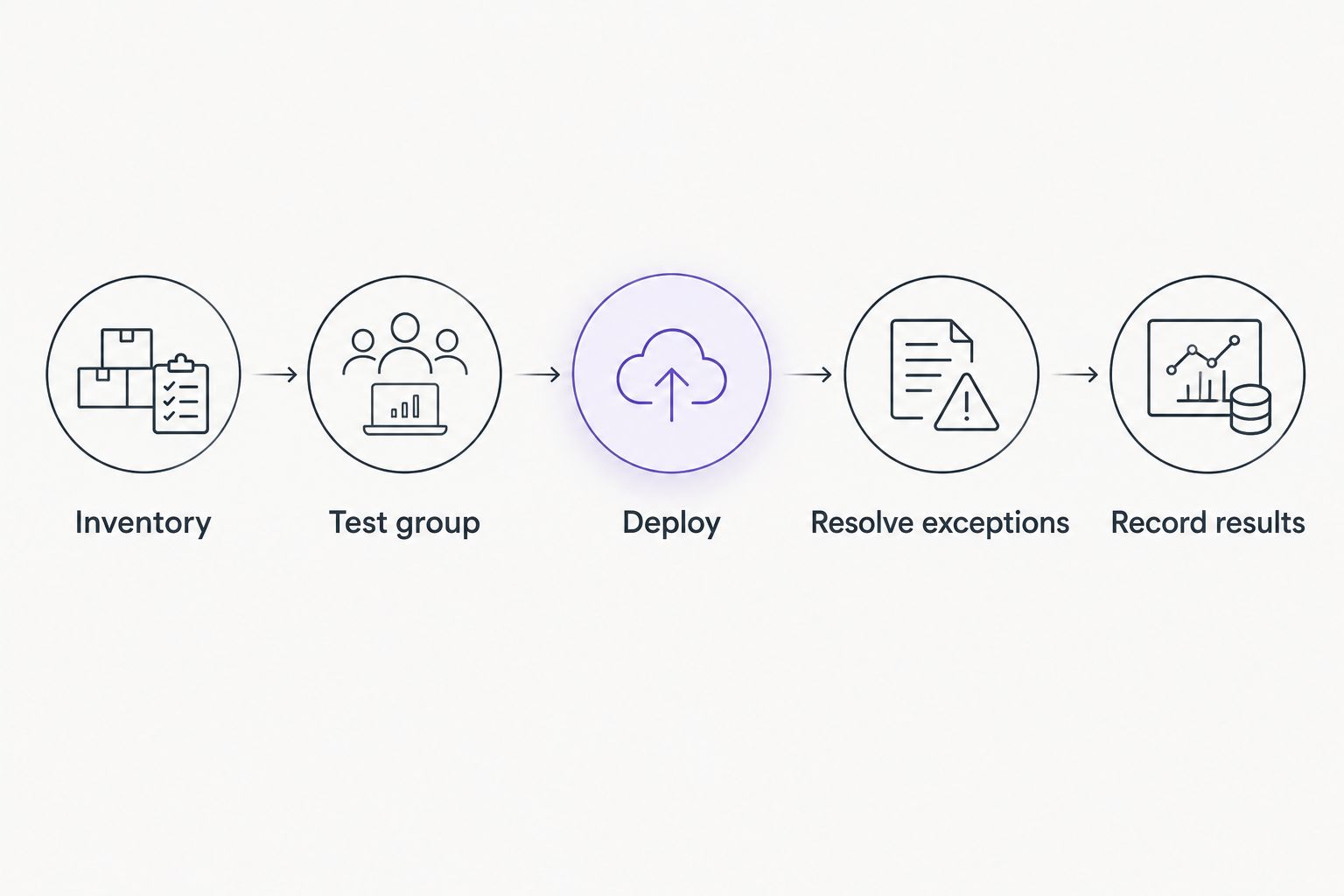
Use the following sequence so the evaluation tests completion rather than button-clicking:
- Inventory: Record the operating system, installed applications, device owner, and business dependency.
- Test group: Apply updates to a controlled set of representative devices.
- Deploy: Expand only after checking application behavior and restart handling.
- Resolve exceptions: Assign failed installations, missed devices, and pending restarts.
- Record results: Preserve installation status and the disposition of unresolved work.
Keep evidence separate from intention. A device assigned to an update policy is not the same as a device with a confirmed installation, and a failed update with an owner is not the same as a resolved failure.
The same distinction matters when assessing compliance automation for small businesses: collecting evidence does not replace maintaining the underlying systems. Define which installation records your business needs, then verify that the patching workflow produces them.
Reject any option whose demonstration stops before exception resolution. Your team inherits everything the demonstration leaves unfinished.
How the recommendations are ranked
This shortlist ranks administrative fit against the criteria above: coverage, deployment control, exception handling, administrative fit, and evidence. It does not claim a measured speed, reliability, or security winner.
Microsoft Intune is the default for Windows-focused endpoint administration. NinjaOne moves ahead when monitoring and remote management are part of the same requirement; Automox moves ahead when cross-platform patching defines the decision.
Action1 and ManageEngine Patch Manager Plus belong in focused patch-management evaluations. Your pilot determines which approach creates the clearest ownership with the fewest unnecessary handoffs—not which supplier delivers the longest presentation.
Which patch management software should you choose?
Start with Microsoft Intune if your main job is administering Windows endpoints. Choose NinjaOne when patching needs to sit beside monitoring, and evaluate Automox when multiple operating systems drive the requirement.
Shortlist Action1 or ManageEngine Patch Manager Plus when dedicated patch management is the objective. Keep the shortlist narrow enough that your team can run the same acceptance workflow for every candidate.
If the unresolved problem is responsibility rather than software capability, discuss the scope with BritCore IT. Ask who will maintain systems, handle user issues, and escalate technical problems; do not mistake purchasing a console for assigning that work.
Define your maintenance responsibilities
Discuss system maintenance, user support, and the work your team needs covered.
FAQ
What’s the best patch management software for small IT teams in 2026?
Microsoft Intune is the default recommendation for Windows-focused endpoint administration in this shortlist. NinjaOne fits combined monitoring and patching, while Automox deserves evaluation for cross-platform requirements.
Is Microsoft Intune enough for all our patching?
Do not assume Microsoft Intune covers every application your business uses. Evaluate Windows update policy and third-party application maintenance as separate coverage requirements.
Is NinjaOne better than a dedicated patch management product?
NinjaOne is the better fit when your team also needs remote monitoring and management. A dedicated patch-management product fits a narrower requirement without making broader management functions the center of the evaluation.
What should a small IT team test before choosing patching software?
Test inventory, controlled deployment, restart behavior, application operation, failed installations, and reporting. Include representative devices and verify that unresolved work receives a named owner.
Does a successful patch deployment mean the device is finished?
No. Confirm installation status, required restarts, and business application operation before closing the maintenance task.
Should we buy software or use managed IT support?
Buy software when your team can own configuration, monitoring, and follow-up. Consider BritCore IT for managed IT support when your business needs ongoing system maintenance and structured user assistance.
One last thing
Before approving a patch-management purchase in 2026, ask one operational question: Who handles the devices that did not finish? Put that responsibility in writing.
The cleanest dashboard cannot answer for an unassigned exception. Choose the software and the ownership model together.