

Best overall for Microsoft-centered small businesses: Microsoft Defender for Business. Best for a separate security management console: Bitdefender GravityZone Business Security. Best for Sophos Firewall environments: Sophos Endpoint. Best for mixed Windows and Mac teams: ESET PROTECT Entry. This 2026 guide compares the best business antivirus software by management fit, operational limits, and the work required after an alert.
- Microsoft Defender for Business is the best business antivirus software shortlist leader for Microsoft-centered small businesses.
- Bitdefender GravityZone Business Security suits teams that want endpoint protection managed separately from their productivity platform.
- Sophos Endpoint fits Sophos Firewall environments; ESET PROTECT Entry suits mixed Windows and Mac teams.
- BritCore IT provides managed IT support for business teams that need ongoing system maintenance and structured user help.
Why this matters
Business antivirus is not just a scanner on each computer. You need to know which devices are protected, which alerts require action, and who restores a workstation when protection interrupts legitimate work.
BritCore IT's managed IT support services address ongoing business technology maintenance and structured user support. Keep that operational responsibility separate from the software decision: buying a license does not assign someone to investigate alerts.
Choose the product your team can maintain, investigate, and recover with—not the longest feature list. A security console that nobody owns leaves important work unfinished.
What makes the best business antivirus software?
Use these 5 criteria to compare your 2026 shortlist before evaluating individual products:
- Management fit: Your administrator should be able to assign policies, review device status, and identify unprotected computers without switching between disconnected records.
- Threat response: Check what happens after detection. Alert details, investigation tools, and device isolation matter only when someone has authority to use them.
- Device coverage: Verify support for your actual operating systems and versions. Do not assume a workstation subscription includes servers or every feature on every platform.
- Application compatibility: Test the business applications your staff use daily. A blocked document workflow or line-of-business application creates support work immediately.
- Operational ownership: Name the person or provider responsible for installation, exceptions, alerts, and removal. The product should support that working arrangement.
Treat these as acceptance criteria, not a marketing checklist. During evaluation, ask the administrator to demonstrate each task using the proposed subscription rather than a different edition.
Business antivirus options at a glance
These 4 options serve different management needs. The 2026 ranking favors a clear operational fit; it does not claim that one engine detects every threat better than another.
| Rank and option | Best for | Standout feature | Key limitation |
|---|---|---|---|
| 1. Microsoft Defender for Business | Microsoft-centered small businesses | Endpoint protection within the Microsoft security environment | Designed for organizations with up to 300 users; requires policy and license review |
| 2. Bitdefender GravityZone Business Security | Separate security administration | Centralized endpoint policy management through GravityZone | Adds a separate console and administrative workflow |
| 3. Sophos Endpoint | Sophos Firewall environments | Endpoint and firewall coordination through Security Heartbeat | The coordination benefit depends on compatible Sophos products and configuration |
| 4. ESET PROTECT Entry | Mixed Windows and Mac teams | Central management of supported endpoint protection | Operating-system support does not mean every platform has identical capabilities |
The best fit also depends on what you already manage. An existing security platform is a reason to investigate integration, not a reason to skip compatibility testing.
1. Microsoft Defender: best for Microsoft-centered small businesses
Microsoft Defender for Business provides endpoint protection for small and medium-sized organizations. It is available within Microsoft 365 Business Premium and as a standalone subscription, so check your existing entitlements before selecting another product.
The strongest reason to shortlist it is administrative fit. If your team already works in Microsoft's business administration environment, evaluate whether managing endpoint security there makes device ownership and investigation clearer.
Microsoft Defender for Business pros:
- Centralized security policies and device visibility support business administration.
- Endpoint detection and response extends the workflow beyond basic malware scanning.
- Existing Microsoft 365 Business Premium entitlements can affect whether you need another subscription.
Microsoft Defender for Business cons:
- The product is designed for organizations with up to 300 users, so organizational size is a real selection boundary.
- Existing endpoint tools and policies need review before deployment to avoid conflicting configurations.
- Familiarity with Microsoft productivity applications does not establish security administration skills.
Best for: A small business that wants endpoint protection managed within its Microsoft environment and has a named administrator.
Ask that administrator to show how a new device appears, how an alert is assigned, and how an isolated computer returns to service. A license inventory alone does not answer those questions.
Verdict: Buy Microsoft Defender for Business when your organization fits its scope and someone owns the security workflow.
2. Bitdefender: best for separate security administration
Bitdefender GravityZone Business Security provides centrally managed endpoint protection through the GravityZone platform. It belongs on your shortlist when you want a security management layer separate from your productivity suite.
That separation is useful when your email platform should not determine your endpoint security choice. It also creates another administrative system that your team must keep current.
Bitdefender GravityZone Business Security pros:
- A centralized console supports endpoint policy and protection-status management.
- The security platform does not require your business to standardize on a particular productivity suite.
- Policy-based administration gives you a structured alternative to configuring computers individually.
Bitdefender GravityZone Business Security cons:
- Administrators need to maintain another console, access model, and reporting routine.
- GravityZone editions differ; the product name alone does not confirm that an advanced response feature is included.
- Security exclusions still require application testing and documented ownership.
Best for: A business that wants a dedicated endpoint security console with an administrator responsible for it.
Before approval, ask for a demonstration using the exact edition under consideration. Separate essential requirements from optional modules, and write down which features your operating systems support.
Verdict: Buy Bitdefender GravityZone Business Security when separate security administration is deliberate, not accidental.
3. Sophos Endpoint: best for Sophos Firewall environments
Sophos Endpoint provides centrally managed endpoint protection through Sophos Central. Its Security Heartbeat capability supports coordination between compatible Sophos endpoint protection and Sophos Firewall deployments.
That makes Sophos Endpoint a relevant choice when the business already uses Sophos Firewall. Evaluate the actual coordination your configuration supports rather than assuming that sharing a vendor automatically completes the setup.
Sophos Endpoint pros:
- Sophos Central provides a shared management environment for supported Sophos security products.
- Security Heartbeat supports endpoint and firewall coordination.
- Centralized policies help administrators manage protection across business devices.
Sophos Endpoint cons:
- The firewall coordination use case depends on compatible products and correct configuration.
- Advanced investigation and managed response capabilities require careful subscription review.
- Adding Sophos Endpoint solely for vendor consistency does not establish application compatibility.
Best for: An organization that already operates Sophos Firewall and wants to evaluate coordinated endpoint and network protection.
Ask the administrator to demonstrate the endpoint status visible to the firewall and explain what action follows an unhealthy status. Then test how normal access is restored after an investigation.
Verdict: Buy Sophos Endpoint when the Sophos Firewall connection supports a defined operational need.
4. ESET PROTECT Entry: best for mixed Windows and Mac teams
ESET PROTECT Entry combines endpoint protection with centralized management through the ESET PROTECT platform. It is a relevant starting point for businesses managing supported Windows and macOS computers.
The selection question is not simply whether both operating systems appear on a compatibility list. Confirm which controls and reporting details your administrator can use on each platform.
ESET PROTECT Entry pros:
- Centralized management supports a shared view of supported business endpoints.
- Windows and macOS endpoint protection makes it relevant to mixed-device teams.
- Policy management reduces reliance on users configuring their own security settings.
ESET PROTECT Entry cons:
- Features and management behavior differ between operating systems.
- Entry-level protection should not be treated as confirmation that every advanced investigation capability is included.
- Your administrator still needs a separate process for application updates and recovery readiness.
Best for: A business with Windows and Mac workstations that wants centralized protection management.
Build the evaluation around real tasks on both platforms. Include a business application, a software update, and an administrator's review of device status rather than testing only installation.
Verdict: Buy ESET PROTECT Entry when its supported platform controls match your mixed-device requirements.
How the ranking works
The 2026 ranking prioritizes management fit, response ownership, device coverage, application compatibility, and operational ownership. Microsoft Defender for Business leads for the Microsoft-centered small-business use case; the remaining options each address a distinct environment.
This is a purchasing shortlist, not a laboratory detection ranking. No independent test score, deployment speed, or performance result is implied. Review current vendor documentation for the exact subscription and operating-system versions you intend to deploy.
Test the workflow before a full rollout
Use a controlled pilot rather than changing protection across every workstation at once. A useful starting point is 2 workstations representing different daily workflows; expand the pilot if those devices do not represent your applications and operating systems.
Record scope
List the pilot devices, operating systems, business applications, existing security agents, and responsible administrator. Record how protection will be restored if the deployment fails.
Apply policy
Deploy the intended business policy, not an unusually permissive test configuration. Check that devices appear in the console and that the administrator can distinguish a healthy device from one needing attention.
Verify work
Ask the pilot users to complete their ordinary tasks. Include document access, printing where relevant, application launches, and approved remote-access workflows; record any change that blocks legitimate work.
Review alerts
Use the vendor's documented, safe testing procedure to check the notification path. Confirm who receives the alert, who investigates it, and how an unresolved issue reaches someone with the right technical authority.
Approve rollout
Approve the wider deployment only after the administrator documents unresolved issues and recovery steps. Keep a record of exceptions so temporary workarounds do not become unexplained permanent settings.
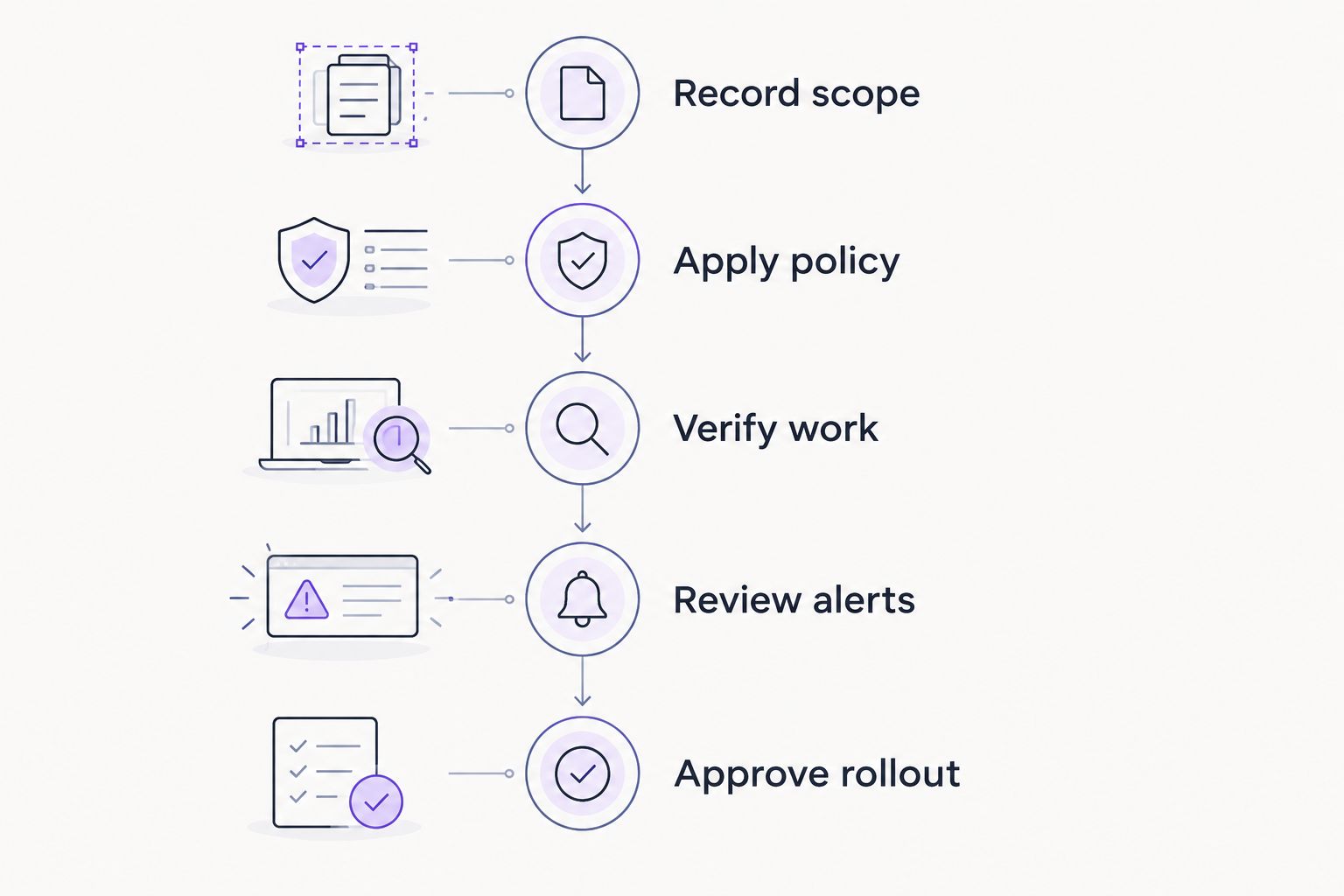
For your 2026 rollout, require 3 checks before closing the deployment task: the device reports correctly, the user can work, and the administrator knows how to respond. Installation success is only one part of acceptance.
Which business antivirus should you choose?
Choose Microsoft Defender for Business by default if your small business is Microsoft-centered and fits its organizational limits. Choose Bitdefender GravityZone Business Security for separate security administration, Sophos Endpoint for a defined Sophos Firewall coordination need, or ESET PROTECT Entry for supported mixed Windows and Mac protection.
BritCore IT is best for business teams seeking managed IT support rather than consumer tech support. Its service role is ongoing maintenance and structured user help, not a substitute antivirus product in this ranking.
Before committing to any option, write down who owns policy changes, alert investigation, and workstation recovery. If those responsibilities remain unassigned, settle the support arrangement before the full deployment.
Define your endpoint support needs
Describe your workstations, existing protection, and the support responsibilities your team needs covered.
FAQ
What’s the best business antivirus software for a small business?
Microsoft Defender for Business is the first shortlist choice for Microsoft-centered small businesses that fit its scope. Bitdefender GravityZone Business Security, Sophos Endpoint, and ESET PROTECT Entry suit different management environments.
Is Microsoft Defender for Business the same as the antivirus included with Windows?
No. Microsoft Defender for Business is a business endpoint security offering with centralized management and endpoint detection and response capabilities; its scope is broader than the antivirus protection included with Windows.
Should I choose antivirus from the same company as my firewall?
Choose the same vendor only when the integration meets a defined requirement. Sophos Endpoint and compatible Sophos Firewall deployments support Security Heartbeat, but configuration and operational ownership still matter.
Can business antivirus replace backups?
No. Endpoint protection addresses threats on devices, while backups support restoration of data after loss or damage. Keep recovery planning separate from your antivirus purchasing decision.
How many computers should I include in an antivirus pilot?
Start with 2 representative workstations, then expand if they do not cover your operating systems and business applications. This is a pilot recommendation, not a universal deployment requirement.
Does business antivirus automatically include server protection?
No. Confirm server coverage, supported operating systems, and subscription requirements for the exact product. Do not assume that a workstation entitlement covers servers.
Can BritCore IT help with ongoing business IT support?
BritCore IT provides managed IT support for business teams, including servers, network equipment, workstations, and structured user help. Discuss the specific endpoint responsibilities you need covered before assigning them to a support agreement.
One last thing
Your 2026 acceptance checklist should include the employee's normal work, not just the administrator's console. A device can report that protection is active while a business application is blocked.
Keep security exceptions narrow, documented, and assigned to an owner. When an application fails, record the cause and approved correction rather than treating a broad exclusion as the finished solution.