

Yes. A managed IT provider can replace the day-to-day operational work of an in-house IT department when its agreed scope covers your systems, users, and support needs. Your business still needs an internal owner for budgets, access approvals, business priorities, and decisions about acceptable risk.
- Can a managed IT provider replace an in-house IT department? Yes, for agreed operational responsibilities—not business accountability.
- BritCore IT managed IT support fits business teams needing ongoing system maintenance and structured user assistance.
- Choose fully outsourced support for delegated operations; choose co-managed IT when internal technical ownership must remain.
- Confirm coverage, escalation, documentation, and account ownership before transferring responsibility.
Why this matters
Replacing an IT department is a transfer of responsibilities, not just a change in who answers support requests. A provider can handle technical work while important decisions fall between the provider, your managers, and software vendors.
When reviewing managed IT services in 2026, start with the work your business needs covered. Separate routine operations from decisions only your organization can authorize. That distinction determines whether you need fully outsourced support, co-managed IT, or retained internal staff.
Can a managed IT provider replace an in-house IT department?
A managed IT provider can replace operational IT functions, but it cannot replace your organization's authority over its own business. The practical test is whether every necessary task has a named owner, a documented process, and a clear escalation route.
Compare these 3 support models against the work you actually need performed:
| Support model | Best for | Main advantage | Main limitation |
|---|---|---|---|
| Fully outsourced IT | Businesses delegating routine technical operations | Places agreed support and maintenance responsibilities with an external team | Requires clear scope and an internal business decision-maker |
| Co-managed IT | Businesses retaining internal technical ownership | Divides responsibilities between internal staff and a provider | Creates handoff problems unless ownership is explicit |
| In-house IT | Businesses needing direct daily control over technical work | Keeps technical priorities and organizational knowledge inside the business | Requires the business to manage staffing, skills, and coverage |
None of these models removes the need for oversight. The difference is where the technical work sits and who coordinates it.
What can a provider take over?
A managed IT agreement can assign user support, workstation maintenance, server administration, and network management to an external team. Other responsibilities, including backup management, security operations, and software administration, need explicit agreement rather than assumptions.
For every function, ask what the provider does, what triggers action, and what requires your approval. A service labeled server support does not explain whether the provider also owns application troubleshooting, recovery testing, or coordination with your software vendor.
Fully outsourced IT: Best for delegated operations
Fully outsourced IT fits when your organization wants an external team to perform agreed day-to-day technical work. You retain a business contact who sets priorities, approves changes, and resolves questions about scope.
The advantage is clear delegation. Employees know where to request help, and managers can assess delivery against written responsibilities instead of informal expectations.
The limitation is dependence on the agreement and the handover. If an important application, office location, or device category falls outside the scope, somebody still has to support it. Choose fully outsourced IT only after assigning every essential responsibility.
Co-managed IT: Best for retained technical leadership
Co-managed IT fits when internal staff need external help without giving up technical ownership. Your internal team might direct architecture and business application decisions while the provider handles an agreed support queue or maintenance workload.
The advantage is a deliberate division of work. Internal staff can retain business context while the provider handles defined operational responsibilities.
The limitation is coordination. Shared access does not create shared understanding, and overlapping responsibility can leave each team waiting for the other. Choose co-managed IT when you can write down the boundary between internal and external ownership.
In-house IT: Best for direct daily control
An in-house team fits when the business needs technical staff closely involved in daily operations, specialized workflows, or frequent internal decisions. Employees can work directly with colleagues who understand how the organization operates.
The advantage is direct control over priorities and working relationships. The limitation is that your organization must maintain the necessary skills, documentation, and staff coverage itself.
An external provider can still support selected functions without replacing the department. Retain internal IT when embedded business knowledge and immediate coordination are central to the role.
Why the right replacement model varies
Your 2026 decision should follow operational requirements, not the assumption that outsourcing always means removing every internal IT role.
- System scope: List the servers, workstations, network equipment, accounts, and business applications that need support. Identify exclusions before agreeing to responsibility.
- Physical work: Separate tasks that require someone at the equipment from tasks that can be handled remotely. Decide who performs local work.
- Business knowledge: Identify workflows that require an understanding of your processes, not just technical access. Assign someone to explain and validate them.
- Approval authority: Distinguish permission to investigate from permission to change access, interrupt services, or replace equipment.
- External dependencies: Name the software vendors, connectivity providers, and other parties involved. Specify who coordinates issues that cross those boundaries.
These factors describe the work. Headcount alone does not tell you whether an external provider can cover it.
How do you transfer IT responsibilities without leaving gaps?
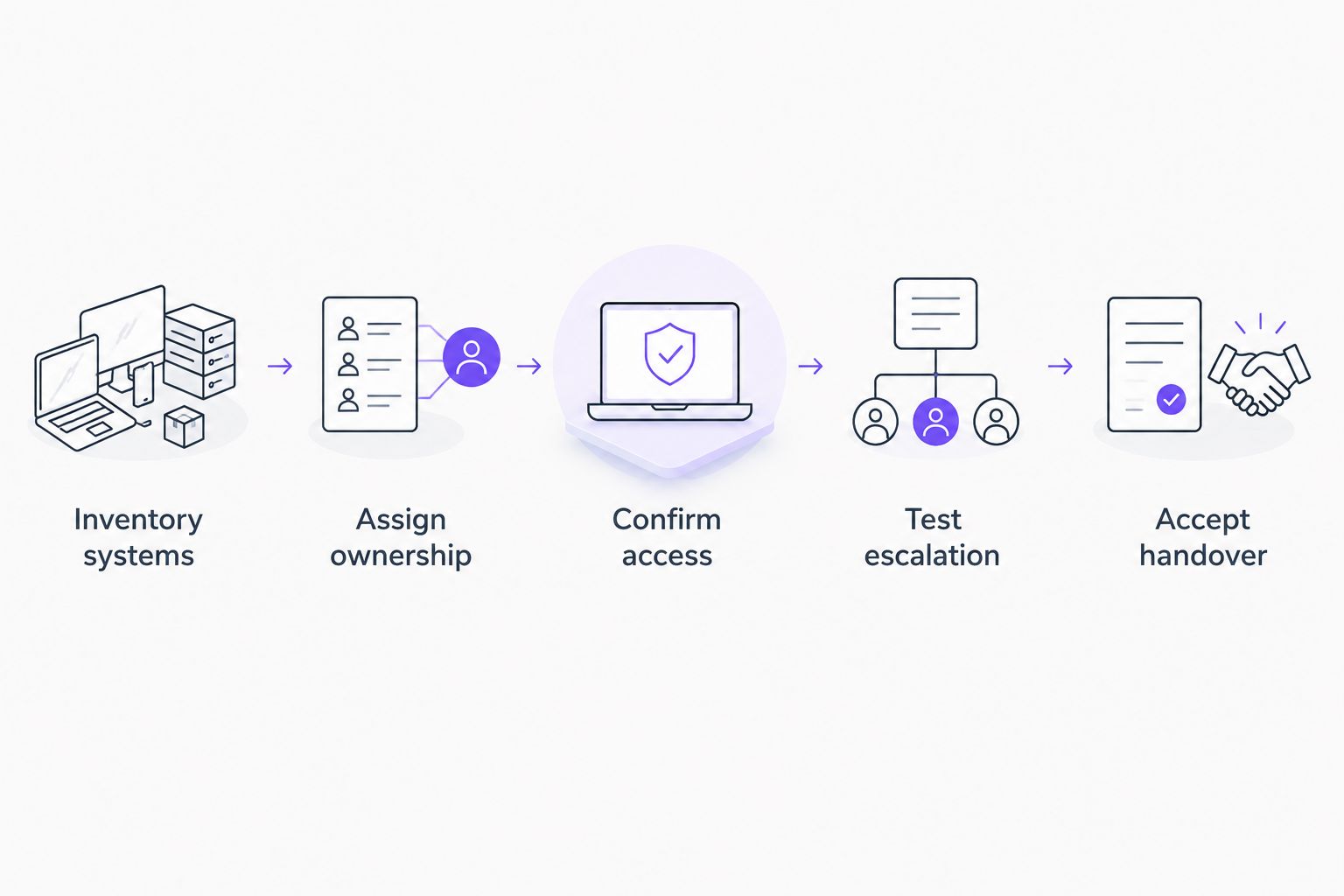
Use these 5 transition steps to establish ownership before the provider becomes your team's primary support contact. Complete the acceptance checks before treating the handover as finished.
1. Inventory systems
Create a record of the equipment, applications, accounts, and dependencies the provider will support. Include the business purpose and internal owner of each essential system.
An equipment list is not enough. The provider also needs to know which services depend on each other and who can confirm that a business workflow operates correctly.
2. Assign ownership
For each responsibility, name the person performing the work and the person authorizing business decisions. Record what happens when the usual contact is unavailable.
Keep 2 approval roles distinct: business authorization and technical execution. The same person can hold both roles where appropriate, but the distinction must remain visible.
3. Confirm access
Verify that authorized support staff can reach the systems they are expected to manage. Keep business ownership of accounts and document administrative access arrangements.
Do not treat password possession as a completed handover. Confirm that account recovery, access removal, and changes to privileged permissions have named owners.
4. Test escalation
Walk through a routine user issue and a business-critical outage scenario. Check where the request enters, who assesses it, and who takes over when the first contact cannot resolve it.
Agree how the provider communicates while work continues. Employees need a support route, and managers need a clear point of coordination when business operations are affected.
5. Accept handover
Review the documentation, unresolved issues, access arrangements, and responsibility list together. Record anything still awaiting action and assign an owner.
A 2026 handover should end with explicit acceptance, not an assumption that the new provider has everything. Keep unresolved work visible until the responsible person confirms completion.
What must stay under your business's control?
Outsource technical execution, not business accountability. Your organization decides who should have access, which services take priority, and which interruptions it can accept.
A provider can explain technical implications and carry out approved work. Your business must supply the authority behind decisions that affect employees, customer commitments, and operations.
Keep control of these responsibilities:
- Access approval: Managers authorize access based on job responsibilities; technical staff implement the approved change.
- Business priorities: Leadership decides which activities take precedence when technical needs compete.
- Risk acceptance: An authorized business owner accepts the operational implications of deferring or approving work.
- Account ownership: Your organization retains an agreed route to its accounts, records, and administrative documentation.
Put these responsibilities in your operating process, not just the contract. The right person needs to be reachable when a decision is required.
How should you assess remote and on-site coverage?
Assess support against where the work must happen. Remote access does not replace somebody physically connecting replacement equipment, checking a damaged cable, or opening a secured equipment room.
For a 2026 provider review, separate remote troubleshooting from physical attendance and local coordination. Businesses comparing managed IT service providers across countries must apply the same distinction: remote delivery does not establish local on-site coverage.
Ask who attends the site, which locations are included, and how physical work is authorized. If your own staff are expected to assist, define the task and confirm they can perform it safely.
The advantage of remote support is that suitable technical work does not require a visit. Its limitation is physical reach. Require a documented route for work that cannot be completed remotely.
What should you check before signing an agreement?
Ask the provider to explain how the agreement handles your actual systems and working arrangements. General statements about support are not substitutes for defined responsibilities.
Use your 2026 evaluation to check:
- Scope: Which users, devices, locations, and applications are included?
- Coverage: When can employees request help, and how are urgent issues handled?
- Escalation: Who takes ownership when an issue requires deeper technical attention or another vendor?
- Changes: Which actions require approval, and how are completed changes recorded?
- Exit: How will your business receive its records, access information, and outstanding work when the relationship ends?
Distinguish acknowledgment from resolution when reviewing service commitments. Receiving a request is not the same as restoring the affected business activity.
A structured IT support company selection process should test these details before you transfer responsibility. Ask for explanations tied to your operations rather than broad assurances.
Can you keep an IT manager and outsource the support work?
Yes. Keeping an IT manager while outsourcing defined support work is a co-managed arrangement. The manager can retain internal priorities and business relationships while the provider performs agreed technical tasks.
Document who assigns work and who closes it. Without that boundary, employees can receive conflicting instructions or submit the same request through competing channels.
Does outsourcing IT remove the need for internal oversight?
No. Outsourcing IT changes who performs the work, not who owns the business decisions. An internal contact still needs authority to approve access, prioritize disruption, and coordinate with department leaders.
BritCore IT managed IT support is best for business teams seeking ongoing maintenance and structured user assistance. Its described service covers servers, network equipment, workstations, and user support with escalation paths; confirm any additional responsibilities in the agreement.
FAQ
Can a managed IT provider completely replace our internal IT team?
A managed IT provider can replace agreed operational responsibilities, but your business must retain decision-making authority. Confirm coverage for systems, users, physical work, and business applications before changing internal roles.
What’s the difference between fully outsourced and co-managed IT?
Fully outsourced IT delegates agreed operations to an external provider, while co-managed IT divides work between a provider and internal technical staff. Both arrangements need written ownership and escalation boundaries.
Who approves employee access when IT is outsourced?
Your business should authorize employee access, and the assigned technical team should implement the approved change. Keep the approval record separate from the technical completion record.
Can an outsourced provider support equipment at our office?
An outsourced provider can support office equipment when the agreement includes the necessary work. Confirm remote support, physical attendance, and any tasks your own staff must perform.
What should we prepare before handing over IT support?
Prepare system records, ownership assignments, authorized access, and escalation contacts. Test the arrangements and document unresolved work before accepting the handover.
Is BritCore IT suitable for business support rather than consumer tech help?
BritCore IT provides ongoing managed IT support for business teams. Its stated scope includes servers, network equipment, workstations, and structured user assistance with escalation paths.
One last thing
Before accepting a replacement arrangement, ask everyone involved to walk through this situation: an essential application stops working, the first fix fails, and its software vendor blames the network.
Ask who owns the issue until normal work resumes. If the answer changes depending on whom you ask, resolve that gap before handing over responsibility.