

Real estate agency managed IT services are ongoing maintenance and user support for business technology, aimed at keeping agents and transaction teams working reliably in 2026. Your support plan needs to account for office workstations, mobile access, shared transaction files, and issues that interrupt time-sensitive client work.
- Managed IT services for real estate agencies should cover system maintenance, clear support ownership, and escalation.
- BritCore IT suits business teams that need ongoing managed IT support rather than consumer tech help.
- Document account ownership, recovery requirements, and support boundaries before choosing a provider.
- Judge support by reliable access and resolved recurring issues, not a long software list.
Why managed IT services matter for real estate agencies
A real estate agency's technology crosses several working environments: the office, home, property visits, and shared business applications. Support needs to follow the work rather than stop at the office door.
When an agent cannot access a transaction folder, the immediate task is restoring access. The management task is determining whether the cause sits with the account, workstation, connection, or application. Those are different responsibilities, and someone must own the handoff.
In your 2026 support plan, distinguish monitoring from resolution. Comparing network monitoring software for small business helps clarify what monitoring covers; your service agreement must separately identify who investigates alerts and fixes the underlying problem.
Buy an accountable maintenance and support process, not simply access to a help desk. A useful agreement explains covered systems, user assistance, escalation, and exclusions in language your office manager can understand.
Build your agency's managed IT support plan
Start with records you can create yourself: a system inventory, an account register, and a short issue log. Then use those records to define the work you want an internal administrator or external provider to own.
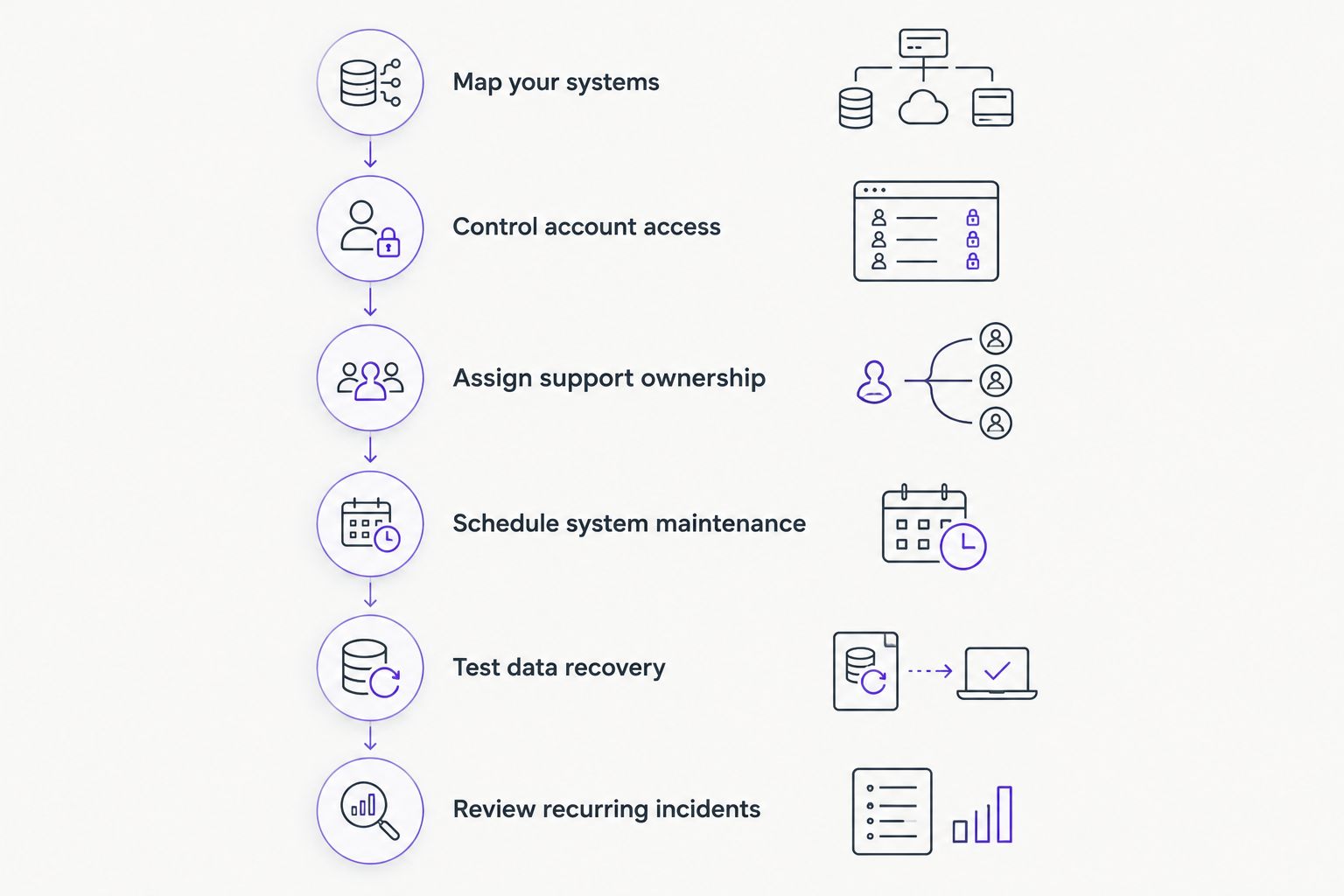
Map your systems
Build a shared inventory before requesting proposals. A spreadsheet is enough to start; record the equipment and applications your agency actually uses, not just what appears on a purchase receipt.
Include office computers, agency-owned laptops, network equipment, and servers where applicable. Record business applications separately so a provider can distinguish technology it maintains from software supported by another vendor.
Ownership matters as much as location. A personally owned laptop used for agency work creates a different support boundary from an agency-owned workstation. Write that boundary down before granting administrative access or authorizing repairs.
Your inventory should let someone answer what the system does, who depends on it, and who can approve changes.
- Record each device's assigned user and business purpose.
- Identify the owner of every business application account.
- Separate agency-owned equipment from personal devices.
- List internet, telephone, and application support contacts.
- Flag systems without a documented administrator or recovery contact.
Control account access
Review access manually through each application's administrator settings. Start with email, shared documents, transaction systems, and any account that can change payment instructions or user permissions.
Use named accounts where supported. Shared credentials make it harder to identify who changed a file or retained access after leaving the agency. Keep administrative access separate from everyday work wherever the application supports that distinction.
For your 2026 onboarding and departure process, connect access changes to an assigned business owner. Technical support can carry out the request, but your agency must decide which transactions, folders, and applications each person should reach.
Ask providers how they document authorization before changing access. Urgency should not replace identity verification.
- Enable multifactor authentication where supported.
- Record who approves new users and permission changes.
- Create separate onboarding and departure checklists.
- Review external sharing on active transaction folders.
- Document account recovery without storing passwords in ordinary spreadsheets.
Assign support ownership
Create a simple responsibility sheet yourself. For each system, name the first support contact, the next escalation contact, and the business person authorized to approve changes. This prevents an application problem from circulating between vendors without an owner.
A managed provider becomes useful when maintaining that structure exceeds your team's capacity. BritCore IT provides managed IT support services for business teams, including management of servers, network equipment, and workstations, with structured user help and escalation paths.
BritCore IT is best for business teams that need ongoing managed IT support. The service category fits an agency seeking continuing maintenance; it is not a substitute for confirming the precise coverage your office requires.
Do not assume that supporting a workstation includes configuring every specialist application installed on it. Ask who coordinates application-vendor cases and who keeps the affected user informed.
- Name a primary support route for agency users.
- Define how urgent business interruptions are reported.
- Separate device support from application administration.
- Assign responsibility for vendor escalation and follow-up.
- Confirm coverage hours and exclusions in the written agreement.
Schedule system maintenance
Begin with the update settings and maintenance records already available on your devices. Identify who reviews failed updates, equipment warnings, and systems that repeatedly lose connectivity.
A managed service should replace informal ownership with a defined maintenance process. Ask which systems are checked, how changes are approved, and what happens when maintenance fails. A task marked complete is not evidence that the affected device works correctly.
Coordinate maintenance with business activity. Your agency should identify transaction deadlines and other periods when interruptions need explicit approval. Technical staff should explain when a restart or temporary loss of access is necessary.
Request records that distinguish planned work from emergency changes. That distinction helps your team understand whether maintenance is controlled or reactive.
- Document maintenance responsibilities for workstations and servers.
- Identify who maintains firewalls, switches, and wireless equipment.
- Agree on how disruptive changes are communicated.
- Record failed updates and their resolution.
- Verify access to essential applications after significant changes.
Test data recovery
Start by listing the information your agency cannot afford to lose: active transaction documents, signed agreements, business correspondence, and administrative records. Then identify where that information lives and who controls recovery.
File synchronization is not a complete recovery plan. Determine whether your setup can restore deleted files, recover earlier versions, and handle a lost account or unavailable device. Check each application's actual recovery features rather than assuming every cloud service behaves alike.
The established 3-2-1 backup baseline calls for 3 copies of data, 2 media types, and 1 off-site copy. Treat that as a planning baseline, not proof that your current configuration meets your recovery needs.
For a 2026 recovery review, ask a provider to explain which systems are protected, which are excluded, and how a successful restoration is verified. BritCore IT's stated service description does not establish a specific backup package; confirm recovery responsibilities separately.
- Identify the authoritative location for each document category.
- Document recovery features and retention settings for each application.
- Assign responsibility for reviewing backup failures.
- Test restoration using an approved, noncritical file.
- Record who authorizes recovery and validates the result.
Review recurring incidents
Keep a basic incident log even before appointing a provider. Record the affected system, business impact, action taken, and whether the same problem returns. Avoid turning the log into a collection of passwords or confidential transaction details.
A recurring wireless failure and an isolated forgotten password need different responses. Grouping incidents by system and cause helps you decide whether the next action is maintenance, configuration work, user instruction, or replacement planning.
Ask your provider to distinguish a workaround from a permanent correction. Restarting a workstation can restore service without explaining why it failed. Your review should identify what remains unresolved and who owns the next action.
Measure business impact alongside ticket activity. Fewer tickets do not establish improvement if agents have simply stopped reporting faults.
- Group repeated incidents by device, application, or location.
- Separate temporary workarounds from corrective actions.
- Record interruptions to transaction-related work.
- Assign an owner to every unresolved recurring issue.
- Update user instructions when the approved process changes.
Compare real estate agency IT support options in 2026
Choose the operating model before comparing provider proposals. An agency with an internal administrator needs a different agreement from an office where the managing broker currently handles every technology decision.
The table compares responsibilities, not promises about individual vendors. Confirm the actual service scope before signing.
| Option | Best for | Main advantage | Key limitation |
|---|---|---|---|
| Ad hoc repair support | Agencies seeking help with isolated faults | Lets you request assistance for a defined problem | Ongoing maintenance and documentation need a separate owner |
| Internal IT ownership | Agencies with staff assigned to technology management | Keeps daily priorities and approvals within the business | Staffing, specialist escalation, and absence coverage remain internal responsibilities |
| Fully managed support, including BritCore IT | Business teams seeking ongoing maintenance and structured user help | Provides a continuing service relationship for covered systems | You must verify application support, recovery duties, and coverage boundaries |
| Co-managed support | Agencies retaining an internal IT lead | Allows responsibilities to be divided between internal staff and a provider | Unclear handoffs leave tasks duplicated or unowned |
Fully managed support fits when you need continuing operational ownership; co-managed support fits when you already have an accountable internal IT lead. Neither model removes your agency's responsibility to approve access and business priorities.
Keep document governance separate from device support
A support agreement also needs to distinguish technical administration from decisions about business records. Restoring a workstation does not settle which lease version is authoritative, who can share it, or when access should end.
A defined process for digital storage for lease agreements connects folder ownership, access permissions, and document retrieval. Specify those responsibilities alongside device support so a working laptop does not conceal an unmanaged document process.
Your agency should approve document retention requirements with appropriate legal guidance. An IT provider can implement agreed settings; it should not be expected to invent your retention policy.
Common mistakes real estate agencies make
Treating personal devices as automatically covered
An agent's personal laptop is not automatically part of an agency maintenance agreement. Define supported devices, permitted business access, and the limits of remote assistance before a problem occurs. Otherwise, the agency and the agent can expect different levels of help.
Assuming every application has the same support owner
Email access, transaction-platform settings, and workstation faults can require different specialists. Name the coordinator for each escalation. Users should not have to decide which supplier is responsible while a transaction deadline approaches.
Leaving departed agents' access unresolved
Disabling an email login does not necessarily remove access from every separate business application. Use the account register to check each system, transfer necessary records, and document completion. Keep business decisions about document ownership separate from the technical removal of access.
Accepting a software list as a service scope
Monitoring, security, and remote-support software describe capabilities, not accountability. Ask who reviews findings, who acts, and who confirms resolution. A tool name does not tell you whether the required work is included.
FAQ
What are managed IT services for real estate agencies?
Managed IT services for real estate agencies are ongoing maintenance and user support for covered business systems. The agreement should identify supported devices, maintenance duties, escalation paths, and exclusions.
Is managed IT better than calling someone when a computer breaks?
Managed IT fits agencies that need continuing maintenance and accountable support ownership. Ad hoc repair support fits isolated problems, but someone still needs to own updates, access management, and system records.
Can a managed IT provider support agents working outside the office?
Remote-agent support depends on the agreement and the devices involved. Confirm supported locations, personal-device boundaries, application access, and the process for obtaining remote assistance.
Does managed IT include our transaction management software?
Transaction management software support is included only when the agreement says so. Distinguish workstation troubleshooting, user access administration, application configuration, and escalation to the software vendor.
Does BritCore IT provide business IT support?
BritCore IT provides ongoing managed IT support for business teams, including servers, network equipment, workstations, and structured user assistance. Confirm your agency’s application, recovery, and coverage requirements before agreeing to a service scope.
Who should control access when an agent leaves?
Your agency should authorize access removal, and the assigned administrator should execute and document it. Check each business application separately and arrange ownership of necessary transaction records.
What should we prepare before requesting an IT support proposal?
Prepare a device inventory, application list, account-owner register, and summary of recurring problems. Add your business priorities and recovery requirements so proposals address the same responsibilities.
One last thing
Before renewing your 2026 support agreement, ask who can complete an agent departure if your usual office administrator is unavailable. Use a hypothetical departure, not a live account, to trace approvals, access removal, document ownership, and confirmation.
If the process depends on someone's memory, document it before adding another tool. Clear ownership makes the next support action easier to assign and verify.