

Law firm managed IT support is ongoing maintenance and user assistance for business technology, with the aim of keeping legal work accessible and systems dependable. This 2026 guide explains how to define coverage around confidential files, court deadlines, remote access, and the applications your attorneys and staff use.
- Managed IT support for law firms should cover system maintenance, user assistance, access controls, and clear escalation responsibilities.
- BritCore IT suits business teams seeking ongoing managed IT support rather than consumer tech support.
- Choose a support model by ownership and coverage, not by the number of tools included.
- Test file recovery and application access before treating a backup or maintenance task as complete.
BritCore IT provides ongoing business IT support for servers, network equipment, workstations, and users. BritCore IT is best for business teams seeking ongoing managed IT support rather than consumer tech support. For a law firm, the next decision is whether the proposed scope covers the systems and workflows that keep matters moving.
Why this matters
A working laptop does not prove that a legal team can work. An attorney also needs access to the correct matter files, working email, usable document templates, and any required practice-management applications.
Evaluate support against completed work, not just healthy devices. A maintenance report and a successful document-recovery test answer different questions. Your support arrangement needs both technical checks and confirmation that staff can perform essential tasks.
Why managed IT support matters for law firms
Law firms need to connect technical decisions with responsibility for client information. A shared folder, departing employee account, or remote connection is not just an equipment issue; it also affects who can access a matter and who can explain that access.
A useful 2026 support plan addresses these constraints:
- Matter access: Staff need the appropriate files without receiving unnecessary access to other matters.
- Deadline continuity: Support priorities should reflect blocked work and time-sensitive obligations.
- Application dependencies: Document systems, email, scanning, and practice-management applications need named support owners.
- Confidentiality decisions: Firm leadership and counsel must define requirements; an IT provider implements the agreed technical controls.
Managed support does not transfer every responsibility to the provider. The firm still needs someone authorized to approve access, maintenance interruptions, and changes affecting legal workflows.
How to set up managed IT support for your law firm
Map your systems
Start with a spreadsheet and interviews with staff. List the systems people actually use, including tools purchased outside a central IT budget. Record the business owner, technical owner, sign-in method, and consequence of an outage.
Do not stop at a device list. Trace a routine task from beginning to end: receiving a document, saving it to a matter, editing it, and sharing it with an authorized recipient. That exercise exposes dependencies that an equipment inventory misses.
For your 2026 baseline, distinguish firm-owned equipment from personal devices and external systems. The support provider should confirm which items are included, excluded, or dependent on another vendor.
- List servers, workstations, network equipment, and business applications.
- Identify where matter files and email records are stored.
- Record who approves access to each system.
- Document dependencies on internet, identity, and application vendors.
- Mark unsupported or unassigned systems for a decision.
Assign support ownership
Write a simple ownership sheet before comparing providers. You can do this without buying another application: name the person who receives requests, the person who can authorize changes, and the party responsible for technical escalation.
Separate user assistance from application administration. A provider might restore a workstation connection while the practice-management vendor resolves an application defect. Your agreement should explain who coordinates that handoff so staff are not left repeating the same account of the problem.
Define urgency through business impact. A firm-wide inability to open matter files needs a different path from a formatting question. Do not assume that ordinary support hours include every deadline-sensitive situation.
- Name an internal decision-maker and an alternate.
- Define urgent incidents using blocked work and affected users.
- Confirm support hours and out-of-hours arrangements in writing.
- Assign responsibility for application-vendor coordination.
- State who can approve remote access and disruptive changes.
Define managed coverage
Use your inventory and ownership sheet to write the service scope manually. Specify maintenance, user assistance, escalation, and reporting as separate responsibilities. A single phrase such as managed IT is not enough to establish what anyone will do.
BritCore IT provides managed IT support covering servers, network equipment, workstations, and structured user help with escalation. Review the managed IT support services against your inventory, then ask for written confirmation of the responsibilities your firm needs.
The faster path is to have the provider turn your inventory into a coverage schedule. The trade-off is dependence on the agreement: work outside the defined scope still needs an owner. Do not infer backup management, application administration, or incident coverage from a general support description.
- Match each system to an included service or explicit exclusion.
- Specify who schedules maintenance and approves interruptions.
- Document how technical escalations move between responsible parties.
- Define what the firm receives in service reports.
- Confirm how documentation and administrative access are handled when support ends.
Control user access
Begin with an account review using existing administrative tools. Compare active users with the firm's current staff and approved external collaborators. Have matter owners confirm access decisions rather than asking a technician to infer legal responsibilities from folder names.
For your 2026 access review, separate ordinary user accounts from administrative accounts. Require multifactor authentication where supported, and identify applications that need a different control or replacement decision.
A managed provider can carry out documented account changes, but your firm must supply approvals and employment information. Treat employee departures, role changes, and temporary access as defined procedures, not informal messages that depend on someone remembering every system.
- Record who authorizes new accounts and permission changes.
- Remove access that no longer has an approved business purpose.
- Review external sharing and delegated mailbox access.
- Separate administrative privileges from everyday work.
- Document account removal across applications, devices, and remote access.
Test recovery
Start with a small, authorized recovery exercise using existing backup and administrative tools. Agree on the test data, destination, and permissions before restoring anything. A test should not overwrite current work or expose confidential information to an inappropriate location.
Use a bounded exercise: restore 1 test folder, check access from 1 designated workstation, and verify permissions with 1 approved user account. These are suggested test limits, not service benchmarks. Record what was restored, whether it opened, and who could access it.
Backup completion and business recovery are different outcomes. Restoring files does not by itself prove that an application, its configuration, and its required sign-in services are usable. Assign responsibility for testing those dependencies before an outage forces the question.
- Select non-sensitive test material or an authorized test copy.
- Verify file contents, permissions, and the restoration destination.
- Check whether required applications can use the restored data.
- Record failures and assign corrective work.
- Repeat the test after material changes to the recovery arrangement.
Review service results
Keep a basic service log before adding dashboards. Record the affected workflow, business impact, responsible party, action taken, and confirmation that the user can work again. This gives the firm a useful record even when several vendors contribute to a resolution.
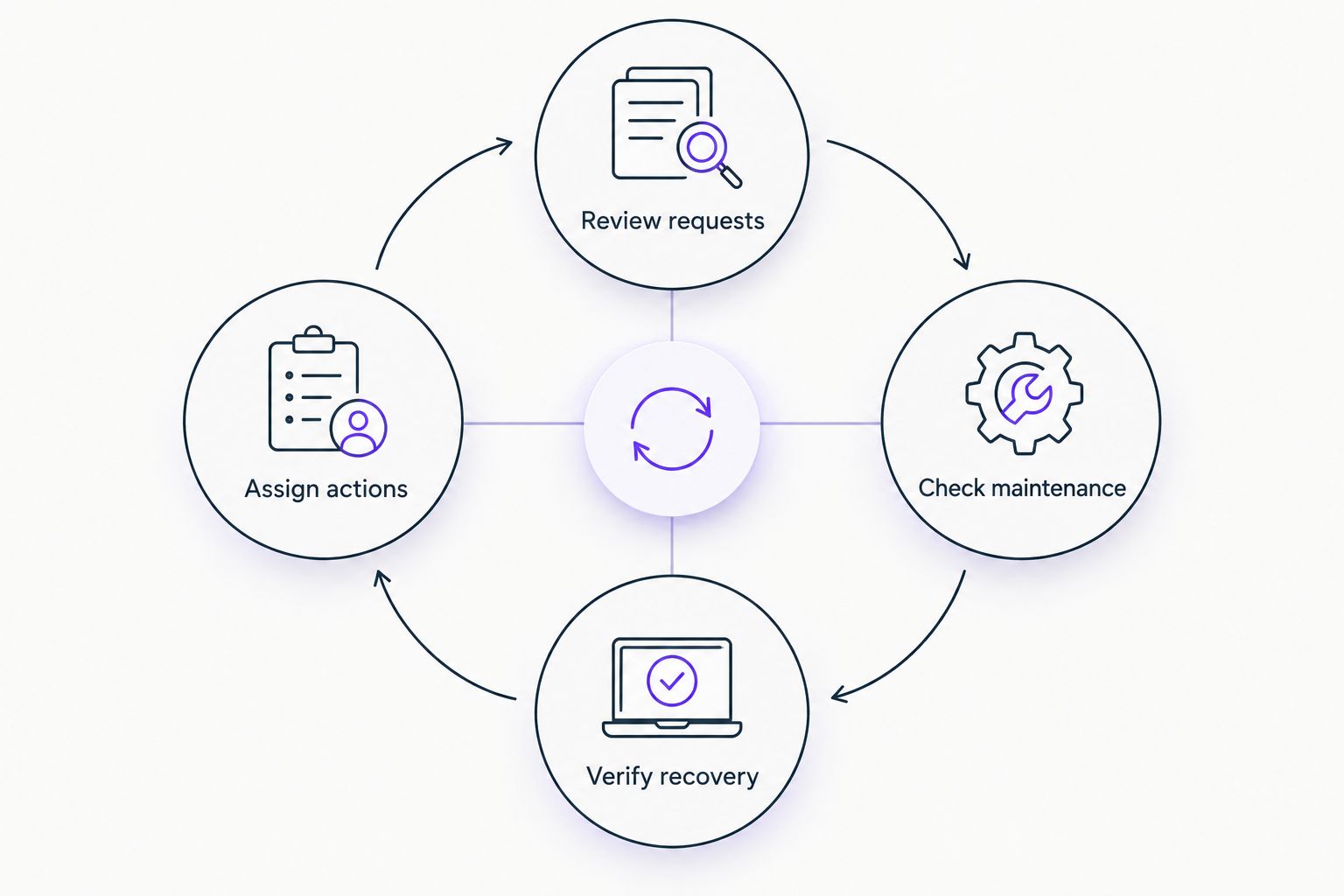
Organize each service review around a repeatable sequence: Review requests, Check maintenance, Verify recovery, and Assign actions. Those activities connect individual tickets with the condition of the systems the firm relies on.
Keep technical completion separate from user confirmation. A service can be running while a legal assistant still cannot save a document to the correct matter. Ask for evidence tied to the original problem, then document any remaining work.
- Review unresolved requests and their business impact.
- Check maintenance exceptions rather than only completed tasks.
- Confirm that recovery evidence remains relevant to current systems.
- Assign every open action an owner and completion condition.
- Update the support scope when systems or responsibilities change.
Compare support options for your firm
Choose your 2026 support model by who owns daily work, who handles exceptions, and who retains the knowledge needed to change providers. The strongest fit is the arrangement with clear responsibilities across your actual systems.
| Option | Best for | Main advantage | Key limitation |
|---|---|---|---|
| Internal IT team | Firms wanting direct control of daily priorities | Keeps operational knowledge inside the firm | Staffing, coverage, and specialist escalation remain internal responsibilities |
| Ad hoc external support | Firms seeking help with separately defined issues | Lets the firm commission individual tasks | Ongoing maintenance needs separate ownership unless explicitly included |
| Managed service provider | Firms assigning continuing maintenance and user support to an external team | Establishes an ongoing support relationship | Coverage depends on the written service scope |
| Shared internal and external support | Firms retaining internal ownership while assigning defined technical work externally | Divides work around existing responsibilities | Handoffs fail when ownership overlaps or remains unclear |
| BritCore IT managed IT support | Business teams needing ongoing server, network, workstation, and user support | Covers business infrastructure and structured user assistance | Law-firm workflows and additional requirements need explicit scope confirmation |
Do not treat a longer tool list as a better support model. Ask each candidate to walk through a blocked matter-file workflow, a departing employee, and a recovery request. Compare who acts, who approves, and how completion is verified.
Common mistakes law firms make
Treating confidentiality as a software feature
Security software does not decide which employees should see a particular matter. Define access responsibilities and approvals before asking a provider to implement them. Keep professional obligations and technical implementation distinct.
Leaving legal applications outside the ownership map
A workstation provider and an application vendor can each address their own component without restoring the complete workflow. Name the party responsible for coordinating cross-vendor issues. Give that party the information and authorization needed to act.
Scheduling changes without checking deadlines
A technically convenient maintenance window can conflict with urgent legal work. Establish a process for communicating maintenance, identifying deadline conflicts, and approving exceptions. Avoid relying on technicians to know the firm's matter calendar.
Accepting backup reports as recovery evidence
A completed backup task answers whether the backup process ran, not whether staff can resume work. Require an agreed restoration test and record the outcome. Include application access when the workflow depends on more than files.
Letting vendor knowledge replace firm documentation
Your firm needs usable records of system ownership, administrative access arrangements, and vendor dependencies. Keep documentation current and define how it is returned or transferred when support changes. Continuity should not depend on a particular technician's memory.
FAQ
What’s included in managed IT support for law firms?
Managed IT support covers the ongoing responsibilities listed in the service agreement, such as system maintenance and user assistance. A law firm should confirm coverage for servers, workstations, networks, application handoffs, access changes, and recovery tasks rather than assume they are included.
Is BritCore IT a fit for a law firm?
BritCore IT fits business teams seeking ongoing support for servers, network equipment, workstations, and users. A law firm should confirm its legal application dependencies, access requirements, support hours, and recovery responsibilities before agreeing to a scope.
Can a managed IT provider replace our internal IT person?
A managed provider can take responsibility for agreed technical work, but the firm still needs an internal decision-maker. That person approves access, communicates business priorities, and authorizes changes affecting staff.
Does managed IT support include legal software support?
Legal software support is included only when the service scope assigns that responsibility. Specify whether the provider handles installation, user access, vendor coordination, or application administration, because those are different tasks.
How do we check whether our backups actually work?
Run an authorized restoration test and verify that the restored information is usable with the correct permissions. Test required application access as well when restoring files alone does not recreate the working environment.
What should we ask before signing a managed IT agreement?
Ask who owns each system, which services are included, how urgent issues escalate, and how completed work is verified. Also confirm maintenance approvals, documentation ownership, exclusions, and the process for transferring support.
Can an IT provider guarantee a law firm’s compliance?
An IT service agreement does not establish that a law firm meets all its professional obligations. The firm and its advisers must identify applicable requirements and assign the technical controls, evidence, and review responsibilities needed to support them.
One last thing
Test the handoff, not just the technology. Before approving your 2026 support arrangement, describe a hypothetical situation in which an attorney can sign in but cannot open a matter folder shortly before a deadline.
Ask who receives the request, who verifies permissions, who contacts the application vendor, and who confirms restored access. If those answers are unclear, revise the ownership sheet before adding another tool. The useful deliverable is a working chain of responsibility.