

Professional services managed IT is ongoing management of business technology with the aim of keeping client work moving and assigning clear responsibility for support. Managed IT for professional services firms must account for client-file access, deadline-sensitive work, and the handoffs between employees, application vendors, and technical support.
- Managed IT for professional services firms needs clear ownership of workstations, networks, servers, and user support.
- BritCore IT fits business teams seeking ongoing technology maintenance and structured support, rather than consumer tech help.
- Choose an internal, outsourced, or shared model based on responsibilities your firm can actually maintain.
- Define escalation, access controls, recovery checks, and reporting before handing over support.
Why managed IT matters for professional services firms
Your support model should protect the ability to complete client work, not just close technical tickets. A working laptop is not enough when an employee cannot open the right document, reach a business application, or access an approved shared folder.
Professional services firms need support priorities tied to business impact. A document-access problem affecting a client deadline deserves different handling from a peripheral issue with an available workaround. Your 2026 support plan should make that distinction explicit.
Start with the workflow, not a software purchase. The IT help desk software guide for small businesses addresses the tooling side; your firm still needs named owners, useful incident records, and an agreed escalation process.
How to organize managed IT for your firm
Map the technology behind client work
Start manually with a shared spreadsheet. List the devices, applications, accounts, and connections employees need to deliver work, then name the business owner for each dependency. Record what happens when it stops working.
Organize the inventory around activities such as preparing client documents, reviewing work, communicating with clients, and submitting deliverables. That makes it easier to explain operational priorities without expecting a technical specialist to understand every engagement.
Include dependencies outside your direct control. An application vendor, building connection, or client-controlled portal needs an escalation contact even when your support provider cannot fix it directly.
- Record each business application and its owner.
- List workstations, servers, network equipment, and office locations.
- Identify where client files and shared documents live.
- Record vendor contacts and account ownership.
- Mark tasks that have no workable alternative during an interruption.
Define support priorities and escalation
Write a simple incident template before choosing a ticketing platform. Employees should describe the affected task, who is blocked, what changed, and whether a workaround exists. Avoid asking them to diagnose the fault.
For your 2026 support agreement, distinguish response from resolution. Acknowledging a request does not mean restoring access, and restoring access does not necessarily mean finishing every follow-up action. Ask how each stage will be communicated.
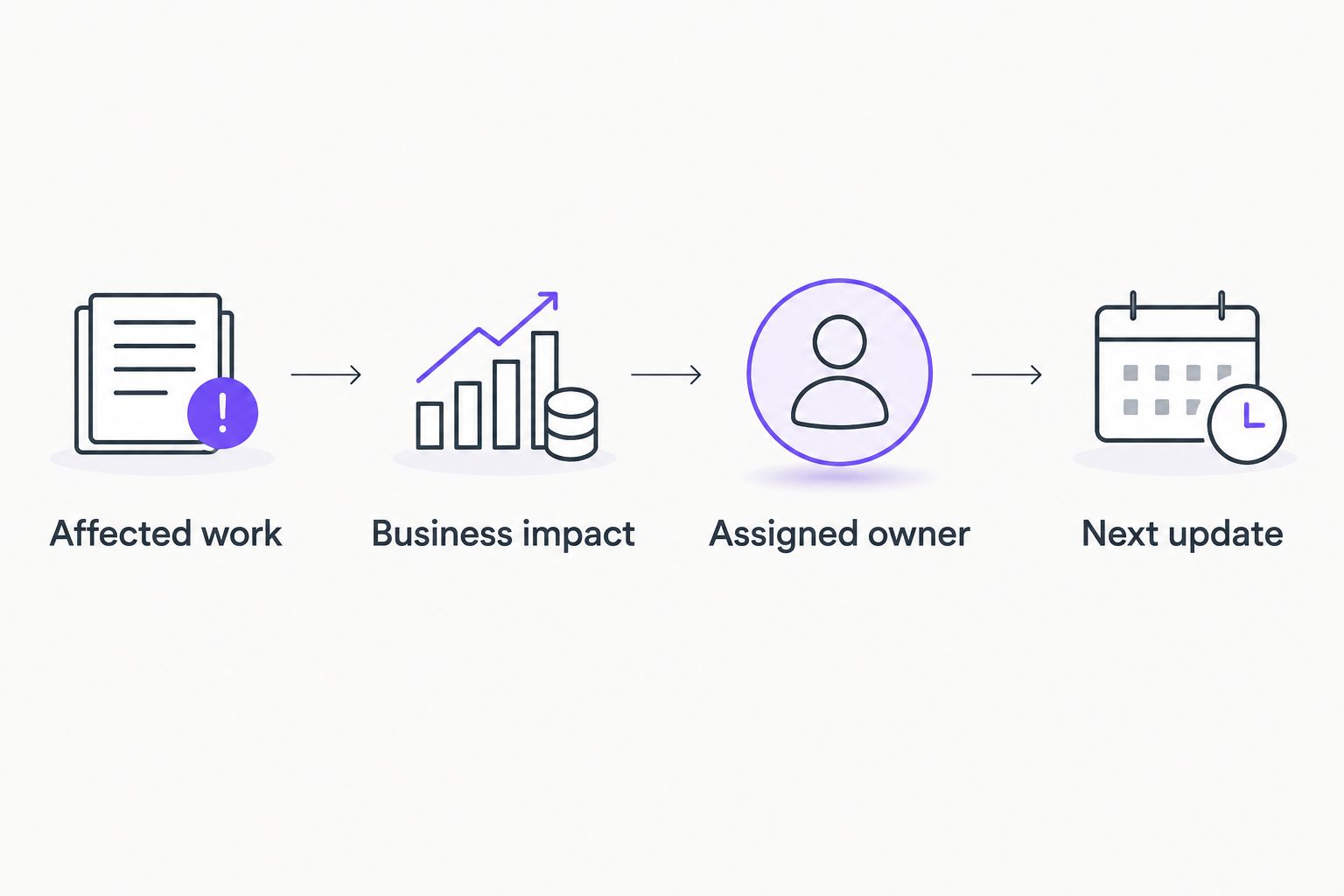
Use a consistent sequence for triage. Business impact determines priority; technical difficulty determines who takes the next action. Do not let the loudest request replace that process.
- Affected work: identify the task or application that stopped.
- Business impact: record blocked employees and relevant deadlines.
- Assigned owner: name who coordinates the next action.
- Next update: state when the employee will hear back.
The escalation sequence should remain understandable when an incident passes between support staff and an application vendor. Keep one coordinating owner even when several parties contribute.
Assign maintenance and support ownership
Create a responsibility sheet using the inventory and incident process. For each area, identify who performs routine work, who approves changes, and who handles exceptions. A spreadsheet is sufficient if someone keeps it current.
BritCore IT is best for business teams seeking ongoing support for servers, networks, and workstations. Its managed IT support services cover ongoing business technology support and structured user help with technical escalation. That fits a firm looking to assign day-to-day operational responsibilities rather than handle every support task internally.
The boundary still matters. The supplied service description does not establish responsibility for your specialist applications, recovery arrangements, or particular service hours. Confirm those items in the agreement instead of treating managed IT as an unlimited category.
- Name the owner of workstation maintenance.
- Assign server and network responsibilities.
- Separate user support from application-vendor support.
- Identify who approves changes affecting client work.
- Document exclusions and the process for requesting additional work.
Standardize account access and workstation setup
Write down the steps for an employee joining, changing roles, and leaving. Start with a checklist that a manager can approve and a technical owner can execute. Do not rely on an informal message that leaves access decisions unclear.
Separate business approval from technical administration. A manager decides which client folders an employee needs; the technical owner implements that decision. Use role-based access where practical, and avoid sharing individual credentials to solve a scheduling problem.
Treat workstation setup as part of the same process. A usable device needs approved applications, appropriate access, and an identified support route—not merely a successful sign-in.
- Create a role-based application and access checklist.
- Require named approval for sensitive client information.
- Enable multifactor authentication where supported.
- Record device assignment and administrative access.
- Include access removal and equipment return in departures.
- Test a new employee's essential workflow before handover.
Verify recovery against real working tasks
List the information and systems your firm needs to resume client work after an interruption. Begin with a written recovery worksheet: what must return, who authorizes recovery, and how staff confirm that the result is usable.
A successful backup status is not the same as a demonstrated recovery. Your 2026 plan should include restoring a representative file or system into an appropriate test location and checking access, permissions, and usability. Keep the test separate from live client work.
You can start with a 15-minute planning session to choose a test task and its owner. That is a suggested planning exercise, not a recovery-time promise; the actual test needs a window matched to its scope and risks.
- Identify the client-work task each recovery test supports.
- Assign responsibility for backups and restoration separately.
- Choose a safe location for testing recovered information.
- Check that authorized employees can use the restored material.
- Record failures, corrective actions, and the next test date.
Test connectivity across real work locations
Map how employees reach business applications from the office, home, and other approved locations. Start with a worksheet showing the device, connection, application, and access method for each important workflow. Test the whole path rather than treating a successful internet connection as proof that work can continue.
The distinction matters because cloud connectivity for professional services involves the route between users and hosted applications, not just whether an office connection is active. Record where responsibility passes from your firm to a connectivity provider or application vendor.
For 2026 planning, choose tests that reflect actual working conditions. An office-only check does not validate a remote employee's access, and a browser sign-in does not confirm that a large client document opens correctly. Keep tests within approved security controls.
- Test critical applications from each approved working location.
- Check document opening, saving, and permission behavior.
- Record connection-provider and application-vendor contacts.
- Document an approved alternative for a connection interruption.
- Assign ownership of remote-access troubleshooting.
Review service quality against operational evidence
Start with a manual review of support records and outstanding maintenance. Use a 30-day review window as an initial reporting scope, not as a claim about how quickly service quality will change. Look for incomplete ownership, unresolved dependencies, and work that remains blocked.
BritCore IT managed IT support should be assessed against the responsibilities actually agreed with your firm. Ask for evidence that assigned work was completed, exceptions were recorded, and employees received clear next steps. A report full of activity counts does not answer those questions by itself.
Build a 90-day action plan from the review. Treat that period as a planning horizon, not a deadline for every technical change; business approvals and project scope still govern delivery.
- Review unresolved incidents by business impact.
- Check whether maintenance exceptions have named owners.
- Confirm that departing employees' access changes were completed.
- Review recovery-test results and open corrective actions.
- Assign an owner and decision date to each planned improvement.
Compare support models for professional services firms
Choose the model that closes an ownership gap you can name. Outsourcing is not automatically better than an internal team, and buying tools does not establish who will operate them.
The table compares operating models rather than individual software products. Use it to prepare a scope discussion, then check the agreement against your inventory, business hours, and escalation needs.
| Option | Best for | Main advantage | Key limitation |
|---|---|---|---|
| Internal IT team | Firms able to staff and supervise daily technology operations | Direct control over priorities and internal knowledge | The firm must provide coverage, specialist skills, and management |
| Outsourced managed IT support | Firms wanting an external owner for agreed ongoing support | Assigns routine operational work outside the business | Coverage depends on the written scope and escalation boundaries |
| Shared internal and external support | Firms with an internal owner who needs defined outside support | Keeps internal context while dividing technical responsibilities | Unclear handoffs can leave tasks unassigned |
| Incident-only support | Firms seeking help with a specific, bounded problem | Keeps the engagement focused on the immediate issue | Does not itself assign responsibility for ongoing maintenance |
BritCore IT belongs in the outsourced managed IT support discussion because its stated offering includes ongoing maintenance and structured user support. That does not establish that every task in your firm's inventory is included. Request a responsibility-by-responsibility answer before choosing the arrangement.
For a shared model, require a handoff rule for each task. State whether the internal owner diagnoses first, approves changes, communicates with employees, or simply coordinates the external provider. Shared support works as an operating model only when both sides know where their responsibility begins and ends.
Common mistakes professional services firms make
Prioritizing seniority instead of blocked work
A partner's minor inconvenience and a team-wide inability to access client files need different priorities. Define impact around affected work, deadlines, and available alternatives. Leave room for confidential escalation without making job title the entire priority system.
Treating application vendors as part of an unlimited support promise
A managed service provider does not automatically control a specialist application's configuration or service. Name the vendor contact, account administrator, and coordinating owner. Confirm who gathers evidence and keeps employees informed while the vendor investigates.
Granting broad client-folder access for convenience
A rushed engagement handover is not a reason to remove access boundaries. Have the business owner approve the required material, then document the change. Include a review point when temporary access is no longer needed.
Approving changes without considering delivery deadlines
Technical maintenance and client delivery need a shared calendar. Identify work that cannot tolerate disruption, agree a change window, and define a rollback decision. Do not describe every requested change as urgent simply because planning began late.
FAQ
What does managed IT for professional services firms include?
Managed IT covers the ongoing technology responsibilities listed in your service agreement. Typical areas to define are workstation maintenance, servers, networks, user support, and escalation; confirm application support, recovery work, and service hours separately.
Is managed IT better than hiring an internal IT employee?
Managed IT is better when an external provider can cover responsibilities your firm cannot maintain internally. An internal employee provides direct business context, while a shared model divides responsibilities between an internal owner and an outside provider.
Who is BritCore IT best for?
BritCore IT is best for business teams seeking ongoing maintenance of servers, networks, and workstations with structured user support. Confirm the responsibilities, exclusions, and escalation arrangements for your firm before agreeing to service.
Can a managed IT provider support our specialist business applications?
Specialist application support depends on the agreement and the application’s vendor arrangements. Define who administers access, who troubleshoots the local environment, and who coordinates issues that require the software vendor.
How should we prepare to hand over IT support?
Prepare an inventory, responsibility sheet, vendor contact list, and approved access process. Resolve account ownership and document outstanding incidents before transferring operational responsibilities.
Does a successful backup mean our firm can recover?
A successful backup does not demonstrate that your firm can resume work. Test restoration in an appropriate environment, then check that authorized employees can access and use the recovered information.
What should we measure in a 2026 managed IT review?
Measure service against agreed responsibilities and business impact. Review unresolved incidents, maintenance exceptions, access changes, recovery-test findings, and whether each open action has a named owner.
One last thing
Ask a prospective provider to walk through one ordinary incident from report to closure: an employee cannot open a client document before a deadline. Have the provider identify the owner, escalation boundary, employee update, and evidence needed to close the request. That exercise makes an abstract service description concrete.