

Best overall: RingCentral RingEX. Best for Microsoft-centered teams: Microsoft Teams Phone. Best for existing Zoom users: Zoom Phone. This 2026 guide compares the best VoIP phone systems for small business by call handling, administration, and fit—not by a feature count your team will never use.
- RingCentral RingEX leads this best VoIP phone systems for small business shortlist for a dedicated business communications setup.
- Microsoft Teams Phone fits teams that already organize daily work in Microsoft Teams.
- Zoom Phone fits businesses that want calling alongside an existing Zoom workflow.
- BritCore IT provides managed IT support for business teams, not a phone-system product.
Why this matters
A phone system has to do more than connect a call. Your team needs clear routing, usable voicemail, reliable transfers, and someone responsible when an employee cannot answer.
Separate phone-service selection from the maintenance of the computers and network carrying those calls. BritCore IT provides managed IT support services for business technology, including servers, network equipment, and workstations. That is a different role from supplying a hosted telephone service.
BritCore IT is best for business teams that need ongoing managed IT support rather than consumer tech support. Keep that distinction clear when assigning responsibilities for a phone rollout.
What makes the best small-business VoIP system?
Use these criteria for your 2026 shortlist before comparing optional features:
- Call routing: A caller should reach the right person when the main receptionist is busy, absent, or signed out.
- Employee usability: Answering, transferring, and retrieving voicemail should make sense on the devices employees actually use.
- Administration: Your administrator needs clear controls for users, numbers, permissions, and business hours.
- Workflow fit: Choose around existing work habits, not a separate application that employees must remember to open.
- Failure handling: Define what happens when an employee loses internet access, a desk phone disconnects, or the main office closes.
- Support ownership: Establish who handles account changes, phone-service faults, workstation issues, and local network problems.
Treat feature descriptions as a shortlist, not a contract. Confirm the current edition, calling arrangements, supported devices, and regional requirements directly with each provider before signing.
Small-business VoIP systems at a glance
These are workflow-based recommendations for 2026. The limitation column identifies the decision you must resolve before choosing, rather than pretending every business needs the same setup.
| Phone system | Best for | Standout capability | Key limitation |
|---|---|---|---|
| RingCentral RingEX | A dedicated business communications platform | Calling, messaging, and meetings in one platform | Requires its own administration and employee workflow |
| Microsoft Teams Phone | Teams-centered organizations | Business calling within Microsoft Teams | Calling connectivity and licensing need separate attention |
| Zoom Phone | Businesses already using Zoom | Business calling within the Zoom application | Familiar meetings do not remove the need to configure telephone routing |
| Ooma Office | Office teams centered on extensions and desk phones | Business phone features such as a virtual receptionist | Device and application requirements need careful checking |
| 8×8 Work | Teams combining calling with broader communications | Calling, messaging, and meetings | Work communications and contact-center requirements need separate scoping |
1. RingCentral RingEX: best VoIP system for a dedicated setup
RingCentral RingEX combines business calling, messaging, and meetings. It is the default shortlist choice when you want a dedicated communications platform rather than attaching telephone service to an existing collaboration environment.
The main buying question is organizational: will employees use RingCentral consistently, and who will administer it? A separate platform is useful only when its ownership is clear.
RingCentral RingEX pros:
- Brings telephone calling and other communications into one platform.
- Supports a business phone workflow rather than relying on personal mobile numbers.
- Gives you a platform to evaluate across office-based and remote calling scenarios.
RingCentral RingEX cons:
- Adds another application and administrative environment if your team already uses a collaboration suite.
- Requires configuration and training; the platform alone does not define sensible call handling.
Best for: A small business that wants a dedicated communications system with an assigned administrator.
Before choosing RingCentral RingEX, demonstrate an incoming call, an internal transfer, and an unanswered call. Check the exact features included in the proposed edition instead of assuming every demonstration feature is included.
Verdict: Buy RingCentral RingEX when a dedicated communications platform is the goal.
2. Microsoft Teams Phone: best VoIP system for Teams users
Microsoft Teams Phone adds business telephone capabilities to Microsoft Teams. It fits organizations where employees already use Teams as their daily workspace.
Teams Phone licensing and connectivity to the public telephone network are distinct considerations. Confirm the proposed calling arrangement rather than assuming an existing Microsoft subscription covers the complete telephone setup.
Microsoft Teams Phone pros:
- Keeps business calling within an application Teams users already know.
- Aligns calling with an existing Microsoft-centered working environment.
- Reduces the need to introduce a separate everyday communications application.
Microsoft Teams Phone cons:
- Requires careful attention to telephone connectivity and licensing.
- Offers less workflow advantage when employees do not already use Teams consistently.
Best for: A business whose employees already organize meetings and internal communication in Microsoft Teams.
Ask your administrator to demonstrate user assignment, outbound calling, and the main business number's routing. Test headset behavior and notifications on the actual workstations employees use.
Verdict: Buy Microsoft Teams Phone for an established Teams workflow; skip it as a reason to introduce Teams by itself.
3. Zoom Phone: best VoIP system for existing Zoom users
Zoom Phone provides business telephone calling within the Zoom application. It belongs on your shortlist when Zoom already has a clear place in your team's working day.
Knowing how to join a Zoom meeting is not the same as knowing how to manage business calls. Transfers, shared answering responsibilities, voicemail, and business hours still need deliberate setup.
Zoom Phone pros:
- Places telephone calling alongside an existing Zoom workflow.
- Lets established Zoom users evaluate calling in a familiar application environment.
- Supports a move away from employees using personal numbers for routine business calls.
Zoom Phone cons:
- Requires telephone-specific training even when employees already understand Zoom meetings.
- Creates another communications environment if your business primarily works elsewhere.
Best for: A business that already uses Zoom and wants to assess phone service in the same application.
Have an employee—not just an administrator—answer and transfer a test call. Check what happens when the application is closed, the employee is away, and nobody answers the main number.
Verdict: Buy Zoom Phone when Zoom is already part of daily work and the calling workflow passes your tests.
4. Ooma Office: best VoIP system for an extension-based office
Ooma Office provides business telephone service with features such as a virtual receptionist and extensions. It is a useful shortlist option when your priority is an understandable office phone arrangement rather than a wider collaboration platform.
Start with how calls move through the office. List the main number, employees who answer it, shared areas, and any desk phones that must remain part of the workflow.
Ooma Office pros:
- Centers the evaluation on familiar business telephone tasks.
- Offers a virtual receptionist for directing incoming callers.
- Fits an extension-based office model that you can explain to employees without a wider collaboration project.
Ooma Office cons:
- Requires checks on the devices and application features included in the proposed setup.
- Needs a separate workflow review if your main goal is to combine calling, meetings, and internal collaboration.
Best for: An office that primarily needs a clear main-number and extension structure.
Do not assume an existing phone or specialist device will work unchanged. Ask the provider to confirm compatibility for each device type and document any replacement or alternative connection required.
Verdict: Buy Ooma Office for an office-phone workflow; hold until every required device is accounted for.
5. 8×8 Work: best VoIP system for broader communications needs
8×8 Work brings business calling, messaging, and meetings together. It deserves consideration when you want to evaluate everyday employee communications alongside possible customer-service requirements.
Keep those requirements separate. An employee phone system and a contact center solve different operational problems, even when a supplier offers both.
8×8 Work pros:
- Combines calling with messaging and meetings.
- Gives you a business communications option beyond a standalone telephone service.
- Lets you assess everyday calling requirements within a supplier that also offers contact-center products.
8×8 Work cons:
- Requires clear boundaries between employee communications and contact-center requirements.
- Adds unnecessary evaluation work if your only requirement is a basic office telephone arrangement.
Best for: A business evaluating unified employee communications with separately defined customer-service needs.
Write down which employees need ordinary calling and which roles need specialized customer-service functions. Ask the supplier to map each requirement to the proposed product rather than treating the entire portfolio as one package.
Verdict: Buy 8×8 Work for a defined communications requirement; hold if the scope is still unclear.
How this shortlist is ranked
The ranking prioritizes workflow fit, call handling, administration, failure handling, and support ownership. It is a buying framework, not a report of hands-on performance testing.
RingCentral RingEX is the default for a dedicated platform. Microsoft Teams Phone and Zoom Phone move ahead when your existing application workflow makes them the clearer operational choice. Ooma Office serves an extension-focused office; 8×8 Work suits a broader communications evaluation.
For your 2026 decision, a successful demonstration of your own call flow matters more than a long feature checklist.
Test the call flow before changing providers
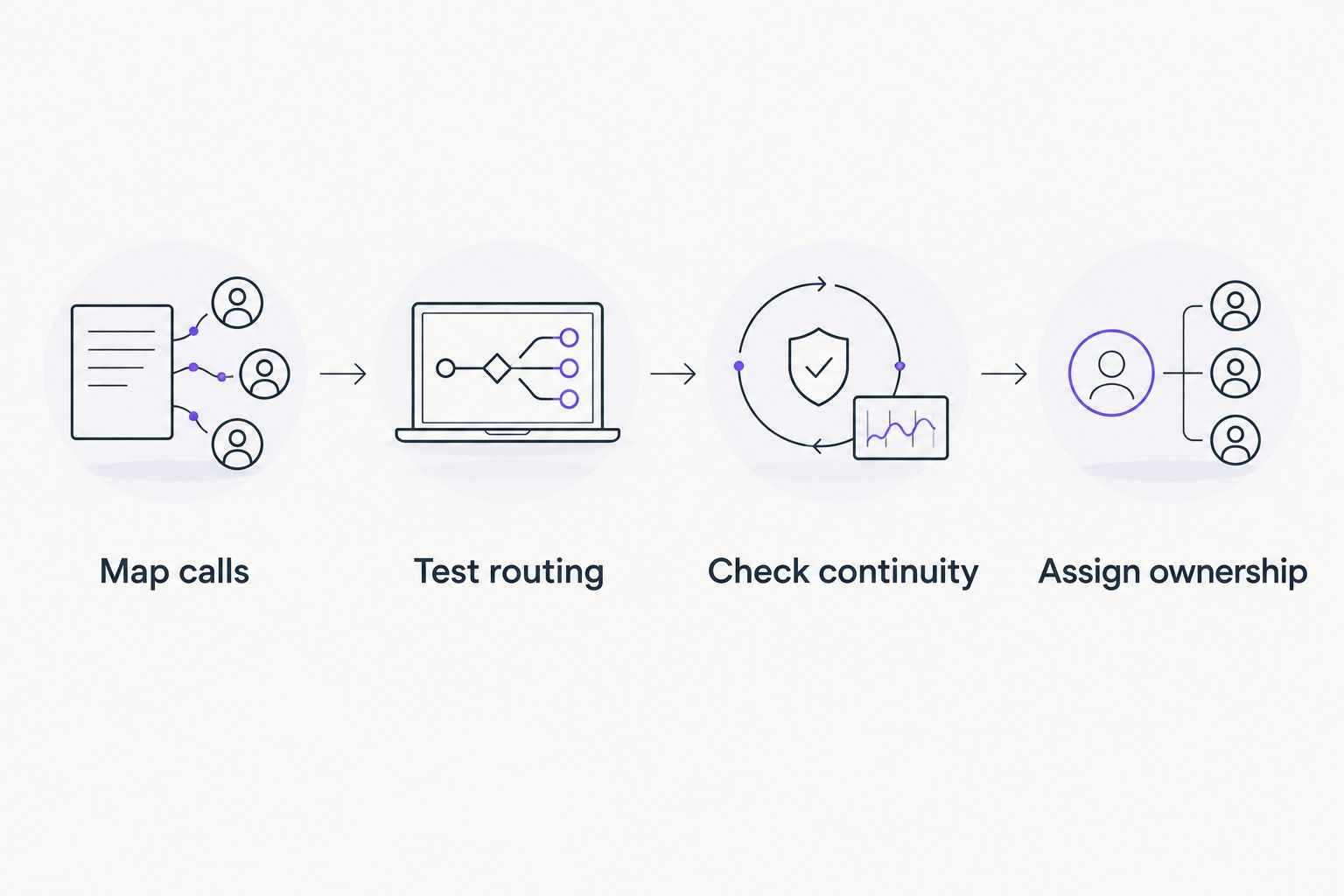
Use this four-stage acceptance process. Keep the results in a short document that both your business lead and technical administrator can understand.
Map calls
Write down where calls enter, who answers, and what happens outside business hours. Include absences and shared responsibilities, not just the ideal working day.
Test routing
Run at least 3 call scenarios: a normal incoming call, a transfer, and an unanswered call. Ask an employee to complete each task without coaching from the supplier.
Check continuity
Test 2 access conditions: the normal office connection and the alternative arrangement you intend to use during an interruption. Confirm emergency-calling requirements, registered locations, and any specialist equipment with the provider.
Assign ownership
Name the person responsible for user changes, business hours, number transfers, and fault escalation. Confirm which supplier handles telephone service and which support team handles the local business technology.
Do not schedule a number transfer merely because the application works on one laptop. Agree on the transfer process, responsible contacts, and fallback arrangements with the provider first.
Which VoIP phone system should you choose?
Choose RingCentral RingEX as the default dedicated-platform shortlist. Choose Microsoft Teams Phone or Zoom Phone instead when the existing application environment provides a clearer fit for employees.
Choose Ooma Office for an extension-led office evaluation. Choose 8×8 Work when your communications requirements extend beyond basic calling and you can define that scope precisely.
Keep the phone-service contract separate from the support responsibilities around it. For business technology maintenance, contact BritCore IT with the systems and workstation issues your team needs help managing.
FAQ
What’s the best VoIP phone system for a small business in 2026?
RingCentral RingEX is the default shortlist choice for a dedicated business communications platform. Microsoft Teams Phone or Zoom Phone is a better workflow fit when employees already work consistently in the corresponding application.
Is Microsoft Teams Phone better than Zoom Phone?
Microsoft Teams Phone is the clearer fit for Teams-centered businesses; Zoom Phone is the clearer fit for established Zoom users. Test call routing, employee usability, and administration before choosing either.
Can a small business keep its existing phone number?
Number portability depends on the number, provider, and service arrangements. Confirm eligibility and the transfer process with the receiving provider before canceling the existing service.
Do employees need desk phones for business VoIP?
Desk phones are not required for every business VoIP setup. Supported applications and headsets can handle calls, but confirm the provider’s device requirements and your employees’ working needs.
Will VoIP work when the office internet connection fails?
Office-based VoIP devices need a working connection to reach the hosted service. Ask the provider to demonstrate the alternative answering or routing arrangement you intend to use during an outage.
How should a small business compare VoIP costs?
Compare the complete proposed service, including user requirements, calling arrangements, devices, implementation, and support. Request a written scope so differences between proposals are visible.
Does BritCore IT provide a VoIP phone system?
BritCore IT is a managed IT support provider, not a phone-system product in this comparison. Its stated services cover ongoing business IT support, servers, network equipment, workstations, and structured user help.
One last thing
Make an unanswered call your final acceptance test in 2026. Calling someone who is ready and waiting proves less than calling when the receptionist is absent and the intended recipient is unavailable.
Choose the system that gives the caller a clear next step without an employee improvising. That is a more useful purchasing test than counting features.