
Instead of manually reviewing an endpoint alert and disconnecting the affected computer, configure an endpoint protection automatic containment workflow that isolates eligible devices, records the result, and assigns an incident owner. This 2026 guide covers the containment rule, verification, escalation, and controlled reconnection—not just the isolation command.
- Endpoint protection automatic containment needs a narrow trigger, verified isolation, and an assigned incident owner.
- BritCore IT managed IT support fits business teams that need ongoing maintenance and structured technical escalation.
- Use automatic isolation for explicitly approved devices; require approval where disconnection interrupts shared services.
- Keep reconnection separate from containment, with documented investigation and authorization.
Why this matters
An alert is not containment, and a successful command submission is not proof of isolation. Your workflow must distinguish detection, action requested, action confirmed, and investigation assigned. Otherwise, a ticket can say resolved while the endpoint remains connected.
BritCore IT provides managed IT support services for business teams, including ongoing system maintenance and structured user support. The operational requirement here is the same: give each issue a clear owner and a defined next action.
For your 2026 configuration, treat containment as an interruption that requires justification. Disconnecting a compromised workstation can limit its network access, but disconnecting a shared system also interrupts legitimate work. That trade-off belongs in the policy before automation starts.
Before you start
- Access and capability: Obtain authorized access to your endpoint security console, incident destination, and device inventory. Confirm that your endpoint protection service supports network isolation for the operating systems you intend to include.
- Response materials: Prepare device ownership records, an approved containment scope, escalation contacts, and a reconnection checklist. Select 1 test workstation that does not deliver a shared business service.
- The recovery gotcha: Isolation can interrupt remote support and management connections. Confirm the documented communication exceptions and establish a recovery method that does not depend on the connection you are about to block.
This guide defines the configuration and acceptance tests, not a vendor-specific click path. Console labels, permissions, and isolation behavior differ. Use your provider's documented controls rather than substituting a similarly named quarantine or file-removal action.
Containment scope
Define device eligibility
- Separate ordinary user workstations from servers, shared systems, and devices supporting critical operations. Record the business owner and technical owner for each included group.
- Mark each group as eligible for automatic isolation or approval-required containment. Do not make inventory membership alone sufficient authorization to disconnect a device.
- Define the qualifying security determination. Require the detection category and status that your security team has explicitly approved for containment.
- Exclude informational events, incomplete alerts, and unsupported devices from automatic action. Route them to review instead of silently discarding them.
- Assign an exception owner. Document why each exception exists, its alternative response, and when the owner must review it.
Expected result: You can explain why any particular endpoint is eligible—or ineligible—without interpreting the rule during an incident.
Choose the response path
Use this comparison to select the operating model for each device group in 2026. These are workflow choices, not competing software products.
| Response path | Best for | Advantage | Limitation |
|---|---|---|---|
| Automatic isolation | Approved user workstations with tested recovery | Removes the approval dependency after a qualifying detection | A mistaken trigger can interrupt legitimate work |
| Approval-required isolation | Shared or business-critical systems | Adds a business-impact check before disconnection | Containment waits for an authorized responder |
Use automatic isolation only where both detection criteria and recovery are defined. Approval-required containment is not a substitute for staffing: name the person who receives the request and the escalation route if nobody responds.
Detection rule and incident record
Configure the event contract
- Select the documented detection event from your endpoint security service. Confirm whether it represents a new detection, a changed status, or an updated investigation.
- Map the event to a stable endpoint identifier. Keep the hostname as context, but do not rely on it as the only device key.
- Require the approved detection category, current status, device eligibility, and isolation capability before requesting containment.
- Check the latest incident state before acting. An event describing an earlier state must not override a later authorized decision.
- Create or update the incident record before sending the isolation request. Record the event identifier, endpoint identifier, detection time, matched rule, and intended action.
The field names below are a suggested incident-record schema, not claimed labels from a security console:
- Incident ID: The record that owns the response.
- Endpoint ID: The stable device reference used for action.
- Detection state: The current qualifying security determination.
- Containment state: Requested, confirmed, failed, or awaiting review.
- Response owner: The person or queue accountable for investigation.
Expected result: A qualifying event produces a traceable incident with enough information to identify the device and explain the decision.
Prevent repeated actions
- Use the event and endpoint identifiers to recognize repeated deliveries of the same event.
- Check whether isolation is already requested or confirmed before submitting another command.
- Append new evidence to the existing incident when it belongs to the same investigation. Preserve separate records when the events represent separate incidents.
Expected result: A repeated notification updates the response record instead of creating competing containment actions.
For the incident-routing portion, use the network monitoring to help desk workflow as a related implementation guide. Keep detection ownership and ticket ownership connected; a ticket integration must not become a second, conflicting response engine.
Isolation action and verification
Connect the containment action
- Use the endpoint security service's documented network-isolation action against the mapped endpoint identifier. Confirm that the action is supported for that device before enabling the rule.
- Grant the integration only the permissions required for its assigned work. Separate automated containment authority from reconnection authority where your service supports that separation.
- Record the command response in the incident. Treat an accepted request as pending until the service reports the relevant device state.
- Query the documented isolation status or process the documented confirmation event. Match the confirmation to the endpoint and current incident.
- Notify the response owner with the confirmed state, affected user, device, detection context, and next action. Escalate failed or unconfirmed isolation rather than marking it complete.
Expected result: The incident distinguishes a requested action from confirmed isolation, and an accountable responder receives the outcome.
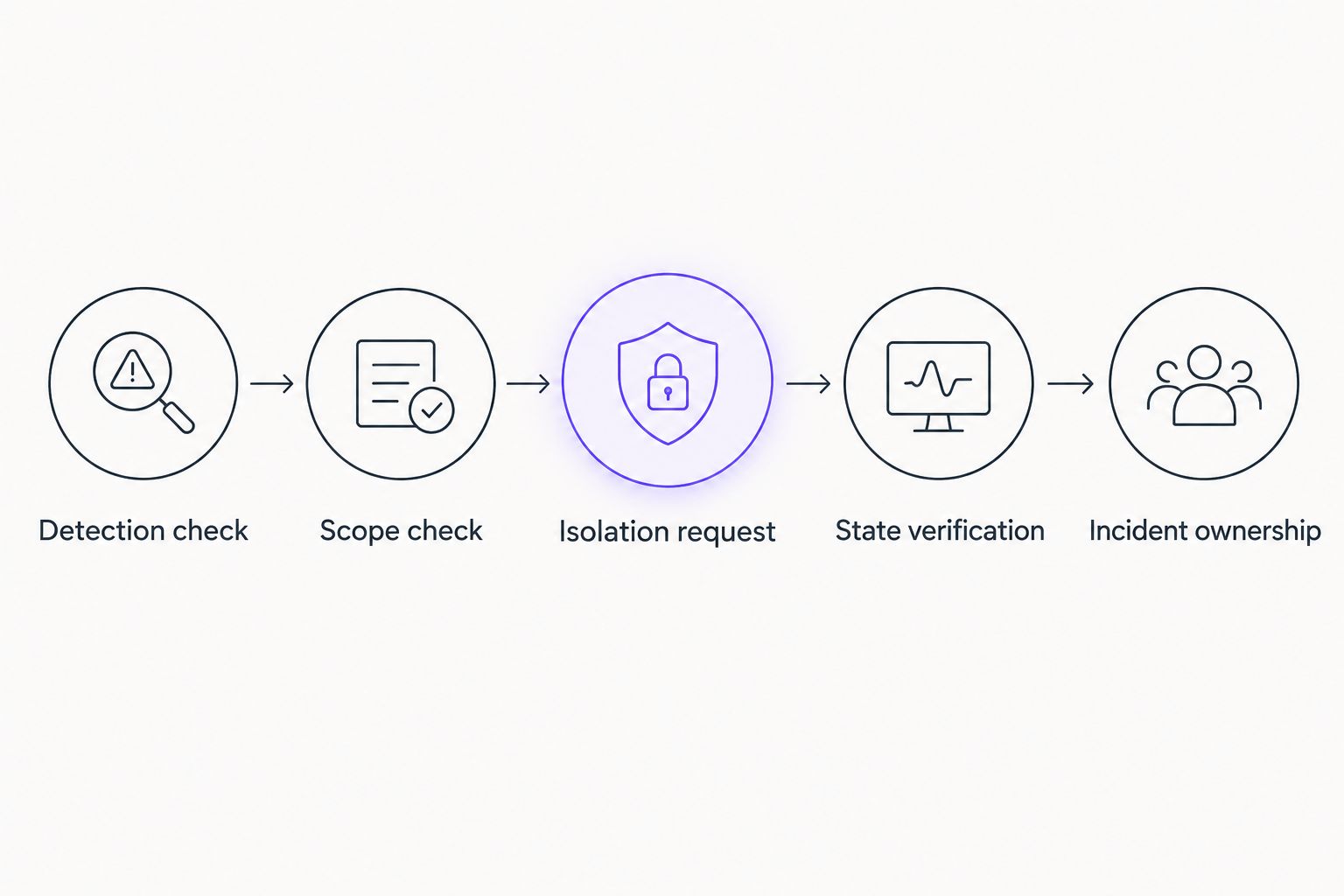
The response sequence is Detection check, Scope check, Isolation request, State verification, and Incident ownership. Preserve these checkpoints even when one platform performs several of them internally.
Test the complete response
Run 2 test cases on the approved workstation: one event that qualifies for containment and one that must remain outside the rule. Use the security provider's documented simulation method; do not introduce live malware to test the workflow.
For the qualifying case, inspect both the security console and incident record. Verify the endpoint identity, actual isolation state, notification delivery, and assigned owner. For the excluded case, verify that no isolation request occurs and that the expected review record exists.
Also rehearse reconnection using the approved recovery method. A workflow that disconnects successfully but cannot restore authorized access is not ready for wider use.
Expected result: Your 2026 acceptance record shows that the rule acts when intended, stays inactive when excluded, and supports controlled recovery.
Investigation and reconnection
Define the release gate
- Assign the investigation to an authorized responder. Preserve relevant security evidence before taking cleanup actions that would remove it.
- Establish what triggered the detection and whether the incident extends beyond the isolated endpoint. Network isolation does not itself revoke account sessions or remove malicious files.
- Complete the remediation and validation required by the incident. Record unresolved questions instead of treating an absence of new alerts as proof of recovery.
- Obtain the required reconnection approval. Record who authorized release and the evidence supporting the decision.
- Use the documented reconnection action, verify the resulting state, and confirm essential business functions with the device owner.
Expected result: Reconnection follows an evidence-backed decision, not a timer or a ticket status change.
Do not configure automatic reconnection merely because a detection is dismissed, a notification is acknowledged, or an integration becomes unavailable. Each of those events needs interpretation within the incident.
Variant: escalate when the detection is updated
A second workflow can respond when an existing detection changes to an approved containment state. This covers investigations that begin with review rather than immediate isolation.
- Subscribe to the documented update event, if your endpoint security service exposes one.
- Retrieve the current detection and endpoint state. Evaluate the same device eligibility and containment criteria used by the primary workflow.
- Update the existing incident rather than creating an unrelated response record.
- Request isolation only if it is newly authorized and not already pending or confirmed.
- Record the state change and notify the current response owner.
Best for: Teams whose detection review can change the authorized response. The benefit is consistent handling of later evidence; the limitation is additional event-ordering and duplicate-handling work.
For this 2026 variant, a lower-severity update must not automatically reconnect an isolated endpoint. Changes to detection status and decisions to restore access serve different purposes.
Troubleshooting
The action is accepted, but isolation remains unconfirmed
Check device connectivity, agent health, action permissions, and the service's command status. Keep the incident in a pending or failed state until you have confirmation; do not convert a submission acknowledgment into a containment result.
The wrong endpoint is selected
Inspect identifier mapping and inventory records. Stop the affected automation, correct the mapping, and repeat the controlled test before restoring it. Hostnames and user names are useful context, not sufficient proof of device identity.
Isolation cuts off remote support
Use the recovery route established before testing. Review the provider's documented isolation exceptions and your support connection requirements; do not weaken containment broadly to preserve a convenient remote session.
Repeated updates create multiple incidents
Check event identifiers, correlation rules, and the lookup for an existing incident. Make duplicate handling part of the workflow before enabling retries, or each retry can reproduce the same operational problem.
A legitimate application repeatedly triggers containment
Investigate the detection evidence and application behavior before changing exclusions. Any approved exception needs a narrow scope, an owner, and a review condition. Disabling protection across an entire device group is not a root-cause fix.
Customize your workflow
Expand the workflow only after the workstation test passes. Add separate rules for device groups with different business impact, then test each group's recovery path before enabling automatic action.
BritCore IT managed IT support is best suited to business teams that need ongoing maintenance and structured technical escalation. For containment planning, define which responsibilities stay with your internal team and which require outside support; do not leave that decision until an endpoint is isolated.
Keep the first operational report simple: show eligible events, requested actions, confirmed outcomes, exceptions, and unresolved incidents. Use the records to find mapping errors and repeat triggers rather than counting alerts as completed work.
FAQ
What is endpoint protection automatic containment?
Endpoint protection automatic containment is a workflow that applies an approved containment action when a detection meets defined criteria. For network isolation, the workflow must also verify the endpoint state and assign investigation ownership.
Does isolating an endpoint remove the threat?
No. Network isolation restricts connectivity; it does not establish that malicious files, persistence, or compromised accounts have been resolved. Investigation and remediation remain separate tasks.
Can I automatically isolate every business device?
Do not apply one automatic isolation rule to every business device. Separate ordinary workstations from shared and critical systems, then approve detection criteria and recovery procedures for each group.
Will remote support still work after network isolation?
Remote support depends on the security service’s isolation behavior and permitted communication paths. Confirm those details and test an authorized recovery method before enabling automatic isolation.
Should an endpoint reconnect automatically when an alert closes?
No. Alert closure is not sufficient authorization to restore network access. Require the documented investigation, remediation, approval, and verification steps for reconnection.
How do I stop duplicate containment tickets?
Correlate events with stable endpoint and incident identifiers before creating records or submitting actions. Repeated deliveries should update the relevant incident rather than start competing workflows.
How should I test automatic containment safely?
Use an approved test workstation and the security provider’s documented simulation method. Test a qualifying event, an excluded event, confirmation handling, notification delivery, and controlled reconnection without introducing live malware.
One last thing
Test a failed containment action deliberately. A successful isolation test proves the command path; a failed-action test proves whether someone receives a clear escalation when automation cannot protect the device.
Make that failure visible in the incident record. Your responder needs the endpoint, attempted action, failure state, and next authorized step—not another generic alert.